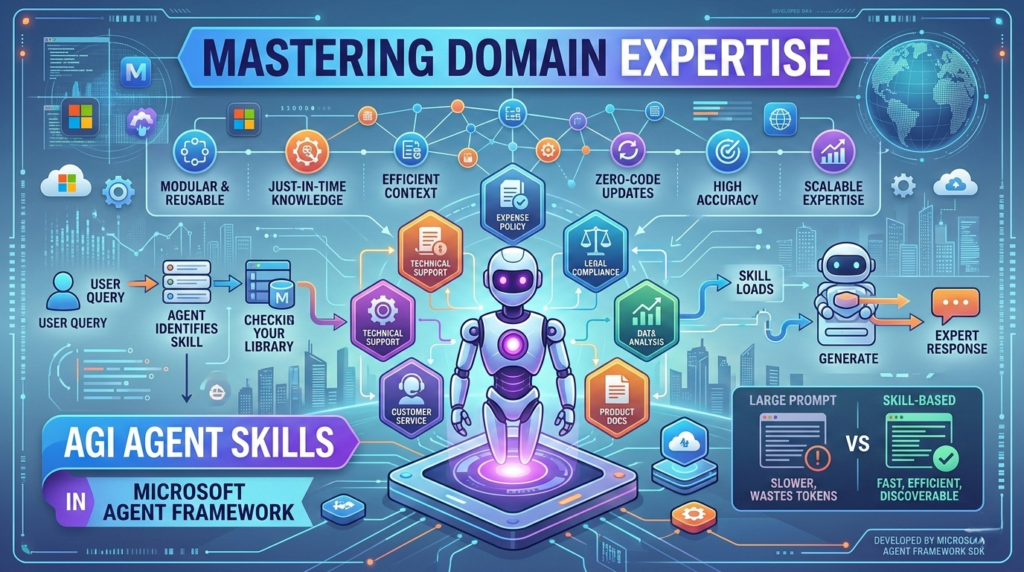
Agent Skills in Microsoft Agent Framework have redefined how developers build specialized AI agents by providing a modular way to inject domain expertise on demand. While building an AI agent that is “smart” is relatively easy in the current landscape of LLMs, building one that possesses deep, reliable, and specialized knowledge has traditionally been a significant architectural challenge. Developers often find themselves caught between two extremes: overloading the system prompt with massive documentation or writing complex custom routing logic to fetch the right info.
The release of the Agent Skills SDK within the Microsoft Agent Framework changes this dynamic entirely. By introducing a portable, reusable, and “on-demand” skill system, Microsoft has provided a path to equip agents with specialized knowledge without modifying a single line of their core instructions.
Building an AI agent that is “smart” is relatively easy in the current landscape of LLMs. However, building an AI agent that possesses deep, specialized, and reliable domain expertise has traditionally been a significant architectural challenge. Developers often find themselves caught between two extremes: overloading the system prompt with massive amounts of documentation—which eats up the context window and degrades performance—or writing complex custom routing logic to fetch the right information at the right time.
The release of the Agent Skills SDK within the Microsoft Agent Framework changes this dynamic entirely. By introducing a portable, reusable, and “on-demand” skill system, Microsoft has provided a path to equip agents with specialized knowledge without modifying a single line of their core instructions.
In this guide, we will explore how you can leverage Agent Skills in Microsoft Agent Framework to create more efficient, auditable, and expert-level AI agents.
What Are Agent Skills in Microsoft Agent Framework?
At its core, Agent Skills in Microsoft Agent Framework is an open format designed to package domain expertise into discrete, manageable units. Instead of treating an agent’s knowledge as one giant, monolithic block of text, you can now break that knowledge down into specific “skills.”
Think of a “skill” as a specialized handbook for a specific task—like an expense policy, a technical troubleshooting guide, or a legal compliance workflow. These skills are stored externally and are only loaded by the agent when they are actually needed for the task at hand.(Agent Skills in Microsoft Agent Framework)
The Anatomy of an Agent Skill
A skill is remarkably simple to build. It doesn’t require complex code or proprietary file formats. Every skill is essentially a folder containing a SKILL.md file. This file contains:
- YAML Frontmatter: Metadata including a name and a detailed description.
- Markdown Instructions: The step-by-step logic, rules, or domain knowledge the agent should follow.
The description field is the most critical piece of the puzzle. The agent uses this description to “discover” the skill. When a user asks a question, the agent scans its available library and decides if a specific skill is relevant enough to be loaded into its active memory.
Why Use Agent Skills? The Benefits of Modular Expertise
Using Agent Skills in Microsoft Agent Framework offers three distinct advantages over traditional prompting methods:
- Context Window Efficiency: Rather than stuffing every policy into the prompt (which might consume 10,000+ tokens), the agent only “advertises” the skill using a tiny (~100 token) summary. The full instructions are only loaded if the agent decides to use them.
- Reusable Knowledge: Once you build a “Compliance Skill” or a “Data Analysis Skill,” you can drop that folder into any agentic project. It becomes a portable asset across your organization.
- Zero-Code Updates: If your company’s travel policy changes, you simply update the
SKILL.mdfile. You don’t need to redeploy your agent’s core code or update its system instructions.
Implementing Agent Skills: A Step-by-Step Approach
To start using Agent Skills in Microsoft Agent Framework, you primarily interact with the FileAgentSkillsProvider. This provider is available for both .NET and Python, ensuring flexibility across different development stacks.
1. Organize Your Skills Directory
Your project structure should look like this:
Plaintext
skills/
├── expense-reports/
│   └── SKILL.md
├── software-troubleshooting/
│   └── SKILL.md
2. Craft the SKILL.md File
Inside your skill folder, the SKILL.md file acts as the brain of that specific domain. Here is a simplified example:
YAML
---
name: expense_policy_expert
description: Use this skill when the user asks about expensing travel, meals, or office equipment.
---
# Expense Policy
1. All meals must be under $50.
2. Receipts are required for anything over $25.
3. International travel requires VP approval.
3. Connect to the Agent
You then configure the FileAgentSkillsProvider to point to your skills folder. The framework recursively searches the directory, validates the skills, and automatically injects the skill names into the agent’s system prompt.(Agent Skills in Microsoft Agent Framework)
How the “Discovery and Load” Workflow Works
One of the most impressive features of Agent Skills in Microsoft Agent Framework is the automated routing. You don’t have to write “If the user says ‘expense’, then load X.” The framework handles this through two internal tools:
| Phase | Token Cost | Action |
| Advertise | ~100 Tokens | The agent sees a list of available skill names and descriptions in its prompt. |
| Load | < 5,000 Tokens | When a user’s intent matches a description, the agent calls load_skill to fetch the full markdown content. |
This “just-in-time” knowledge delivery ensures that Agent Skills in Microsoft Agent Framework keeps your agents lean and responsive, even when they have access to hundreds of different domain-specific skill sets.
Real-World Use Cases for Agent Skills
How can you apply Agent Skills in Microsoft Agent Framework in a production environment? Here are a few actionable scenarios:
- Customer Support Playbooks: Instead of one support agent trying to know everything, create skills for “Billing Disputes,” “Technical Troubleshooting,” and “Warranty Returns.” The agent will switch between these playbooks as the conversation evolves.
- HR and Compliance Bots: Package your employee handbook into separate skills. When an employee asks about maternity leave, only the relevant “Leave Policy” skill is loaded, ensuring higher accuracy and fewer hallucinations.
- Multi-Team Libraries: Large organizations can maintain a central repository of “Official Skills.” Any department building an agent can simply “subscribe” to the skills they need, ensuring consistent answers across the entire company.
Actionable Insights for Developers
To get the most out of Agent Skills in Microsoft Agent Framework, follow these best practices:
- Optimize Your Descriptions: Since the agent uses the YAML description to decide when to load a skill, be explicit. Instead of “HR Policy,” use “Use this skill for questions about health insurance, dental plans, and open enrollment.”
- Keep Skills Atomic: Don’t create one giant skill for “Company Rules.” Break them down into small, focused skills. This keeps the loaded context small and makes the agent much more precise.
- Treat Skills as Code: Even though skills are just Markdown files, they should be version-controlled in Git. This allows you to track changes to your agent’s “knowledge” over time and roll back if a new policy instruction causes unexpected behavior.
- Review Third-Party Skills: If you are importing skills from outside sources, treat them like open-source dependencies. Always review the
SKILL.mdcontent to ensure it doesn’t contain prompt injections or conflicting instructions.
The Future of Microsoft Agent Framework
The introduction of Agent Skills in Microsoft Agent Framework marks a shift toward more modular AI architectures. Microsoft is moving away from the “one prompt to rule them all” philosophy and toward a “library of capabilities” model.
As we look forward, we expect to see even tighter integration with the Model Context Protocol (MCP) and expanded support for interactive “Skill Creators” that help non-technical domain experts write and test their own agent skills. By adopting Agent Skills in Microsoft Agent Framework today, you are future-proofing your AI applications and ensuring they can scale as your organization’s specialized knowledge grows.
Whether you are building a simple assistant or a complex multi-agent system, the ability to inject domain expertise on demand is a game-changer. Start small by turning one frequently asked policy into a skill, and watch how much more reliable your agent becomes.