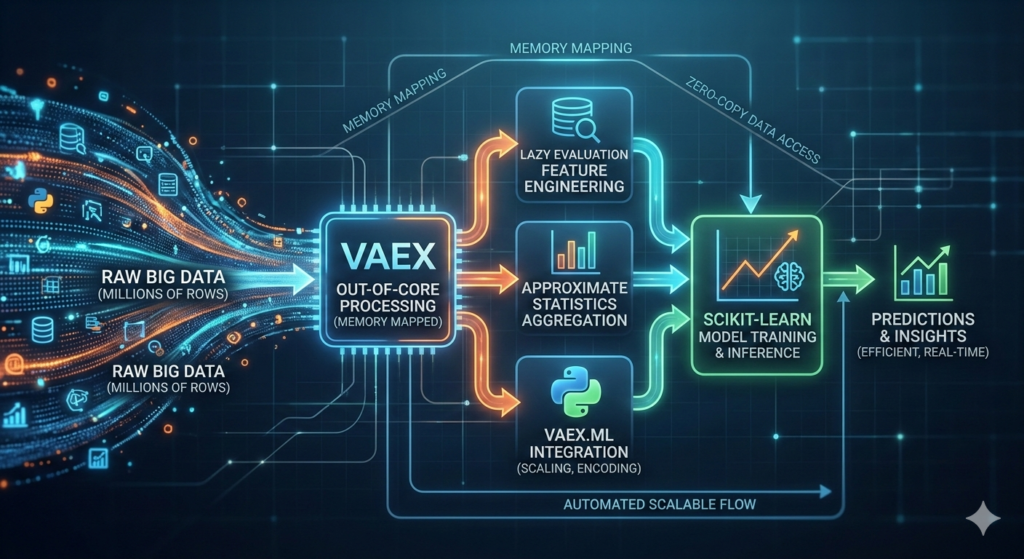
In the era of Big Data, the limitations of traditional Python libraries like Pandas often become a bottleneck. When your dataset hits millions of rows, the “out of memory” error is a common frustration for data scientists. Enter Vaex, a high-performance Python library designed for lazy out-of-core DataFrames.
This guide explores how to leverage a Vaex pipeline to handle massive datasets efficiently. Instead of materializing data in RAM, Vaex uses memory mapping and lazy evaluation to provide near-instantaneous results on datasets that would otherwise crash your machine. We will walk through the creation of an end-to-end analytics and machine learning workflow, ensuring your processing remains scalable and production-ready.
Why Choose a Vaex Pipeline for Big Data?
Traditional tools require you to load the entire dataset into memory. For a dataset with 100 million rows, this is simply not feasible on a standard workstation. A Vaex pipeline solves this by using three core principles:
- Memory Mapping: Data is read directly from disk as needed.
- Lazy Evaluation: Operations (like adding a column) are stored as expressions and only calculated when required for display or export.
- Zero-Copy Policy: It doesn’t create unnecessary copies of your data, saving precious gigabytes of RAM.
By implementing a Vaex pipeline, you can perform exploratory data analysis (EDA) and feature engineering on millions of records with the same ease as a small CSV file.
Step 1: Setting Up the Environment and Data Generation
To get started, you need the core library along with its machine learning and visualization extensions.
Python
# Installation
!pip install vaex vaex-ml vaex-viz pyarrow scikit-learn
In the featured tutorial, we work with a synthetic dataset of 2,000,000 rows. This scale is perfect for demonstrating how a Vaex pipeline handles data without lagging. The dataset includes customer attributes like age, city, income, and transaction history.
Step 2: Intelligent Feature Engineering with Lazy Expressions
The true power of a Vaex pipeline lies in its “virtual columns.” When you define a new feature, Vaex does not calculate the values for every row immediately. Instead, it creates a recipe for how to calculate those values.
Core Feature Engineering Examples:
- Income Normalization:
df["income_k"] = df.income / 1000.0 - Log Transformations:
df["log_income"] = df.income.log1p() - Time-based Metrics:
df["tx_per_year"] = df.tx / (df.tenure_y + 0.25)
Because these are virtual columns, they take up virtually no memory. This allows you to iterate on complex features without worrying about resource exhaustion.
Step 3: Scalable Aggregations and Contextual Features
Often, we need to compare an individual record against a group average (e.g., comparing a user’s income to the city average). In a standard workflow, this involves heavy “Group By” and “Join” operations.
Within a Vaex pipeline, you can use approximate statistics to speed this up. Vaex can compute 95th percentiles or means using binning-based operations that are significantly faster than exact sorts on millions of rows.
| Feature Type | Methodology | Benefit |
| Categorical Encoding | vaex.ml.LabelEncoder | Memory-efficient mapping of strings to integers. |
| Approximate Stats | df.percentile_approx() | Rapidly calculates distribution benchmarks. |
| Contextual Joins | df.join() | Merges group-level insights back to the main lazy DataFrame. |
By joining these aggregates, we can create high-signal features like income_vs_city_p95—a ratio showing where a customer stands compared to their local peers.
Step 4: Integrating Machine Learning into the Vaex Pipeline
While scikit-learn is the gold standard for modeling, it typically expects in-memory NumPy arrays. A Vaex pipeline bridges this gap using vaex.ml. This allows you to scale and transform data lazily and only pass the necessary features to the model trainer.
The Modeling Workflow:
- Scaling: Use
vaex.ml.StandardScalerto normalize numerical features. - Splitting: Perform a random split (
df.split_random) without copying the underlying data. - Training: Wrap a standard model (like
LogisticRegression) in avaex.ml.sklearn.Predictor. - Transformation: The model becomes part of the Vaex pipeline, allowing for seamless inference on new data.
This integration ensures that the transformation logic used during training is identical to what is used during deployment, preventing “training-serving skew.”
Step 5: Model Evaluation and Performance Metrics
Once the model is trained, evaluating millions of predictions can also be memory-intensive. By keeping the predictions within the Vaex pipeline, we can calculate lift tables and decile-based metrics efficiently.
In the guide, we segment predictions into deciles and compute the “lift”—the ratio of the target rate in a specific bucket compared to the baseline. This diagnostic tool is essential for understanding if your model effectively ranks high-value customers.
Step 6: Pipeline Persistence and Reproducibility
A data science project is only as good as its reproducibility. One of the best features of a Vaex pipeline is the ability to export the “state.”
By saving the pipeline state as a JSON file, you record every transformation, encoding, and scaling step. When you need to process a new batch of data (even months later), you can reopen your raw data and apply the saved state to recreate your features exactly.
Python
# Exporting the state
df.state_save('vaex_pipeline.json')

# Re-applying the state to new data
df_new = vaex.open('new_data.parquet')
df_new.state_load('vaex_pipeline.json')
Actionable Insights for Large-Scale Data
To make the most of your Vaex pipeline, keep these best practices in mind:
- Avoid
.to_pandas(): Converting a large Vaex DataFrame to Pandas will attempt to load everything into memory and likely crash your session. Only convert small samples for final visualization. - Use Parquet or HDF5: These file formats support memory mapping, which is what makes Vaex so fast. Avoid CSVs for large-scale work.
- Leverage Multithreading: Vaex is designed to use all available CPU cores. Ensure your environment is configured to allow parallel processing for maximum speed.
Conclusion
Building a Vaex pipeline is the most effective way to handle analytics and machine learning on millions of rows using Python. By utilizing lazy evaluation, virtual columns, and memory mapping, you can bypass the traditional memory constraints of DataFrames. Whether you are performing complex per-city aggregations or training predictive models, the Vaex pipeline provides a robust, scalable architecture that transitions smoothly from experimentation to production.