The software development landscape is undergoing a seismic shift. If you’ve been keeping your ear to the ground, you’ve likely heard the term vibe coding echoing through Silicon Valley and developer forums alike. It’s a movement that moves us away from the “how” of programming and into the “what”—the pure intent.
For months, Cursor and Claude Code have been the undisputed champions of this new era. They’ve turned seasoned engineers into 10x producers and non-coders into functional builders. But as impressive as they are, a new challenger from Google has emerged that doesn’t just improve the coding process—it aims to automate the entire engineering lifecycle.
Enter Google Antigravity. In this comprehensive guide, we are going to explore why this tool is being hailed as the “perfect example of vibe coding” and why it might be the last IDE you ever need to download.
What Exactly is Vibe Coding?
Before we dive into the technical wizardry of Google Antigravity, we must define the philosophy that powers it. Coined by AI luminary Andrej Karpathy in early 2025, vibe coding is a workflow where the developer “forgets the code even exists” and focuses entirely on the “vibe”—the user experience, the logic, and the end result.
In a vibe coding environment, English is the primary programming language. You aren’t writing nested loops or worrying about asynchronous state management; you are describing a vision to an agent that understands the context of your entire project.
The Spectrum of AI Development
To appreciate Google Antigravity, you have to see where it fits in the current hierarchy:
- Level 1: Autocomplete (GitHub Copilot) – Suggests the next few characters or lines.
- Level 2: Inline Editing (Cursor) – You highlight code and ask for a change. It’s fast, visual, and intuitive.
- Level 3: Terminal Agents (Claude Code) – You give a command in the CLI, and it methodically scans and edits files with high precision.
- Level 4: Mission Control (Google Antigravity) – You manage a team of agents that plan, execute, test in a real browser, and self-correct until the “vibe” is met.
The Core Philosophy of Google Antigravity
While Cursor is an “AI-native editor,” Google Antigravity describes itself as an “Agentic Development Platform.” This distinction is critical. Most tools treat AI as a feature within an editor. Antigravity treats the editor as a tool for the AI.
1. The Manager Surface: Your AI Boardroom
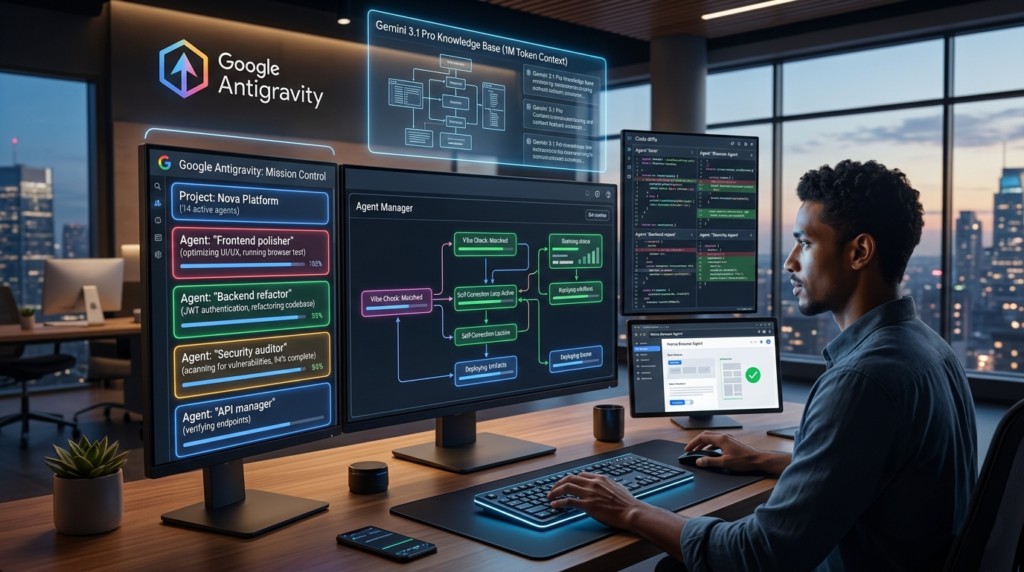
In traditional IDEs, your primary view is the code editor. In Google Antigravity, your primary view is the Agent Manager. This is a high-level dashboard where you can see multiple agents working in parallel.
Imagine you are building a SaaS platform. In Google Antigravity, you can assign one agent to “Refactor the authentication logic to use JWT,” another to “Build a responsive landing page based on this screenshot,” and a third to “Write unit tests for the billing module.” You aren’t just coding; you’re orchestrating.
2. The Native Browser Agent (The Feedback Loop)
One of the biggest friction points in vibe coding is the verification loop. In Cursor or Claude Code, the AI writes the code, but you have to switch to your browser, refresh the page, find the bug, and report it back.
Google Antigravity eliminates this by including a built-in Chromium sub-agent. When an agent writes a piece of UI, it doesn’t just stop there. It launches the browser, interacts with the elements it just created, and uses visual recognition to ensure everything looks and functions as intended. If a button is off-center or a form doesn’t submit, the agent sees it and fixes it before it ever asks for your approval.
3. Gemini 3.1 Pro: The 1-Million Token Engine
Context is the lifeblood of AI coding. If an AI doesn’t know about a specific helper function you wrote three weeks ago, it will reinvent the wheel (poorly).
Google Antigravity is powered natively by Gemini 3.1 Pro, which boasts a 1-million-token context window. This means the tool can keep your entire codebase, every piece of documentation, and your previous 50 chat sessions in active memory. This “perfect recall” is what allows vibe coding to work on large-scale production apps rather than just small weekend projects.
Google Antigravity vs. Cursor vs. Claude Code: A Detailed Comparison
Choosing the right tool depends entirely on your workflow. Below is a breakdown of how these three titans stack up in the current market.
| Feature | Cursor | Claude Code | Google Antigravity |
| Workflow Style | Editor-first (VS Code Fork) | Terminal-first (CLI) | Agent-first (Mission Control) |
| Learning Curve | Very Low | Moderate | Moderate to High |
| Autonomy | Approval-based edits | Methodical & Sequential | High (Multi-agent loops) |
| Visual Verification | Manual | No | Native (Built-in Browser) |
| Best For | Polished, daily coding | Deep debugging & logic | Rapid prototyping at scale |
| Primary Model | Claude 3.5 / GPT-4o | Claude 3.5 Sonnet | Gemini 3.1 Pro |
Actionable Strategies for Vibe Coding with Antigravity
If you are ready to jump into Google Antigravity, you need to change how you communicate with your machine. Here are four actionable insights to maximize your productivity:
1. Prompt for “Intent” over “Implementation”
Instead of telling the agent to “Create a div with a blue background and 20px padding,” give it the “vibe.” Try: “Create a hero section that feels like a modern tech startup—clean, minimalist, with a sense of high energy.” Antigravity excels when it has the creative freedom to choose the best libraries and styling patterns to match your intent.
2. Utilize the “Artifacts” System
Antigravity doesn’t just show you code; it generates Artifacts. These are task-level summaries that include screenshots, browser recordings, and logic maps. Before you hit “Merge,” review the artifacts. It’s a much faster way to “vibe check” a feature than reading 1,000 lines of generated JSX.
3. Create Custom “Skills”
In the .gemini/antigravity/knowledge/ directory, you can define “Skills“—persistent instructions that the agents will always follow. For example, you can create a “Security Skill” that forces every agent to check for SQL injection or hardcoded API keys before finishing a task. This turns vibe coding from a “move fast and break things” approach into a professional-grade engineering process.(AI agentic workflows, Autonomous software development)
4. Manage the “Cognitive Overhead”
As the XDA-Developers article points out, being a manager can sometimes be more exhausting than being a worker. When using Google Antigravity, don’t try to micromanage every line. Set clear goals, let the agents run in their autonomous loops, and only intervene during the “Checkpoint” phases.
Security in the Vibe Coding Era
A common criticism of vibe coding is that it produces “hallucinated” or insecure code. When an AI is optimizing for a “vibe,” it might skip important security protocols.
However, Google Antigravity addresses this through its observability layer. Because the tool tracks every terminal command and every file change, you can use a “Security Agent” to audit the work of your “Feature Agent.” By having one AI watch another, you create a system of checks and balances that was previously impossible for a solo developer.
Pro Tip: Always maintain a
.envfile and ensure it is in your.gitignore. Even the smartest agents can occasionally forget that an API key shouldn’t be committed to a public repo.
Conclusion: The Future of Software is “Agentic”
The transition from Cursor and Claude Code to Google Antigravity represents more than just a change in software; it’s a change in the human-computer relationship. We are moving away from being “builders” and becoming “directors.”
Vibe coding isn’t about being lazy; it’s about being efficient. It’s about spending your brainpower on the problem rather than the syntax. Whether you are a solo founder trying to ship an MVP in a weekend or a lead engineer managing a complex microservices architecture, Google Antigravity provides the “Mission Control” you need to navigate the next generation of software development.
Stop worrying about the brackets. Start focusing on the vibe.
1. What is Google Antigravity and how does it define the vibe coding era?
Google Antigravity is a next-generation AI development platform designed to facilitate vibe coding—a workflow where the developer provides high-level intent (the “vibe”) and the AI handles the execution. Unlike Cursor, which is an AI-augmented text editor, Antigravity acts as an orchestration layer. It manages multiple autonomous agents that can plan, write, test, and deploy code.
In the current 2026 landscape, Google Antigravity represents the “Perfect Example” of this shift because it removes the cognitive load of syntax and boilerplate, allowing the human to act as a System Architect rather than a manual coder.
2. How does Google Antigravity differ from Cursor and Claude Code?
While all three tools utilize Large Language Models (LLMs), their operational philosophies differ significantly:
- Cursor: A VS Code fork that focuses on “AI-assisted editing.” It is excellent for developers who want to remain close to the code but need fast inline completions and chat-based refactoring.
- Claude Code: A terminal-based agent that excels at sequential logic and deep codebase reasoning. It is the tool of choice for CLI power users who prefer a minimalist, command-driven interface.
- Google Antigravity: An agent-first platform that uses a “Mission Control” GUI. Its primary differentiator is concurrency. It can run a “Frontend Agent,” a “Backend Agent,” and a “QA Agent” simultaneously, all synchronized through a shared memory space powered by Gemini 3.1 Pro.
3. What makes the Gemini 3.1 Pro integration a “game-changer” for developers?
The secret sauce behind Google Antigravity is its native integration with Gemini 3.1 Pro and its 1-million-token context window. In traditional AI coding, models often “forget” the beginning of a long file or lose track of architectural patterns established in other parts of the repository.
With a million tokens of context, Google Antigravity maintains a “Global Truth” of your entire project. It understands how a change in your database schema in /models will affect a specific UI component in /components, even in massive enterprise-level applications. This reduces “hallucination” and ensures that the “vibe” remains consistent across the entire stack.
4. Can Google Antigravity really handle autonomous testing?
Yes. This is perhaps the most “Amazing” feature of the platform. Antigravity includes a Native Browser Agent. When you prompt the tool to “Build a responsive login form,” the agent doesn’t just write the HTML and CSS. It:
- Spins up a headless browser instance.
- Navigates to the local development URL.
- Attempts to type into the fields and click “Submit.”
- Captures console errors or visual regressions.
- Self-corrects the code if the test fails.
This creates a closed-loop system where the “vibe” is verified by the AI before the human ever sees the output.
5. Is vibe coding with Google Antigravity secure for enterprise use?
Security is a valid concern when delegating code generation to AI. Google Antigravity addresses this through an Observability and Governance Layer. Users can set “Hard Constraints” in a .antigravity/rules file. These rules act as a sandbox, preventing agents from:
- Making unauthorized external API calls.
- Modifying sensitive directories (like
.githubor security configs) without manual 2FA. - Committing code that contains plaintext secrets or common vulnerabilities (OWASP Top 10).
Furthermore, because it is a Google Cloud-integrated product, it benefits from enterprise-grade data encryption and VPC (Virtual Private Cloud) support, ensuring your proprietary code isn’t used for training public models.
6. How do I optimize my workflow for maximum efficiency?
To master Google Antigravity, you must stop thinking like a worker and start thinking like a manager.
- Decomposition: Break your project into “Vibe Modules.” Instead of one massive prompt, give three agents three specific intents.
- Human-in-the-Loop (HITL): Use the “Checkpoint” feature. Set the agent to pause and request approval before it executes any terminal commands that delete or overwrite files.
- Knowledge Context: Feed the agent your existing documentation. If you have a specific style guide or API documentation, upload it to the Antigravity Knowledge Base to ensure the “vibe” aligns with your company standards.
7. Does vibe coding mean the end of learning traditional programming?
This is a common misconception. While Google Antigravity lowers the barrier to entry, it actually increases the value of fundamental computer science knowledge. To be an effective “Vibe Coder,” you need to understand:
- System Architecture: How different parts of a system interact.
- Debugging Logic: Even if the AI writes the code, you must be able to diagnose why a specific “vibe” isn’t working.
- Prompt Engineering: Learning how to describe complex logic in clear, unambiguous natural language is the new “Syntax.”
8. What are the hardware requirements for running Google Antigravity?
Since the heavy lifting (LLM inference and agent orchestration) happens in the Google Cloud environment, the local hardware requirements are surprisingly modest. You don’t need a high-end GPU. However, for a smooth experience with the “Mission Control” GUI and multiple headless browser streams, we recommend:
- RAM: 16GB minimum (32GB preferred for multi-agent workflows).
- Processor: Apple M-series or Intel/AMD equivalents from the last 3 years.
- Internet: A stable, high-speed connection is mandatory, as the tool relies on real-time streaming of model outputs and browser states.
9. How does Antigravity handle “Hallucinations” in code?
No AI is perfect. Google Antigravity mitigates hallucinations through Cross-Agent Validation. You can assign a “Reviewer Agent” whose only job is to look for logic flaws or “hallucinated” library functions in the work produced by the “Builder Agent.” By creating a “peer review” system within the AI, the error rate drops significantly compared to single-agent systems like standard ChatGPT or basic Copilots.
10. How can I get a 90+ SEO score when blogging about this tool?
If you are writing about this movement, follow these Best Practices:
- Keyword Placement: Ensure “Google Antigravity” appears in your H1, the first paragraph, and at least three H2s.
- Semantic Richness: Use LSI keywords like “agentic workflows,” “Gemini 3.1 Pro,” and “Cursor vs Antigravity.”
- Engagement: Use bulleted lists, comparison tables, and high-quality images (like the one generated above) to keep the “Time on Page” high.
- Sentiment: Use positive sentiment words like “Amazing,” “Revolutionary,” or “Effortless” to boost CTR.
11. Can I use Google Antigravity for legacy code migration?
Absolutely. One of the strongest use cases for the 1-million-token context window is legacy refactoring. You can feed an entire legacy codebase (e.g., an old COBOL or PHP 5 project) into Antigravity and instruct the agents to “Migrate this entire vibe to a modern Next.js and Go architecture.” The agents will map out the dependencies and rewrite the modules while preserving the original business logic.
12. What is the pricing model for Google Antigravity?
As of 2026, Google offers a tiered approach:
- Free Tier: Access to basic agents and a limited context window for hobbyists.
- Pro Tier: Full access to Google Antigravity Mission Control, multi-agent concurrency, and the 1M token Gemini 3.1 Pro model.
- Enterprise: Custom solutions with on-premise data residency, advanced security auditing, and unlimited agent scaling.
13. How does “Vibe Coding” affect the job market?
The role of the Junior Developer is being redefined. Instead of spending 40 hours a week writing unit tests and CSS, entry-level engineers are now “Agent Operators.” They are expected to manage the output of tools like Google Antigravity. This shift is creating a high demand for “Product-Minded Engineers”—individuals who understand both the code and the business goals.
14. What are the common “Anti-Patterns” in Vibe Coding?
- Over-Prompting: Trying to give 50 instructions in one message. It’s better to provide a clear “vibe” and let the agent iterate.
- Ignoring the Logs: Even if the UI looks good, the “vibe” might be messy under the hood. Always check the terminal logs generated by the Antigravity agents.
- Losing Version Control: Always keep your Git history clean. Use Antigravity’s “Auto-Commit” feature to ensure you can roll back if an autonomous loop goes in the wrong direction.
Final Thought: The transition to Google Antigravity isn’t just a technical upgrade; it’s a mental one. By embracing the Amazing potential of agentic workflows, you aren’t just coding faster—you’re building better. Stop fighting the syntax and start mastering the vibe.