Published on Kalinga.ai | AI Architecture & Developer Intelligence
What if the biggest bottleneck in your AI workflow isn’t your model — it’s your memory system?
That’s the implicit argument behind a quietly viral post by Andrej Karpathy that has crossed 1.2 million views on X and sent developers across the world dismantling their RAG pipelines. Karpathy — co-founder of OpenAI, former Director of AI at Tesla, and the man who coined “vibe coding” — shared a deceptively simple idea he calls LLM Knowledge Bases. And it challenges one of the most deeply held assumptions in enterprise AI development: that vector databases and Retrieval-Augmented Generation are the only serious way to give LLMs access to your data.
This post breaks down the full architecture, explains why it matters for developers and AI-first teams in 2026, and gives you a clear, actionable path to building your own.
Why RAG Has a Hidden Problem Nobody Talks About
For the past three years, RAG has been the default answer to a very real question: how do you give an LLM access to your private or proprietary data without fine-tuning an entire model?
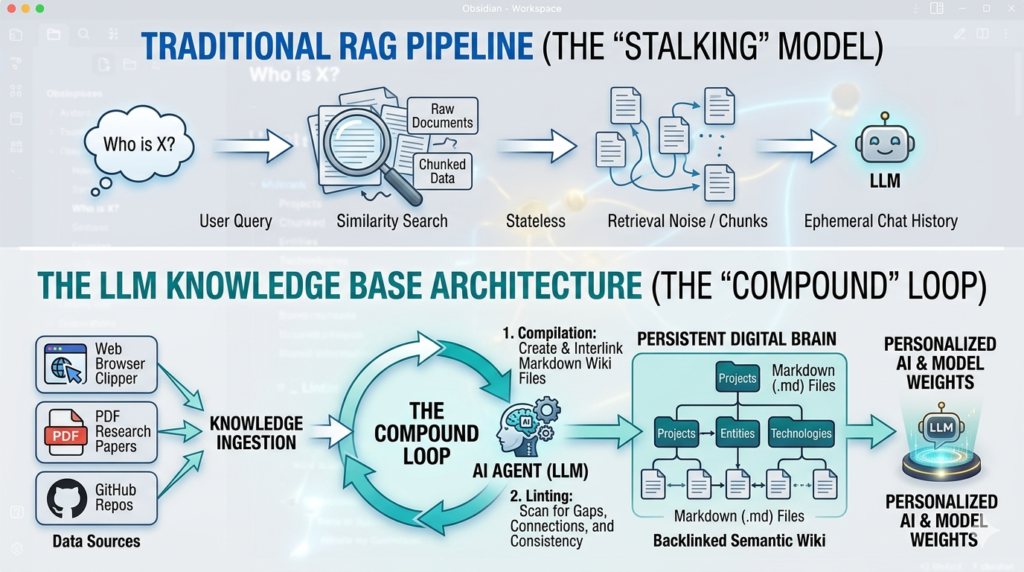
The standard RAG setup goes like this: documents are sliced into arbitrary chunks, converted into numerical vectors (embeddings), and stored in a specialized vector database. When you ask a question, the system runs a similarity search, pulls the most “relevant” chunks, and feeds them into the LLM.
It works. But it has a fundamental flaw that rarely gets named directly.
RAG is stateless. Every time you ask a question, the LLM rediscovers knowledge from scratch. There is no accumulation. No compounding. You ask a subtle question that requires synthesizing five documents — and the system has to find and piece together relevant fragments every single time. Nothing is built up. Nothing gets smarter.
The second problem is opacity. Vector embeddings are a black box. You can’t read them. You can’t audit what the AI retrieved. You can’t trace an answer back to a specific source and verify it. And for developers who’ve spent hours debugging a “hallucinated” answer that sounded perfectly plausible, this is a genuinely painful engineering reality.
Karpathy’s LLM Knowledge Base attacks both problems at once.
What Is an LLM Knowledge Base? The Core Idea
The central insight is elegant and almost embarrassingly obvious in hindsight.
Instead of retrieving from a static, chunked document store, what if you had the LLM itself actively compile and maintain a structured, interlinked knowledge base — written entirely in human-readable Markdown files?
No vector databases. No embedding models. No retrieval pipelines. Just a directory of .md files that an LLM continuously reads, writes, and refines — acting not as a search engine, but as a research librarian.
As Karpathy himself put it: “You rarely ever write or edit the wiki manually; it’s the domain of the LLM.”
The LLM Knowledge Base approach treats knowledge as a living artifact — something that accumulates, self-corrects, and grows richer with every new piece of information fed into it. This is the exact opposite of how most RAG systems work today.
The Architecture: Three Stages That Power the System
The LLM Knowledge Base operates in three distinct stages, cycling continuously:
Stage 1: Data Ingest (raw/ directory)
Everything starts with raw materials. Research papers, GitHub repositories, datasets, blog posts, and web articles are dropped into a directory called raw/. Karpathy uses the Obsidian Web Clipper to convert web content into Markdown files, ensuring that even images are stored locally so the LLM can reference them using vision capabilities.
This is the only stage where humans are doing significant manual work — curating what goes in. The rest is the LLM’s job.
Stage 2: Wiki Compilation (wiki/ directory)
This is where the magic happens. The LLM reads raw source material and compiles it into a structured, interlinked wiki of concept articles. Each article is organized by topic, with backlinks and cross-references to related concepts — similar to a Wikipedia for your specific research domain.
The compilation is incremental, not a full reprocessing on every run. New raw data gets integrated into the existing wiki structure, building on what’s already there.
Key activities the LLM performs during this stage:
- Summarization: Distilling long sources into dense, accurate concept pages
- Interlinking: Discovering connections between topics and creating explicit cross-references
- Index maintenance: Keeping a navigable master index so the LLM can find specific articles efficiently
- Active linting: Scanning the wiki for inconsistencies, outdated information, missing data, or new connections — effectively letting the knowledge base heal itself
Stage 3: Querying and Use
Once the wiki exists, querying it is surprisingly direct. Rather than running a similarity search over embeddings, the LLM navigates the wiki using its summaries and index files — much like a librarian who knows their collection. At the scale Karpathy describes (~100 articles, ~400,000 words), this works extremely well.
The long-term roadmap goes even further: the refined, linted wiki becomes a high-quality dataset for synthetic data generation and fine-tuning. Eventually, you could fine-tune a smaller, more efficient model on your own wiki — so the knowledge lives in the model’s weights, not just its context window.
LLM Knowledge Base vs. Traditional RAG: A Direct Comparison
| Feature | Traditional RAG | LLM Knowledge Base |
|---|---|---|
| Knowledge storage | Vector embeddings (black box) | Markdown files (human-readable) |
| Retrieval method | Similarity search | LLM navigates index + summaries |
| Knowledge accumulation | None — stateless | Continuous — compounding |
| Auditability | Low — opaque embeddings | High — every claim is traceable |
| Latency overhead | High (embedding + search) | Low at personal/mid scale |
| Infrastructure complexity | High (vector DB, embedding model, pipeline) | Low (files, scripts, one LLM) |
| Self-healing | No | Yes — via active linting passes |
| Fine-tuning potential | Limited | High — wiki = clean training set |
| Ideal scale | Large enterprise datasets | Personal to departmental (100K–1M words) |
| Portability | Low (DB-dependent) | High — plain text files, any editor |
The comparison reveals something important: for a large fraction of real-world use cases — individual researchers, small teams, departmental wikis, focused research projects — the traditional RAG stack is likely overkill that introduces more complexity and retrieval noise than it solves.
Why This Actually Works: The Technical Reasoning
A common objection is: won’t the LLM get confused navigating hundreds of Markdown files? The answer, at mid-scale, is no — and Karpathy’s results at ~400,000 words bear this out.
Modern frontier LLMs have dramatically improved at reasoning over structured text with explicit links and summaries. When you give an LLM a well-organized wiki — with a clear index, topic pages, and cross-references — it can navigate it with far more precision than a RAG system retrieves from flat, arbitrarily-chunked documents.
Karpathy makes another incisive observation: vector search is a blunt instrument. In a large codebase, for example, a RAG system might retrieve snippets that sound similar to your query but miss the specific line of logic that actually governs the system. Structured Markdown with explicit relationships is a scalpel where embeddings are a sledgehammer.
The insight from the AI research community confirms this: Elvis Saravia of DAIR.AI noted that “LLMs are excellent at curating and searching — finding connections — once data is stored properly.” The key word is properly. Structure matters more than sheer volume.
Multiple developers have also noted the conceptual overlap with Graph RAG — a retrieval technique where knowledge is stored as a graph of interconnected nodes rather than flat documents. Karpathy’s wiki-with-backlinks approach is essentially a manual, Markdown-based implementation of Graph RAG — without the graph database overhead.
Real-World Validation: Lex Fridman’s Ephemeral Wiki and “Farzapedia”
The LLM Knowledge Base concept has already attracted high-profile validation beyond Karpathy’s own usage.
Lex Fridman confirmed using a similar workflow, with an interesting addition. He has the system generate dynamic HTML with JavaScript that lets him sort, filter, and visualize data interactively. He also uses the system to generate a temporary focused mini-knowledge-base that he loads into an LLM for voice-mode interaction during long runs. This “ephemeral wiki” concept — spinning up a custom research environment for a specific task, then dissolving it — hints at a future where AI-maintained wikis power multi-agent workflows.
Developer Farza built a live implementation called “Farzapedia” — a personal Wikipedia compiled from 2,500 entries spanning his diary, Apple Notes, and iMessages. The result is a queryable, cross-referenced knowledge base of his own life and work, maintained entirely by the LLM.
These aren’t just experiments. They’re proof that the LLM Knowledge Base pattern scales across use cases — from research to personal productivity to enterprise intelligence.
How to Build Your Own LLM Knowledge Base: A Practical Starting Point
You don’t need to wait for a packaged product. The system is intentionally buildable today. Here’s a practical framework:
Step 1: Set up your directory structure
/knowledge-base
  /raw           ← dump raw sources here
  /wiki          ← LLM-compiled articles live here
    /index.md    ← master navigation file
    /concepts/   ← topic pages with backlinks
    /log.md      ← running log of what's been processed
Step 2: Choose your tools
- Obsidian as your Markdown interface (local-first, folder-based, supports backlinks and graph visualization)
- Obsidian Web Clipper for converting web content to Markdown
- Claude Code, OpenAI Codex, or any capable LLM agent to handle compilation, linting, and indexing
- Custom scripts (shell or Python) as glue logic to orchestrate LLM calls
Step 3: Define your compilation prompt
Instruct your LLM agent with a clear prompt that specifies:
- Read all files in
raw/that haven’t been processed - Update or create the appropriate concept page in
wiki/concepts/ - Update
index.mdwith any new entries - Add a log entry to
log.mdnoting what was processed and what connections were found - Perform a linting pass: flag any inconsistencies or outdated claims
Step 4: Build your linting workflow
Schedule periodic linting passes where the LLM scans existing wiki articles for:
- Contradictory claims across pages
- Missing cross-references
- Concepts that have been superseded by newer raw materials
- Pages that could be merged or split for clarity
Step 5: Query your wiki
For querying, pass your index.md and relevant concept pages directly into the LLM context. At ~400,000 words, you can load summary-level content for the full wiki and detailed content for relevant sections within a single context window.
The Enterprise Opportunity: “Every Business Has a raw/ Directory”
Perhaps the most provocative observation from the community reaction came from entrepreneur Vamshi Reddy: “Every business has a raw/ directory. Nobody’s ever compiled it. That’s the product.”
This is a genuine insight. Most companies are drowning in unstructured data — Slack conversations, internal wikis, PDF reports, call transcripts, engineering runbooks — that sits unprocessed and unsynthesized. A traditional RAG layer searches this data. But a Karpathy-style enterprise system would actively author a dynamic company knowledge base — what some are calling a “Company Bible” — that updates in real-time as new information arrives.
The LLM Knowledge Base approach at enterprise scale has real challenges. CEO Eugen Alpeza of Edra noted the complexity of scaling from personal research to millions of records with contradictory tribal knowledge. Multi-agent architectures will be needed, with supervisory models acting as quality gates — scoring and validating draft pages before they enter the live knowledge base.
But the direction is clear. And the early community proposals for “Swarm Knowledge Base” designs — 10-agent systems with LLM quality gates — suggest the architecture is already being extended beyond personal use.
What This Signals About the Future of AI Development
Karpathy’s LLM Knowledge Base is more than a clever workflow trick. It’s a signal about where the field is moving.
From stateless chat to persistent collaboration. The dominant AI interaction model today is still the chat session — you open a tab, establish context, get an answer, close the tab. Everything resets. The LLM Knowledge Base is a direct attack on this model. It treats the LLM as an ongoing collaborator that maintains its own memory in your filesystem.
From code to concepts. When Karpathy published his system, he didn’t release code. He released a GitHub Gist — an “idea file.” His explanation was striking: “In this era of LLM agents, there is less of a point sharing the specific code. You share the idea. Each person’s agent builds a version customized for their specific needs.” The product is increasingly the concept, not the implementation.
From search to synthesis. The shift from RAG to LLM Knowledge Bases represents a deeper transition: from retrieving information to accumulating it. Knowledge that compounds is fundamentally different from knowledge that must be rediscovered. It’s the difference between a library and a librarian.
From black boxes to auditable intelligence. By using plain Markdown as the storage layer, the LLM Knowledge Base makes AI reasoning transparent in a way that embeddings never can be. Every claim is traceable to a specific file a human can read, edit, or delete. In an era of increasing concern about AI hallucination and explainability, this is not a minor advantage.(LLM Knowledge Base)
Limitations to Keep in Mind
No architecture is a silver bullet. The LLM Knowledge Base has real constraints:
- Scale ceiling: At very large enterprise scale (millions of documents), the approach will require multi-agent orchestration and quality gates that add engineering complexity.
- Hallucination risk: An LLM writing to its own knowledge base can potentially propagate or compound errors. Robust linting passes and human review of key pages are essential.
- Latency on large wikis: As wiki size grows into millions of words, loading even summary-level content may stress context window limits. Chunked navigation strategies will be needed.
- Not a replacement for all RAG: For purely search-and-retrieve use cases over very large static corpora (legal databases, medical literature), purpose-built RAG with vector databases remains appropriate.
The honest framing: the LLM Knowledge Base is the right tool for mid-sized, evolving knowledge domains where accumulation and auditability matter. Traditional RAG remains valid for large-scale, search-first use cases.(Andrej Karpathy AI Architecture, AI Markdown Wiki, Compound AI Systems, RAG vs Knowledge Base)
The Bottom Line for Developers and AI Teams
Karpathy hasn’t just shared a workflow. He’s shared a philosophy of AI memory: that LLMs should be active agents that maintain their own persistent, human-readable knowledge — not passive consumers of chunked text retrieved by similarity scores.
For individual researchers and developers, the LLM Knowledge Base offers something genuinely new: an AI that gets smarter about your specific domain over time, without retraining, without vector infrastructure, and without the context-reset lobotomy of session-based chat.
For teams building AI-first products, it points toward a new product category — one where the value isn’t the model or the retrieval pipeline, but the compiled, curated, self-healing knowledge asset that sits between raw data and intelligent output.
The “autonomous archive” era has started. The question is who builds the tools to make it accessible at scale.
Interested in how architectures like this apply to Indian AI teams and developer tooling? Follow kalinga.ai for developer-first AI coverage from Bharat’s emerging tech ecosystem.
Frequently Asked Questions: Mastering the LLM Knowledge Base
How does an LLM Knowledge Base differ from a Vector Database?
While both store information, the fundamental difference lies in structure and retrieval. A vector database relies on mathematical “distance” between text chunks, which often leads to “retrieval noise” or lost context. An LLM Knowledge Base uses a structured, human-readable format (Markdown) where the AI acts as a compiler. It synthesizes information into a coherent wiki with manual and AI-generated backlinks, ensuring the AI understands the relationship between concepts rather than just the similarity of words.
Is this architecture scalable for enterprise-level data?
Karpathy’s current model is optimized for “human-scale” or “departmental-scale” data (~100 to 1,000 high-quality documents). For millions of documents, a hybrid approach is best: use traditional RAG for the initial “needle in a haystack” search, and then use the LLM Knowledge Base architecture to synthesize those results into a persistent, high-integrity “Master Wiki.” This ensures that your most important corporate knowledge isn’t just stored, but actually understood by the system.
What are the best tools to start building a Knowledge Base in 2026?
The ecosystem has matured significantly. For the interface, Obsidian remains the gold standard due to its local-first Markdown support and Graph View. For the “AI Agent” or compiler role, you need a model with a massive context window and strong reasoning capabilities. Claude 3.5 Sonnet and Gemini 1.5 Pro are currently the top choices for their ability to manage 100k+ tokens without losing track of instructions.
Does this replace the need for fine-tuning?
Not necessarily, but it changes the workflow. Think of the LLM Knowledge Base as “Short-to-Medium Term Memory” (Context) and Fine-tuning as “Long-Term Muscle Memory” (Weights). By maintaining a high-quality Markdown wiki, you are essentially creating a perfectly curated dataset. In the future, you can use this “Clean Data” to fine-tune a smaller, faster model that inherently “knows” your project’s core logic without needing to look it up every time.
How do I handle “Hallucinations” in a compiled wiki?
This is where the “Linting” process is critical. You should program your AI Agent to perform weekly “consistency checks.” The agent scans the wiki for contradictory statements or outdated information. Because the data is in plain text (Markdown), you can easily see the “Source Citations” back to your raw PDFs or GitHub repos, making it much easier to verify and correct than an opaque vector embedding.
Can I automate the ingestion of new research?
Yes. By using web-scraping agents and Obsidian Web Clippers, you can automate the flow of raw information into a “Staging” folder. From there, a scheduled script can trigger your LLM to “read and incorporate” that new data into the existing knowledge base, ensuring your digital brain stays up to date with the latest industry shifts.