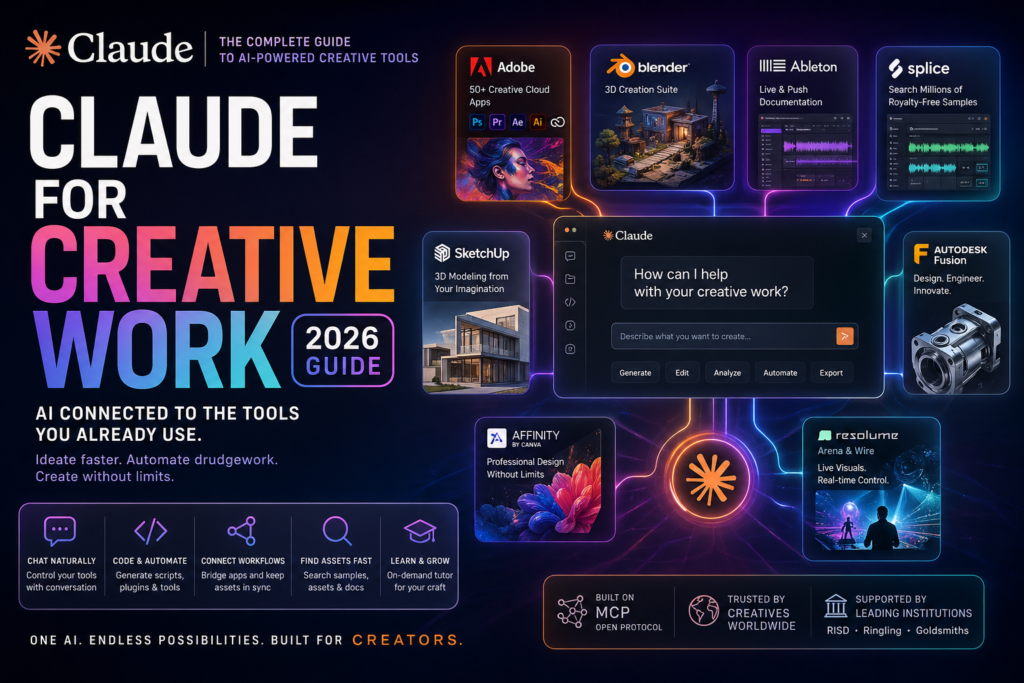
Claude for creative work is now a reality — not a promise. If you’re a designer, animator, music producer, or filmmaker wondering whether AI can actually integrate with the tools you already use every day, the answer is yes. Anthropic’s Claude now connects directly to industry-standard creative software through a growing ecosystem of connectors, enabling professionals to ideate faster, automate drudgework, and tackle larger-scale projects than ever before.
This guide breaks down every connector, use case, and workflow so you can start using Claude for creative work today.
What Is Claude for Creative Work?
Definition: Claude for creative work refers to Anthropic’s initiative — launched in April 2026 — that connects Claude’s AI capabilities directly into professional creative software through a protocol called MCP (Model Context Protocol). These connections are called “connectors.”
Expansion: Rather than replacing your existing tools, Claude acts as an intelligent layer on top of them. You can converse with Claude inside Blender, search Splice’s sample library from a chat window, or generate 3D models in SketchUp through plain language descriptions. The goal is not to replace taste or imagination — it’s to give creatives an extended reach, a larger skill set, and relief from repetitive production tasks. AI for designers
The partners currently connected to Claude for creative work include:
- Adobe (Photoshop, Premiere, Express, and 50+ Creative Cloud apps)
- Blender (open-source 3D creation suite)
- Ableton (music production and Live/Push documentation)
- Autodesk Fusion (3D modeling and engineering design)
- Splice (royalty-free sample library for music producers)
- SketchUp (architectural and product 3D modeling)
- Affinity by Canva (professional graphic design and photo editing)
- Resolume Arena and Wire (live visual performance and VJ tools)
Each connector is built on open MCP standards, meaning the integrations are accessible to other AI systems as well — a reflection of the open-source ethos many creative tools already embrace.
Why AI Is Reshaping the Creative Workflow
The creative industry has always been quick to adopt technology that expands what’s possible. Digital audio workstations replaced tape machines. Non-linear video editing replaced the cutting room floor. Generative AI for creatives is the next structural shift — and it’s arriving faster than most expected.
From Assistant to Co-Creator
The old model of AI in creative work was autocomplete: fill in a blank, suggest a color, finish a sentence. The new model enabled by Claude for creative work is fundamentally different. Claude can now:
- Analyze an entire Blender scene and debug complex node setups
- Translate assets between tools in a multi-application pipeline
- Write custom plugins and shaders through Claude Code
- Search Splice’s sample catalog using natural language descriptions like “warm analog bassline, 90 BPM, minor key”
- Generate parametric 3D models from a conversational description
The key shift is that Claude doesn’t just assist within one moment — it can bridge entire workflows, keeping assets in sync across design, audio, and 3D tools without requiring manual handoffs between applications.
The Claude Connectors — A Full Breakdown
Each connector solves a specific problem for a specific creative discipline. Here’s what each one does in practice.
Design and Visual Tools
Adobe for Creativity is arguably the broadest connector in the ecosystem. It connects Claude to more than 50 Creative Cloud tools, including Photoshop, Premiere Pro, and Adobe Express. Creatives can bring images, videos, and designs to life through natural language — asking Claude to adjust a Premiere timeline, apply batch edits in Photoshop, or export assets in the right format for a specific platform.
Affinity by Canva takes a similar approach for the Affinity suite. It automates repetitive production work like batch image adjustments, layer renaming, and file export — tasks that routinely consume hours of a production designer’s week. It also generates custom features and macros directly inside the app.
Resolume Arena and Wire serve live visual artists and VJs. With these connectors, performers can control Arena, Avenue, and Wire in real time using natural language during live shows or AV production sessions — a genuinely novel use case for conversational AI.
3D Modeling and Architecture
Blender receives a natural-language interface to its Python API through the official MCP connector. Artists can ask Claude to analyze and debug entire scenes, build custom scripts to batch-apply changes across objects, or add new tools directly into Blender’s interface without writing a single line of Python by hand. Anthropic has also joined the Blender Development Fund as a patron to support the project’s ongoing API development.
Autodesk Fusion connects Claude to one of the most widely used engineering design platforms in the world. Designers and engineers with a Fusion subscription can now create and modify 3D models through conversation — describing a component’s dimensions, constraints, or function in plain language and watching the model update accordingly.
SketchUp turns a conversation with Claude into the starting point for architectural or product modeling. Describe a room layout, a furniture piece, or a site concept, and Claude generates an initial model you can open directly in SketchUp for refinement.
Music and Audio Production
Ableton grounds Claude’s answers in official documentation for Live and Push, making it a reliable on-demand tutor for producers navigating complex synthesis techniques, effects chains, or MIDI routing setups.
Splice gives music producers the ability to search its enormous catalog of royalty-free samples from within Claude. Instead of opening a separate browser and scrolling through filters, you can describe what you’re looking for conversationally and receive curated results without leaving your workflow context.
Claude vs. Other AI Creative Tools — Comparison Table
How does Claude for creative work compare to other AI tools targeting creatives in 2026?
| Feature | Claude (with Connectors) | Adobe Firefly | GitHub Copilot (for Creative Coders) | Midjourney |
|---|---|---|---|---|
| Native software integration | Yes — Blender, Adobe, Ableton, Autodesk, SketchUp, Splice, Resolume, Affinity | Adobe CC only | Code editors only | No |
| Conversational workflow control | Yes — real-time natural language control | Limited | Yes (code context) | Prompt-based only |
| Script/plugin generation | Yes (via Claude Code) | No | Yes | No |
| Multi-tool pipeline bridging | Yes | No | No | No |
| Sample/asset library search | Yes (Splice) | No | No | No |
| 3D model generation | Yes (SketchUp, Autodesk, Blender) | No | No | No |
| Open protocol (MCP) | Yes | No | No | No |
| Education program | Yes (RISD, Ringling, Goldsmiths) | No | GitHub Education | No |
The key differentiator is depth of integration. Most AI creative tools generate assets in isolation. Claude for creative work embeds directly into the tools creatives already use — which means output goes immediately into a real workflow rather than requiring a separate import step.
How Creatives Are Using Claude for Creative Work Right Now
The use cases that have emerged since launch fall into five broad categories:
1. Learning and mastering creative tools on demand. Claude acts as a real-time tutor. A motion designer can ask how a specific modifier stack works in Blender. A producer can ask Claude to walk them through a synthesis technique in Ableton Live. The answers are grounded in official documentation, not general training data.
2. Extending tools with custom code. Claude Code — the command-line coding agent — can write scripts, plugins, shaders, and generative systems for the software you already use. A VFX artist can describe a procedural animation system and receive documented, reusable code. A developer building for games can request a custom shader written to the exact specifications of their engine.
3. Bridging tools in a multi-application pipeline. Complex creative projects span multiple tools — concept design in Figma, 3D in Blender, final editing in Premiere, audio in Ableton. Claude can translate file formats, restructure metadata, and keep assets synchronized across all of these tools without manual handoffs.
4. Rapid exploration and handoff. Claude Design, a new product from Anthropic Labs, allows creatives to explore ideas for software interfaces and visual experiences. It iterates on concepts based on feedback and exports results to other tools, starting with Canva.
5. Handling repetitive production work. Batch-processing assets, setting up project scaffolding, applying procedural changes across a scene — these are the tasks that drain creative energy without adding creative value. Claude for creative work can handle all of them.
Claude for Creative Work in Education
Alongside the connector launch, Anthropic announced partnerships with three leading art and design institutions:
- Rhode Island School of Design (RISD) — Art and Computation program
- Ringling College of Art and Design — Fundamentals of AI for Creatives
- Goldsmiths, University of London — MA/MFA Computational Arts program
Students and faculty at these institutions receive access to Claude and the full suite of creative connectors. Their feedback is intended to shape how generative AI for creatives develops — directly informed by practitioners in structured learning environments rather than by users alone.
This is significant. Most AI tools reach educational institutions months or years after professional adoption. Anthropic’s approach of building the education program in parallel with the product launch means the next generation of creative professionals will develop AI fluency alongside their core craft skills.
Frequently Asked Questions
What is Claude for creative work?
Claude for creative work is Anthropic’s initiative to integrate Claude’s AI capabilities directly into professional creative software — including Adobe Creative Cloud, Blender, Ableton, Autodesk Fusion, Splice, SketchUp, Resolume, and Affinity by Canva — through a set of connectors built on the open MCP (Model Context Protocol) standard.
Do I need to know how to code to use Claude with creative tools?
No. The connectors are designed to work through natural language conversation. You describe what you want — a 3D model, a batch edit, a sample search result — and Claude executes it within the connected software. Claude Code is available for users who want to go deeper and generate custom scripts or plugins, but it is not required for most use cases.
Which creative software works with Claude right now?
As of April 2026, the confirmed connectors include Adobe (50+ Creative Cloud apps), Blender, Ableton, Autodesk Fusion, Splice, SketchUp, Affinity by Canva, and Resolume Arena and Wire.
Is Claude for creative work available to individual users or only teams?
The connectors are accessible through Claude.ai and the Claude connector directory. Both individual and team users can connect to supported platforms. The education program is available to students and faculty at partner institutions.
Will Claude replace human creative professionals?
Claude cannot replace taste, judgment, or imagination — and Anthropic has been explicit about this. The goal of AI creative tools in this ecosystem is to expand what a creative professional can accomplish: faster ideation, larger project scope, automation of repetitive production tasks, and on-demand technical tutoring. The creative vision remains human.
What is MCP and why does it matter for creatives?
MCP stands for Model Context Protocol. It’s an open standard that allows AI models like Claude to connect to external tools and platforms. Because it’s open, connectors built for Claude are accessible to other AI systems as well. For creatives, it means the integrations are not locked to a single AI vendor — the ecosystem can grow independently.
The Bigger Picture: What Claude for Creative Work Signals
The launch of Claude for creative work is not just a product update — it’s a structural signal about where AI and creative software are heading. The most important shift is that AI creative tools are moving from standalone generation (create an image, write a caption) to embedded co-creation (work alongside me inside the tools I already use).
For creative professionals, this means the productivity floor is rising. The barrier to accessing complex technical features — Python scripting in Blender, parameter engineering in Autodesk Fusion, synthesis routing in Ableton — is dropping significantly. And the time spent on repeatable production tasks is being reclaimed for actual creative work.
For the industry as a whole, it means AI fluency is becoming a core creative competency — as fundamental as knowing your DAW, your 3D suite, or your color grading tools. The institutions investing in this early — RISD, Ringling, Goldsmiths — understand that. The creatives who adopt these workflows now will have a meaningful head start.
Claude for creative work is available now through the connector directory at claude.ai. If you’re a creative professional working with any of the supported tools, the integration is worth exploring today — not because it will replace what you do, but because it will expand what you can do.