YouTube AI search is changing how billions of people discover video content — and if you create or market on the platform, you need to understand it right now.
YouTube has launched a test of “Ask YouTube,” an AI-powered interactive search feature that delivers step-by-step guided answers combining text snippets, short video clips, and full-length videos — all in response to a single natural-language query. Think of it as Google’s AI Mode, but native to the world’s largest video platform.
What Is YouTube AI Search?
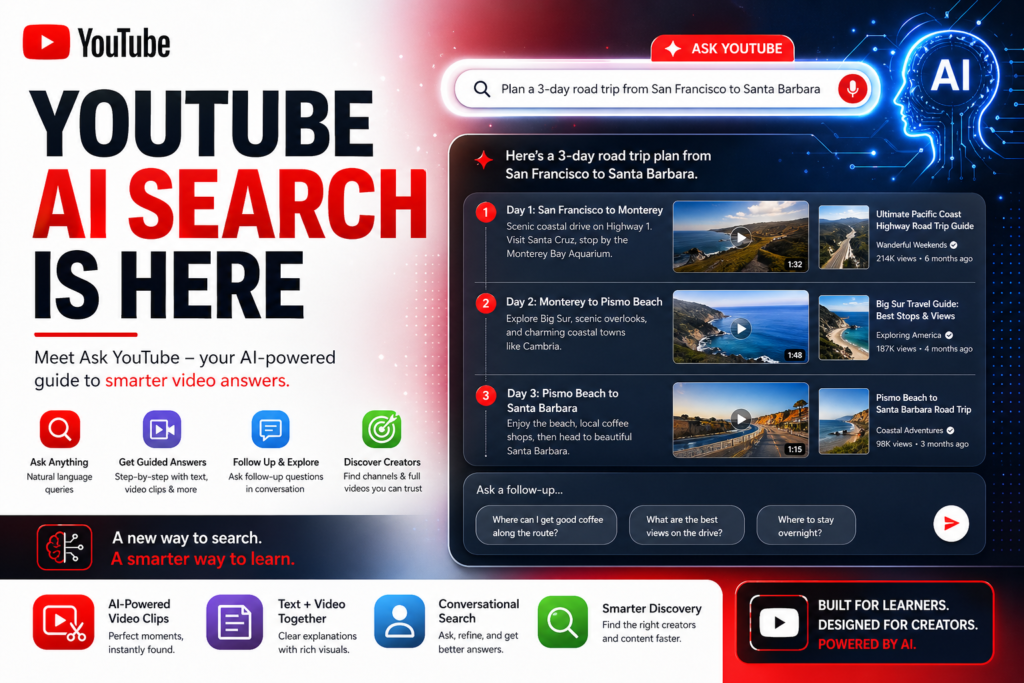
Definition: YouTube AI search (also called “Ask YouTube”) is an experimental generative search feature that lets users type or speak a conversational question — such as “plan a 3-day road trip from San Francisco to Santa Barbara” — and receive a structured, multi-format answer instead of a traditional ranked list of video thumbnails.
Expansion: Rather than scrolling through dozens of video results and hoping the first one answers your question, users get a curated, step-by-step response. That response blends text explanations with relevant short clips and longer videos, surfacing channel names and titles to help viewers discover new creators in the process.
This is not a simple search algorithm tweak. YouTube AI search represents a fundamental shift in how intent is matched to content — moving from keyword matching toward semantic understanding of what a user actually needs.
How the Ask YouTube Feature Works
Step-by-Step: From Query to Guided Answer
The Ask YouTube experience works like this:
- A user types a natural-language question into YouTube’s search bar.
- The AI parses the intent behind the query — not just the keywords.
- YouTube returns a guided answer panel at the top of results, structured as a series of steps or sections.
- Each section includes a mix of text, short video clips (relevant segments from longer videos), and links to full videos.
- Channel names and video titles are displayed to help users discover creators — not just consume content anonymously.
- Users can then ask follow-up questions (e.g., “Where can I get good coffee along that route?”) and receive additional guided answers in the same conversational thread.
This conversational, multi-turn experience mirrors how Google’s AI Mode works in web search — but it is purpose-built for video discovery.
Mixed-Format Results: Text + Video
One of the most significant aspects of YouTube AI search is that it does not return only video. This is a deliberate design choice. Some queries are best answered with a short text explanation followed by a demonstration clip, rather than requiring a user to sit through a 20-minute video to find the 90-second segment they actually need.
For creators, this means that specific, well-structured segments within a video may now be surfaced independently — even if the full video ranks lower in traditional results. A tightly produced 3-minute tutorial on “how to knead bread dough” embedded inside a longer baking video could now be extracted and shown as the authoritative answer to a relevant query.
Follow-Up Questions and Conversational Search
Ask YouTube supports conversational continuity. After receiving an initial guided answer, users can refine or expand their query with natural follow-up questions. This mirrors the behavior of AI chatbots and represents a significant shift from the traditional “one search, many results” paradigm.
For marketers, this opens up a new strategic question: are you creating content that satisfies not just the initial query, but the likely follow-up questions your audience will ask?
YouTube AI Search vs. Traditional YouTube Search
| Feature | Traditional YouTube Search | YouTube AI Search (Ask YouTube) |
|---|---|---|
| Query type | Keywords and short phrases | Natural language, conversational questions |
| Result format | Ranked list of video thumbnails | Guided answer with text + video segments |
| User intent matching | Keyword frequency and engagement signals | Semantic understanding of intent |
| Follow-up support | New separate search required | Conversational threads within same session |
| Creator discovery | Based on channel authority and video rank | AI-surfaced relevant segments + channel names |
| Content length preference | Long-form often favored | Relevant segments from any length |
| Availability | All users globally | U.S. Premium subscribers (18+), opt-in |
| Monetization potential | Pre-roll and mid-roll ads | Sponsored placements under exploration |
The contrast is stark. Traditional YouTube search rewards videos that generate high watch time and engagement. YouTube AI search rewards content that directly and clearly answers a specific question — whether that answer appears at the 2-minute or 20-minute mark.
Why This Matters for Content Creators and Marketers
Discoverability Is Shifting
For years, YouTube SEO meant optimizing titles, descriptions, tags, and thumbnails to rank for high-volume keywords. That model is not disappearing overnight, but YouTube AI search introduces a parallel discovery layer that operates on different principles.
In a guided-answer environment, topical depth beats topical breadth. A channel that has five videos each comprehensively covering one specific aspect of a topic will likely outperform a channel with fifty shallow overview videos. The AI needs clear, structured, authoritative content to cite — and vague, broad content gives it very little to work with.
This mirrors what has already happened in Google’s generative search features. Publishers who optimized purely for traffic volume have seen declines, while those who focused on structured, question-answering content have maintained or grown their AI-driven visibility.
What Types of Content Will Win
YouTube AI search will favor content that:
- Answers a specific question directly and early. Videos that bury the core answer at the 10-minute mark will be less useful to the AI than videos that deliver the key point within the first 60–90 seconds.
- Uses clear verbal structure. Phrases like “Step one is…”, “The most important thing here is…”, and “Here’s what you’ll need…” give the AI clear signals about content organization.
- Covers the full query journey. A video on “how to plan a road trip” that also addresses accommodation, food stops, and fuel costs naturally satisfies more follow-up questions — making it a richer source for the AI to draw from.
- Is organized into identifiable chapters. YouTube’s chapter feature (using timestamps in descriptions) already helps viewers jump to relevant segments. This same structure now helps the AI identify and extract precise answers from within longer videos.
- Includes authoritative, specific detail. Generic content (“there are many great coffee shops along the Pacific Coast Highway”) is less useful than specific, verifiable information (“Pismo Beach has a strong café scene, with several independent roasters near the pier”).
YouTube AI Search in the Context of Google’s Broader AI Strategy
Ask YouTube does not exist in isolation. It is the latest move in a deliberate, multi-surface push by Google to integrate generative AI into every search touchpoint it controls.
Here is the timeline of Google’s AI search expansion:
- 2025: Google introduces AI Mode in Google Search, enabling multi-part questions and follow-up queries within a single search session.
- Early 2026: Google launches side-by-side web browsing within AI Mode, letting users explore search results and AI answers simultaneously.
- April 2026: Google adds product price exploration and in-stock local availability features to AI Mode.
- April 2026: Google tests Ask YouTube — bringing the same AI-powered guided-answer format to YouTube search.
The pattern is clear: Google is systematically replacing the blue-link paradigm with answer-first, AI-mediated experiences across Search, YouTube, Shopping, and beyond. Each new surface reduces the number of clicks a user needs to make to get an answer — and simultaneously increases the importance of being the source that the AI cites.
For brands and creators, this means the competitive advantage is shifting from “ranking #1” to “being cited as the authoritative source.” That is a fundamentally different content strategy.
What We Know About Availability and Rollout
Who can access Ask YouTube right now?
- YouTube Premium subscribers in the United States
- Users aged 18 or older
- Opt-in required via youtube.com/new
Who is it coming to next?
Google has confirmed it is working to make Ask YouTube available to non-Premium users, though no timeline has been provided. Given Google’s track record with AI Mode rollouts — which moved from limited testing to broad availability within roughly 12 months — a wider Ask YouTube rollout within 2026 is plausible.
What about monetization?
Google has indicated it is exploring sponsored placements within Ask YouTube results — a natural extension of its existing ad products into the AI-answer layer. This mirrors the trajectory of AI Mode ads in Google Search, where Google has been testing cost-per-click advertising within AI-generated answer panels.
How to Optimize Your Content for YouTube AI Search
Optimizing for YouTube AI search requires a shift in mindset: you are no longer just optimizing for human viewers scrolling a results page. You are also optimizing for an AI system that needs to extract, understand, and cite your content clearly.
Here is a practical framework for creators and marketers:
- Lead with the answer. Start your video by stating what the viewer will learn or accomplish. This gives the AI (and the viewer) an immediate signal of relevance.
- Use verbal signposting. Phrases like “first,” “next,” “the key takeaway is,” and “in summary” create a spoken structure the AI can follow.
- Add YouTube chapters. Use timestamps in your video description to break content into named sections. This is one of the clearest signals you can give the AI about where specific answers live within your video.
- Write descriptive, keyword-rich transcripts. YouTube’s auto-generated captions are already indexed, but manually adding accurate transcripts ensures the AI has clean, unambiguous text to work from.
- Target question-based titles. Instead of “Road Trip Planning Tips,” try “How to Plan a 3-Day Road Trip from San Francisco to Santa Barbara.” The latter maps directly to the kinds of queries Ask YouTube is designed to answer.
- Go specific, not generic. The more specific and verifiable your information, the more useful it is to an AI assembling a guided answer. Specific hotel names, exact distances, real product prices, and named tools are all more citable than vague generalities.
- Create modular content. Consider whether your long-form videos could be structured as self-contained modules — so that each chapter answers one discrete question completely, without requiring context from other chapters.
- Build topical depth on your channel. A channel with 10 videos covering 10 complementary aspects of the same topic is a much richer source for AI-guided answers than a channel with 50 unrelated videos. Topic clusters signal expertise.
Frequently Asked Questions About YouTube AI Search
What is YouTube AI search? YouTube AI search, also called Ask YouTube, is an experimental feature that lets users ask natural-language questions and receive guided, multi-format answers combining text and video content — instead of a traditional list of video results.
Is Ask YouTube available to all users? Not yet. As of April 2026, the feature is limited to YouTube Premium subscribers in the U.S. who are 18 or older and have opted in via youtube.com/new. Google is working to expand access to non-Premium users.
How does YouTube AI search differ from Google’s AI Mode? Both use generative AI to produce structured, guided answers. The key difference is the content medium: Google’s AI Mode draws from web pages and documents, while YouTube AI search draws from video content — extracting relevant segments, text summaries, and channel information.
Will Ask YouTube affect how videos rank? Traditional ranking signals (watch time, engagement, keywords) still govern the standard results page. However, YouTube AI search introduces a parallel discovery layer that rewards content structured for direct question-answering — regardless of a video’s traditional ranking position.
Can creators optimize for Ask YouTube? Yes. Using chapters, specific language, question-based titles, and accurate transcripts all improve the likelihood that the AI can identify and surface relevant segments from your content. Structured, specific, authoritative content is the foundation of Ask YouTube optimization.
Will there be ads in Ask YouTube? Google has indicated it is exploring sponsored placements within the Ask YouTube experience, though no firm details have been announced. This is consistent with Google’s broader approach to monetizing AI-powered search surfaces.
The Bottom Line
YouTube AI search marks the arrival of generative AI at the center of the world’s most-watched video platform. For the 2.7 billion monthly users who rely on YouTube to learn, plan, and discover — and for the creators and brands who serve them — the rules of discoverability are being rewritten in real time.
The platforms that win in this new environment will be those that treat every video not just as a piece of content to be watched, but as a structured knowledge source to be cited. That means leading with answers, building with specificity, and organizing content so that an AI — and a human — can find exactly what they need, exactly when they need it.
YouTube AI search is not a future trend. It is a present reality. The optimization window is open right now — and the creators who move first will define what authoritative looks like on the next generation of the platform.