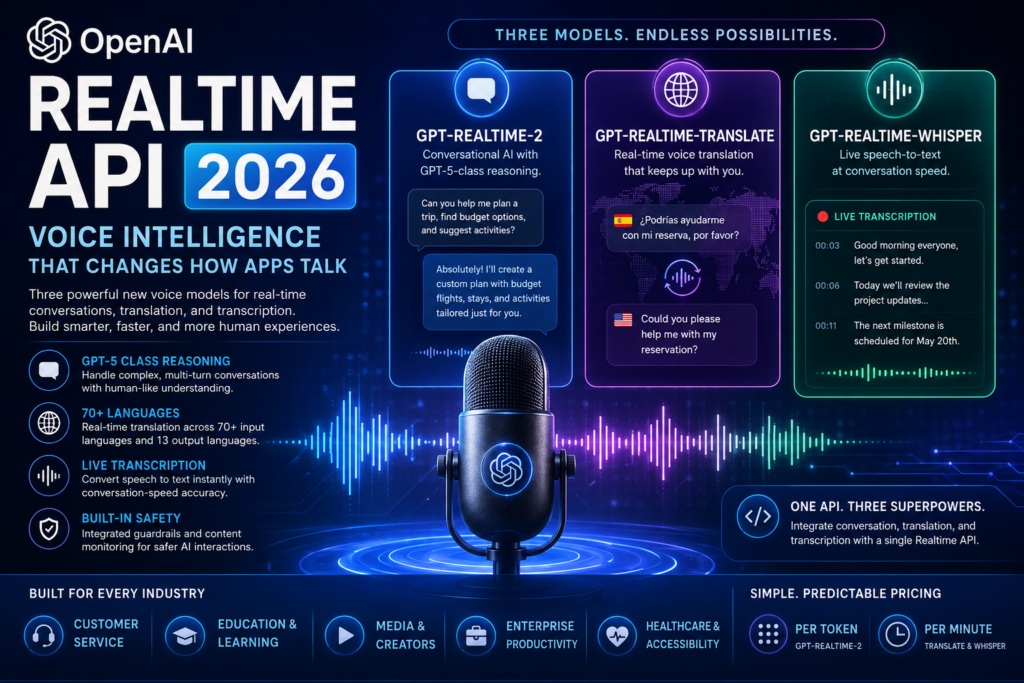
OpenAI just launched three new voice models inside its Realtime API — and developers building voice-powered apps now have a significantly more capable toolkit. If you want to understand what GPT-Realtime-2, GPT-Realtime-Translate, and GPT-Realtime-Whisper actually do, how they differ, and which one belongs in your next build, this guide has the answers.
What Is the OpenAI Realtime API?
Definition: The OpenAI Realtime API is a developer interface that allows applications to process, generate, and respond to audio in real time — enabling conversational AI, live speech transcription, and multi-language translation within a single API layer.
Unlike traditional AI APIs that handle text-in and text-out interactions, the OpenAI Realtime API works with live audio streams. It is designed for use cases where latency matters: customer service bots that respond mid-sentence, language learning platforms that react to pronunciation, and enterprise tools that need to transcribe meetings as they happen.
As of May 2026, OpenAI expanded this platform significantly with three new voice intelligence models, each targeting a distinct capability gap in the developer ecosystem. Together, they represent a shift from simple call-and-response voice interfaces toward systems that can listen, reason, translate, transcribe, and act — all while a conversation is still unfolding.
What’s New: The Three Models OpenAI Just Launched
OpenAI released a suite of voice models under the Realtime API umbrella on May 7, 2026. Each model serves a specific function, and they can be used independently or in combination depending on the application being built.
GPT-Realtime-2: Conversational AI with GPT-5-Class Reasoning
What it is: GPT-Realtime-2 is OpenAI’s latest conversational voice model, built to handle complex, multi-turn spoken dialogues using GPT-5-class reasoning capabilities.
How it improves on its predecessor: The previous model in this line, GPT-Realtime-1.5, was capable of natural-sounding conversation but was limited in how well it could reason through complicated requests. GPT-Realtime-2 addresses that gap by integrating the same reasoning architecture that powers GPT-5, allowing it to handle instructions that require understanding context, inferring intent, and generating nuanced responses — not just mimicking a scripted answer.
This matters most in use cases where conversations go off-script. A customer service agent powered by GPT-Realtime-2 can handle a customer who asks three related questions at once, pivots mid-conversation, or presents an edge case that no FAQ document anticipated. The model stays coherent because it’s reasoning, not pattern-matching.
Billing: GPT-Realtime-2 is billed by token consumption, meaning developers pay based on the volume of content processed rather than a flat per-minute rate.
GPT-Realtime-Translate: Breaking Language Barriers in Real Time
What it is: GPT-Realtime-Translate is a real-time voice translation model designed to keep pace with natural spoken conversation — processing speech in one language and producing a spoken response in another with minimal delay.
Supported languages: The model supports over 70 input languages (the languages it can comprehend) and 13 output languages (the languages it speaks back to the user). This makes it one of the most multilingual real-time voice translation tools available through an API.
What “keeping pace” actually means: Many translation APIs introduce a noticeable pause — the speaker finishes a sentence, a gap appears, and then the translation arrives. GPT-Realtime-Translate is engineered to reduce that gap to the point where conversation can flow naturally. For a live international customer support call or a multilingual classroom, that difference in latency changes the entire user experience.
Billing: GPT-Realtime-Translate is billed by the minute, making cost estimation straightforward for developers building time-bounded interactions like support calls or interview platforms.
GPT-Realtime-Whisper: Live Speech-to-Text at Conversation Speed
What it is: GPT-Realtime-Whisper is OpenAI’s live transcription model, delivering speech-to-text conversion as a conversation occurs rather than after it ends.
How it differs from standard Whisper: OpenAI’s Whisper model family has been widely adopted for high-accuracy transcription of audio files. GPT-Realtime-Whisper takes the same accuracy and applies it to live audio streams, generating text output continuously rather than waiting for a complete recording. This unlocks a different category of applications — real-time captioning, live meeting notes, and spoken command interfaces that need immediate textual confirmation.
Billing: Like GPT-Realtime-Translate, GPT-Realtime-Whisper is priced per minute, giving developers predictable costs for transcription-heavy workflows.
How the OpenAI Realtime API Works for Developers
Access
All three new voice models are available through OpenAI’s Realtime API, which developers can access via the standard OpenAI API platform. The API is structured around audio stream handling, with documentation available at OpenAI’s developer portal covering supported audio formats, latency expectations, and integration patterns for common frameworks.
Pricing Structure at a Glance
| Model | Billing Method | Best For |
|---|---|---|
| GPT-Realtime-2 | Per token | Open-ended conversation, reasoning-heavy dialogue |
| GPT-Realtime-Translate | Per minute | Timed calls, multilingual customer service |
| GPT-Realtime-Whisper | Per minute | Live transcription, real-time captioning |
The difference in billing models matters for cost planning. If a developer is building a customer support system where calls last an average of 8 minutes, per-minute billing (Translate and Whisper) gives them a clean cost-per-interaction. GPT-Realtime-2’s token-based pricing rewards efficient prompting and is better suited to short, high-reasoning interactions where quality-per-exchange matters more than raw time.
What Developers Need to Know Before Integrating
- All three models operate over the Realtime API — there is no separate endpoint for each model.
- Audio input and output specifications (sample rate, encoding format) are defined in OpenAI’s developer documentation.
- The models are designed for low-latency streaming, not batch-processing of audio files — that use case is still best served by the standard Whisper API.
- Safety filters are embedded at the model level (more on this below), so developers do not need to build their own content moderation layer from scratch.
Who Benefits Most? Use Cases by Industry
The OpenAI Realtime API’s new voice intelligence models are not limited to any single vertical. OpenAI has identified a broad range of industries where these tools create meaningful product opportunities.
Customer Service and Contact Centers This is the most obvious target. GPT-Realtime-2’s reasoning capability means AI agents can handle escalated conversations, multi-part problems, and ambiguous requests — the types of interactions that traditionally required human escalation. GPT-Realtime-Whisper adds automatic transcription for quality review, compliance logging, and real-time agent assist tools that surface relevant knowledge as a call progresses.
Education and Language Learning GPT-Realtime-Translate opens a significant door for language learning platforms. A student conversing in a second language can receive real-time correction and contextual feedback. Multilingual classrooms can use the translation layer to allow students and instructors to speak in their native language while the platform handles conversion. GPT-Realtime-Whisper enables pronunciation tracking and spoken exercise evaluation.
Media, Events, and Creator Platforms Live event platforms can integrate GPT-Realtime-Whisper for automatic closed captioning. Podcast and video creators gain access to real-time transcription that can feed into searchable content libraries, chapter markers, or auto-generated show notes. For global creator platforms, GPT-Realtime-Translate enables content to reach audiences who speak any of the 13 supported output languages.
Enterprise Productivity Tools Meeting platforms integrating GPT-Realtime-Whisper can offer live transcription with immediate searchability. Multinational businesses can use GPT-Realtime-Translate to remove language friction from international meetings. Sales tools can use GPT-Realtime-2 to power AI-driven practice scenarios for pitches and objection handling.
Healthcare and Accessibility Live transcription through GPT-Realtime-Whisper supports accessibility tools for users with hearing impairments and can assist clinicians with real-time documentation during patient interactions. The low latency of the system is particularly relevant in healthcare contexts, where delayed transcription disrupts workflow.
OpenAI Realtime API vs. Competing Voice AI Solutions
How does the OpenAI Realtime API stack up against alternatives in the voice AI space? The comparison below covers the key criteria developers evaluate when selecting a voice intelligence platform.
| Capability | OpenAI Realtime API | Google Cloud Speech-to-Text | AWS Transcribe / Chime | ElevenLabs |
|---|---|---|---|---|
| Live transcription | ✅ GPT-Realtime-Whisper | ✅ Streaming available | ✅ Streaming available | ❌ (TTS-focused) |
| Real-time translation | ✅ 70+ input / 13 output languages | ✅ Via Media Translation API | ⚠️ Limited | ❌ |
| Conversational reasoning | ✅ GPT-5-class reasoning | ❌ Transcription only | ❌ Transcription only | ❌ |
| Custom voice generation | ⚠️ Via separate TTS API | ⚠️ Via Wavenet/Neural2 | ❌ | ✅ Primary focus |
| Integrated safety layer | ✅ Built-in guardrails | ⚠️ Separate filtering required | ⚠️ Separate filtering required | ⚠️ Limited |
| Billing model | Token (Realtime-2) / Per minute (others) | Per second / Per request | Per minute | Per character |
Key takeaway: OpenAI’s differentiation is the combination of reasoning-capable conversation and transcription and translation in a single API. Competitors like Google Cloud and AWS offer strong transcription and translation, but do not bundle conversational reasoning at the same capability level. ElevenLabs leads in custom voice synthesis but does not compete in the transcription or translation space. Developers who want a single API that handles all three functions — and where the underlying model can reason through a conversation rather than just transcribe it — will find the OpenAI Realtime API to be the most vertically integrated option currently available.
Built-In Safety: How OpenAI Is Guarding Against Abuse
Any technology that enables convincing, real-time synthetic voices raises legitimate concerns. The same capabilities that power a helpful customer service agent can theoretically be used to generate spam calls, voice phishing attacks, or AI-generated fraud at scale.
OpenAI has acknowledged this risk directly and says it has implemented multiple layers of protection within the new voice models.
What the Safety Architecture Includes
- Automated content monitoring: The system monitors active conversations and can halt an interaction if content violates OpenAI’s usage policies.
- Harmful content triggers: Specific triggers are embedded in the models so that conversations that begin moving toward policy-violating territory — spam generation, fraud facilitation, abusive content — are detected and interrupted.
- Platform-level enforcement: Developers accessing the OpenAI Realtime API agree to usage policies that prohibit building tools designed for spam, fraud, or harassment. OpenAI can revoke API access for policy violations.
What Remains an Open Question
Built-in guardrails are a starting point, not a complete solution. The effectiveness of any content filtering system depends on how broadly its violation categories are defined and how difficult they are to circumvent through prompt engineering or indirect instruction. As with all generative AI safety systems, real-world adversarial testing will reveal the limits of these guardrails over time. Developers building sensitive applications — particularly those involving vulnerable populations — should plan to add their own application-layer safety controls on top of OpenAI’s built-in protections.
What This Means for the Future of Voice Intelligence
The Interface Layer Is Moving to Audio
For most of the past decade, the primary interface between AI systems and users has been text. Voice was a secondary modality — used in consumer assistants like Siri and Alexa, but rarely in developer-built enterprise tools. The OpenAI Realtime API signals a shift: voice is becoming a first-class interface for AI applications, with the same richness of reasoning capability previously reserved for text.
This has implications beyond technology. It changes what users expect. An AI that sounds human, reasons fluently, and responds without noticeable delay will set a new baseline for voice experiences — one that text-only interfaces cannot match for speed or naturalness.
From Call-and-Response to Actual Dialogue
The previous generation of voice AI, including earlier Realtime models, functioned primarily as sophisticated call-and-response systems. A user speaks, the system responds, then waits. GPT-Realtime-2’s integration of GPT-5-class reasoning changes the underlying dynamic: the system can now maintain context across a conversation, handle interruptions, and adapt to evolving intent — behaviors that characterize genuine dialogue rather than structured query handling.
Multilingual AI Becomes Table Stakes
With 70 input languages supported in GPT-Realtime-Translate, the expectation for multilingual voice AI support will rise industry-wide. Developers and product teams building global-facing applications no longer face a binary choice between English-only capability and expensive custom multilingual builds. A single API integration now offers broad language coverage out of the box.
The Developer Opportunity Is Immediate
The models are available now through the OpenAI Realtime API. For developers currently building on older voice AI pipelines — whether that means stitching together separate ASR, NLP, and TTS systems — the consolidation available through a single API represents meaningful infrastructure simplification. The immediate opportunity is not just capability improvement but architectural simplification: fewer vendors, fewer integration points, and a single reasoning layer that handles the full voice interaction lifecycle.
How to Get Started with the OpenAI Realtime API
Who should start here: Developers building voice-first applications, product teams evaluating AI voice infrastructure, and technical decision-makers comparing voice AI platforms.
Step-by-Step Starting Point
- Access the API documentation. OpenAI’s developer portal (developers.openai.com) includes a dedicated Realtime API guide covering audio input/output formats, session management, and integration examples.
- Choose your model based on use case. If you need conversational reasoning → GPT-Realtime-2. If you need language translation → GPT-Realtime-Translate. If you need live transcription → GPT-Realtime-Whisper. Most production applications will combine at least two.
- Estimate costs before building. GPT-Realtime-2 is token-billed — run token estimates against your expected conversation lengths. Translate and Whisper are per-minute — calculate based on your expected call durations and volumes.
- Build in safety controls at the application layer. OpenAI’s built-in guardrails are a foundation, not a ceiling. Add application-level monitoring appropriate to your specific use case and user base.
- Start with a focused pilot. Rather than rebuilding an entire voice pipeline on launch, identify one specific interaction type — an FAQ bot, a live transcription widget, or a translation layer for a single language pair — and validate performance before scaling.
What to Evaluate During a Pilot
- Latency: Measure the gap between user speech ending and model response beginning. This is the most perceptible quality signal for end users.
- Reasoning accuracy: For GPT-Realtime-2, test with complex, multi-part questions that go beyond your FAQ. The reasoning capability is the differentiator — stress-test it.
- Translation naturalness: For GPT-Realtime-Translate, have native speakers evaluate output in your target languages. Technical accuracy and natural fluency are both important.
- Transcription fidelity: For GPT-Realtime-Whisper, test across different accents, background noise levels, and speaking speeds. Real-world audio is rarely clean.
Frequently Asked Questions
What makes these new voice models different from earlier voice AI systems?
Earlier generations of voice tools were usually built as disconnected layers. One service handled speech recognition, another handled language understanding, and another produced text-to-speech output. While functional, that setup often introduced delays, inconsistent outputs, and more engineering complexity.
The latest generation improves this by reducing fragmentation. Instead of stitching together separate tools, developers can work with systems designed for continuous listening, understanding, and responding. This leads to conversations that feel less robotic and more fluid.
Another major difference is contextual awareness. Traditional voice systems often treated every user message like an isolated request. Newer systems are much better at preserving conversational memory across multiple turns, which makes follow-up questions, interruptions, and topic changes easier to manage. In practice, this means users no longer need to repeat themselves every few seconds just to stay understood.
Which industries will benefit most from these advancements?
The immediate beneficiaries are businesses where speed, accessibility, and communication are central to the experience.
Customer support is an obvious example. Voice agents can now manage more natural conversations, understand layered questions, and reduce wait times. Instead of rigid IVR systems that frustrate users, businesses can offer support experiences that feel conversational.
Education is another strong fit. Language-learning products can provide live pronunciation feedback, transcription, and translation assistance. Virtual tutors can engage in spoken interactions that are more dynamic than text-only chat.
Healthcare also stands to benefit. Clinicians often spend excessive time on documentation. Real-time transcription and note generation can reduce administrative burden, allowing professionals to focus more on patient care. Accessibility tools for hearing-impaired users can also become faster and more accurate.
Media and events platforms can use live captioning and multilingual support to make content available to broader audiences instantly.
Are these systems expensive to deploy?
Cost depends heavily on the product being built and how efficiently it is designed.
Applications centered on long-duration calls, meetings, or streaming interactions typically benefit from predictable time-based pricing. This makes budgeting easier for businesses that can estimate session lengths in advance.
More reasoning-heavy applications may rely on usage-based pricing tied to processing volume. In those cases, costs vary depending on how much information is exchanged and how complex the interactions are.
For startups and smaller teams, the best approach is usually not to launch a massive voice platform immediately. Start with a narrow use case, measure engagement and cost behavior, then expand gradually. A focused pilot reveals far more about financial feasibility than spreadsheet assumptions ever will.
How reliable is real-time translation?
Translation quality has improved dramatically, but reliability still depends on context.
For everyday conversation, general business communication, and travel-oriented use cases, performance is increasingly strong. Casual interactions are now far more natural than the delayed, awkward experiences users often associate with earlier translation tools.
However, specialized vocabulary remains a challenge. Legal, medical, scientific, and highly technical conversations may still require human review. A translation can be linguistically correct while still missing domain nuance.
Accent variation, background noise, and speaking speed also influence results. Systems perform best when audio quality is reasonably clean and speakers are not constantly interrupting each other.
In short: highly usable for many scenarios, but not magical. Teams deploying translation in sensitive environments should test rigorously before assuming full reliability.
Should businesses still build additional safeguards?
Absolutely.
Built-in protections are helpful, but they are not a substitute for product-level responsibility. Every application has different risks depending on audience, domain, and scale.
A platform serving enterprise clients will likely have different moderation needs than a language-learning app or a consumer voice assistant. Sensitive industries such as finance, healthcare, and education often require logging, monitoring, permission controls, and escalation mechanisms.
Developers should think in layers:
- model-level protections,
- application rules,
- human review when needed.
Relying entirely on upstream safeguards is like assuming your building is secure because the front door has a lock while every window is open.
What should teams test before launching?
Before launch, teams should evaluate real-world performance rather than relying only on demos.
Latency is one of the most important metrics. Even a highly intelligent system feels broken if response timing is slow enough to interrupt conversational rhythm.
Teams should also test conversational resilience:
- interruptions,
- topic switching,
- ambiguous phrasing,
- follow-up questions,
- noisy environments.
For multilingual experiences, involve native speakers rather than internal assumptions. A technically correct translation may still sound unnatural or culturally awkward.
For transcription-heavy products, test across accents, microphone quality, and speech speeds. Clean demo audio is generous; real users rarely are.
The Bottom Line
Voice interfaces are moving from novelty to infrastructure.
For years, voice products were often limited by latency, brittle workflows, and fragmented tooling. Building something that felt genuinely conversational usually required engineering teams to combine multiple vendors, handle synchronization issues, and accept trade-offs between speed, intelligence, and quality.
That equation is changing.
What matters now is not simply whether a system can hear speech or generate audio. Those capabilities are increasingly expected. The real shift is toward systems that can process conversation as an ongoing interaction rather than a sequence of isolated commands.
This changes product expectations across industries.
Users will increasingly expect software to understand interruptions, remember conversational context, adapt across languages, and respond with minimal delay. Products that still behave like rigid command interpreters will feel outdated quickly.
For builders, this is both an opportunity and a warning.
The opportunity is clear: voice can become a more natural interface layer for education, support, collaboration, accessibility, and global communication.
The warning is equally clear: shipping a voice experience is no longer impressive by default. Users are becoming harder to impress.
Success will depend less on simply adding voice features and more on designing useful workflows around them. Teams that win will be those that combine strong user experience design, cost discipline, safety considerations, and practical deployment strategy.
In other words, the technology is becoming easier to access—but building something people genuinely want to use is still the hard part.
That part, inconveniently for everyone hoping APIs solve everything, remains a human problem.