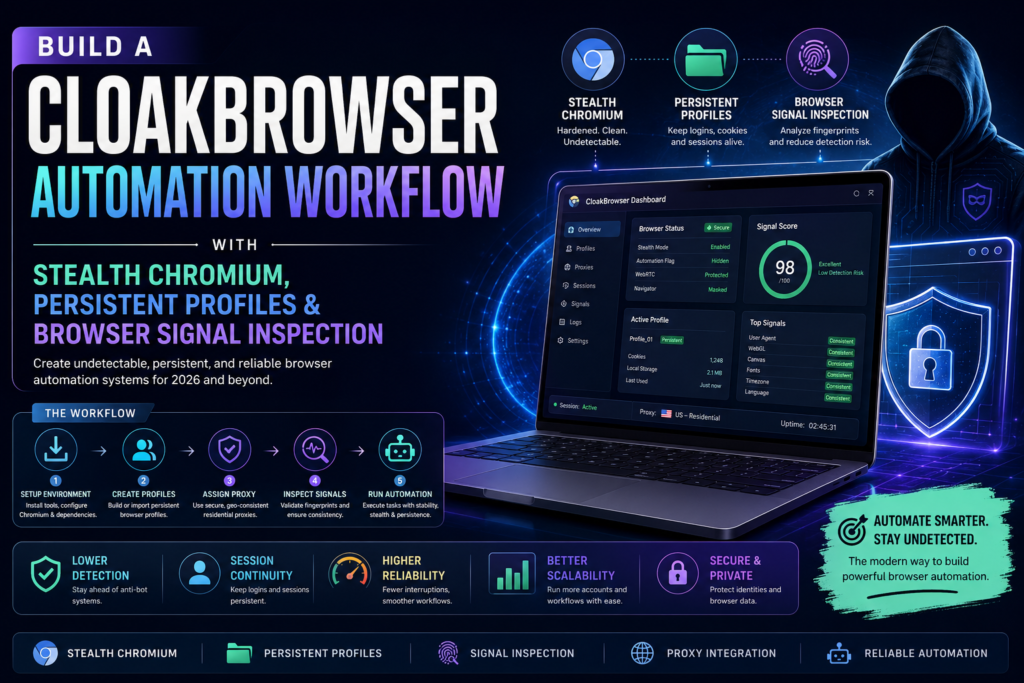
Browser automation has evolved far beyond simple scripts opening tabs and clicking buttons. In 2026, teams building scraping systems, QA frameworks, agentic browsers, and autonomous workflows need more reliable browser environments that mimic real user behavior while maintaining persistent sessions and stable browser identities.
A CloakBrowser Automation Workflow is designed for exactly that purpose. It combines stealth Chromium, persistent browser profiles, and browser signal inspection to create automation systems that are harder to detect, more session-stable, and better suited for long-running workflows.
Whether you are building autonomous web agents, testing anti-bot systems, or managing browser-based operations at scale, understanding this workflow is becoming essential.
What Is a CloakBrowser Automation Workflow?
A CloakBrowser Automation Workflow is a browser automation setup that focuses on stealth, persistence, and signal consistency.
Instead of launching disposable browser instances every time, this workflow maintains browser state across sessions.
Definition
A browser automation workflow is a structured system for automating browser tasks such as:
- logging into accounts
- filling forms
- scraping websites
- testing web apps
- managing sessions
- running browser agents
A CloakBrowser Automation Workflow extends this by adding:
- stealth Chromium layers
- persistent user profiles
- browser fingerprint management
- signal inspection systems
This makes automation appear closer to genuine human browsing patterns.
Why Stealth Chromium Matters in 2026
Traditional browser automation tools are easier to detect than ever.
Web platforms increasingly analyze:
- browser fingerprints
- WebGL signals
- canvas fingerprints
- timezone consistency
- fonts
- navigator properties
- plugin behavior
- mouse patterns
This means simple Puppeteer or Playwright scripts often trigger defenses.
Direct Answer: Why use Stealth Chromium?
Stealth Chromium reduces detectable browser anomalies by masking automation signals and improving browser consistency.
Benefits include:
- lower bot detection rates
- improved session continuity
- more reliable login persistence
- stable automation across websites
For automation-heavy businesses, this is no longer optional.
Core Components of a CloakBrowser Automation Workflow
A successful CloakBrowser Automation Workflow has three major layers.
1. Stealth Chromium
Stealth Chromium is a Chromium-based browser modified or configured to reduce automation fingerprints.
It usually includes:
- patched navigator properties
- automation flag suppression
- WebRTC leak prevention
- timezone consistency
- canvas noise handling
Why it matters
Without stealth layers, automation frameworks often expose:
- webdriver flags
- headless anomalies
- missing browser signals
Stealth Chromium closes these gaps.
2. Persistent Browser Profiles
Persistent profiles allow browser state to survive across sessions.
This includes:
- cookies
- local storage
- cache
- session tokens
- extension states
Instead of starting fresh every run, workflows reuse identities.
Benefits of persistent profiles
- reduced repeated logins
- stronger account continuity
- session durability
- realistic browsing history
This is especially useful for:
- long-running agents
- account management systems
- browser-based automation pipelines
A strong CloakBrowser Automation Workflow always prioritizes persistence.
3. Browser Signal Inspection
Signal inspection analyzes browser fingerprints and identifies detection risks.
Signals commonly inspected:
- user agent
- screen size
- GPU renderer
- fonts
- WebGL
- canvas
- audio fingerprint
- timezone
- language settings
Why inspect signals?
Even small inconsistencies can trigger detection.
For example:
- US timezone + Indian IP
- Mac user agent + Windows fonts
- desktop resolution mismatch
Signal inspection helps validate browser realism before automation begins.
How to Build a CloakBrowser Automation Workflow
Here is a practical workflow.
Step 1: Install a Chromium Automation Stack
Recommended stack:
- Chromium
- Playwright or Puppeteer
- profile manager
- proxy layer
- signal inspector
Folder structure:
automation/
 ├── profiles/
 ├── sessions/
 ├── scripts/
 ├── proxies/
 └── logs/
This modular structure improves maintainability.
Step 2: Configure Stealth Chromium
Key settings:
- disable automation flags
- spoof browser signals
- set consistent locale
- configure fonts
- manage GPU settings
Checklist:
- remove webdriver exposure
- disable obvious headless markers
- align browser metadata
This forms the foundation of the CloakBrowser Automation Workflow.
Step 3: Enable Persistent Profiles
Assign a dedicated profile per session or account.
Example profile data:
- cookies.json
- localStorage.db
- preferences.json
Best practices:
- isolate profiles
- avoid profile contamination
- back up session states
Persistent profiles significantly improve workflow reliability.
Step 4: Add Proxy and Network Layer
A realistic workflow includes:
- residential proxies
- geo-consistent IP routing
- DNS stability
Rules:
- align timezone with proxy region
- maintain IP consistency
- avoid rapid proxy switching
Step 5: Run Browser Signal Inspection
Before automation begins:
- launch browser
- inspect fingerprint
- validate signals
- compare anomalies
- start workflow
This preflight check reduces failures.
A production-grade CloakBrowser Automation Workflow should never skip inspection.
CloakBrowser vs Standard Browser Automation Tools
| Feature | CloakBrowser Workflow | Standard Automation |
|---|---|---|
| Persistent profiles | Yes | Limited |
| Stealth support | Strong | Weak |
| Fingerprint management | Built-in | Manual |
| Session continuity | High | Low |
| Detection resistance | Better | Lower |
| Signal inspection | Included | Rare |
Direct Answer
If you need long-running automation or browser agents, CloakBrowser-style workflows are significantly more robust.
Best Practices for Secure and Stable Automation
To keep automation resilient:
Use isolated identities
Never reuse profiles across unrelated workflows.
Monitor browser drift
Profiles degrade over time.
Track:
- cookie expiry
- extension changes
- cache corruption
Maintain logging
Log:
- launch failures
- fingerprint mismatches
- session crashes
Update Chromium regularly
Older browser versions become easier to fingerprint.
A reliable CloakBrowser Automation Workflow requires maintenance discipline.
Common Challenges and Fixes
Challenge: Frequent logouts
Cause: session inconsistency
Fix:
- use persistent storage
- avoid clearing cookies
Challenge: Detection despite stealth
Cause: signal mismatch
Fix:
- inspect timezone
- validate fonts
- align proxy region
Challenge: Broken profiles
Cause: corrupted session files
Fix:
- periodic backups
- profile rotation
Challenge: High memory usage
Cause: multiple Chromium instances
Fix:
- resource pooling
- browser recycling
Future of Stealth Browser Automation
Automation is moving toward autonomous browser agents.
Emerging trends:
- AI-controlled browsers
- memory-backed sessions
- adaptive fingerprints
- real-time signal mutation
This makes workflows more agentic and persistent.
The next generation of browser systems will likely integrate:
- LLM orchestration
- browser state memory
- dynamic identity layers
A modern CloakBrowser Automation Workflow is becoming infrastructure, not just tooling.
Final Verdict: Why CloakBrowser Workflows Matter
The browser automation ecosystem is no longer about just running scripts.
It is about identity continuity, stealth execution, and reliable session management.
A well-designed CloakBrowser Automation Workflow combines:
- Stealth Chromium
- persistent profiles
- signal inspection
- network consistency
Together, these create automation systems suited for 2026 workloads.
If you are building web agents, browser testing systems, or browser-based pipelines, this architecture offers a more scalable path forward.
FAQ
What is a CloakBrowser Automation Workflow?
A CloakBrowser Automation Workflow is a browser automation setup using stealth Chromium, persistent profiles, and browser signal inspection.
Why are persistent browser profiles important?
Persistent profiles preserve cookies, sessions, and browser state, improving continuity.
Is Stealth Chromium better than regular Chromium?
For automation-heavy workflows, yes. It reduces detectable automation signals.
What is browser signal inspection?
It is the process of checking browser fingerprints such as fonts, GPU, WebGL, timezone, and user agent consistency.
Who should use this workflow?
Useful for:
- automation engineers
- browser agent builders
- QA teams
- web infrastructure teams
Frequently Asked Questions (FAQ)
What makes stealth browser automation different from traditional browser scripting?
Traditional browser scripting focuses mainly on automating actions such as opening pages, clicking buttons, filling forms, or extracting content. It is often used for testing websites, scraping information, or simplifying repetitive tasks.
Stealth browser automation adds another layer entirely. Instead of only executing commands, it attempts to create an environment that behaves more like a genuine user session. This includes maintaining consistency across browser settings, installed fonts, screen dimensions, language preferences, timezone alignment, graphics rendering, and storage behavior.
Modern websites increasingly analyze technical signals to identify unusual browsing behavior. As a result, simple scripts are often insufficient for complex or long-duration tasks. Advanced automation environments are designed to reduce these inconsistencies while preserving workflow reliability.
This makes stealth-focused systems particularly valuable for teams building browser agents, testing login flows, validating anti-bot mechanisms, or running long-term browser sessions that require state continuity.
Why are persistent sessions important in browser-based systems?
Persistent sessions allow a browser to retain information between launches. Instead of starting with a clean slate every time, the browser can preserve cookies, cached files, local storage, preferences, and authenticated states.
This offers several benefits.
First, users or automation systems do not need to repeatedly log in, which saves time and reduces friction.
Second, preserved session history can improve behavioral realism because the browser contains historical state, bookmarks, browsing data, and remembered configurations.
Third, persistent storage improves workflow durability. If a task stops unexpectedly, the session can often resume from an earlier state rather than requiring a complete reset.
Long-running browser tasks especially benefit from persistence because they often rely on stable identities and session memory. Without it, workflows become fragile, repetitive, and easier to disrupt.
How does browser fingerprinting work?
Browser fingerprinting is a technique used to identify or characterize a browser based on technical attributes.
Unlike cookies, fingerprinting does not rely solely on stored identifiers. Instead, it observes combinations of browser properties to create a unique or semi-unique profile.
Common fingerprinting inputs include:
- browser version
- operating system
- screen resolution
- installed fonts
- timezone
- language settings
- GPU renderer
- WebGL behavior
- canvas rendering output
- audio stack characteristics
Even when two users share the same browser version, small environmental differences can make their fingerprints distinct.
Websites often use these signals for fraud prevention, abuse detection, analytics, and security analysis.
Understanding fingerprinting is important because browser consistency directly affects workflow stability.
What causes browser detection failures?
Detection failures usually happen because of inconsistencies or unrealistic behavior patterns.
Examples include:
- browser metadata not matching system configuration
- language settings conflicting with IP geography
- graphics renderer anomalies
- missing plugins or extensions
- obvious automation flags
- suspiciously repetitive behavior
In many cases, detection is not triggered by one issue alone. Instead, multiple weak signals combine into a stronger confidence score.
For example, a browser using a European timezone while connecting through an Asian IP with inconsistent fonts may appear unusual.
Reducing such mismatches improves reliability.
Regular environment validation is often necessary to identify and resolve these issues before launching browser tasks.
Why do browser environments need signal validation?
Signal validation helps ensure that browser attributes remain internally consistent.
A browser may appear normal on the surface while still exposing subtle anomalies.
For example:
- screen size may not align with device profile
- GPU information may be incomplete
- language order may be unrealistic
- rendering behavior may differ from expected output
Signal validation checks these details before workflows begin.
This improves stability because issues can be detected early instead of after failures occur mid-process.
It also helps teams standardize browser configurations across environments.
Without validation, small configuration drift can accumulate over time and reduce reliability.
How often should browser environments be updated?
Browser environments should be reviewed and updated regularly.
This includes:
- browser version updates
- dependency updates
- profile maintenance
- extension audits
- cache cleanup policies
Outdated environments may become easier to identify or less compatible with modern websites.
However, updates should be controlled carefully.
Blindly updating every component can introduce instability, compatibility issues, or profile corruption.
A safer strategy is staged updates:
- test updates in isolated environments
- validate behavior
- compare signal consistency
- deploy gradually
This reduces operational risk.
Maintenance discipline is often what separates stable systems from unreliable ones.
What are the biggest mistakes teams make when building browser workflows?
Several mistakes appear repeatedly.
1. Treating automation as disposable
Some teams repeatedly launch clean environments for every task.
While simple, this approach removes continuity and increases repetition.
It also makes workflows less resilient.
2. Ignoring storage management
Poor storage handling leads to:
- corrupted sessions
- broken preferences
- login instability
Proper backup and recovery systems are essential.
3. Mixing identities
Reusing the same environment across unrelated tasks can create contamination.
Examples include:
- mixed cookies
- conflicting preferences
- unstable local storage
Isolation improves predictability.
4. Lack of observability
Without logs and monitoring, diagnosing failures becomes difficult.
Teams should track:
- launch behavior
- crash events
- session continuity
- storage integrity
Visibility improves troubleshooting speed.
How should browser profiles be managed at scale?
At small scale, manual profile management may be enough.
At larger scale, structured lifecycle management becomes important.
Recommended practices:
- assign dedicated profile directories
- label profiles clearly
- version critical configurations
- schedule backups
- archive inactive sessions
It is also useful to maintain metadata such as:
- last usage date
- status
- configuration version
- associated workflow
This reduces confusion and simplifies maintenance.
Scalable profile management is less about storage size and more about operational organization.
What role do proxies play in browser systems?
Proxies act as network intermediaries.
They can be used for:
- routing traffic through specific locations
- separating environments
- improving geographic consistency
- testing localized behavior
Proxy configuration should align with browser settings.
For example:
- timezone should match region
- language should align logically
- DNS behavior should remain stable
Poor alignment between browser settings and network characteristics can create inconsistencies.
Network architecture therefore matters as much as browser configuration.
Can browser automation support AI agents?
Yes. Browser environments are becoming increasingly important infrastructure for AI agents.
Many autonomous systems interact with web interfaces to:
- retrieve information
- submit forms
- navigate dashboards
- monitor workflows
- trigger actions
Unlike static APIs, browsers allow interaction with real interfaces.
This expands agent capability significantly.
Persistent environments are especially useful for agent systems because they preserve state and reduce repeated setup overhead.
Future browser agents will likely rely heavily on:
- memory systems
- session continuity
- adaptive workflows
- browser state management
Browser automation is evolving from scripting into execution infrastructure.
How can teams improve reliability over time?
Reliability improves through iteration and discipline.
Key strategies include:
Standardize environments
Use repeatable configurations instead of ad hoc setups.
Monitor drift
Track changes in:
- browser versions
- profile state
- rendering behavior
Small drift can compound.
Maintain backups
Critical profiles and configurations should be recoverable.
Unexpected corruption is common.
Validate before launch
Run environment checks before important workflows begin.
Preventive checks reduce failure rates.
Document workflows
Internal documentation should cover:
- launch steps
- maintenance rules
- recovery procedures
- troubleshooting paths
Documentation reduces dependency on tribal knowledge.
What is the future of browser-based automation?
Browser-based systems are moving toward more intelligent, persistent, and adaptive architectures.
Expected trends include:
- AI-native browser orchestration
- memory-backed browsing sessions
- smarter environment adaptation
- workflow-level observability
- real-time configuration validation
As web interfaces remain central to digital systems, browser automation will likely continue expanding.
Rather than being limited to scripts, browsers are becoming programmable operational environments.
This shift creates opportunities for:
- operations teams
- product teams
- QA teams
- AI infrastructure builders
Organizations that understand this transition early will be better positioned to build reliable browser workflows in the years ahead.
Is browser automation still relevant when APIs exist?
Yes, because many systems still expose functionality primarily through web interfaces.
APIs are ideal when available and stable.
However, browsers remain valuable when workflows require:
- visual interaction
- dynamic pages
- authentication persistence
- interface testing
- real-world user simulation
In practice, APIs and browser systems often complement each other.
A mature automation stack may combine both depending on task requirements.
Browsers are not replacing APIs, nor are APIs replacing browsers.
Each solves different operational problems.
What should beginners focus on first?
New builders should avoid overengineering too early.
Start with fundamentals:
- browser basics
- session persistence
- profile management
- logging
- environment validation
Once these are stable, additional sophistication can be layered in gradually.
Trying to optimize every detail immediately often creates unnecessary complexity.
Strong fundamentals produce better long-term outcomes than premature optimization.
The best systems are rarely the most complicated—they are the most maintainable.