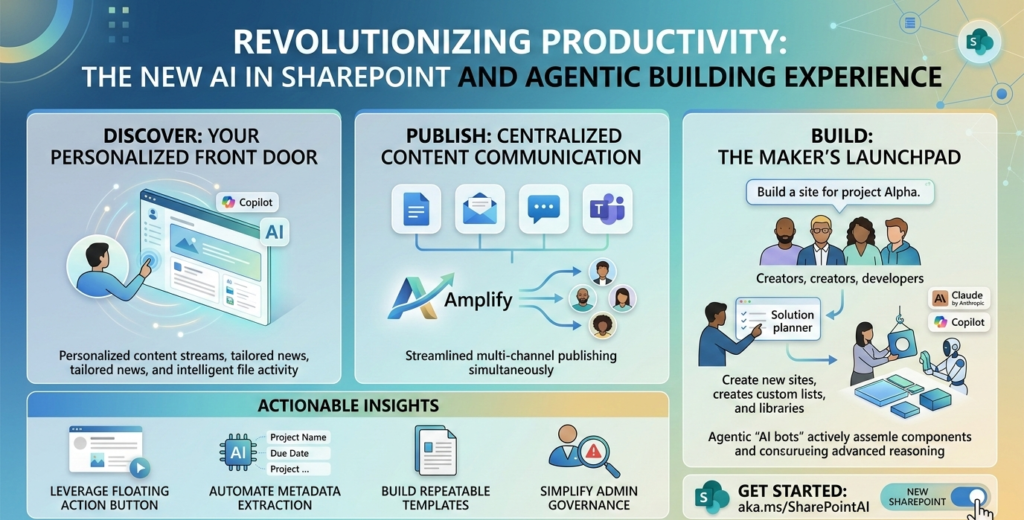
In the ever-evolving landscape of digital collaboration, Microsoft has just dropped a bombshell. To celebrate SharePoint’s 25th anniversary, the tech giant has unveiled a transformative vision for the platform: AI in SharePoint. This isn’t just a minor update or a fresh coat of paint; it is a fundamental shift from a manual configuration tool to an “agentic” partner that builds solutions alongside you.
If you have ever felt overwhelmed by the technical hurdles of setting up a complex intranet or managing sprawling document libraries, the new AI in SharePoint features are designed specifically for you. By moving from “how to build” to “what to build,” Microsoft is lowering the barrier to entry while supercharging the productivity of seasoned experts.
In this guide, we will dive deep into the new agentic building capabilities, the refreshed user interface, and the advanced governance tools that make AI in SharePoint the future of the modern workplace.
What is Agentic Building in SharePoint?
The term “agentic” refers to AI that doesn’t just answer questions but takes action. With AI in SharePoint, the platform now acts as a proactive teammate. Instead of you manually creating sites, lists, and libraries, you simply describe your intent in natural language.
The AI in SharePoint engine then orchestrates a multi-turn reasoning process. It asks clarifying questions, proposes a structured plan, and—once approved—executes the creation of pages, metadata schemas, and even starter content. This “Intent-to-Solution” workflow is the cornerstone of the new SharePoint era.
The Three Pillars of the New SharePoint Experience
Microsoft has reorganized the SharePoint interface around three core user “jobs.” This structural change ensures that whether you are a consumer, a creator, or a developer, you have a dedicated “front door” to start your work.
1. Discover: Your Personalized Front Door
The old SharePoint Start page is being replaced by Discover. Powered by AI in SharePoint, this view surfaces the most relevant files, news, and site updates based on your network and activity. It’s designed so that the work finds you, rather than you hunting for the work.
2. Publish: Centralized Content Communication
For the first time, SharePoint and Viva Amplify are converging. The Publish hub allows communicators to create content once and distribute it across SharePoint, email, Microsoft Teams, and Viva Engage. AI in SharePoint assists here by helping you draft pages, adjust tone, and generate summaries instantly.
3. Build: The Maker’s Launchpad
This is where the agentic magic happens. The Build interface is the central workspace for creating sites, lists, libraries, and agents. If you are licensed for AI in SharePoint, you can use the solution planner to iterate on complex business processes before a single file is even uploaded.
Key Features at a Glance: AI in SharePoint Capabilities
| Feature | Capability | Status |
| Site Creation | Describe a solution; AI generates the site, pages, and lists. | Public Preview (Late March) |
| Intelligent Pages | On-canvas AI for drafting, summarizing, and reshaping content. | Available Now (Preview) |
| Smart Libraries | Automated metadata extraction and file organization. | Available Now (Preview) |
| Natural Language Lists | Create, update, and query list data using prompts. | Rolling Out (Preview) |
| Structured Docs | Convert form responses into consistent Word documents. | Public Preview (March) |
Actionable Insights: How to Use AI in SharePoint Today
To get the most out of AI in SharePoint, you need to shift your mindset from “clicking buttons” to “directing an assistant.” Here are four ways to leverage these new tools:
Leverage the Floating Action Button
The “Knowledge Agent” has been integrated directly into the platform as AI in SharePoint. Look for the floating action button; it provides context-aware suggestions based on your role. Use it to clean up old libraries or summarize long documents without leaving your current view.
Automate Metadata Extraction
Stop manual tagging. When you upload files to a library managed by AI in SharePoint, the system can automatically extract key fields (like “Project Name” or “Due Date”) and apply them as metadata. This ensures your content is “AI-ready” and easily searchable.
Build Repeatable Document Templates
With the new Structured Documents feature, you can use AI in SharePoint to detect fields in a Word document and turn them into a form. This is perfect for HR onboarding or contract management, ensuring every document generated is compliant and professional.
Simplify Admin Governance
Governance is often the bottleneck for AI adoption. The new SharePoint Admin Agent uses AI in SharePoint to analyze tenant-wide permissions. Admins can now ask, “Show me all sites with oversharing risks,” and receive a remediated list in seconds.
Security, Trust, and the Claude Integration
One of the most notable technical details of this rollout is Microsoft’s partnership with Anthropic. To power these advanced reasoning capabilities, the initial rollout of AI in SharePoint relies on the Claude model.
For organizations, this means:
- Privacy First: Data handled by AI in SharePoint remains within the Microsoft 365 trust boundary.
- Regional Opt-ins: Depending on your location, admins may need to opt-in to allow Anthropic as a sub-processor during the preview period.
- Enterprise Grade: Microsoft has committed to ensuring these models meet rigorous compliance standards before General Availability (GA).
The 25-Year Evolution: Why This Matters
SharePoint has survived and thrived for a quarter-century because it adapts. By integrating AI in SharePoint, Microsoft is solving the “blank page” problem. No longer do users need to be SharePoint architects to build an enterprise-grade solution.
The move toward agentic building means that the “Knowledge” stored in SharePoint is finally becoming “Actionable.” Whether it is a small team managing a project or a global corporation distributing news, AI in SharePoint ensures that the platform is more than a storage bin—it is a dynamic participant in the business.
How to Get Started with the Public Preview
If you want to experience AI in SharePoint right now, follow these steps:
- Tenant Opt-in: Your IT administrator must opt-in to the “New SharePoint” experience via the SharePoint Admin Center.
- Toggle the Switch: Once enabled, individual users will see a “New SharePoint” toggle to flip between the classic and modern AI-powered views.
- Join the Hackathon: Microsoft is hosting a global SharePoint hackathon (aka.ms/SharePointHackathon) to encourage users to build their first agentic solutions.
Conclusion
The introduction of AI in SharePoint marks a new chapter for the world’s most popular content collaboration platform. By combining the power of agentic AI with a refreshed, user-centric design, Microsoft is making it easier than ever to turn ideas into reality.
As AI in SharePoint continues to roll out, the focus will remain on empowering “makers”—those individuals in every department who see a problem and want to build a solution. With an AI partner by your side, the next 25 years of SharePoint look brighter than ever.