The friction between writing code and successfully deploying it at scale has long been the “valley of death” for developer velocity. Even with the rise of AI-powered coding assistants, the gap between a functioning local script and a production-ready, well-architected cloud environment remains significant. Developers often find themselves caught in a cycle of searching documentation, manually configuring Infrastructure as Code (IaC), and triple-checking pricing calculators.
This landscape changed significantly in March 2026. AWS officially bridged this gap with the release of AWS Agent Plugins. This open-source repository provides AI coding agents with specialized skills designed specifically for architecting, deploying, and operating applications on the AWS ecosystem. By transforming natural language commands into fully realized cloud infrastructures, AWS Agent Plugins are poised to redefine how we think about “DevOps” in an agentic world.
What Are AWS Agent Plugins?
At its core, AWS Agent Plugins is a collection of specialized tools that extend the capabilities of popular AI code editors like Cursor and Claude Code. Rather than relying on a Large Language Model’s (LLM) general knowledge—which may be outdated or lack specific context—these plugins allow agents to access real-time AWS data, best practices, and pricing.
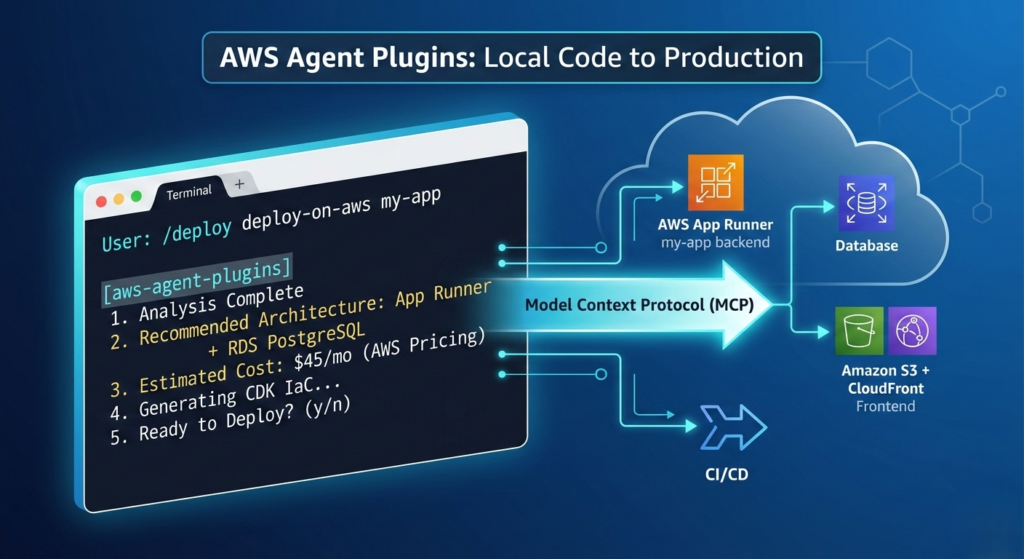
The standout feature of this release is the deploy-on-aws plugin. This tool acts as a bridge between your local codebase and a live environment. By utilizing the Model Context Protocol (MCP), AWS Agent Plugins ensure that AI tools are not just generating text based on training data, but are actively operating within your technical ecosystem with precision and best-practice alignment.
The Power of the deploy-on-aws Workflow
The deploy-on-aws plugin isn’t just a simple script generator; it is a sophisticated orchestration layer. When a developer issues a command like “deploy this Express app to AWS,” AWS Agent Plugins initiate a structured five-step workflow that automates the heavy lifting of cloud architecture.
| Step | Action | Description |
| 1 | Codebase Analysis | The agent scans your project to identify languages (e.g., Node.js), frameworks (e.g., React), and dependencies (e.g., PostgreSQL). |
| 2 | Architecture Recommendation | Based on the analysis, it suggests optimal services (like App Runner or S3) with a detailed rationale for each choice. |
| 3 | Cost Estimation | The plugin fetches real-time data from AWS Pricing to provide projected monthly costs before any resources are provisioned. |
| 4 | IaC Generation | It generates complete, production-ready Infrastructure as Code using the AWS CDK or CloudFormation. |
| 5 | Automated Deployment | Upon user confirmation, the agent executes the deployment, setting up CI/CD pipelines and security groups. |
This systematic approach is what sets AWS Agent Plugins apart from traditional CLI automation. While a CLI might help you run a command faster, these plugins standardize the design process itself, ensuring that every deployment follows organizational standards and AWS best practices.
Why AWS Agent Plugins Matter for Developer Velocity
For years, the industry has struggled with “context bloating.” Developers would copy-paste massive chunks of AWS documentation or internal “golden path” guidelines into an AI prompt to get a useful result. This is inefficient and error-prone.
AWS Agent Plugins solve this by encoding expertise as reusable, versioned capabilities. Instead of the LLM “guessing” how to secure an S3 bucket, the plugin provides the exact, up-to-date hook or guardrail required. This leads to several core benefits:
- Reduced Friction: It eliminates the context-switching between the IDE and the AWS Management Console.
- Cost Transparency: By integrating real-time pricing, developers can make informed architectural decisions before spending a dime.
- Knowledge Formalization: Organizations can use AWS Agent Plugins to ensure every developer—regardless of cloud expertise—is deploying using the company’s approved patterns.
- Rapid Prototyping: What used to take hours of configuration can now be achieved in under 10 minutes, as seen in early AWS benchmarks.
Technical Deep Dive: The MCP Architecture
One of the most innovative aspects of AWS Agent Plugins is the use of the Model Context Protocol (MCP). This allows the plugin to function as more than just a “prompt enhancer.” A single plugin within this ecosystem can package multiple types of expertise:
- Agent Skills: Structured workflows and playbooks that guide the AI through complex tasks.
- MCP Servers: Direct connections to external data sources. The current release includes servers for AWS Knowledge (documentation), AWS Pricing (live costs), and AWS IaC (CDK/CloudFormation guidance).
- Hooks: Automated guardrails that trigger during developer actions to prevent insecure configurations.
- References: Standardized configuration defaults and documentation snippets.
By leveraging this architecture, AWS Agent Plugins provide a level of “active” intelligence that general-purpose AI models simply cannot match on their own.
Getting Started: How to Install AWS Agent Plugins
Setting up these plugins is straightforward, provided you have a modern AI-enabled development environment. Currently, AWS Agent Plugins are optimized for Claude Code and Cursor.
Prerequisites
- AWS CLI configured with appropriate credentials.
- An installation of Claude Code or the Cursor editor.
Installation in Claude Code
To add the marketplace and install the deployment plugin, use the following commands in your terminal:
Bash
/plugin marketplace add awslabs/agent-plugins
/plugin install deploy-on-aws@awslabs-agent-plugins
Installation in Cursor
Cursor users can find the plugins directly in the Cursor Marketplace or add them manually through the editor’s settings pane under the “Rules for AI” or “Plugins” section.
Best Practices and Safety Considerations
While AWS Agent Plugins significantly accelerate the development lifecycle, AWS emphasizes that they are accelerators, not replacements for human judgment. To maintain a secure and resilient cloud footprint, developers should follow these guidelines:
- Code Review: Always review the generated CDK or CloudFormation code before hitting “deploy.” Check for security group configurations and resource limits.
- Least Privilege: Ensure the AWS credentials used by your IDE have only the permissions necessary for the specific task at hand.
- Security Scanning: Run tools like
cdk-nagorcheckovon the generated infrastructure code to catch potential vulnerabilities that the AI might have missed. - Cost Monitoring: While the plugin provides estimates, always set up AWS Budgets to monitor actual spend in real-time.
The Future of Agentic Cloud Operations
The launch of the deploy-on-aws plugin is just the beginning. AWS has indicated that the AWS Agent Plugins repository will be expanded in the coming weeks to include capabilities for monitoring, troubleshooting, and optimization.
We are moving toward a future where the “cloud architect” role evolves into one of oversight and strategy, while the tactical execution—the writing of YAML files, the manual linking of VPCs, and the calculation of IOPS—is handled by intelligent agents. AWS Agent Plugins represent the first major step by a cloud provider to officially sanction and support this agentic shift.
Conclusion
The release of AWS Agent Plugins marks a pivotal moment in the evolution of cloud computing. By providing a structured, best-practice-aligned way for AI agents to interact with cloud resources, AWS is removing the final barriers to true developer autonomy. Whether you are a solo developer looking to launch a side project in minutes or a lead architect at a Fortune 500 company seeking to standardize deployments, these plugins offer the tools necessary to thrive in the AI-driven era of DevOps.
By integrating AWS Agent Plugins into your workflow today, you aren’t just automating deployment—you are future-proofing your development process.