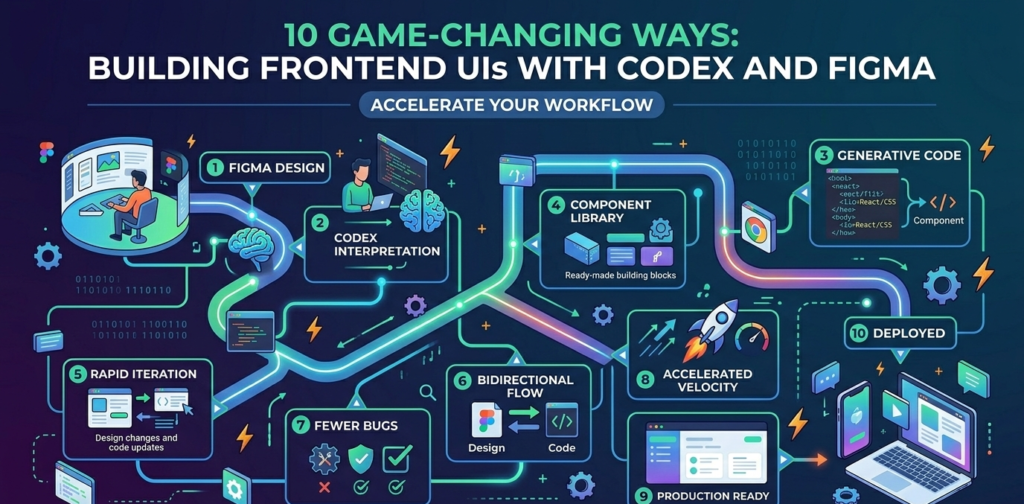
Building frontend UIs with Codex and Figma is the revolutionary leap the tech world has been waiting for, effectively bridging the massive gap between creative design and production-ready code. In the fast-paced world of software development, the “handoff” from designers to engineers has historically been a friction point filled with manual work, misinterpreted specs, and constant back-and-forth. However, OpenAI has changed the game. By leveraging the power of building frontend UIs with Codex and Figma, teams can now move fluidly between a visual canvas and a live application with unprecedented speed.
The New Era of Design-to-Code Workflow
For years, designers have lived in Figma, while developers lived in their IDEs. The new integration, powered by the Figma Model Context Protocol (MCP) server, allows OpenAI’s Codex to “see” and “understand” design files directly. This isn’t just about generating a rough snippet of CSS; it’s about building frontend UIs with Codex and Figma that are functional, structured, and production-capable.
When you start building frontend UIs with Codex and Figma, you aren’t just looking at a static image. Codex accesses the actual layer data, auto-layout constraints, and component properties within Figma. This means the code generated isn’t just a “guess” at what the UI should look like—it’s a direct translation of the design intent into high-quality React or Next.js code.
How to Get Started: Connecting the Canvas to the Code
To begin building frontend UIs with Codex and Figma, you first need to install the Figma MCP server within the Codex desktop application. Once configured, the process becomes incredibly intuitive. You can simply copy a link to a specific frame or component in Figma and paste it into Codex.
The AI agent then parses the design tokens—colors, typography, spacing, and layout—to scaffold a working frontend. This level of automation ensures that building frontend UIs with Codex and Figma saves developers hours of tedious styling work, allowing them to focus on complex business logic and state management instead.
Bidirectional Fluidity: From Code Back to Design
One of the most impressive features of this integration is its bidirectional nature. Most tools only move from design to code, but building frontend UIs with Codex and Figma works both ways. If an engineer makes a change in the code or wants to explore a new layout idea directly in the browser, they can use the generate_figma_design tool.
This tool captures the live, running interface and brings it back into Figma as fully editable frames. This “roundtrip” workflow is essential for modern teams. It allows designers to see exactly how their designs translate into a real environment and refine them without needing to manually recreate every change made by the development team. Building frontend UIs with Codex and Figma ensures that the design and the codebase remain in perfect sync.
Why This Integration Matters for Modern Teams
The synergy of building frontend UIs with Codex and Figma solves several critical industry problems:
- Eliminating Handoff Friction: No more missing font sizes or incorrect padding values. The AI reads the source of truth directly.
- Rapid Prototyping: You can go from a Figma wireframe to a clickable, styled React prototype in minutes.
- Consistency: By utilizing existing design systems, building frontend UIs with Codex and Figma ensures that the brand identity is maintained across every line of code.
- Role Blurring: It empowers “design-engineers” to work across the entire stack, making the distinction between design and development less of a barrier.
Deep Integration with the Codex Desktop App
The Codex desktop app is specifically designed for this type of “agentic” workflow. It allows you to manage multiple agents in parallel, which is incredibly helpful when building frontend UIs with Codex and Figma. You can have one agent focusing on the sidebar navigation while another builds out the main dashboard, all while referencing the same Figma file.
Furthermore, the integration supports Figma Design, Figma Make, and FigJam. Whether you are brainstorming a flow in FigJam or refining a high-fidelity prototype in Figma Design, the context is preserved. This holistic approach to building frontend UIs with Codex and Figma makes it the most robust solution for AI-assisted development available today.
The Technical Edge: Understanding MCP
At the heart of building frontend UIs with Codex and Figma is the Model Context Protocol (MCP). MCP is an open standard that allows AI agents to securely connect to external data sources. By using this protocol, Figma has essentially turned its canvas into a “database” of design intent that Codex can query in real-time. This is far superior to old-school methods of exporting PNGs or using OCR (Optical Character Recognition) to guess what a design contains.
Best Practices for High-Fidelity Results
To get the best results while building frontend UIs with Codex and Figma, designers should stick to a few best practices:
- Use Auto-Layout: Codex understands Figma’s Auto-Layout perfectly, translating it into Flexbox or CSS Grid automatically.
- Name Your Layers: Descriptive layer names help the AI understand the semantic meaning of your components (e.g., calling a layer “PrimaryButton” instead of “Frame 402”).
- Define Design Tokens: Using Figma variables for colors and spacing makes the generated code much cleaner and easier to maintain.
Conclusion: The Future of Frontend Development
We are entering a period where the boundary between “drawing” an app and “writing” an app is disappearing. Building frontend UIs with Codex and Figma is a glimpse into a future where software is built at the speed of thought. By removing the manual translation layer, OpenAI and Figma are enabling teams to iterate faster, ship higher-quality products, and focus on what truly matters: the user experience.
If you haven’t tried building frontend UIs with Codex and Figma yet, now is the time to integrate this workflow into your stack. It is more than just a tool; it is a fundamental shift in how digital products are conceived and delivered. Whether you are a solo developer or part of a large enterprise, the efficiency gained from building frontend UIs with Codex and Figma will undoubtedly become a competitive advantage in the years to come.