If you’ve been watching the AI coding assistant space, you already know things are moving fast. But Claude Code 2.0 just raised the bar in ways that matter — not with incremental tweaks, but with a set of capabilities that fundamentally change how developers write, review, and manage code at scale.
Whether you’re a solo developer looking to automate repetitive workflows or part of a team that needs robust, collaborative code review, this release has something concrete to offer. This guide breaks down every major feature, explains what it actually means for your day-to-day work, and shows you how to get the most from each capability.
What Is Claude Code 2.0 and Why Does It Matter?
Claude Code 2.0 is Anthropic’s significantly upgraded AI coding environment, building on the foundation of its predecessor with a focus on three core pillars: smarter automation, better memory, and collaborative multi-agent workflows.
What makes this release particularly noteworthy is that it doesn’t just make Claude faster — it makes it more aware of what you’re doing. The system can now maintain context across long-running tasks, coordinate multiple AI agents simultaneously, integrate natively with tools like Microsoft Excel and PowerPoint, and even respond to voice commands. For enterprise and team users especially, these aren’t nice-to-haves; they’re genuine workflow accelerators.
Let’s dig into each feature in detail.
Top 5 Focus Keywords at a Glance
Before we dive in, here’s a quick reference to the key concepts this post covers — and the search terms that best capture the value of Claude Code 2.0:
| # | Focus Keyword | Why It Matters |
|---|---|---|
| 1 | Claude Code 2.0 (Primary) | The core subject — Anthropic’s upgraded AI coding environment |
| 2 | Multi-agent code review | The headline enterprise feature for team collaboration |
| 3 | AI coding assistant | Broad term capturing the assistant’s core role for developers |
| 4 | Automated task scheduling | A standout workflow automation capability in this release |
| 5 | Claude Code features | The umbrella term for discovery searches around this update |
The “By the Way” Command: Multitasking Without Losing Your Place
One of the most quietly powerful additions to Claude Code 2.0 is the “By the Way” command. On the surface, it sounds simple: you can ask a quick question or inject a short instruction while a longer task is already running. But the deeper value is what it doesn’t do — it doesn’t break your context.
In most AI workflows, interrupting a process to ask something unrelated means the assistant loses track of what it was doing. The “By the Way” command sidesteps this entirely. Claude holds your active context in place while it processes the interject, then picks right back up where it left off.

Practical Use Cases
- You’re running a long refactor and realize you need to clarify a naming convention — interject it without stopping the refactor.
- A dependency check is running and you want to ask a quick question about a library — ask it without restarting the session.
- You’re generating documentation and want to add a note about a specific function — drop it in mid-stream.
For developers who work on complex, multi-step tasks, this is the kind of small-but-impactful feature that saves meaningful time over the course of a workday.
The /Loop Command: Automating Recurring Workflows Like a Pro
If the “By the Way” command is about reactive agility, the /Loop command is about proactive automation. Think of it as a cron job built directly into your AI coding assistant — you set a prompt to fire at a defined interval, and Claude Code 2.0 handles it automatically, as long as the desktop app is active.
What You Can Automate with /Loop
- Daily code reviews: Schedule a review of newly committed code each morning before standup
- Dependency update checks: Run a weekly scan for outdated packages or security vulnerabilities
- Routine system health checks: Automate status pings or log reviews at set intervals
- Reminder workflows: Trigger context-aware prompts at the right moment in a sprint or release cycle
This feature is especially useful for developers managing multiple projects simultaneously. Instead of context-switching to handle routine checks manually, you set them up once and let the system run. Combined with Telegram integration for real-time notifications, you stay informed without babysitting any individual process.
Pro Tip: Combining /Loop with Telegram Alerts
Set up your /Loop workflows to pipe their results to a Telegram bot. This way, if something flags during an overnight dependency scan or a scheduled code audit, you get a notification directly to your phone without needing to be at your desk.
Automated Task Scheduling: Building a Hands-Free Development Pipeline
The desktop task scheduler in Claude Code 2.0 extends the automation narrative beyond just the /Loop command. It enables you to build a lightweight, hands-free development pipeline where repetitive operational tasks happen in the background while you focus on the work that actually requires your attention.
This is particularly valuable for teams under deadline pressure. Rather than dedicating developer time to maintenance tasks — running tests, updating changelogs, checking build statuses — those tasks can be offloaded to the scheduler. The integration with messaging platforms like Telegram means the team gets updates without anyone having to manually pull status.
Scheduling Best Practices
- Start simple: Automate one or two low-stakes tasks first to understand how the system behaves
- Use real-time notifications: Configure Telegram or a similar platform to receive alerts so nothing runs silently without oversight
- Define effort levels: Match the effort setting (low, medium, high, maximum) to the complexity of the scheduled task — more on this below
- Keep the desktop app running: The scheduler requires the app to be active, so plan accordingly in team environments
Enhanced Memory Management: Context That Actually Sticks
One of the persistent frustrations with AI assistants in complex workflows is memory degradation — the system “forgets” details established earlier in a session, forcing you to re-explain context. Claude Code 2.0 addresses this head-on with a significantly upgraded memory management system.
The new approach uses structured templates to store and retrieve project memories more reliably. Feedback loops, project-specific preferences, and task history are organized in a way that reduces redundancy and improves accuracy across sessions. This means the more you work with Claude Code 2.0 on a specific project, the better it gets at anticipating your needs and maintaining consistent context.
Why This Matters for Long-Term Projects
For short, one-off tasks, memory management is a minor concern. But for long-running projects — multi-week sprints, large codebases, ongoing research — consistent context retention is the difference between an AI that genuinely assists and one that feels like it’s starting from scratch every time.
The structured template approach also means less redundancy in what the system stores. Instead of accumulating noise, it organizes memories efficiently, making recall faster and more accurate.
Multi-Agent Code Review: The Headline Feature for Teams
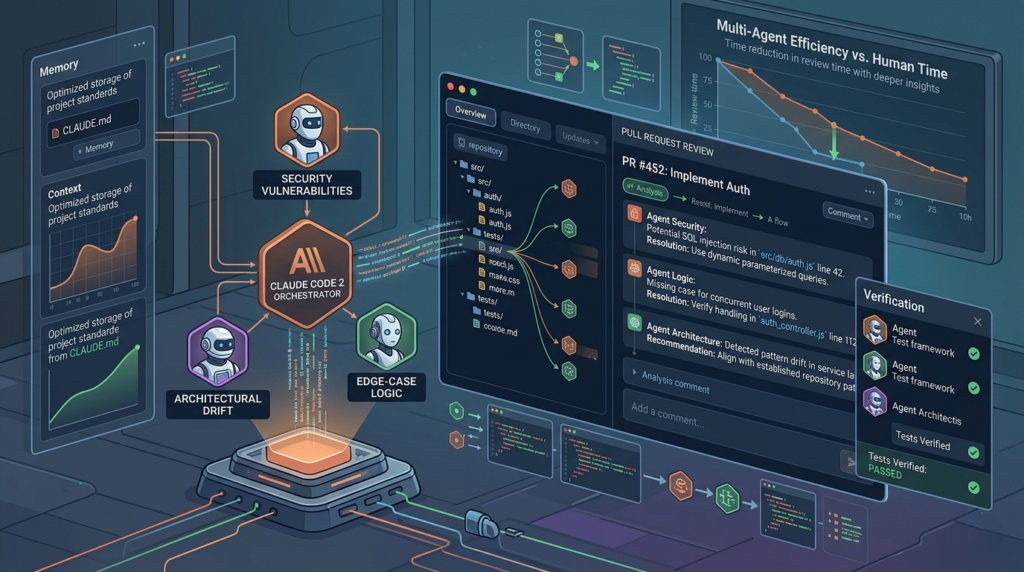
This is the feature that makes Claude Code 2.0 genuinely compelling for team and enterprise users. The multi-agent code review system deploys multiple AI agents simultaneously to analyze code, each contributing from a different angle. The result is a more thorough, comprehensive review than a single-agent approach could provide.
How Multi-Agent Code Review Works
Rather than one AI instance reviewing a pull request linearly, multi-agent code review distributes the workload across several agents. Each can focus on different aspects — security vulnerabilities, logic errors, style consistency, performance bottlenecks, documentation gaps — and their findings are synthesized into a unified, actionable report.
Benefits for Teams and Enterprise Users
| Benefit | Details |
|---|---|
| Higher code quality | Multiple review angles catch issues that single-pass reviews miss |
| Faster turnaround | Parallel processing reduces total review time significantly |
| Consistent feedback | Standardized review criteria applied uniformly across the codebase |
| Reduced reviewer fatigue | Human reviewers can focus on high-level concerns rather than exhaustive manual checks |
| Scalable for large codebases | Distributed agents handle complex, large-scale projects more efficiently |
For engineering teams shipping frequently, this feature alone can meaningfully reduce the time between code submission and merge, without sacrificing review quality.
Who Gets Access?
The multi-agent code review capability is available to Team and Enterprise plan users. If your organization is evaluating Claude Code for collaborative development workflows, this is the feature most worth piloting.
Streamlined Skill Development and Multi-Agent Testing
Beyond code review, Claude Code 2.0 introduces an improved interface for developing and testing AI agent skills. The updated skill creation system supports parallel evaluations — running multiple agents through benchmark scenarios simultaneously — which dramatically reduces the iteration time when building custom solutions.
For teams building proprietary AI-driven workflows on top of Claude Code, this is a significant productivity multiplier. You can test a new skill against multiple scenarios in parallel rather than sequentially, identify edge cases faster, and push refined solutions to production sooner.
Key Improvements in Skill Development
- Parallel benchmarking: Test multiple agent configurations simultaneously
- Refined feedback loops: More granular scoring and performance data for each skill iteration
- Faster time-to-deployment: Reduced iteration cycles mean custom solutions ship sooner
- Better reliability: More comprehensive testing leads to more robust production behavior
API Integration Mentorship: Learn Advanced Features While You Build
One of the more underrated additions to Claude Code 2.0 is its role as a live API mentor. Instead of requiring developers to already know how to implement advanced features like prompt caching or adaptive thinking, the system provides step-by-step guidance as you work.
This is particularly valuable for developers who are expanding their technical scope — integrating AI features into a product for the first time, or implementing complex API behaviors they haven’t tackled before. Rather than context-switching to documentation or Stack Overflow, you get contextual, in-line guidance that’s specific to what you’re building.
Features Where API Mentorship Shines
- Prompt caching: Understanding when and how to cache prompts for performance gains
- Adaptive thinking: Implementing dynamic reasoning depth based on task complexity
- Multi-turn conversation management: Building state-aware AI interactions
- Error handling and retry logic: Building resilient API integrations from the start
Effort Level Customization: Matching AI Depth to Task Complexity
Not every task needs the same depth of reasoning, and Claude Code 2.0 recognizes this with its effort level settings. Users can choose from four tiers — low, medium, high, and maximum — each calibrated to a different balance of reasoning depth, task duration, and resource usage.
Choosing the Right Effort Level
| Effort Level | Best For | Trade-off |
|---|---|---|
| Low | Simple queries, quick lookups, routine checks | Faster, cheaper, less thorough |
| Medium | Standard development tasks, moderate complexity | Balanced performance and depth |
| High | Complex refactors, architectural analysis, thorough reviews | Slower, more comprehensive |
| Maximum | Mission-critical tasks, large-scale analysis, enterprise reviews | Maximum depth and cost |
This is a practical feature for teams managing costs or working under time constraints. A scheduled nightly dependency scan might run at low effort, while a pre-release code review runs at maximum. Having explicit control over this dimension makes Claude Code 2.0 significantly more resource-efficient in practice.
Interactive Data Visualization: Charts and Diagrams in the Chat Interface
Currently in beta, the interactive visualization feature brings a genuinely new dimension to coding workflows. You can generate charts, diagrams, and visual representations of data directly within the Claude Code 2.0 chat interface — no external tools required.
Where This Adds Real Value
- Data analysis: Visualize query results or dataset summaries without leaving the workflow
- Architecture diagrams: Generate visual representations of system structures or dependency graphs
- Presentations: Create charts that can be directly incorporated into stakeholder updates
- Education and documentation: Add visual context to technical explanations
As a beta feature, the visualization capabilities will continue to evolve. Early adopters who integrate it into their workflows now will be well-positioned as it matures into a full-featured capability.
Voice Command Support: Hands-Free Development
Claude Code 2.0 introduces voice input as a legitimate interaction mode — not a novelty, but a practical option for scenarios where typing is impractical or inefficient. You can generate prompts, trigger commands, and interact with the system entirely through voice.
This expands accessibility in meaningful ways and opens up workflows that weren’t previously possible — dictating code documentation while reviewing a printed spec, running checks while your hands are occupied, or simply reducing the physical overhead of constant keyboard input during long sessions.
Microsoft Integration: Bridging Code and Productivity Tools
The native integration with Microsoft Excel and PowerPoint in Claude Code 2.0 closes a gap that has historically required awkward workarounds. The system can now share context across these files — manipulating data in Excel or updating PowerPoint presentations — as part of a unified workflow.
For developers who regularly produce data-driven reports or presentations as deliverables alongside their code, this integration means less context-switching and a more coherent end-to-end workflow. A data pipeline that processes results can now hand those results directly to an Excel sheet or a slide deck without manual intervention.
How to Get the Most from Claude Code 2.0: Actionable Recommendations
Understanding the features is one thing. Using them effectively is another. Here’s how to approach Claude Code 2.0 strategically:
- Start with the /Loop command for your most repetitive tasks. Identify the three most time-consuming routine checks in your workflow and automate them first. The ROI is immediate and measurable.
- Pilot multi-agent code review on a low-stakes project first. Before rolling it out to your main codebase, test it on a contained project so your team can calibrate expectations and refine the process.
- Use effort levels deliberately. Map your task types to effort levels and make that mapping explicit in your team’s workflow. Consistency here pays dividends in both cost control and predictability.
- Lean into memory management for long-running projects. The more context you feed the system early in a project, the better it performs over time. Treat the first session as an investment in future sessions.
- Connect Telegram notifications to your scheduled tasks. This creates a lightweight oversight layer that keeps you informed without requiring you to actively monitor anything.
- Explore the API mentorship feature when expanding your technical scope. Don’t save it for when you’re stuck — engage it proactively when implementing something new to accelerate your learning curve.
Claude Code 2.0 vs. Previous Versions: What’s Actually New
| Capability | Before 2.0 | With Claude Code 2.0 |
|---|---|---|
| Code review | Single-agent, sequential | Multi-agent, parallel |
| Task automation | Manual triggers | Scheduled /Loop command |
| Memory | Context degradation over time | Structured templates, improved recall |
| Interactivity | Text-only input | Text + voice commands |
| Microsoft tools | No native integration | Excel and PowerPoint context sharing |
| Skill testing | Sequential benchmarking | Parallel multi-agent evaluation |
| Visualizations | External tools required | Built-in beta visualization |
| Effort control | Fixed reasoning depth | Selectable low/medium/high/max |
Final Thoughts: Is Claude Code 2.0 Worth Your Attention?
The short answer is yes — especially if you’re part of a team or managing complex, ongoing projects. Claude Code 2.0 isn’t a marginal update; it’s a substantive rethinking of how an AI coding assistant fits into professional development workflows.
The multi-agent code review feature alone makes a compelling case for enterprise adoption. The /Loop command and desktop task scheduler address a real pain point for developers managing multiple projects. And the improved memory management means the system gets more useful the longer you work with it, not less.
For individual developers, the voice commands, effort level customization, and API mentorship features lower the barrier to doing more ambitious work with AI assistance. For teams, the collaborative review system and parallel skill testing create genuine efficiency gains at scale.
The most meaningful takeaway from Claude Code 2.0 is that it’s designed for the realities of professional software development — complex, long-running, collaborative, and often messy. That’s a meaningful step forward.