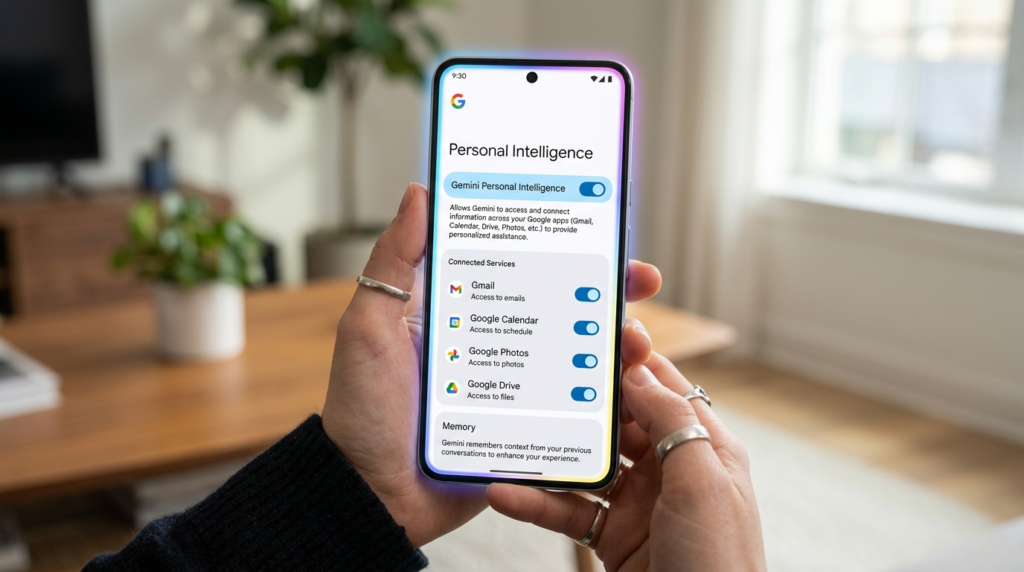
The landscape of mobile artificial intelligence just shifted significantly. Google has officially begun the wide rollout of Gemini Personal Intelligence and a revamped “Memory” feature to free users in the United States. Previously locked behind the premium Google AI One subscription, these powerful tools are now reaching the pockets of millions, transforming Gemini from a simple chatbot into a deeply integrated personal assistant that understands your world.
In this comprehensive guide, we’ll dive into what this rollout means for you, how the new visual redesign enhances the Android experience, and why the Gemini Personal Intelligence toggle is the most important setting you need to know about today.
What is Gemini Personal Intelligence?
Gemini Personal Intelligence is a sophisticated feature suite that allows Google’s Large Language Models (LLMs) to access, interpret, and synthesize information from across your personal Google ecosystem. Unlike standard AI interactions where you must provide all the context in every prompt, Gemini Personal Intelligence “knows” your schedule, your files, and your photos because it has explicit permission to reference them in real-time.
By tapping into your first-party data, Gemini can provide answers that are uniquely tailored to your life without you having to copy-paste information or explain who your contacts are. This marks a transition from(Free Gemini Features) “Generic AI” to “Contextual AI.”(Google Gemini Update)(AI Memory Feature)(Android AI Redesign)
The Core Features of the Rollout
The March 2026 update brings several high-value changes to the free tier of the Gemini app:
- Cross-App Data Integration: Gemini Personal Intelligence can now pull context from Gmail, Google Calendar, Google Drive, Google Photos, YouTube, Google Maps, and Search.
- Memory (Persistent Context): Gemini now has a persistent memory of your previous conversations. If you told it last week that you’re planning a trip to Tokyo, it will remember that context for today’s questions.
- Visual Redesign: A new “Full Screen Glow” effect replaces the old pill-shaped overlay, signaling when the AI is active and processing your screen’s content.
- Free Tier Accessibility: Features that cost $19.99/month just weeks ago are now available on standard Google Accounts, making Gemini Personal Intelligence accessible to everyone.
How to Set Up Gemini Personal Intelligence
Since this involves sensitive personal data, Google requires an explicit opt-in. You aren’t just turned “on” by default; you have to grant the AI the keys to your digital life.
Step-by-Step Activation
- Update the App: Ensure you are running the latest version of the Gemini app from the Play Store.
- The Opt-In Prompt: Upon opening the app, many users are seeing a splash screen explaining the benefits of Gemini Personal Intelligence. Tap “Get Started.”
- Manage Services: Navigate to your Account Menu > Personal Intelligence. Here, you can individually toggle which apps Gemini can see. For example, you might want it to see your Calendar but not your Drive.
- The Tools Menu: Within any specific chat, you can tap the Tools menu (the screwdriver/wrench icon) to quickly enable or disable these “extensions” on the fly.
The New “Memory” Feature: AI That Actually Remembers
One of the biggest frustrations with AI assistants has been their “amnesia.” Every time you started a new chat, you had to re-explain your preferences. The new Memory feature, powered by Gemini Personal Intelligence, solves this.
| Feature | Old Experience | New “Memory” Experience |
| Context Retention | Lost as soon as the chat ended. | Persists across different chat threads. |
| Preference Learning | Had to be manually prompted (e.g., “I’m vegan”). | Learns over time from your interactions. |
| Searchability | Hard to find old info. | Gemini Personal Intelligence can reference past chats to answer current queries. |
This shift allows for more natural, ongoing “agentic” workflows. You can ask, “What was that recipe we talked about last Tuesday?” and the system will find it instantly.
Actionable Insights: Making Gemini Work for You
Now that Gemini Personal Intelligence is free, how do you actually use it to save time? Here are high-impact ways to leverage the update:
1. The “Where’s My Stuff?” Query
Stop digging through your inbox. You can now ask:
- “When is my flight to Austin, and what’s the confirmation number?”
- “Find the PDF of the lease agreement I saved in Drive last month.”
2. Smart Event Planning
Because Gemini Personal Intelligence sees your Calendar and Maps, you can streamline your day:
- “I have a gap between my 2 PM and 4 PM meetings. Suggest a coffee shop nearby with good Wi-Fi.”
3. Visual Search in Photos
Personal Intelligence extends to Google Photos. You can ask:
- “Show me photos of the sunset from my trip last year and help me write a caption for Instagram.”
Deep Dive: The Mechanics of Personal Intelligence
To understand why Gemini Personal Intelligence is such a breakthrough, we have to look at how Retrieval-Augmented Generation (RAG) works at a consumer scale. Usually, an AI is trained on a static dataset. With this rollout, Google is essentially creating a “Private RAG” for every user.
When you ask a question, Gemini Personal Intelligence doesn’t just guess. It performs a “semantic search” across your connected Google services. If you ask about a meeting, it queries the Calendar API; if you ask about a receipt, it scans Gmail. It then feeds that specific data into the LLM as “context,” allowing the AI to generate an answer that is 100% factual to your life.
Privacy and Control: The “Silent” Guardian
With great data access comes great responsibility. Google has integrated a prominent Gemini Personal Intelligence toggle at the bottom of the Gemini overlay. If you are asking a question that is generic or sensitive and you don’t want the AI to use your personal data for that specific prompt, you can uncheck the toggle in seconds.
Furthermore, Google has emphasized that this data is used to provide your specific response and is not used to train the global Gemini model in a way that would expose your private information to others. This “Privacy Sandbox” approach is critical for user trust.
The Evolution of the Android Assistant
For years, Google Assistant was a voice-activated command tool. It could set timers and play music, but it couldn’t “think.” The integration of Gemini Personal Intelligence changes the fundamental DNA of the Android operating system.
We are moving toward a “Proactive Assistant” model. Imagine your phone noticing you have a flight in three hours and automatically pulling up your boarding pass while suggesting the best time to leave based on current traffic—all without you asking. This is the ultimate goal of Gemini Personal Intelligence.
Comprehensive FAQ on Gemini Personal Intelligence
What exactly is Gemini Personal Intelligence?
Gemini Personal Intelligence is a suite of features that allows Google’s AI to access your personal data from Google Workspace (Gmail, Drive, Calendar) and other services like Photos and Maps to provide personalized, context-aware assistance.
Is Gemini Personal Intelligence free for everyone?
Yes, as of the March 2026 rollout, Gemini Personal Intelligence is available to free-tier users in the United States. Previously, these features were restricted to Google One AI Premium subscribers.
How do I turn off Gemini Personal Intelligence if I don’t like it?
You can disable it entirely by going to your Gemini App Settings > Personal Intelligence and toggling the master switch to “Off.” You can also disable specific app permissions (like Gmail or Photos) individually.
Does Gemini Personal Intelligence read my private emails to train its model?
Google states that while Gemini Personal Intelligence accesses your emails to answer your specific queries, that personal data is not used to train the underlying public AI models used by other people.
Can I use Gemini Personal Intelligence on iOS?
While the deep system integration is currently most robust on Android, iPhone users can access Gemini Personal Intelligence features through the Google app on iOS, provided they have the necessary extensions enabled.
What is the “Memory” feature in Gemini?
The Memory feature allows the AI to remember details from your previous conversations. This means Gemini Personal Intelligence can remember your favorite food, your work projects, or your upcoming travel plans without you needing to repeat them in every new chat.
Why is my Gemini app glowing around the edges?
The “Full Screen Glow” is a new visual indicator part of the Gemini Personal Intelligence update. It signifies that the AI is active and can “see” what is on your screen to provide contextual help.
Does Gemini Personal Intelligence work offline?
Currently, most Gemini Personal Intelligence features require an internet connection because the processing of your personal data and the LLM reasoning happen on Google’s secure servers.
Can Gemini Personal Intelligence delete my emails or files?
By default, Gemini Personal Intelligence is designed to read and retrieve information. It does not have the “write” permissions to delete your data unless you explicitly authorize a specific action through a verified Google Tool.
How does this differ from the old Google Assistant?
The old Google Assistant followed rigid “if-then” logic. Gemini Personal Intelligence uses generative AI to understand complex, nuanced requests and can summarize long documents or find specific information buried in years of emails.
What apps are currently supported?
Currently, Gemini Personal Intelligence supports Gmail, Google Calendar, Google Drive, Google Photos, Google Maps, YouTube, and Google Flights/Hotels.
Can I clear the “Memory” of Gemini?
Yes. Within the settings for Gemini Personal Intelligence, there is an option to “Clear Memory,” which will wipe the AI’s context of your past conversations while keeping your actual emails and files intact.
Is Gemini Personal Intelligence available in languages other than English?
The initial rollout is focused on English (US), but Google has announced plans to expand Gemini Personal Intelligence to more languages and regions throughout 2026.
Does this feature drain my battery?
Because the heavy lifting is done in the cloud, Gemini Personal Intelligence does not significantly impact battery life more than a standard search or app usage session.
Can I use Gemini Personal Intelligence for work?
If you use a personal Google account for work, yes. For Google Workspace Enterprise users, the rollout of Gemini Personal Intelligence depends on the specific privacy settings managed by your organization’s IT administrator.
Summary of the New Era
The rollout of Gemini Personal Intelligence represents Google’s bid to make AI a utility rather than a luxury. By merging LLM reasoning with the massive data silos of Workspace and Photos, they have created a “Personal AI” that feels significantly more capable than the previous iteration.
The Future of Your Digital Life: Why This Rollout Matters
The introduction of Gemini Personal Intelligence to the free tier is more than just a software update; it is a fundamental shift in the relationship between humans and their personal data. For decades, our digital lives have been fragmented. Your flight details lived in Gmail, your meeting notes lived in Drive, your family memories lived in Photos, and your daily schedule lived in Calendar. Connecting these dots required manual effort—searching, switching apps, and copying information.
With the rollout of Gemini Personal Intelligence, Google is essentially providing the “connective tissue” for your digital existence. By allowing an advanced AI to sit at the center of these services, your phone stops being a collection of isolated silos and starts acting as a unified, sentient ecosystem. The “Personal” in Gemini Personal Intelligence isn’t just a marketing buzzword; it represents a move away from the “one-size-fits-all” AI models that give the same answer to everyone. This AI is yours. It knows your daughter’s birthday, it knows you prefer vegetarian restaurants, and it knows that when you ask for “that document from last week,” you’re referring to the project proposal you edited at 11 PM on Thursday.
Scaling Personal Productivity for Everyone
Historically, having a personal assistant who managed your schedule and retrieved information was a luxury reserved for executives. Gemini Personal Intelligence democratizes this experience. By bringing these premium features to the free tier, Google is ensuring that students, freelancers, and small business owners have access to the same productivity-boosting tools as enterprise users.
Imagine a student using Gemini Personal Intelligence to cross-reference their class syllabus in Drive with their exam schedule in Calendar, while simultaneously pulling study resources from YouTube. Or a freelancer managing three different clients, asking Gemini to “summarize the feedback from my last three emails with Client X.” The time saved from these micro-tasks adds up to hours of reclaimed productivity every week. This is the true promise of the Gemini Personal Intelligence rollout: the elimination of “digital friction.”
The Ethical Frontier of AI Memory
As we embrace the convenience of Gemini Personal Intelligence, we also enter a new era of digital ethics. The “Memory” feature is a double-edged sword that requires a high level of user trust. We are now living in a world where our devices remember our preferences, our moods, and our history. While this makes for a better user experience, it also places a massive responsibility on Google to maintain the “Privacy Sandbox” they have promised.
The inclusion of the Gemini Personal Intelligence toggle is a vital step in giving users agency over their data. It acknowledges that there are times when we want our AI to be “all-knowing” and times when we want it to be a blank slate. This granular control is what will separate successful AI assistants from intrusive ones. As users, we must remain vigilant and proactive in managing these settings, ensuring that our Gemini Personal Intelligence serves us without overstepping boundaries.
A New Visual Language for AI
The “Full Screen Glow” redesign accompanying the Gemini Personal Intelligence update is also a significant psychological cue. In the past, AI felt like something “hidden” inside a search bar. Now, when the edges of your screen pulse with light, it signals that the device is “awake” and contextually aware of what you are looking at.
This visual language helps bridge the gap between human intent and machine execution. When you see that glow, you know that Gemini Personal Intelligence isn’t just processing text; it’s looking at the PDF you’re reading, the map you’re navigating, or the photo you’re editing. It makes the AI feel like a present collaborator rather than a background process.
What Lies Ahead for Gemini Personal Intelligence?
As we look toward the rest of 2026, the potential for Gemini Personal Intelligence is limitless. We are likely to see even deeper integrations with third-party apps outside the Google ecosystem. Imagine Gemini being able to check your Spotify listening habits to suggest local concerts or looking at your banking app (with permission) to help you budget for a vacation it found in your emails.
The “Personal” aspect of Gemini Personal Intelligence will only become more refined as the models learn from billions of interactions. We are moving toward a “Proactive AI” future where the assistant doesn’t wait for a prompt. It might see that you have a meeting in 10 minutes and that rain is starting, so it proactively suggests calling a ride-share service.
Final Thoughts: Embracing the AI-Enhanced Life
The rollout of Gemini Personal Intelligence to free users is a landmark moment in the AI revolution. It moves the technology out of the “novelty” phase and into the “utility” phase. For the millions of users in the US currently receiving this update, the advice is simple: Explore it. Don’t be afraid to test the limits of what your Gemini Personal Intelligence can remember. Ask it complex questions that involve multiple apps. Play with the settings until you find the perfect balance between convenience and privacy. The more you interact with the system, the more it learns how to be useful to you specifically.
We are standing at the beginning of a journey where our devices finally understand us. With Gemini Personal Intelligence, Google has set a new standard for what a smartphone should be. It is no longer just a window to the internet; it is a mirror of your digital life, reflecting your needs, your history, and your goals back to you in a way that helps you move through the world more efficiently.
Welcome to the era of the truly personal assistant. The glow is on—what will you ask your Gemini Personal Intelligence to do first?