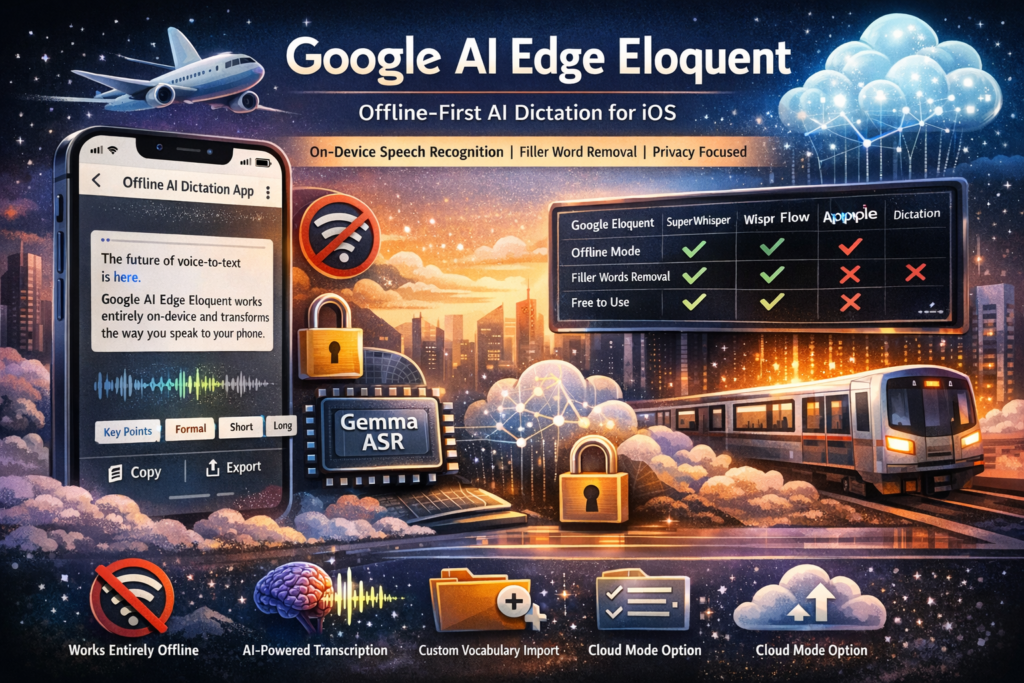
Google just shipped a quietly powerful product — and most people missed it. Google AI Edge Eloquent is a free, offline-first AI dictation app for iOS that transcribes your speech, strips filler words, and polishes your prose entirely on your device — no internet connection required.
If you’ve been searching for a private, fast, and intelligent alternative to cloud-dependent voice-to-text tools, this is the most significant development in AI-powered transcription in 2026.
What Is Google AI Edge Eloquent?
Google AI Edge Eloquent is an experimental dictation application developed by Google, released quietly on the Apple App Store in April 2026. It is built on Gemma-based Automatic Speech Recognition (ASR) models that run entirely on your iPhone — making it the first major on-device speech recognition app from Google targeting the consumer iOS market.
How Does It Work?
When you first launch Google AI Edge Eloquent, the app downloads a set of Gemma-based ASR models to your device. Once those are in place, transcription runs locally — no data leaves your phone unless you explicitly enable cloud mode.
Here’s the basic workflow:
- Speak — Start dictating naturally. Live transcription appears on screen in real time.
- Pause — The AI automatically filters out filler words like “um,” “uh,” and false starts.
- Transform — Choose from formatting options: Key Points, Formal, Short, or Long to reshape the output for your use case.
- Export — Copy the clean transcript and use it anywhere.
The app also surfaces useful session metadata: words spoken in the last session, your words-per-minute speed, and total lifetime word count.
Key Features of Google AI Edge Eloquent
Understanding what makes Google AI Edge Eloquent different starts with its feature set. Below is a breakdown of every meaningful capability currently available:
Core dictation capabilities:
- Real-time, live transcription with on-device processing
- Automatic filler-word removal (“um,” “uh,” mid-sentence corrections)
- AI-powered text cleanup and polishing
- Multiple output styles: Key Points, Formal, Short, Long
- Full transcription history with search
Privacy and connectivity:
- Offline-first architecture — works completely without Wi-Fi or cellular
- Optional cloud mode using Gemini models for enhanced text cleanup
- Toggle between local-only and cloud processing at any time
Personalization:
- Import custom vocabulary: names, jargon, and industry terms from your Gmail account (opt-in)
- Manual custom word list for domain-specific terminology
Analytics:
- Words-per-minute tracking
- Session word count
- Lifetime words spoken counter
Upcoming (per App Store listing):
- Android version (referenced in original listing, later removed — status unclear)
- iOS system-wide keyboard integration
Offline Mode vs. Cloud Mode: What’s the Difference?
One of the most distinctive design choices in Google AI Edge Eloquent is the explicit separation between local and cloud processing. This matters for two reasons: privacy and capability. (AI-powered transcription iOS, offline AI dictation app)
Offline Mode (Default)
In offline mode, all speech recognition and text cleanup happens on your iPhone using the locally downloaded Gemma ASR model. No audio, text, or metadata is sent to any server. This is the mode recommended for:
- Dictating sensitive content (medical notes, legal drafts, personal journaling)
- Use in areas with no connectivity (planes, rural areas, underground)
- Users who are privacy-first by default
The trade-off: the on-device model, while impressive, is lighter than a full cloud model. Output quality is high but may occasionally miss complex vocabulary without custom word additions.
Cloud Mode (Optional)
When you toggle cloud mode on, Google AI Edge Eloquent routes the polished text through Google’s Gemini models for enhanced cleanup and transformation. The result can be notably more nuanced — especially for the “Formal” and “Key Points” output styles.
Cloud mode is better for:
- Long-form content requiring significant restructuring
- Professional documents needing higher-polish rewrites
- Users less concerned about privacy and more focused on output quality
Bottom line: Offline mode handles 90% of use cases exceptionally well. Cloud mode is the power-user upgrade.
Google AI Edge Eloquent vs. the Competition
The AI dictation space has exploded over the past 18 months. Here’s how Google AI Edge Eloquent stacks up against the leading alternatives as of April 2026:
| App | Offline Mode | Platform | Filler Word Removal | Free Tier | Floating Button | On-Device AI Model |
|---|---|---|---|---|---|---|
| Google AI Edge Eloquent | ✅ Yes | iOS (Android TBC) | ✅ Yes | ✅ Yes | ❌ Not yet | Gemma ASR |
| Wispr Flow | ❌ No | iOS, Android, Mac | ✅ Yes | ❌ Limited | ✅ Android | Cloud-based |
| SuperWhisper | ✅ Yes | macOS, iOS | ✅ Yes | ❌ Paid | ❌ No | Whisper |
| Willow | ❌ No | iOS | ✅ Yes | ✅ Limited | ❌ No | Cloud-based |
| Apple Dictation | ✅ Yes | iOS, macOS | ❌ No | ✅ Yes | ❌ No | Apple Neural Engine |
Key takeaway: Google AI Edge Eloquent is the only free, offline-capable, filler-word-filtering iOS dictation app in this category. Its closest rival on the offline front is SuperWhisper, which costs money and is primarily macOS-first. Apple’s native dictation is free and offline but offers none of the AI cleanup features.
Why On-Device Speech Recognition Is a Big Deal in 2026
The rise of on-device speech recognition isn’t just a technical milestone — it represents a fundamental shift in how AI tools relate to user privacy and trust.
The Privacy Argument
Every time you dictate to a cloud-only tool, your voice data — and the text derived from it — travels to a remote server. That data may be logged, analyzed, or used to improve models. For everyday notes, that might feel acceptable. For business strategy, personal health information, or anything legally sensitive, it’s a meaningful risk.
On-device processing in Google AI Edge Eloquent means your audio never leaves the phone. Google cannot access it. Neither can advertisers, regulators, or bad actors intercepting network traffic.
The Latency Argument
Cloud transcription requires a round-trip: audio out, text back. On a fast connection, this can be near-instant. On a slow or congested network, it introduces noticeable lag. On-device AI eliminates this completely — transcription happens as fast as your processor can run inference, which on modern iPhones is extremely fast.
The Reliability Argument
Offline-first architecture means Google AI Edge Eloquent works when internet connectivity doesn’t. On a plane, in a subway tunnel, in a rural conference room with terrible Wi-Fi — the app performs identically.
Who Should Use Google AI Edge Eloquent?
Google AI Edge Eloquent isn’t for everyone yet — it’s still an experimental release. But it’s immediately useful for a specific set of users:
Best suited for:
- Writers and journalists who dictate drafts and need clean output without manual editing
- Medical and legal professionals who require offline processing for compliance or sensitivity reasons
- Students capturing lecture notes, meetings, or interview recordings
- Non-native English speakers who want AI cleanup on naturally spoken but grammatically imperfect input
- Productivity-focused iPhone users who want a free alternative to paid tools like SuperWhisper or Wispr Flow
Less suited for (for now):
- Android users (no confirmed release date)
- Users who need system-wide keyboard access (coming to iOS, not yet available)
- Power users needing real-time speaker diarization or multi-speaker transcription
- Those requiring direct integration with note-taking apps like Notion or Obsidian
What’s Missing — and What’s Coming Next
As an experimental app, Google AI Edge Eloquent has notable gaps that prevent it from being a complete dictation solution today.
Current Limitations
No iOS system-wide keyboard (yet). Right now, Eloquent functions as a standalone app — you dictate, get your text, then copy-paste it wherever you need it. The App Store listing references an upcoming iOS keyboard extension that would allow dictation in any text field across the entire operating system. That capability would transform the app from useful to indispensable.
Android status is unclear. The original App Store listing referenced seamless Android integration, including a floating-button interface similar to Wispr Flow’s Android experience. That reference was removed in an update on the same day. Google has not issued an official statement.
No speaker diarization. The app transcribes a single voice. If you’re recording a meeting or interview with multiple speakers, there’s no way to distinguish who said what.
No direct app integrations. Export is manual — copy, then paste. There’s no API, no Shortcuts integration, and no direct export to Notion, Docs, or email.
What to Watch For
If Google expands this experiment into a full product, the most likely evolution path is:
- A native iOS keyboard extension (already referenced in the App Store description)
- An official Android release with floating-button access
- Deeper Gemini integration for cloud cleanup
- Vocabulary sync extending beyond Gmail to Google Contacts and Calendar
- Potential integration into Google Docs for seamless voice drafting
Frequently Asked Questions
Is Google AI Edge Eloquent free? Yes. The app is currently free to download on the iOS App Store with no in-app purchases listed.
Does Google AI Edge Eloquent work without internet? Yes. Once the Gemma ASR models are downloaded during initial setup, the app works entirely offline. No internet connection is needed for transcription.
What AI model powers Google AI Edge Eloquent? The app uses Google’s Gemma-based ASR models for on-device transcription. When cloud mode is enabled, it leverages Gemini models for advanced text cleanup.
Is Google AI Edge Eloquent available on Android? Not at launch. The original App Store listing referenced Android support, but that reference was removed the same day. Google has not made an official announcement about Android availability.
How does Google AI Edge Eloquent handle privacy? In offline mode, no audio or text data is sent to Google’s servers. Cloud mode (optional) sends text to Gemini for enhanced cleanup. Gmail vocabulary import is entirely opt-in.
Can I add custom words to the dictionary? Yes. You can manually add custom vocabulary including names, technical terms, and industry jargon. You can also optionally import words from your Gmail account.
How accurate is the transcription? Early testing suggests high accuracy for standard English speech in quiet environments. The automatic filler-word removal and cleanup features significantly improve the readability of natural, conversational dictation.
The Bottom Line
Google AI Edge Eloquent is one of the more quietly significant AI launches of 2026. In a category dominated by cloud-dependent, subscription-based tools, Google has shipped something free, private, and genuinely capable — running directly on your phone.
It’s not a finished product. The missing keyboard extension and unclear Android status are real friction points. But as an experimental release, it’s a compelling signal: on-device AI speech recognition is mature enough to challenge cloud-first incumbents on quality, not just privacy.
If you’re an iOS user who dictates regularly — or who’s simply been waiting for a private, capable, free transcription app — Google AI Edge Eloquent is worth downloading today.
Frequently Asked Questions (FAQs)
What makes Google AI Edge Eloquent different from other dictation apps?
Google AI Edge Eloquent stands out because it is designed as an offline-first AI dictation app, meaning it can transcribe and refine speech entirely on-device without requiring an internet connection. Unlike most competitors that rely heavily on cloud processing, this app uses Gemma-based ASR models locally on your iPhone. This not only improves privacy but also reduces latency, making transcription faster and more reliable. Additionally, it automatically removes filler words and offers multiple output formats like formal text or key points, which many traditional dictation tools lack.
Does Google AI Edge Eloquent require an internet connection to work?
No, Google AI Edge Eloquent does not require an internet connection for its core functionality. Once the necessary AI models are downloaded during the initial setup, you can use the app completely offline. This makes it ideal for environments with poor connectivity, such as flights, remote locations, or underground areas. However, if you choose to enable cloud mode, the app can use advanced AI models for enhanced text refinement, which will require internet access.
How accurate is Google AI Edge Eloquent for transcription?
Google AI Edge Eloquent delivers high accuracy for standard speech, especially in quiet environments. Its on-device speech recognition performs well for natural conversations and dictation, and the built-in AI cleanup further improves readability by removing filler words and correcting sentence structure. However, accuracy may vary depending on factors such as background noise, accents, speech speed, and technical vocabulary. Users can improve accuracy by adding custom words to the app’s vocabulary.
Is Google AI Edge Eloquent safe for sensitive or confidential information?
Yes, one of the biggest advantages of Google AI Edge Eloquent is its privacy-first design. In offline mode, all processing happens directly on your device, and no audio or text data is transmitted to external servers. This makes it suitable for handling sensitive content such as medical notes, legal drafts, business strategies, or personal journaling. If cloud mode is enabled, only the processed text (not raw audio) may be sent for further refinement, and this feature is entirely optional.
Can I use Google AI Edge Eloquent for professional work?
Absolutely. Google AI Edge Eloquent is well-suited for professional use cases such as writing drafts, creating meeting notes, preparing reports, or capturing ideas quickly. Its ability to transform spoken language into structured text formats like summaries or formal writing makes it especially useful for professionals in fields like journalism, marketing, consulting, and education. However, for highly specialized workflows like multi-speaker transcription or direct integrations with tools like Notion, it may still have some limitations.
Does Google AI Edge Eloquent support multiple languages?
As of now, Google AI Edge Eloquent primarily performs best with English speech. While there is potential for multi-language support in the future, current performance may vary for other languages. Since the app is still experimental, updates may introduce broader language capabilities over time, especially given Google’s advancements in multilingual AI models.
Can I customize the vocabulary in Google AI Edge Eloquent?
Yes, the app allows users to add custom vocabulary, including names, technical terms, and industry-specific jargon. This feature significantly improves transcription accuracy, especially for niche domains. Additionally, users have the option to import vocabulary from their Gmail account (with permission), which helps personalize the dictation experience further.
How does cloud mode improve the output?
Cloud mode enhances the output by leveraging more powerful AI models for text transformation and refinement. While offline mode already provides clean and readable transcription, cloud mode can improve grammar, restructure sentences, and produce more polished outputs—especially for formats like formal writing or summarized key points. This makes it useful for users who prioritize output quality over strict offline privacy.
Is Google AI Edge Eloquent available on Android devices?
Currently, Google AI Edge Eloquent is only available on iOS. Although there were initial hints about Android support, no official release has been confirmed yet. Given Google’s ecosystem, it is likely that an Android version may be introduced in the future, potentially with deeper system-level integration.
Can Google AI Edge Eloquent replace traditional typing?
For many users, yes. Google AI Edge Eloquent can significantly reduce the need for manual typing by allowing you to dictate thoughts quickly and convert them into structured text. It is especially effective for drafting content, brainstorming ideas, and capturing notes on the go. However, for tasks requiring precise formatting or editing, users may still need to make manual adjustments after transcription.
Does the app support real-time transcription?
Yes, Google AI Edge Eloquent provides real-time transcription as you speak. The text appears instantly on the screen, allowing you to monitor and adjust your speech if needed. This feature enhances productivity and makes the dictation process more interactive and efficient.
What are the current limitations of Google AI Edge Eloquent?
While powerful, the app does have some limitations. It currently lacks system-wide keyboard integration, meaning you need to copy and paste text into other apps. It also does not support multi-speaker identification or direct integrations with productivity tools. Additionally, its availability is limited to iOS, and some advanced features are still under development.
Is Google AI Edge Eloquent free to use?
Yes, Google AI Edge Eloquent is currently free to download and use. There are no mandatory subscriptions or hidden charges for its core features. This makes it highly competitive compared to other AI dictation tools that often require paid plans for advanced functionality.