Google MCP Server: The Key to Scalable Agentic AI
Google MCP Server technology is officially changing how we build and deploy artificial intelligence. As AI evolves from simple chatbots into sophisticated “Agentic AI” capable of executing complex workflows, we are finally solving the “N x M” problem: the messy, brittle process of connecting every new AI model to every unique data source or API.
By implementing a Google MCP Server, developers can utilize the Model Context Protocol (MCP) as a universal “USB-C port” for AI. This standardizes how models interact with external tools, moving us away from hard-coded API wrappers toward a world of seamless, discoverable, and secure AI integrations.
Artificial Intelligence is evolving from simple chatbots into sophisticated “Agentic AI” capable of executing complex workflows. However, the biggest hurdle has always been the “N x M” problem: the messy, brittle process of connecting every new AI model to every unique data source or API.
Enter the Model Context Protocol (MCP). Originally introduced by Anthropic and now heavily embraced by Google Cloud, MCP acts as a universal “USB-C port” for AI. It standardizes how AI models interact with external tools, moving us away from hard-coded API wrappers toward a world of seamless, discoverable, and secure AI integrations.
In this guide, we will dive deep into the world of Google MCP Servers, exploring how they function, why they are essential for modern developers, and how you can get started using the Google Cloud tutorial series as a roadmap.
What is a Google MCP Server?
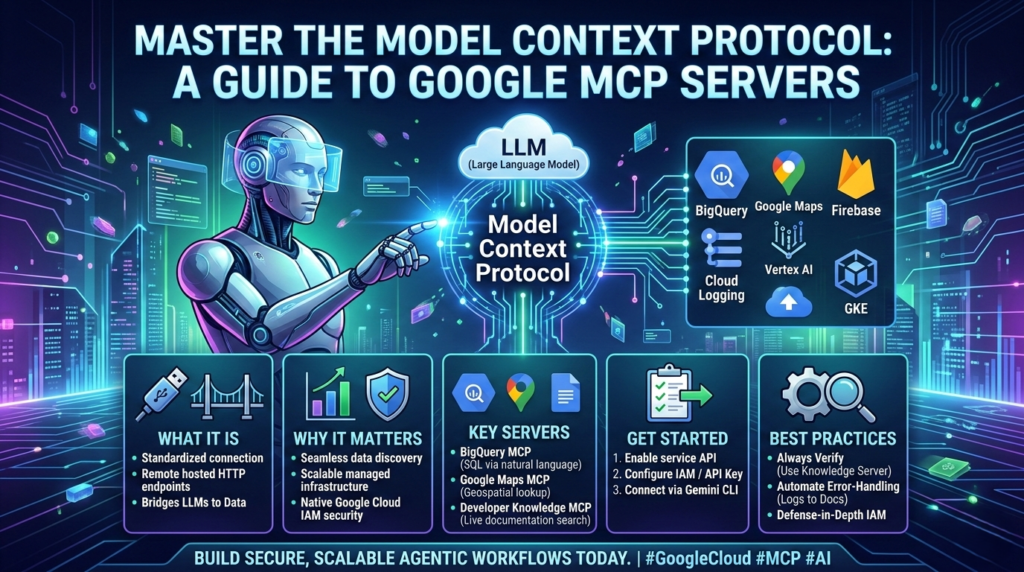
A Google MCP Server is a hosted implementation of the Model Context Protocol that runs on Google’s managed infrastructure. It acts as a semantic bridge between a Large Language Model (LLM)—like Gemini or Claude—and Google’s massive ecosystem of services, including BigQuery, Google Maps, and Google Kubernetes Engine (GKE).
Unlike local MCP servers that run on your machine using standard input/output (stdio), Google’s remote servers provide public HTTP endpoints. This means your AI agents can access petabyte-scale data and complex cloud resources without you needing to manage the underlying infrastructure or authentication flows manually.
The Core Architecture: Host, Client, and Server
To understand how a Google MCP Server works, you must understand the three-role architecture:
- MCP Host: The runtime environment where the AI lives (e.g., Gemini CLI, Claude Desktop, or Cursor IDE).
- MCP Client: The protocol layer inside the host that maintains a stateful connection to the server.
- MCP Server: The provider of tools and data. It exposes specific “Tools” (functions), “Resources” (data), and “Prompts” (templates) that the AI can use.
Why Google MCP Servers are a Game Changer
Before MCP, if you wanted an AI to query a database, you had to write custom Python scripts, define JSON schemas for function calling, and handle OAuth tokens. With a Google MCP Server, the “discovery” is automatic.
Key Benefits of Managed Remote Servers
- Scalability: Managed servers run on Google’s infrastructure, handling stateless requests at an enterprise scale.
- Enterprise Security: They integrate natively with Google Cloud IAM. An agent must pass two “gates”: the MCP Gate (permission to talk to the server) and the Service Gate (permission to access the actual data).
- Real-Time Grounding: Tools like the “Developer Knowledge MCP Server” allow agents to search official, live documentation rather than relying on potentially outdated training data.
- Reduced Hallucinations: By providing a direct line to structured data sources, the AI no longer needs to “guess” facts; it can look them up.
Exploring the Google MCP Server Ecosystem
Google has released a series of specialized servers designed to empower developers. Here is a breakdown of the most impactful tools currently available in the Google MCP Server lineup:
| Service | Primary Function | Example Use Case |
| BigQuery MCP | Bridges natural language to SQL execution. | “Compare sales in the Northeast vs Southwest regions.” |
| Google Maps MCP | Geospatial discovery and travel logistics. | “Can I make a 5 PM meeting if I leave the airport at 4 PM?” |
| Developer Knowledge | Grounds agents in live official documentation. | “What is the latest syntax for a GKE cluster update?” |
| Cloud Logging MCP | Real-time troubleshooting and log retrieval. | “Find all ‘Permission Denied’ errors from the last hour.” |
| Firestore MCP | Natural language database management. | “Update all user records where the subscription has expired.” |
Step-by-Step: Getting Started with a Google MCP Server
If you are ready to build your first agentic workflow, the Google Cloud tutorial series suggests a clear path forward. Here is how to enable and test a Google MCP Server using the Gemini CLI.
1. Enable the API
First, you must enable the specific service API in your Google Cloud Project. For example, if you want to use the Developer Knowledge server, search for “Developer Knowledge API” in the Cloud Console and enable it.
2. Configure Authentication
You will need a Google Cloud API Key or a Service Account with the roles/mcp.toolUser role. This ensures that only authorized entities can trigger the Google MCP Server tools.
3. Connect via Gemini CLI
The Gemini CLI is a powerful host for testing MCP integrations. You can configure a server with a single command:
Bash
# Example configuration for a Google MCP Server
gemini-cli configure mcp-server --name "maps-service" --url "https://mapstools.googleapis.com/mcp"
4. Test with MCP Inspector
Before deploying to production, use the MCP Inspector. This is a web-based developer tool that lets you connect to your Google MCP Server interactively. You can list available tools, view their input schemas, and run test queries to ensure the connection is stable.
Actionable Insights: Best Practices for AI Agents
Simply connecting a Google MCP Server isn’t enough; you need to build with safety and efficiency in mind.
- Implement “Defense-in-Depth”: Use IAM Service Accounts as the ultimate authority. Never rely solely on the AI’s “instructions” to limit its power.
- Use the “Always-Verify” Skill: When building agents that execute CLI commands, create a “Skill” (a persistent playbook) that forces the agent to consult the Developer Knowledge Google MCP Server before running any destructive command.
- Handle Errors Gracefully: Use the Cloud Logging server to create an “autonomous loop.” If a command fails, the agent can automatically retrieve the logs, research the error in the documentation, and suggest a fix.
The Future of Agentic Workflows
The Google MCP Server ecosystem is just getting started. As more services like Firebase and Google Workspace are added to the protocol, the friction between “thinking” and “doing” will disappear. We are moving toward a future where developers don’t just write code—they orchestrate a team of specialized AI agents, each powered by a standardized, secure Google MCP Server.
Whether you are automating cloud infrastructure or building a data-driven marketing assistant, mastering this protocol is the key to unlocking the full potential of Generative AI in the enterprise.