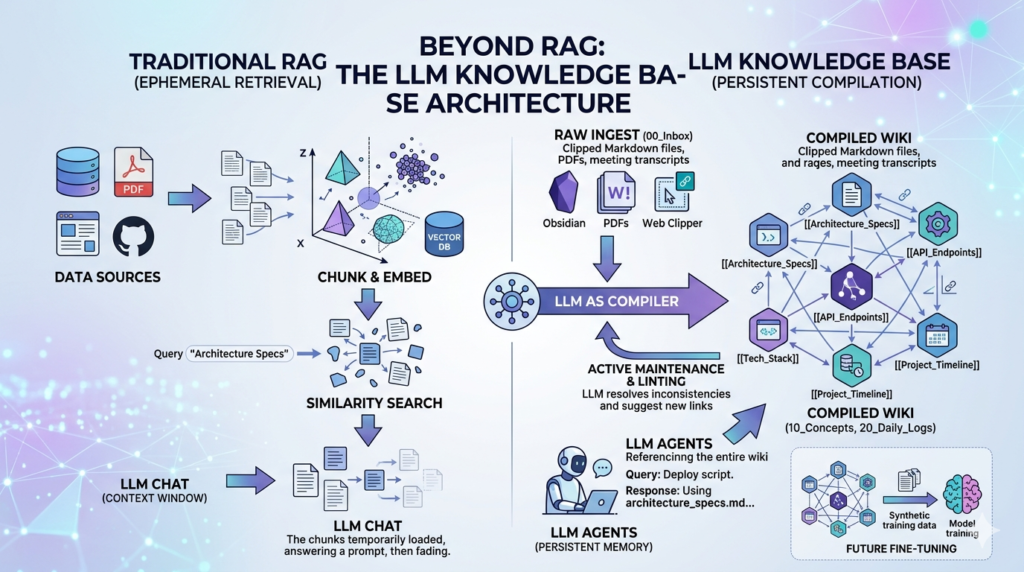
The landscape of Artificial Intelligence is currently undergoing a fundamental shift. For the past two years, the industry has been obsessed with Retrieval-Augmented Generation (RAG). We were told that the only way to give a Large Language Model (LLM) access to private, up-to-date information was to slice documents into “chunks,” turn them into mathematical vectors, and store them in a specialized database.
However, Andrej Karpathy—the former Director of AI at Tesla and a founding member of OpenAI—has proposed a radical alternative. He calls it the LLM Knowledge Base.
This isn’t just a minor tweak to existing workflows. It is a complete structural rethink that moves away from the “retrieval” mindset and toward a “compilation” mindset. By leveraging the LLM Knowledge Base architecture, developers and researchers can create a persistent, evolving, and human-readable intelligence layer that overcomes the most frustrating limitations of traditional RAG systems.
In this comprehensive guide, we will break down the mechanics of Karpathy’s vision, why he believes RAG is often a “crutch,” and how you can implement an LLM Knowledge Base to achieve a higher level of AI autonomy and project memory.
The Genesis of the LLM Knowledge Base Concept
To understand why the LLM Knowledge Base is necessary, we must first look at the “Statelessness Problem.” Modern LLMs, despite their brilliance, are effectively “amnesiacs.” Every time you open a new chat window with Claude, GPT-4, or Gemini, the model starts from zero. It has no memory of your previous technical decisions, your coding style, or the specific nuances of your business logic unless you manually paste that context in.
RAG was the first attempt to fix this amnesia. It allows the model to “look things up” in a digital library. But Karpathy argues that “looking things up” is not the same as “knowing.”
When a human expert works on a project, they don’t just search a database; they maintain a structured understanding. They keep notes, they link ideas, and they refine their knowledge over time. Karpathy’s LLM Knowledge Base is an attempt to give AI that same capability: a structured, persistent, and self-managed “brain” stored in Markdown.
Why RAG is Falling Short
Before we dive into the new architecture, let’s identify the specific pain points that the LLM Knowledge Base aims to solve:
- The “Chunking” Nightmare: RAG requires you to break documents into 500-token or 1000-token chunks. This often splits a crucial sentence in half or loses the context of a paragraph, leading to hallucinations or incomplete answers.
- Semantic Blindness: Vector search (the heart of RAG) finds things that are mathematically similar, not necessarily logically relevant. If you ask about “The King of England,” a RAG system might pull up a recipe for “King Cake” just because the words are similar.
- Lack of Synthesis: Standard RAG is a one-way street. The AI reads the data, answers your prompt, and then forgets everything. It never improves the data or identifies contradictions in the source material.
The LLM Knowledge Base changes the game by turning the LLM from a passive reader into an active librarian.
Core Components of the Karpathy Architecture
Karpathy’s architecture is built on the principle of “Knowledge as Code.” Just as software is compiled from raw source code into an executable, your raw data should be compiled into a structured LLM Knowledge Base.
1. The Raw Ingest Layer (/raw)
The first stage of the LLM Knowledge Base is the collection of “dirty” data. This includes:
- PDFs of research papers.
- Transcripts of meetings or YouTube videos.
- Raw exports from Notion or Slack.
- Web-clipped articles (Karpathy specifically advocates for the Obsidian Web Clipper to ensure clean Markdown).
The key here is that this folder is a “Source of Truth” but it is not what the AI interacts with daily. It is the fuel for the next stage.
2. The LLM Compiler (The “Processing” Phase)
In a traditional RAG setup, you would just embed these raw files. In the LLM Knowledge Base workflow, you run an LLM-based “Compiler” script. The LLM reads the raw files and performs several high-level cognitive tasks:
- De-noising: Removing ads, headers, footers, and irrelevant sidebars from web content.
- Entity Extraction: Identifying the people, technologies, and concepts mentioned.
- Structured Rewriting: Turning a messy transcript into a clean, bulleted technical summary.
3. The Interlinked Wiki (/compiled)
The output of the compiler is a set of Markdown files that look like a professional Wiki. This is the heart of the LLM Knowledge Base.
- Backlinking: The LLM creates
[[Wiki Links]]between related files. If a new paper mentions “RAG,” the compiler automatically links it to the existingRAG_Overview.mdfile. - Hierarchy: Instead of flat files, the LLM Knowledge Base organizes data into logical folders:
/Protocols,/People,/Projects, and/Concepts.
Comparison: LLM Knowledge Base vs. Traditional RAG
For organizations deciding where to invest their engineering resources, understanding the trade-offs is vital. Use the table below to evaluate which system fits your needs.
While RAG is still superior for searching through 10 million customer support tickets, the LLM Knowledge Base is vastly superior for deep technical research, project management, and personal learning.
The “Vibe Coding” Philosophy in Knowledge Management
One of the most interesting aspects of Karpathy’s approach is the implementation method. He doesn’t suggest writing thousands of lines of rigid Python code. Instead, he leans into “Vibe Coding”—using AI agents (like Cursor, Windsurf, or Claude Engineer) to build the automation scripts.
In a LLM Knowledge Base setup, your “vibe” determines how the data is organized. You might prompt your agent:
“Hey, look at my
/rawfolder. If you see anything related to ‘System Architecture,’ create a new file in/compiledand link it to my ‘Master Architecture’ doc. Use a professional, technical tone.”
This allows the LLM Knowledge Base to adapt to your specific “vibe” or professional requirements without you needing to be a senior software engineer.
The Role of Obsidian
Karpathy frequently highlights Obsidian as the ideal “IDE” for an LLM Knowledge Base. Why?
- Local First: Your data isn’t locked in a proprietary cloud. It’s just a folder of text files on your hard drive.
- Graph View: Obsidian can visualize the links the LLM creates, allowing you to see the “clusters” of knowledge forming in your LLM Knowledge Base.
- Plugin Ecosystem: You can easily write or use plugins that allow an LLM to “read” your entire vault and suggest updates.
Advanced Strategies: Linting and Recursive Summarization
To maintain a high-quality LLM Knowledge Base, Karpathy suggests borrowing concepts from software engineering—specifically Linting.
Knowledge Linting
In programming, a linter checks your code for errors. In a LLM Knowledge Base, the LLM acts as a “Knowledge Linter.” Every week, you can run a script that asks the LLM to:
- Find two documents that contradict each other.
- Identify “orphan” files that aren’t linked to anything else.
- Suggest updates to old files based on new information in the
/rawfolder.
Recursive Summarization
When your LLM Knowledge Base grows too large, even the biggest context windows (like Gemini 1.5 Pro’s 2 million tokens) can get crowded. The solution is recursive summarization. The LLM takes five detailed files on a topic and “compiles” them into one master executive summary. This master summary becomes the primary “entry point” for the model, ensuring that the most important context is always at the top of its mind.
Actionable Steps: Building Your Own Persistent Memory
If you want to move beyond ephemeral chats and start building a LLM Knowledge Base, follow this workflow:
Phase 1: The Setup
- Install Obsidian: Create a new vault named “My_Intelligence_Base.”
- Create Folders: Set up
00_Inbox(for raw clips),10_Concepts(for compiled data), and20_Daily_Logs. - Configure Web Clipper: Set up a browser extension to save articles directly to
00_Inboxas Markdown.
Phase 2: The Agentic Loop
- Select your LLM Agent: Use a tool like Cursor or a custom Python script using the OpenAI/Anthropic API.
- Define the Prompt: Tell the agent its job is to act as a “Knowledge Architect.”
- Execute the Compilation: Have the agent read the
00_Inbox, extract the core insights, and write/update files in10_Concepts. Ensure it uses the[[Link]]format for Obsidian compatibility.
Phase 3: The Daily Workflow
When you start a new task, don’t just ask the LLM a question. First, feed it the relevant “compiled” files from your LLM Knowledge Base.
“Using the context from
Architecture_Specs.mdandProject_Roadmap.md, help me write a deployment script for our new API.”
This ensures the LLM is working with your actual project history, not just general internet knowledge.
The Future: Fine-Tuning and “Private Intelligence”
The ultimate destination of the LLM Knowledge Base is the elimination of “Prompt Engineering.” Currently, we spend a lot of time giving the AI context. But as your LLM Knowledge Base becomes more refined, it becomes the perfect dataset for Fine-Tuning.
Imagine a future where you take your highly-curated LLM Knowledge Base and use it to fine-tune a small, local model (like a Llama 3 or Mistral variant). You would end up with a “Personal AI” that has your specific knowledge baked into its very weights.
In this scenario, the LLM Knowledge Base acts as the “training ground” for your digital twin. You no longer need RAG because the model is the knowledge.
Strategic Benefits for Organizations
For businesses, the LLM Knowledge Base offers a competitive advantage that traditional RAG cannot match:
- Institutional Memory: When a lead engineer leaves, their “mental model” often leaves with them. If that engineer was maintaining an LLM Knowledge Base, their logic, decisions, and “vibe” are preserved in a format the AI can continue to use.
- Data Sovereignty: Because the LLM Knowledge Base relies on Markdown files rather than a complex cloud-based vector database, the company retains total control over its intellectual property.
- Accuracy and Trust: Because every claim in the LLM Knowledge Base is human-readable and linked to a source in the
/rawfolder, the “Hallucination Risk” is drastically reduced. You can always click a link to see exactly why the AI believes something is true.
Conclusion: Emulating the Karpathy Method
Andrej Karpathy’s pivot away from standard RAG toward a compiled LLM Knowledge Base is a wake-up call for the AI community. It reminds us that Large Language Models are not just calculators; they are “reasoning engines.” By treating our data as a structured, interlinked library rather than a pile of mathematical vectors, we unlock the true potential of these models.
The LLM Knowledge Base is more than just a storage system; it is a philosophy of “Active Intelligence.” It requires effort to set up and curate, but the reward is an AI that truly understands your world, remembers your history, and grows alongside your projects.
Stop “chunking” your data and start “compiling” your knowledge. The era of the amnesiac AI is over; the era of the LLM Knowledge Base has begun.
Frequently Asked Questions (FAQ)
To help you fully master the LLM Knowledge Base architecture and understand how it differs from the tools you’re likely already using, we’ve compiled this exhaustive FAQ. This guide addresses technical nuances, implementation hurdles, and the strategic “why” behind Karpathy’s approach.
1. General Concepts & Fundamentals
What is the core difference between an LLM Knowledge Base and a traditional Wiki?
A traditional Wiki (like Wikipedia or a corporate Notion) is human-written and manually linked. While it is structured, it is passive. An LLM Knowledge Base is an active, self-organizing system. The LLM acts as the primary “editor,” reading raw inputs (PDFs, transcripts, articles) and “compiling” them into a structured Markdown format. It automatically handles cross-referencing, summarization, and updates, ensuring that the “knowledge asset” evolves without constant human labor.
Why does Andrej Karpathy suggest “bypassing” RAG?
Karpathy isn’t saying RAG is useless, but rather that it is often “over-engineered” for small-to-mid-scale datasets (~100–1,000 documents). Standard RAG relies on vector similarity, which can be noisy and lose context due to arbitrary “chunking.” By using a LLM Knowledge Base, you keep information in a human-readable, highly structured Markdown format. This allows the LLM to reason over entire, well-organized articles rather than fragmented snippets, leading to much higher accuracy and better synthesis of complex ideas.
What is “Knowledge Compilation” in this context?
In software, compilation turns human-readable code into machine-executable instructions. In this architecture, Knowledge Compilation is the process where an LLM takes unstructured “raw” data and transforms it into a “compiled” Markdown file. This involves:
- De-noising: Stripping away HTML fluff or irrelevant text.
- Structuring: Applying a consistent hierarchy of H1, H2, and H3 tags.
- Linking: Creating
[[Internal Links]]to other related concepts in the vault. - Summarizing: Generating a high-density “Executive Summary” at the top of every file.
2. Technical Implementation & Tooling
Why is Markdown the preferred format for an LLM Knowledge Base?
Markdown is the “native language” of LLMs. Most major models (GPT-4, Claude, Gemini) were trained extensively on Markdown-heavy datasets like GitHub and Stack Overflow. It is:
- Token-Efficient: It uses fewer tokens than HTML or JSON to convey structure.
- Portable: It is a plain-text format that works in any editor.
- Interlinkable: It supports easy backlinking (especially in tools like Obsidian).
- Future-Proof: It is easily converted into synthetic data for future fine-tuning.
What role does Obsidian play in this architecture?
Karpathy describes Obsidian as the “IDE” (Integrated Development Environment) for your knowledge. While the LLM does the heavy lifting of writing the files, Obsidian provides the interface for you to browse, audit, and visualize the data. Key features like the “Graph View” allow you to see the semantic clusters the LLM has created, helping you identify gaps in your research or unexpected connections between projects.
How does “Linting” work for a knowledge base?
Just as a code linter checks for syntax errors, a Knowledge Linter (powered by an LLM) scans your Markdown wiki for logical errors. It looks for:
- Contradictions: “File A says the deadline is June, but File B says it’s July.”
- Orphaned Nodes: Files that aren’t linked to the rest of the wiki.
- Stale Data: Information that hasn’t been updated despite new raw data being available in the
/rawfolder. - Missing Links: Suggesting where two separate concepts should actually be connected.
3. Scaling & Performance
Can an LLM Knowledge Base scale to millions of documents?
Currently, no. For massive datasets (like 10 million customer support tickets), traditional RAG with a vector database is still the superior choice due to search speed and storage efficiency. The LLM Knowledge Base is designed for “High-Signal Knowledge”—technical research, project specs, and personal learning—where quality of synthesis is more important than sheer volume.
How do I handle context window limits as the wiki grows?
Even with the 2-million-token context window of Gemini 1.5 Pro, you can eventually hit a limit. The architecture handles this through Recursive Summarization and Progressive Disclosure:
- Level 0: The LLM always reads a “Master Index” (the map of the wiki).
- Level 1: It reads the high-level summaries of relevant categories.
- Level 2: It only reads the full, detailed Markdown files for the specific topics it needs to answer a query.This tiered approach allows the system to scale far beyond what a single prompt could handle.
Is there a cost implication to this “Compilation” step?
Yes. Traditional RAG is cheap because you only “pay” to embed the document once. In Karpathy’s model, you pay for the LLM to read and rewrite the document into the wiki. While this is more expensive upfront, it significantly reduces costs later by providing cleaner, more concise context that requires fewer tokens to process during daily queries.(Karpathy AI Architecture, Bypassing RAG Systems, Persistent AI Memory, AI Markdown Wiki)
4. Advanced Workflows: Vibe Coding & Fine-Tuning
What is “Vibe Coding” and how does it relate to this?
“Vibe Coding” is the practice of using AI agents to write the code for your tools based on your “vibe” or intent, rather than manual syntax. In this setup, you would use an agent (like Cursor) to build the Python scripts that move data from your /raw folder to your /compiled wiki. You are essentially “vibe coding” your own custom intelligence pipeline.
How does this architecture lead to Fine-Tuning?
This is the “Endgame” of the Karpathy method. Once you have a perfectly curated, interlinked LLM Knowledge Base, you have the world’s best training dataset. You can use these clean Markdown files to generate “Synthetic Q&A pairs” and fine-tune a smaller, local model (like Llama 3). This effectively “bakes” your knowledge into the model’s weights, making it a true “Private Intelligence” that doesn’t need to look things up—it just knows them.
Can I use this for collaborative team environments?
Absolutely. Because the wiki is just a folder of Markdown files, you can host it in a Git repository. Teams can “pull” the latest knowledge, and the LLM “compiler” can run as a GitHub Action or a background process, ensuring that the team’s collective intelligence is always structured, linked, and up-to-date.
5. Troubleshooting & Best Practices
What should I do if the LLM makes a mistake during compilation?
Because the output is Markdown, it is Human-in-the-Loop friendly. If the AI hallucinates a connection, you can simply open the file in Obsidian and delete the link. The “Active Maintenance” layer can also be programmed to flag its own “low-confidence” summaries for human review.
Is it better to use a local LLM or an API for the compiler?
For the compilation step, frontier models (like Claude 3.5 Sonnet or GPT-4o) are highly recommended because they are better at following complex structural formatting and identifying subtle semantic links. However, once the wiki is “compiled,” a smaller local LLM can easily handle the daily “querying” of that structured data, saving you money and increasing privacy.