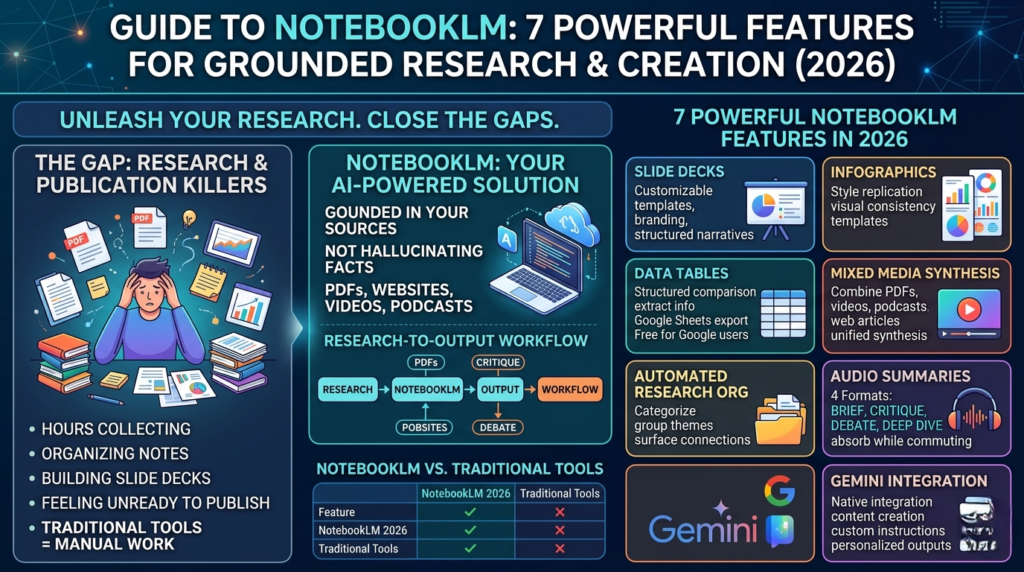
If you’ve ever spent hours collecting research, organizing notes, building slide decks, and still felt like you had nothing ready to publish — you’re not alone.
The gap between raw research and polished, publishable content is one of the biggest productivity killers for writers, analysts, educators, and marketers alike. Most AI tools help you write faster. Very few help you think and organize better.
This NotebookLM guide is here to change that.
This NotebookLM guide breaks down the 7 most powerful features of the platform in 2026, explains how each one saves you real time, and gives you actionable strategies to integrate them into your workflow — whether you’re producing reports, building presentations, or synthesizing research at scale. By the time you finish this NotebookLM guide, you’ll know exactly which features matter most for your work and how to start using them today.
What Is NotebookLM? {#what-is-notebooklm}
NotebookLM is Google’s AI-powered research and content creation platform. Unlike standard chatbots, it’s designed to work with your sources — PDFs, websites, YouTube videos, podcasts, and more — rather than relying solely on pre-trained knowledge.
The core premise is powerful: upload your sources, and NotebookLM becomes an AI grounded in your curated research. It doesn’t hallucinate facts from the general internet. It pulls directly from what you give it.
In 2026, the platform has matured significantly, adding robust content creation tools that take it well beyond a note-taking app. This NotebookLM guide will show you exactly what’s new — and more importantly, how to use it effectively.
📌 New to AI-powered research tools? Also read our internal guide on How to Choose the Right AI Research Tool for Your Workflow before diving in.
NotebookLM Guide: 7 Powerful Features Explained {#7-features}
Feature 1: Customizable Slide Decks {#slide-decks}
One of the most immediately practical additions covered in this NotebookLM guide is its Customizable Slide Decks feature.
Rather than exporting raw notes and manually formatting them in PowerPoint or Google Slides, NotebookLM now lets you generate complete, presentation-ready slide decks directly from your source materials.
You get:
- Multiple design templates tailored to different professional contexts
- Editable slide structures so you maintain full narrative control
- Branding options to align presentations with your organization’s visual identity
For professionals who regularly present research findings — consultants, educators, product managers — this feature alone can save several hours per presentation cycle. The AI doesn’t just dump bullet points onto slides; it organizes content logically, pulling key arguments and supporting evidence directly from your curated sources.
Pro tip: Before generating a slide deck, spend five minutes refining your source list. Fewer, higher-quality sources consistently produce tighter, more compelling decks that require less post-generation cleanup.
Feature 2: Infographic Generation with Style Replication {#infographics}
Visual communication is increasingly non-negotiable in content marketing, internal reporting, and educational publishing. NotebookLM’s infographic generation feature addresses this need directly.
What makes it stand out from generic design tools is style replication. You can reference a visual example — a competitor’s infographic, your brand’s existing design aesthetic — and the platform will generate new infographics that mirror those visual conventions.
This is genuinely valuable for:
- Content marketing teams maintaining visual consistency across campaigns
- Educators building materials that align with institutional style guides
- Researchers creating publication-ready figures without a dedicated designer
The templates are pre-built but highly adjustable, meaning you’re not locked into a rigid format. You can iterate quickly — and that’s the real productivity gain here.
Feature 3: NotebookLM Data Tables & Google Sheets Export {#data-tables}
This is arguably the most underrated feature in this NotebookLM guide, and it’s now free for all Google users.
NotebookLM data tables allow you to extract structured, comparative information from your uploaded sources and organize it into clean, exportable tables instantly. Once generated, these tables export directly to Google Sheets — making them immediately shareable and analysis-ready.
Think about the typical workflow this replaces:
- Read through multiple sources manually
- Copy relevant data points into a spreadsheet
- Format, label, and clean the data
- Share with collaborators
NotebookLM compresses all four steps into one. You define what you need — a comparison of product specs, a breakdown of statistics across studies, a summary of competing arguments — and the AI structures it for you.
According to Google’s official NotebookLM documentation, the platform supports a wide variety of source types, making data extraction from heterogeneous research sets significantly more efficient than manual methods.
Who should use this feature most: Analysts, researchers, journalists, and product teams running competitive research will find data tables especially valuable.
Feature 4: Mixed Media Synthesis {#mixed-media}
Most research doesn’t arrive in a single format. You might have a PDF report, a YouTube explainer, a podcast interview, and three web articles — all covering different angles of the same topic.
NotebookLM’s Mixed Media Synthesis feature was built precisely for this scenario.
You can feed the platform content from:
- PDFs (academic papers, reports, e-books)
- Websites (news articles, documentation, blog posts)
- YouTube videos (interviews, lectures, tutorials)
- Podcasts (audio-first content and expert discussions)
NotebookLM then synthesizes all of these into a single, coherent, evidence-based output — whether that’s a summary, a comparative analysis, or a content draft.
This fundamentally changes the research-to-content pipeline. Instead of manually cross-referencing five open tabs and taking fragmented notes, you get a unified synthesis grounded in all your sources simultaneously.
📌 See also: Claude Projects vs. NotebookLM — Which Tool Is Right for Your Research? — an in-depth comparison of the two leading AI research platforms.
Feature 5: Automated Research Organization {#research-org}
If you’ve ever opened a folder called “Research — FINAL v3” and felt a quiet sense of dread, this is the NotebookLM feature for you.
Automated Research Organization eliminates the manual work of sorting, labeling, and categorizing your source materials. The platform:
- Automatically collects and categorizes uploaded sources
- Groups related materials thematically
- Surfaces connections between sources you might not have spotted manually
The result: you jump straight from source collection to analysis — skipping the organizational busywork entirely.
This is particularly powerful for long-form research projects where source volumes grow quickly, such as academic literature reviews, market research reports, or investigative journalism.
Feature 6: Audio Summaries in Four Formats {#audio-summaries}
This is one of the more creative features in this NotebookLM guide, and it reflects a sophisticated understanding of how professionals actually consume information.
NotebookLM Audio Summaries are available in four distinct formats:
| Format | What It Does | Best For |
|---|---|---|
| Brief | Concise key-point summary | Quick decision-making, daily catch-ups |
| Critique | Analyzes strengths and weaknesses | Peer review, editorial evaluation |
| Debate | Presents opposing viewpoints | Strategy planning, nuanced discussions |
| Deep Dive | In-depth exploration of complex topics | Academic study, thorough comprehension |
The ability to choose your format depending on context is a genuine differentiator. A busy executive might want a Brief summary of a 40-page report. A policy analyst might need the Debate format to understand multiple stakeholder positions. A graduate student might benefit from the Deep Dive to master a dense topic.
All four formats are audio-delivered, meaning you can absorb research while commuting, exercising, or between meetings — reclaiming time that would otherwise be lost.
Feature 7: Gemini Integration for Direct Content Creation {#gemini}
The most powerful capability covered in this NotebookLM guide is its native integration with Google Gemini.
Rather than exporting your research notes and pasting them into a separate AI writing tool, NotebookLM connects directly with Gemini to let you create content from curated research without leaving the platform.
This eliminates a friction point that sounds small but compounds significantly:
- No copying and pasting between tools
- No re-prompting an AI with context it doesn’t have
- No risk of the AI drifting away from your verified sources
With Custom AI Instructions, you can fine-tune how Gemini interprets your research — specifying tone, format, depth of analysis, and target audience. Outputs feel genuinely personalized rather than generic.
For content creators, researchers, and marketing teams, this integration transforms NotebookLM from a research organizer into a full research-to-publication pipeline.
You can learn more about Gemini’s underlying capabilities directly on the Google Gemini official page, which outlines the model’s multimodal reasoning features that power NotebookLM’s content generation.
NotebookLM vs. Traditional Research Tools {#comparison}
| Feature | NotebookLM 2026 | Traditional Tools (Notion, Evernote) | Generic AI Chatbots |
|---|---|---|---|
| Source-grounded outputs | ✅ Yes | ❌ No | ❌ No |
| Slide deck generation | ✅ Built-in | ❌ Manual export | ⚠️ Text-only |
| Data table export (Google Sheets) | ✅ Direct | ⚠️ Manual formatting | ❌ No |
| Audio summaries | ✅ 4 formats | ❌ No | ❌ No |
| Mixed media input | ✅ PDF, video, web, podcast | ⚠️ Limited | ⚠️ Variable |
| Gemini integration | ✅ Native | ❌ No | ❌ No |
| Style replication for visuals | ✅ Yes | ❌ No | ❌ No |
| Free tier availability | ✅ Yes (data tables included) | ⚠️ Limited | ✅ Yes |
The comparison makes one thing clear: no single traditional tool covers all these bases simultaneously. The value of this NotebookLM guide is understanding that it’s not just any one feature — it’s how each feature feeds seamlessly into the next.
Best Practices to Get the Most From NotebookLM {#best-practices}
Reading a NotebookLM guide is one thing. Extracting maximum value from the platform requires a deliberate approach. Here are the most effective strategies based on how the platform is designed to work.
Curate Ruthlessly, Not Broadly
It’s tempting to upload every source you can find on a topic. Resist this. Fewer, higher-quality sources consistently produce better outputs. NotebookLM performs best when its source pool is tightly focused rather than sprawling. Think of it like briefing a highly capable researcher: the clearer the scope, the sharper the output.
Write Detailed, Specific Prompts
Vague prompts produce vague outputs. If you’re generating a data table, specify exactly which variables you want compared. If you’re creating a slide deck, describe the audience, the key takeaway, and the tone.
Tools like Claude or other specialized AI assistants can help you draft highly structured research prompts before you bring them into NotebookLM — using one AI to get the best from another.
For more on prompt engineering strategy, Anthropic’s prompt engineering documentation offers an excellent foundation that applies directly to getting stronger outputs from NotebookLM’s custom instruction fields.
Use Audio Summaries as a Pre-Reading Map
Before diving into a complex document set, generate a Brief audio summary. This gives you a high-level map of the content, making your deeper reading faster and more strategic. Use the Deep Dive format afterward to fill in the gaps.(NotebookLM guide)
Use Gemini Integration for First Drafts, Not Final Copies
Don’t use the Gemini integration to produce final content. Use it to produce strong, source-grounded first drafts — then edit, add your perspective, and refine. This hybrid approach preserves both speed and quality.
Build Repeatable Workflow Templates
If you regularly produce the same type of output — weekly competitive analysis, monthly research reports, stakeholder briefings — build a reusable NotebookLM workflow around it. Set up a consistent source structure, save your custom AI instructions, and you’ll cut production time dramatically with each iteration.(NotebookLM guide)
📌 Also explore: The Best AI Productivity Tools for Professionals in 2026 — a comprehensive roundup of tools that pair well with NotebookLM.(best AI tools for content creation 2026)
Who Benefits Most From NotebookLM in 2026? {#who-benefits}
This NotebookLM guide has covered a wide range of features, but different professionals will find different parts most transformative. Here’s a quick breakdown:
- Researchers & academics: Mixed media synthesis, data table creation, and audio Deep Dive summaries are game-changing for literature reviews and study preparation.
- Content creators & bloggers: The Gemini integration and infographic generation eliminate two of the most time-consuming parts of the content pipeline.
- Consultants & analysts: Customizable slide decks and automated research organization compress the gap between raw research and client-ready deliverables.
- Educators & trainers: Style replication for infographics and the four audio summary formats enable faster, more consistent creation of learning materials.
- Marketers: Mixed media input and visual branding options make NotebookLM powerful for competitive research and campaign content development alike.
The common thread: if your work involves synthesizing information and turning it into structured outputs, NotebookLM is built for you.
Final Thoughts: Is This NotebookLM Guide Worth Acting On? {#final-thoughts}
The short answer is yes — especially now that data tables are free for all Google users.(best AI tools for content creation 2026)(NotebookLM guide)
What makes this NotebookLM guide relevant beyond a feature list is the broader shift it represents: AI tools are maturing from novelty to genuine professional infrastructure. NotebookLM isn’t asking you to change how you think. It’s automating the parts of research and content creation that were always tedious, freeing you to focus on the judgment calls that only you can make.(NotebookLM guide)
The platform’s core strength is its insistence on evidence-based outputs. Every slide, every table, every audio summary is grounded in sources you control. That’s not a small thing in an era where AI hallucination is a real concern for anyone producing professional content.(NotebookLM Gemini integration)(NotebookLM guide)
If you’re already using Google Workspace, the on-ramp couldn’t be lower. Start with data tables and the audio Brief format — both are immediately practical and require zero learning curve. From there, layer in the slide decks, infographic generation, and Gemini integration as you grow more comfortable with the workflow.(NotebookLM Gemini integration)(NotebookLM guide)
The professionals who master this NotebookLM guide in early 2026 will have a compounding productivity advantage over those who wait. Start with one source. One prompt. One output. The sophistication follows naturally.”NotebookLM features 2026″
Here is the FAQ — ready to copy and paste:
Frequently Asked Questions About NotebookLM
1. What exactly is NotebookLM and how is it different from ChatGPT or other AI chatbots?
NotebookLM is a source-grounded AI research platform built by Google. The fundamental difference from general-purpose chatbots like ChatGPT is that NotebookLM only draws from the sources you upload — PDFs, websites, YouTube videos, podcasts, and Google Docs — not from the broader internet or its pre-trained knowledge base.
This matters enormously for professional work. When you generate a data table, summary, or slide deck inside NotebookLM, every claim traces back to a source you control and have verified. For researchers, analysts, journalists, and educators who need evidence-backed outputs, that’s a meaningful advantage over a chatbot that may confidently produce inaccurate information.
In short: ChatGPT generates content from general training data. NotebookLM generates content from your curated research.
2. Is NotebookLM free to use in 2026?
Yes — NotebookLM has a free tier that includes access to most core features, including the newly expanded data tables functionality, which Google made available to all users at no cost. This makes it one of the most accessible AI research tools currently available.
The free plan covers source uploads, notebook creation, audio summaries, data table generation, and basic content outputs. Google’s Workspace integration — including direct Google Sheets export from data tables — is also included.
For users who need higher upload limits, more concurrent notebooks, or enterprise-grade collaboration and admin controls, a paid tier is available through Google Workspace plans. For the majority of individual professionals and small teams, the free version is more than sufficient to build a fully functional research workflow.
3. How many sources can I upload to a single NotebookLM notebook?
NotebookLM supports up to 50 sources per notebook, with each source capped at 500,000 words. That covers most professional use cases — from a literature review pulling from 30 academic papers to a competitive analysis built from a mix of websites, reports, and podcast transcripts.
The key practical advice here is not to hit that ceiling just because you can. As covered in this NotebookLM Guide, fewer, higher-quality sources consistently outperform large, unfocused source collections. The AI synthesizes more accurately and produces tighter outputs when the source pool is deliberately curated rather than exhaustively broad.
If a project genuinely requires more than 50 sources, the recommended approach is to split it across multiple notebooks organized by theme or subtopic, then synthesize findings manually at the end.
4. Can NotebookLM replace a research assistant or content writer?
Not entirely — and it’s not designed to. NotebookLM is best understood as a force multiplier for your own expertise, not a replacement for human judgment.
What it genuinely replaces is the mechanical side of research work: gathering sources, organizing materials, extracting structured data, generating first-draft summaries, and building presentation skeletons — tasks that consume significant time without requiring creative thinking.
What it doesn’t replace is your ability to evaluate source quality, identify research gaps, add original insight, or ensure the final output reflects your professional voice. The best results come from treating NotebookLM as a highly capable research partner that handles the groundwork so you can focus on the thinking.
5. Does NotebookLM work with sources in languages other than English?
Yes. NotebookLM supports multiple languages for both source ingestion and output generation, powered by Google’s Gemini model. Users have successfully used the platform with sources in Spanish, French, German, Portuguese, Japanese, and several other languages.
Performance is strongest with English-language sources, as the model’s training data is most dense in English. For multilingual research projects — say, a comparative policy analysis drawing from government documents in three languages — test outputs carefully and cross-check key claims, as synthesis quality can vary across language pairs.
Audio summaries are also available in multiple languages, making the platform genuinely useful for international teams building research workflows in their native language.