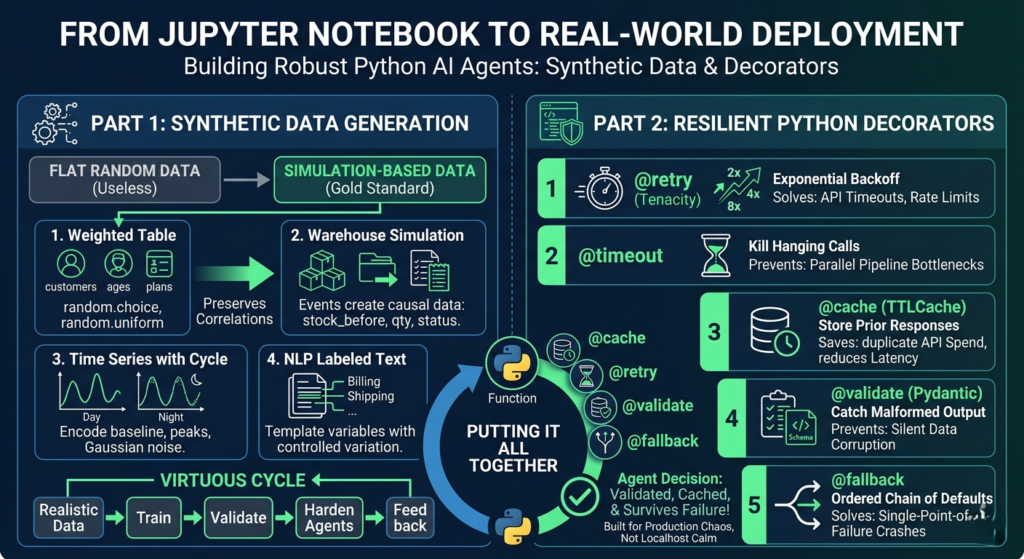
You build something beautiful in a Jupyter notebook. It runs clean, handles edge cases, and the demo looks great. Then you push it to production — and within 48 hours, it’s fallen apart. API calls hang indefinitely. LLM responses come back as unstructured mush. Your training data is a flat, random mess that the model refuses to generalize from.
This is the gap between “AI agent that works in a notebook” and “AI agent that works in the real world.” Crossing it requires two things most tutorials skip: synthetic data that actually mimics reality, and Python decorators that handle production failure gracefully.
This post covers both — end to end, with code — so your Python-powered AI agents are built for the chaos of production, not the calm of localhost.
🔍 Focus Keywords
| Priority | Keyword | Use |
|---|---|---|
| Primary | Python AI agents | Core theme tying both halves together |
| Secondary | synthetic data generation Python | Left-side article topic |
| Secondary | Python decorators for AI | Right-side article topic |
| Supporting | robust AI agent production | Deployment quality angle |
| Supporting | LLM API failure handling Python | Long-tail technical search |
Why These Two Skills Belong in the Same Article
Most discussions of AI agents focus on architecture: which LLM to use, how to wire up tools, what orchestration framework to reach for. Very few address the two engineering fundamentals that determine whether a Python AI agent succeeds or fails at scale.
The first is data quality. If you’re testing an agent against synthetic data, how that data was generated matters enormously. Flat, uniformly random data teaches your model nothing meaningful. Simulation-based data with realistic distributions, correlations, and edge cases teaches it everything.
The second is resilience infrastructure. Production AI agents live in hostile environments: rate limits, hanging connections, malformed LLM outputs, cascading tool failures. Without the right patterns at the function level, your agent doesn’t just slow down — it falls over completely.
Think of synthetic data generation as the foundation beneath your Python AI agents, and Python decorators as the shock absorbers that keep them upright under load.
Part 1: Synthetic Data Generation — Writing Your Own Scripts
Before you reach for Faker, SDV, or SynthCity, there’s a compelling argument for writing synthetic data scripts yourself. Libraries are convenient, but they abstract away the exact thing you need to understand: where bias and error enter a dataset.
When you generate your own data, you see every assumption you’re encoding. That knowledge becomes irreplaceable once you do move to production libraries.
Script 1: Simple Random Data — A Necessary Starting Point
The simplest entry point is a table. A fake customer CSV, for example — customer IDs, ages, countries, plan tiers, monthly spend, and signup dates — can be generated in under 30 lines with Python’s built-in random and csv modules.
python
import csv
import random
from datetime import datetime, timedelta

random.seed(42)
countries = ["Canada", "UK", "UAE", "Germany", "USA"]
plans = ["Free", "Basic", "Pro", "Enterprise"]

def random_signup_date():
    start = datetime(2024, 1, 1)
    end = datetime(2026, 1, 1)
    delta_days = (end - start).days
    return (start + timedelta(days=random.randint(0, delta_days))).date().isoformat()

rows = []
for i in range(1, 1001):
    rows.append({
        "customer_id": f"CUST{i:05d}",
        "age": random.randint(18, 70),
        "country": random.choice(countries),
        "plan": random.choice(plans),
        "monthly_spend": round(random.uniform(0, 500), 2),
        "signup_date": random_signup_date()
    })

with open("customers.csv", "w", newline="", encoding="utf-8") as f:
    writer = csv.DictWriter(f, fieldnames=rows[0].keys())
    writer.writeheader()
    writer.writerows(rows)
This dataset is fine for UI mocking or SQL practice. But it has a serious problem: everything is statistically independent. An Enterprise customer might spend $2 a month, while a Free user might spend $400. That kind of noise is not just useless for training — it actively misleads your models.
Adding Controlled Relationships
The fix is to introduce conditional logic that mirrors reality:
- Enterprise customers have spending minimums
- Spending ranges depend on the selected plan
- Older users spend slightly more on average
- Plan distribution reflects realistic market penetration (most users are Free)
python
def choose_plan():
    roll = random.random()
    if roll < 0.45: return "Free"
    if roll < 0.75: return "Basic"
    if roll < 0.93: return "Pro"
    return "Enterprise"

def generate_spend(age, plan):
    ranges = {"Free": (0, 10), "Basic": (10, 60), "Pro": (50, 180), "Enterprise": (150, 500)}
    base = random.uniform(*ranges[plan])
    if age >= 40:
        base *= 1.15
    return round(base, 2)
This version preserves meaningful patterns. The data still looks random at the row level, but the distributions match reality — which is the entire point of synthetic data generation as a discipline.
Key controls to encode in any synthetic dataset:
- Weighted category selection (not flat uniform distribution)
- Realistic min/max ranges per category
- Conditional logic between correlated columns
- Intentionally seeded rare edge cases
- Missing values at low, controlled rates
Script 2: Simulation-Based Data — The Gold Standard
Simulation is the most powerful approach to synthetic data generation in Python because you’re not populating columns — you’re simulating a system and recording what falls out. The data becomes a natural byproduct of behavior.
A warehouse simulation is a perfect example. Orders arrive, inventory decreases, low stock triggers restocks, and the log captures every state transition:
python
inventory = {"A": 120, "B": 80, "C": 50}

for day in range(30):
    for product in inventory:
        daily_orders = random.randint(0, 12)
        for _ in range(daily_orders):
            qty = random.randint(1, 5)
            if inventory[product] >= qty:
                inventory[product] -= qty
                status = "fulfilled"
            else:
                status = "backorder"
            # log the event...

        if inventory[product] < 20:
            restock = random.randint(30, 80)
            inventory[product] += restock
The result is data where stock_before, stock_after, qty, and status are all naturally correlated — because they emerged from a simulated causal process. No library does this as well as hand-written simulation code.
Other processes worth simulating for Python AI agents:
- Call center queues with agent capacity
- Ride-sharing demand and driver matching
- Loan applications, approvals, and defaults
- Subscription lifecycles and churn
- Patient appointment flows and cancellations
- Website traffic with day-of-week and hour patterns
Script 3: Time Series Data with Cyclic Patterns
For agents dealing with sequential or temporal data, flat random time series are worse than useless. A proper time series generator should encode:
- Baseline load that differs between weekdays and weekends
- Hourly peaks that reflect actual user behavior (morning ramp, evening spike, overnight trough)
- Gaussian noise that creates natural variation without destroying the signal
python
for i in range(hours):
    ts = start + timedelta(hours=i)
    base = 120 if ts.weekday() < 5 else 80
    if 8 <= ts.hour <= 11: base += 60
    elif 18 <= ts.hour <= 21: base += 40
    elif 0 <= ts.hour <= 5: base -= 30
    visits = max(0, int(random.gauss(base, 15)))
This data can train agents to detect anomalies, route traffic, or trigger alerts — because the signal-to-noise ratio reflects what they’ll see in production.
Script 4: Event Logs for Product Analytics Agents
Event-based data is indispensable for agents that reason over user behavior. Instead of one row per customer, you generate one row per action — and you can make events conditionally dependent on prior events to create believable session flows.
python
events = ["signup", "login", "view_page", "add_to_cart", "purchase", "logout"]

for _ in range(event_count):
    event = random.choice(events)
    value = round(random.uniform(10, 300), 2) if event == "purchase" and random.random() < 0.6 else 0.0
    # log event with timestamp, user_id, value...
    current_time += timedelta(minutes=random.randint(1, 180))
The key technique: chain events causally. A purchase should follow a login. A logout should follow a sequence of page views. This makes the log believable as training or test data for funnel analysis, anomaly detection, and BI pipeline validation.
Script 5: Synthetic Text Data with Templates
Not every synthetic data problem is tabular. For NLP-focused Python AI agents — classifiers, intent detectors, chatbot evaluators — you can generate labeled text datasets using simple templates combined with controlled variation.
python
issues = [
    ("billing", "I was charged twice for my subscription"),
    ("login", "I cannot log into my account"),
    ("shipping", "My order has not arrived yet"),
]
tones = ["Please help", "This is urgent", "Can you check this"]

for _ in range(100):
    label, message = random.choice(issues)
    tone = random.choice(tones)
    text = f"{tone}. {message}."
    # write to JSONL...
The resulting JSONL file is immediately usable for fine-tuning classifiers, evaluating prompt quality, or stress-testing response pipelines — all without touching real user data.
Common Synthetic Data Mistakes to Avoid
| Mistake | Why It Matters | Fix |
|---|---|---|
| Uniform random values everywhere | Produces flat, unrealistic distributions | Use weighted sampling and conditional ranges |
| Ignoring feature correlations | Columns behave independently unlike real data | Encode causal logic between fields |
| Violating business rules | Enterprise customer spending $0/month | Add hard constraints per domain |
| Data too “clean” for edge case testing | Models fail on real-world messiness | Intentionally inject anomalies and NULLs |
| Reusing identical patterns | Dataset becomes repetitive and predictable | Vary structure across generation passes |
| Assuming synthetic = safe by default | Over-fitted generators can leak original data | Use differentially private methods for sensitive domains |
Part 2: Python Decorators — Keeping AI Agents Alive in Production
You’ve got realistic training data. Now your Python AI agents need to survive deployment. The most common failure modes — API timeouts, malformed LLM responses, unnecessary repeat API calls, cascading errors — are all solvable with five well-designed Python decorators. (Python AI agents)
The elegance of this approach is that decorators compose. Stack a @retry on a @timeout on a @validate, and you’ve built a function that won’t hang, won’t silently fail, and won’t pass garbage downstream — all without cluttering your business logic. (Python AI agents)
Decorator 1: @retry with Exponential Backoff
Every Python AI agent communicates with external APIs. Every external API will eventually fail. The question is whether your agent retries intelligently or surrenders on the first 429. (Python AI agents)
An exponential backoff @retry decorator wraps any function so that on a specific exception, it waits and tries again. The wait time doubles with each attempt — 1 second, then 2, then 4 — so you don’t hammer an already struggling endpoint: (Python AI agents)
python
from tenacity import retry, wait_exponential, stop_after_attempt, retry_if_exception_type
import openai

@retry(
    wait=wait_exponential(multiplier=1, min=1, max=60),
    stop=stop_after_attempt(5),
    retry=retry_if_exception_type((openai.RateLimitError, openai.APIConnectionError))
)
def call_llm(prompt: str) -> str:
    response = openai.chat.completions.create(
        model="gpt-4o",
        messages=[{"role": "user", "content": prompt}]
    )
    return response.choices[0].message.content
Critical configuration detail: Only retry on transient errors. Connection failures and rate limits should retry. A bad prompt will fail every time — retrying it five times is just five times the cost and latency. (Python AI agents)
Decorator 2: @timeout — Kill Hanging Calls Before They Kill You
LLM calls can hang. In isolation that’s annoying. In a pipeline with parallel Python AI agents, one hanging call can bottleneck everything. A @timeout decorator sets a hard ceiling on execution time and raises a TimeoutError that you catch and route around:
python
import signal
from functools import wraps

def timeout(seconds: int):
    def decorator(func):
        @wraps(func)
        def wrapper(*args, **kwargs):
            def handler(signum, frame):
                raise TimeoutError(f"{func.__name__} timed out after {seconds}s")
            signal.signal(signal.SIGALRM, handler)
            signal.alarm(seconds)
            try:
                return func(*args, **kwargs)
            finally:
                signal.alarm(0)
        return wrapper
    return decorator

@timeout(30)
@retry(...)
def call_llm_with_guard(prompt: str) -> str:
    ...
Stack @timeout and @retry and you cover a major class of production failures: if the call hangs, the timeout kills it; the retry logic picks it up with a fresh attempt. (Python AI agents)
Decorator 3: @cache — Stop Paying for the Same Response Twice
Multi-step reasoning loops in Python AI agents often re-verify prior results or re-fetch context they already retrieved. Without caching, you’re paying for every one of those duplicate API calls. (Python AI agents)
A @cache decorator stores function outputs keyed to input arguments. For agent workflows, you want a cache with TTL support so responses expire — Python’s built-in functools.lru_cache works for simple cases, but cachetools.TTLCache is the better production choice:(Python AI agents)
python
from cachetools import TTLCache, cached
from cachetools.keys import hashkey

llm_cache = TTLCache(maxsize=256, ttl=3600)  # 1-hour TTL

@cached(cache=llm_cache, key=lambda prompt, model="gpt-4o": hashkey(prompt, model))
def call_llm_cached(prompt: str, model: str = "gpt-4o") -> str:
    ...
The impact compounds. Agents using tool-calling patterns may execute the same retrieval or classification step dozens of times across a session. Caching those calls doesn’t just cut cost — it meaningfully reduces latency.
Decorator 4: @validate — Turn Silent Data Corruption into Loud Errors
Large language models are, by nature, unpredictable. You ask for JSON; you get a Markdown code block with a trailing comma. That corrupt output flowing silently into downstream agent logic is one of the hardest bugs to track down in production. (Python AI agents)
A @validate decorator — cleanly implemented with Pydantic — catches this at the boundary:
python
from pydantic import BaseModel, ValidationError
from functools import wraps
import json

class AgentResponse(BaseModel):
    action: str
    parameters: dict
    confidence: float

def validate_output(model_class):
    def decorator(func):
        @wraps(func)
        def wrapper(*args, **kwargs):
            raw = func(*args, **kwargs)
            try:
                return model_class.model_validate(json.loads(raw))
            except (ValidationError, json.JSONDecodeError) as e:
                raise ValueError(f"Output validation failed: {e}\nRaw output: {raw}")
        return wrapper
    return decorator

@validate_output(AgentResponse)
def get_agent_action(context: str) -> str:
    # call LLM and return raw string...
The practical impact: you debug validation failures in minutes instead of hours, because the error surface is explicit and localized to the boundary function.
Decorator 5: @fallback — Plan B for When Everything Goes Wrong
Production Python AI agents need fallback chains. If your primary model is unavailable, if your vector database is unreachable, if a tool API starts returning garbage — your agent needs to degrade gracefully rather than crash. (production-grade AI engineering)
A @fallback decorator defines an ordered chain of alternative functions. The primary executes first; on failure, execution cascades down the chain:
python
from functools import wraps
import logging

def fallback(*fallback_funcs):
    def decorator(primary_func):
        @wraps(primary_func)
        def wrapper(*args, **kwargs):
            all_funcs = [primary_func] + list(fallback_funcs)
            last_error = None
            for func in all_funcs:
                try:
                    result = func(*args, **kwargs)
                    if func != primary_func:
                        logging.warning(f"Fell back to {func.__name__}")
                    return result
                except Exception as e:
                    last_error = e
                    logging.error(f"{func.__name__} failed: {e}")
            raise RuntimeError(f"All fallbacks exhausted. Last error: {last_error}")
        return wrapper
    return decorator

@fallback(call_claude, call_local_llama)
def call_primary_gpt(prompt: str) -> str:
    return call_gpt4(prompt)
This pattern appears everywhere in mature production machine learning systems. The decorator keeps the fallback logic cleanly separated from your business code — and the logging at each fallback level gives you a precise record of where the system degraded and why.
Putting It All Together: A Decorator-Hardened AI Agent
Here’s what a well-defended function in a Python AI agent looks like when you compose all five patterns:
python
@fallback(call_claude_fallback, return_cached_default)
@validate_output(AgentResponse)
@timeout(seconds=30)
@retry(wait=wait_exponential(min=1, max=60), stop=stop_after_attempt(5),
       retry=retry_if_exception_type((RateLimitError, APIConnectionError)))
@cached(cache=TTLCache(maxsize=256, ttl=3600))
def get_agent_decision(context: str) -> AgentResponse:
    raw = call_primary_llm(context)
    return raw
Read from the inside out:
- The call is cached — no duplicate API spend
- If it runs, it has a retry for transient failures
- It has a timeout so it can’t hang indefinitely
- The output is validated against a strict schema
- If the whole thing fails, a fallback chain picks it up
This is the architecture that separates Python AI agents that work in demos from ones that work at 2am under unexpected load.
The Virtuous Cycle: Better Data, Better Agents
Synthetic data and production resilience aren’t independent concerns — they reinforce each other. When your Python AI agents are hardened against failure, you can run them against richer synthetic data at greater scale, stress-testing behavior under conditions that would be impossible to reproduce with real data. When your synthetic data reflects realistic distributions and edge cases, your agents generalize better and fail less often in production.
The workflow that emerges:
- Generate simulation-based synthetic data with controlled distributions and injected edge cases
- Train and validate Python AI agents against this realistic data
- Harden every external call with
@retry,@timeout,@cache,@validate, and@fallback - Deploy with confidence that your agent handles failure as gracefully as it handles success
- Log fallback events and validation failures as signals to improve your synthetic data in the next cycle
Actionable Next Steps
If you’re building Python AI agents today, here’s where to start:
- Add
@retrywith exponential backoff to every function that calls an external API — do this first, today, before anything else - Replace flat random generation with simulation scripts that encode causal relationships between fields
- Profile your agent’s LLM calls to identify repeated calls that would benefit from
@cache - Define Pydantic models for every LLM output schema in your pipeline, then wrap with
@validate - Map your critical paths and define fallback functions for each one before you need them
The shift in reliability between a notebook agent and a production agent comes down to engineering discipline at these two layers. Master synthetic data generation, master the five decorators, and your Python AI agents will be built for the real world — not just the demo.
Summary: Quick Reference
5 Python Scripts for Realistic Synthetic Data
| Script Type | Best For | Key Technique |
|---|---|---|
| Controlled random tables | Demos, SQL practice, API testing | Weighted distribution + conditional logic |
| Process simulation | Inventory, queues, workflows | Event-driven state machines |
| Time series | Traffic, sensors, logs | Gaussian noise + cyclic baselines |
| Event logs | Product analytics, funnels | Causally-linked sequential events |
| Template text (JSONL) | NLP classifiers, intent detection | Label-controlled template variat |