In the rapidly evolving landscape of Artificial Intelligence, the way we retrieve information has undergone a fundamental shift. Traditional search engines have long relied on keyword matching—a process that is often rigid and prone to missing the “big picture.” If you search for “infant apparel,” a basic keyword search might fail to show results for “baby clothes” simply because the exact words don’t match.
This is where semantic search with LLM embeddings changes the game. By leveraging the power of Large Language Models (LLMs), we can now build search systems that understand the intent and contextual meaning behind a query rather than just the characters typed. In this guide, we will explore how to build semantic search with LLM embeddings to create more intuitive, human-like retrieval systems.
Understanding the Shift: Keyword vs. Semantic Search
To appreciate the value of building semantic search with LLM embeddings, we must first understand the limitations of the “classical” approach. Traditional search (often called lexical search) uses algorithms like BM25 or TF-IDF to count word frequencies.
The Problem with Keywords
- Synonym Blindness: It cannot recognize that “automobiles” and “cars” refer to the same concept.
- Context Ignorance: It struggles with polysemy (words with multiple meanings, like “bank” as a financial institution vs. “bank” of a river).
- Rigid Matching: Misspellings or variations in phrasing often lead to zero results.
The Semantic Advantage
When you implement semantic search with LLM embeddings, you transform text into high-dimensional vectors. These vectors represent the “semantic space” of the language. In this space, similar concepts are placed close together. This allows the system to retrieve documents that are conceptually related, even if they share zero identical keywords.
What Are LLM Embeddings?
At the heart of modern retrieval systems are embeddings. These are numerical representations of text—essentially long lists of numbers—that capture the “essence” of a sentence or document.
When we talk about semantic search with LLM embeddings, we are referring to using models like Hugging Face’s all-MiniLM-L6-v2 or OpenAI’s text-embedding-3-small. These models have been trained on billions of sentences to learn how words relate to one another. The result is a “vector” that serves as a unique fingerprint for the meaning of the text.
Step-by-Step: Implementing Semantic Search with LLM Embeddings
Building a functional search engine requires three main components: a dataset, an embedding model, and a similarity metric. Below is the workflow to get your system up and running using Python.
1. Preparing Your Environment
To get started, you will need the sentence-transformers library for generating vectors and scikit-learn for finding the nearest neighbors.
Python
from sentence_transformers import SentenceTransformer
from sklearn.neighbors import NearestNeighbors
import numpy as np
2. Generating the Embeddings
The first step in semantic search with LLM embeddings is to convert your document corpus into vectors. We use a pre-trained transformer model to encode our text.
Python
# Load a lightweight, efficient model
model = SentenceTransformer('all-MiniLM-L6-v2')

# Example documents
documents = [
    "The cat sits outside",
    "A man is playing guitar",
    "The new movie is awesome",
    "The feline rests in the garden",
    "A person strumming a musical instrument"
]

# Convert documents to embeddings
document_embeddings = model.encode(documents)
3. Creating the Search Index
Once you have your vectors, you need a way to compare them. The most common method is Cosine Similarity. This measures the angle between two vectors; the smaller the angle, the more similar the meaning.
We use the NearestNeighbors algorithm to “fit” our index, allowing for lightning-fast retrieval during a query.
Comparison: Traditional Search vs. Semantic Search
| Feature | Keyword-Based (Lexical) | Semantic Search with LLM Embeddings |
| Search Basis | Exact character matching | Conceptual meaning and intent |
| Handling Synonyms | Requires manual mapping | Automatic via vector proximity |
| Contextual Awareness | Low (treats words in isolation) | High (understands word relationships) |
| Computational Cost | Very Low | Moderate (requires GPU/CPU for encoding) |
| Accuracy | High for specific terms | High for natural language queries |
Actionable Insights for Better Retrieval
Simply generating vectors is not enough for a production-grade system. If you want to master semantic search with LLM embeddings, consider these professional optimizations:
Choose the Right Model
Not all embedding models are created equal. If you are working with technical documentation, a general-purpose model might struggle. Look for “domain-specific” transformers if your data is highly specialized (e.g., medical or legal).
Use a Vector Database for Scale
In our example, we used a simple Python list. However, if you are searching through millions of documents, you should use a dedicated vector database like Pinecone, Milvus, or Qdrant. These tools are optimized for high-dimensional nearest-neighbor searches.
Implement Re-ranking
Sometimes, the most “semantically similar” result isn’t the most relevant. A common pattern in AI engineering is to retrieve the top 50 results using semantic search with LLM embeddings and then use a more powerful (but slower) “Cross-Encoder” model to re-rank those 50 results for the user.
The Role of Semantic Search in RAG
If you have heard the term Retrieval-Augmented Generation (RAG), you are already looking at a use case for this technology. RAG systems use semantic search with LLM embeddings to find relevant context in a private database and then feed that context to a model like GPT-4 to generate an answer. Without semantic retrieval, RAG would be limited to basic keyword lookups, significantly reducing its “intelligence.”
Challenges to Consider
While powerful, semantic search with LLM embeddings is not a silver bullet. One common issue is “hallucination by similarity,” where the model finds a document that is linguistically similar but factually irrelevant. To mitigate this, many developers use a “Hybrid Search” approach, combining the precision of keyword matching with the breadth of semantic understanding.
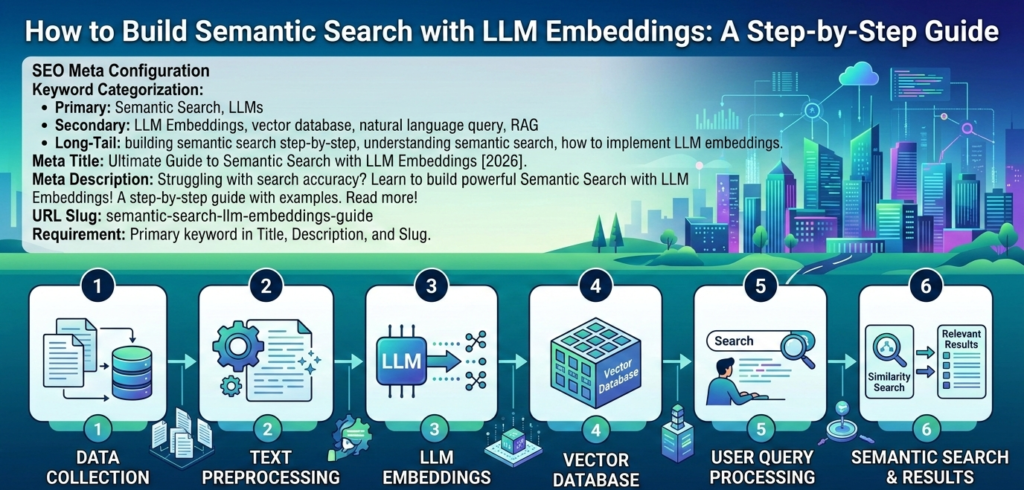
Summary of the Workflow
To successfully implement semantic search with LLM embeddings, follow this refined pipeline:
- Clean your data: Remove HTML tags or irrelevant metadata from your text.
- Chunking: Break long documents into smaller “chunks” (e.g., 300 words) so the embeddings remain focused.
- Embedding: Use a Sentence Transformer to turn chunks into numerical vectors.
- Indexing: Store these vectors in a searchable index (like Scikit-Learn’s NearestNeighbors or a Vector DB).
- Querying: Encode the user’s question and find the vectors with the highest cosine similarity.
Final Thoughts
The ability to build semantic search with LLM embeddings is a foundational skill for any modern AI developer or data scientist. It bridges the gap between how machines read and how humans think. By moving away from rigid keyword matching and toward intent-based retrieval, you can create applications that feel significantly more intuitive and “smart.”
Whether you are building a customer support bot, a personal knowledge base, or an enterprise-level search engine, the power of semantic search with LLM embeddings ensures that your users find exactly what they are looking for—even if they don’t know the exact words to use.