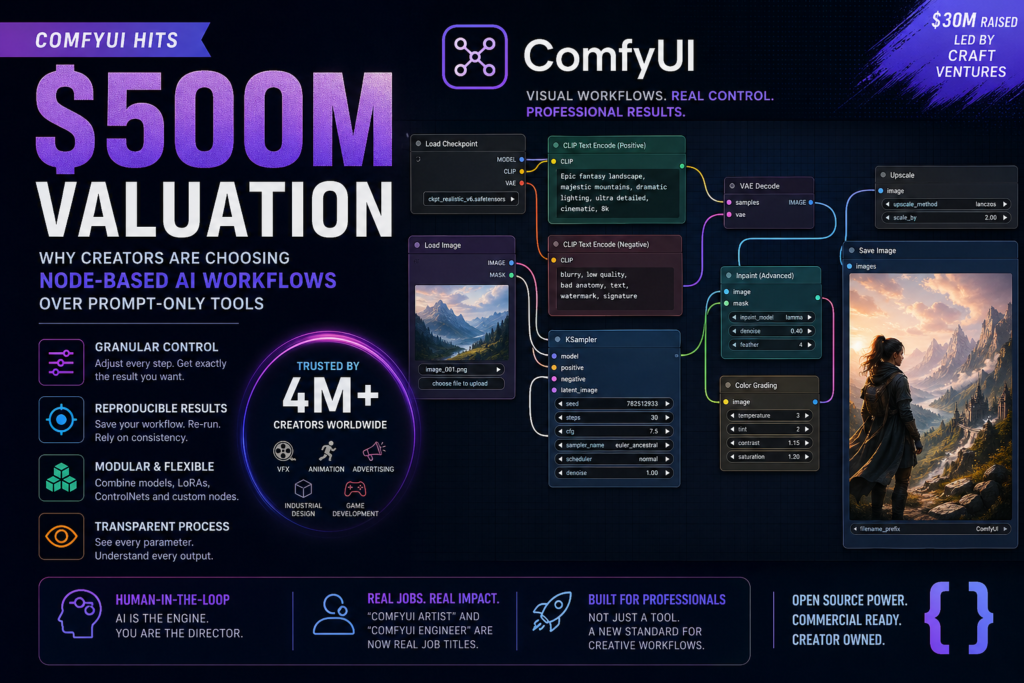
ComfyUI just raised $30 million at a $500 million valuation — because giving creators granular control over AI-generated media is now a half-billion-dollar idea. If you’ve ever felt frustrated watching a perfectly generated image get ruined the moment you try to tweak one small detail, ComfyUI was built to solve exactly that problem. comfyui node-based ai workflow
What Is ComfyUI?
ComfyUI is an open-source, node-based interface for controlling diffusion models — the AI systems behind tools like Stable Diffusion that generate images, video, and audio from text or visual inputs.
Instead of typing a prompt into a single text box and hoping for the best, ComfyUI lets you build a visual flowchart of interconnected “nodes,” each representing a specific step in the generation process. You can control exactly how an image is sampled, upscaled, refined, inpainted, or composited — with complete visibility into every parameter at every stage.
Founded in 2023 as an open-source project and formally incorporated as a startup in late 2024 (when it raised a $19 million Series A), ComfyUI has grown to over 4 million users worldwide. Its April 2026 funding round — led by Craft Ventures, with participation from Pace Capital, Chemistry, and TruArrow — values the company at $500 million, cementing its status as the leading professional tool in the generative AI creative stack.
Why Prompt-Only AI Tools Leave Creators Short
Most people’s first experience with AI image generation looks like this: you type a detailed prompt, the model returns something 70% correct, you refine the prompt, and the model completely changes the parts that were already perfect. Repeat indefinitely.
This isn’t a bug — it’s a fundamental architectural limitation of prompt-only interfaces.
The “Slot Machine” Problem
Yoland Yan, ComfyUI’s co-founder and CEO, describes the frustration with unusual precision: “If you think about your typical prompt-based solution, like Midjourney or ChatGPT, you ask for something, it gets only 60–80% there. But to change that remaining 20%, you have to try this slot machine.”
The casino metaphor is apt. Adjusting one word in a prompt can cause the entire composition, lighting, character, and color palette to regenerate from scratch — even the elements you wanted to keep. You cannot express surgical intent through a text box.
For hobbyists generating occasional images, this randomness is part of the fun. For professional visual artists, VFX teams, advertising studios, and industrial designers, it’s a workflow-killing liability.
How ComfyUI’s Node-Based Workflow Solves the Control Problem
A node-based workflow gives creators deterministic, modular control over every stage of the AI generation pipeline.
Think of it like a visual programming environment — similar to what editors use in tools like Blender’s shader graph or Unreal Engine’s Blueprint system. Each node in ComfyUI performs one specific function: loading a model checkpoint, encoding a text prompt, applying a sampler, running a ControlNet pass, upscaling an output. You connect nodes with wires, and data flows through the graph exactly as you’ve defined it.
This architecture unlocks capabilities that are simply impossible in prompt-only tools:
- Isolated changes: Modify the upscaling step without touching the sampling step. Adjust a face using an inpainting node without regenerating the background.
- Reproducibility: Save your exact node graph and re-run it on any image for consistent, repeatable results.
- Composability: Stack multiple models, LoRAs, ControlNets, and custom scripts together in a single pipeline.
- Transparency: See exactly which model checkpoint, sampler settings, seed, and parameters produced a given output.
This is why ComfyUI has become a reference standard for technical artists: it behaves less like a vending machine and more like a professional non-linear editing suite.
ComfyUI vs. Traditional Prompt-Based Tools
How does ComfyUI compare to the tools most creators are already using? The differences are significant, especially for professional workflows.
| Feature | ComfyUI | Midjourney / DALL-E / ChatGPT Image |
|---|---|---|
| Interface Type | Node-based visual graph | Single prompt text box |
| Control Granularity | Per-step, parametric | High-level, probabilistic |
| Reproducibility | Full (save/share graph) | Limited (seeds unreliable) |
| Custom Model Support | Any Stable Diffusion checkpoint, LoRA, ControlNet | Proprietary models only |
| Isolated Editing | Yes (target specific nodes) | No (regenerates full image) |
| Learning Curve | Steep (requires technical understanding) | Minimal |
| Best For | Professional studios, technical artists, R&D | Casual generation, rapid ideation |
| Pricing Model | Open-source + commercial plans | Subscription-based, hosted |
| Output Formats | Image, video, audio | Primarily image |
Bottom line: Prompt-based tools win on accessibility and speed-to-first-result. ComfyUI wins on precision, repeatability, and professional-grade output quality — which is exactly why studios, not casual users, are its fastest-growing segment.
Who Is Using ComfyUI and How
ComfyUI’s 4 million users span a surprisingly wide range of industries. What unites them is a need for outputs that are not just “good enough” — they need to be exact.
Industries Adopting ComfyUI
- Visual Effects (VFX): Studios use ComfyUI to generate background plates, texture references, and concept art with the precision required for production pipelines.
- Animation: Teams build custom pipelines that maintain character consistency across frames — a notoriously difficult challenge for standard diffusion models.
- Advertising: Agencies use it to generate product imagery with exacting brand color standards, lighting setups, and compositional requirements that a single prompt can’t reliably deliver.
- Industrial Design: Designers generate product visualizations and iterate on specific geometric or material properties in isolation without resetting the entire render.
- Game Development: Art teams use it to prototype environmental assets and character designs with repeatable aesthetics across large asset libraries.
A telling indicator of how mainstream ComfyUI has become in professional circles: job listings on studio boards now explicitly list “ComfyUI artist” and “ComfyUI engineer” as formal job titles. This isn’t a hobbyist’s side tool anymore — it’s a line item in production budgets.
The $500M Valuation: What the Funding Round Signals
ComfyUI’s April 2026 funding round — $30 million at a $500 million valuation, led by Craft Ventures — tells a clear story about where the AI creative tools market is heading.
Three signals stand out:
1. The “good enough” ceiling has arrived. Foundational models from OpenAI, Google, and Stability AI have become remarkably capable. But as Yan notes, they are still far from perfect. The market is no longer asking “can AI generate images?” — it’s asking “can AI generate the specific image I need, reliably, every time?” ComfyUI answers yes.
2. Professional workflows command premium valuations. The startup’s $500M valuation on $30M raised reflects investor confidence that professional creative tooling — the layer above raw foundational models — is where durable, high-margin businesses are built. Enterprise software for creative studios is a well-understood, high-retention market.
3. Open-source to commercial is a proven path. ComfyUI began as a free, open-source project and built 4 million users before taking a dollar in investment. That community moat — thousands of shared workflows, custom nodes, and tutorials — is extremely hard for a well-funded competitor to replicate from scratch.
ComfyUI’s main named competitor, Weavy, was acquired by Figma in late 2025. That acquisition actually validates the space while reducing the number of standalone competitors, improving ComfyUI’s strategic position.
The Future of AI Creative Tools: Human-in-the-Loop Wins
The framing that Yan uses to describe ComfyUI’s long-term thesis is worth quoting carefully: “In the world where AI slop is going to be everywhere, the Comfy version of human-in-the-loop approach is going to win out most of the eyeballs in the end.”
This is a sharp observation about where the broader AI media landscape is headed. As generative AI makes it trivially easy to produce mediocre content at scale, the competitive advantage shifts decisively to those who can produce precise, intentional, high-quality outputs.
Human-in-the-loop generation — where a skilled artist or engineer uses AI as a controllable tool rather than a black-box oracle — is becoming the professional standard. ComfyUI is the most sophisticated implementation of this philosophy available today.
This also has implications for how we should think about AI “replacing” creative jobs. The more likely outcome, at least in high-value professional contexts, is that AI fluency becomes a core competency — and tools like ComfyUI are what that fluency looks like in practice.
What “Human-in-the-Loop” Means in Practice
- The human defines the intent, aesthetic, constraints, and quality bar.
- The AI executes specific, isolated steps within a controlled pipeline.
- The human reviews, iterates, and adjusts individual nodes — not the entire output.
- The final result reflects genuine creative direction, not random sampling.
This is fundamentally different from “type a prompt, hope for the best.” And it’s why ComfyUI adoption is growing fastest among skilled practitioners, not despite the tool’s complexity, but because of it.
Should You Add ComfyUI to Your Creative Stack?
ComfyUI is the right tool if you need repeatable, high-precision AI-generated outputs and are willing to invest in learning a node-based workflow.
It is not the right tool if you need to generate images quickly with minimal setup, or if your use case doesn’t require surgical control over the generation process.
ComfyUI Is Right for You If:
- You’re working in a professional studio, agency, or production environment where output quality is non-negotiable.
- You need to maintain visual consistency across a large volume of generated assets (characters, environments, product imagery).
- You want to integrate custom fine-tuned models, LoRAs, or ControlNets into your pipeline.
- You need to reproduce exact results from a previous session.
- You’re building automated generation pipelines for commercial applications.
- You already use tools like Blender, Nuke, DaVinci Resolve, or other node-based professional software and are comfortable with graph-based thinking.
ComfyUI Might Not Be Right for You If:
- You need to generate a quick concept image for a presentation or brainstorm.
- You have no experience with diffusion models, AI image generation concepts, or node-based interfaces.
- Your team doesn’t have time to invest in onboarding and workflow development.
- You’re working on consumer-facing applications where speed and simplicity matter more than precision.
The good news: ComfyUI’s core tool remains open-source, so you can download and experiment without any upfront cost. A large, active community has produced thousands of tutorials, shared workflows, and custom node extensions — lowering the effective barrier to entry considerably.
Frequently Asked Questions (FAQ)
1. What is ComfyUI node-based AI workflow and how does it work?
The comfyui node-based ai workflow is a visual system that allows users to design and control AI image generation pipelines step by step. Instead of relying on a single prompt, users connect nodes representing tasks like model loading, sampling, upscaling, and inpainting. This structured approach ensures that every part of the generation process is transparent and adjustable. The comfyui node-based ai workflow works by passing data between nodes, giving creators full control over how an image is generated and refined. This makes it significantly more powerful than traditional prompt-based tools.
2. Why is ComfyUI node-based AI workflow better than prompt-based tools?
The comfyui node-based ai workflow offers a level of control that prompt-based tools cannot match. In prompt-only systems, changing a small detail often regenerates the entire image, leading to inconsistent results. With the comfyui node-based ai workflow, users can isolate specific steps and modify them without affecting the entire output. This ensures better consistency, precision, and repeatability. Professionals prefer the comfyui node-based ai workflow because it eliminates randomness and provides predictable outcomes for high-quality projects.
3. Is ComfyUI node-based AI workflow suitable for beginners?
The comfyui node-based ai workflow can be challenging for beginners due to its technical nature. Unlike simple prompt-based tools, it requires understanding nodes, connections, and workflows. However, many tutorials and pre-built templates make it easier to get started. While beginners may face a learning curve, mastering the comfyui node-based ai workflow can significantly improve their ability to generate precise and professional-quality images. Over time, users find the flexibility worth the effort.
4. What are the main benefits of using ComfyUI node-based AI workflow?
The comfyui node-based ai workflow provides several key benefits. First, it allows granular control over every stage of image generation. Second, it ensures reproducibility by saving workflows that can be reused. Third, it supports integration with multiple models, including LoRAs and ControlNets. Finally, the comfyui node-based ai workflow enables modular editing, meaning users can tweak specific elements without starting from scratch. These advantages make it ideal for professional creators and studios.
5. Can ComfyUI node-based AI workflow be used for commercial projects?
Yes, the comfyui node-based ai workflow is widely used in commercial environments such as advertising, game development, and visual effects. Its ability to produce consistent and high-quality outputs makes it suitable for professional use. Companies rely on the comfyui node-based ai workflow to create assets that meet strict quality standards. Additionally, because workflows can be saved and reused, teams can maintain consistency across large-scale projects.
6. How does ComfyUI node-based AI workflow improve consistency in AI images?
Consistency is one of the biggest advantages of the comfyui node-based ai workflow. By controlling each step of the pipeline, users can ensure that specific elements remain unchanged across multiple outputs. For example, a user can lock certain parameters or reuse the same workflow to generate similar images. The comfyui node-based ai workflow also allows the use of seeds and controlled inputs, ensuring repeatable results. This is especially important for branding, animation, and product design.
7. What tools and models can be integrated with ComfyUI node-based AI workflow?
The comfyui node-based ai workflow supports a wide range of tools and models, including Stable Diffusion checkpoints, LoRAs, ControlNets, and custom scripts. This flexibility allows users to build highly customized pipelines tailored to their needs. The comfyui node-based ai workflow can also integrate with external tools for video, audio, and advanced image processing. This makes it a versatile solution for creators working across multiple formats.
8. Is ComfyUI node-based AI workflow open-source?
Yes, the comfyui node-based ai workflow is built on an open-source platform, which means users can access, modify, and extend its functionality. This open ecosystem has led to a large community that shares workflows, plugins, and tutorials. The open-source nature of the comfyui node-based ai workflow also ensures rapid innovation, as developers continuously improve and expand its capabilities.
9. How long does it take to learn ComfyUI node-based AI workflow?
Learning the comfyui node-based ai workflow depends on the user’s background. Beginners may take a few days to understand the basics and several weeks to become proficient. However, users with experience in node-based tools like Blender or Unreal Engine may learn the comfyui node-based ai workflow much faster. Consistent practice and experimenting with workflows are key to mastering it.
10. What is the future of ComfyUI node-based AI workflow in AI tools?
The future of the comfyui node-based ai workflow looks promising as demand for precise and controllable AI tools continues to grow. As generative AI evolves, professionals will increasingly prefer systems that offer transparency and repeatability. The comfyui node-based ai workflow is likely to become a standard in creative industries, especially where high-quality output is essential. Its human-in-the-loop approach aligns with the future of AI, where users guide and refine machine-generated content.
Conclusion
The comfyui node-based ai workflow represents a major shift in how creators interact with AI tools. Instead of relying on unpredictable prompts, users gain full control over every stage of the generation process. While it requires time to learn, the benefits in precision, consistency, and scalability make it a powerful solution for professionals. As AI adoption grows, the comfyui node-based ai workflow will continue to play a crucial role in shaping the future of creative technology.
Key Takeaways
Here is a concise summary of what the ComfyUI story tells us about the AI creative tools landscape in 2026:
- ComfyUI raised $30M at a $500M valuation in April 2026, led by Craft Ventures.
- The core problem it solves is the loss of granular control in prompt-only AI image generation — what its CEO calls the “slot machine” problem.
- Its node-based workflow allows artists and engineers to isolate, modify, and reproduce specific stages of the generation pipeline.
- 4 million users across VFX, animation, advertising, industrial design, and game development have adopted ComfyUI as a professional standard.
- “ComfyUI artist” and “ComfyUI engineer” are now formal job titles appearing on studio job boards.
- The human-in-the-loop model — using AI as a precise, controllable tool — is emerging as the competitive standard for high-quality creative output.
- The open-source-to-commercial path gave ComfyUI a community moat that is difficult for competitors to replicate quickly.
As foundational AI models continue to improve, the tools that help skilled creators direct them with precision will become increasingly valuable — not less. ComfyUI is currently the clearest example of what that layer looks like.
Published: April 2026 | Category: AI Tools, Generative AI, Creative Technology
SEO Meta Description: ComfyUI hit a $500M valuation in 2026. Learn how its node-based AI workflow gives creators surgical control over image generation — and why that’s worth half a billion dollars.
Slug: comfyui-500m-valuation-node-based-ai-workflow-creator-control