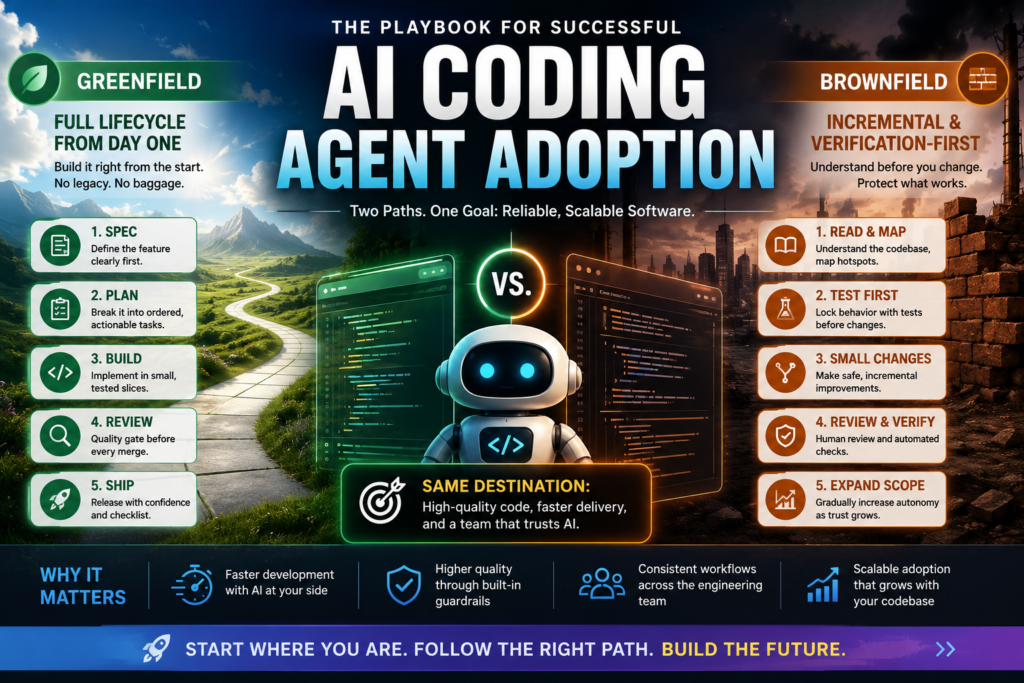
AI coding agent adoption succeeds or fails based on one variable most teams ignore: the age of the codebase. A brand-new project can hand an AI agent the full engineering lifecycle from commit one, while a five-year-old codebase needs a slower, verification-first rollout, or the agent will confidently break things nobody remembers how to fix.
That distinction is the backbone of a rollout strategy increasingly used by engineering teams adopting structured “skill packs” for tools like Claude Code, Cursor, and similar AI coding agents. Rather than treating every codebase the same way, a successful rollout splits into two deliberate paths — greenfield and brownfield — that eventually converge on the same disciplined end state. This guide breaks down both paths in full, with the phases, anti-patterns, and decision points that separate a smooth rollout from a chaotic one.
What Is AI Coding Agent Adoption, and Why Does the Codebase’s Age Matter?
AI coding agent adoption is the process of integrating an AI agent — and the structured skills, rules, and workflows that guide it — into a real engineering team’s day-to-day practice. It’s not just installing a tool; it’s deciding what the agent is allowed to touch, in what order, and with what safety nets around it.
This distinction matters more than most rollout plans account for. Teams often treat agent onboarding like installing a linter: add the config, point it at the repo, and move on. But an AI coding agent doesn’t just flag problems — it writes code, proposes architecture, and can touch files across the entire system in a single session. Handing it that level of autonomy without a sequencing plan is how a well-intentioned rollout turns into a cleanup project.
The reason codebase age matters so much comes down to risk. A new project has no legacy behavior to preserve, so quality gates like spec-writing and test-driven development cost almost nothing and compound in value from day one. There’s nothing yet for the agent to accidentally break, so the strictest practices can be enforced immediately without friction. An established codebase carries years of undocumented decisions, uneven test coverage, and conventions nobody wrote down — sometimes not even the original authors remember why a particular workaround exists. Rolling out an agent there means it has to understand the system before it’s allowed to change it, and skipping that step is where most failed rollouts originate.
This is why a single onboarding checklist doesn’t work across every team. The right approach always starts with one question: is this codebase being built, or is it being inherited? The answer determines almost everything else — which skills get loaded first, how much autonomy the agent gets, and how quickly a team can trust it with larger changes.
Greenfield vs. Brownfield: Which Path Are You On?
Before choosing an AI coding agent adoption strategy, identify which environment you’re actually working in. The signals are usually obvious once laid out side by side.
| Signal | Greenfield | Brownfield |
|---|---|---|
| Age of codebase | Days to weeks | Months to years |
| Test coverage | Controlled from day one | Uneven; some areas untested |
| Conventions | Defined as you go | Established, often undocumented |
| Team habits | Still forming | Entrenched |
| Risk of a bad agent change | Low blast radius | Can break things nobody remembers how to fix |
| Recommended adoption strategy | Full lifecycle, immediately | Incremental, verification-first |
If your project sits somewhere in between — young, but already shipped to production — the safest move is to start with the brownfield path and accelerate through it. It converges on the same end state either way, just faster.
Path A: Greenfield — Full Lifecycle from Day One
A new project is the best-case scenario for AI coding agent adoption. There’s no legacy behavior to protect, so quality gates cost almost nothing and pay off immediately.
Day 0: Install and Wire Up
A greenfield rollout starts with three setup steps:
- Install the skill pack or agent tooling for your platform (for example, via a package manager command or native tool integration).
- Load a meta-skill or router capability so the agent can direct work to the right skill automatically instead of loading everything into every session.
- Add a short project rules file — the equivalent of a
CLAUDE.mdor.cursorrules— describing your stack, commands, and boundaries. This single file does more for a smooth rollout than almost any other step, because it’s what keeps the agent from guessing at conventions it hasn’t seen yet.
None of these three steps should take more than an hour on a new project, and they pay for themselves the first time the agent has to make a decision it would otherwise have guessed at — which build command to run, which directories are off-limits, or which framework conventions to follow.
Day 0: Define Before You Build
Question: What order should a greenfield team run the AI lifecycle in? Direct answer: Spec first, then plan, then build in small verified slices, then review, then ship.
That sequence looks like this in practice:
/spec   →  SPEC.md            (define the feature before writing code)
/plan   →  tasks/plan.md      (break the spec into ordered tasks)
/build  →  one slice at a time (implement with tests as you go)
/review →  before every merge  (quality gate)
/ship   →  when going live     (release checklist)
An automated build mode is a strong fit for a greenfield rollout: the team approves the plan once, and every subsequent task still runs test-first and commits individually rather than landing as one large, unreviewable diff. Keep the spec and plan artifacts in version control while work is in flight — they’re living documents, not throwaway scaffolding, and they become the first entries in the project’s institutional memory.
Always-On Practices from the Start
Certain practices should be non-negotiable from the very first commit in any serious AI coding agent adoption effort:
- Test-driven development — coverage debt is cheapest to avoid at zero, not to retrofit later.
- Disciplined git workflow — atomic commits and small, reviewable changes should be habits, not retrofits.
- Security and hardening — authentication, input validation, and secrets handling are structural decisions; bolting them on later becomes its own migration project.
- Documentation of architectural decisions — the earliest decisions are exactly the ones nobody will remember the reasoning behind in two years.
Add Capability as the Project Grows
| When it happens | What to load |
|---|---|
| First public API or module boundary | Interface and API design practices |
| First UI work | Frontend engineering skills, plus browser-based testing |
| First CI pipeline | CI/CD and automation practices |
| First production deploy | Observability and instrumentation, launch checklist |
| Performance requirements appear | Performance optimization practices |
Greenfield Anti-Patterns
Even in the easiest scenario for rolling out an AI agent, teams still find ways to derail it:
- Skipping the spec because “it’s just a prototype.” Prototypes become products, and the spec is the cheapest artifact you’ll ever write for a codebase.
- Loading every available skill into every session. This wastes context and dilutes the skills that actually matter for the task at hand.
- Deferring observability until “there’s something to observe.” Instrumenting as you build avoids turning structured logging into a brownfield problem you created for yourself.
Path B: Brownfield — Incremental, Verification-First AI Coding Agent Adoption
In an established codebase, the risk profile flips. The danger isn’t building the wrong thing — it’s changing something whose behavior was never fully documented. A brownfield rollout therefore starts with the skills that read and protect the codebase, and only later moves to the ones that change it. Sequencing it any other way tends to produce specs for code that already works and refactors with no safety net underneath them.
Phase 1: Context and Read-Only Work First
Question: What’s the very first step in brownfield AI coding agent adoption? Direct answer: Teach the agent the codebase’s real conventions before letting it modify anything.
That phase includes:
- Write a project context file first. Document the conventions that actually exist in the code, not the ones described in an outdated wiki. Include build and test commands, what each directory means, and known landmines — the parts of the system nobody should touch blind, like a billing module with no tests and a handful of known workarounds nobody has had time to fix.
- Turn on code review as an early, zero-risk win. Automated review with clear severity labels — separating what blocks a merge from what doesn’t — works on any pull request regardless of how messy the underlying codebase is. This is usually the fastest way to demonstrate value to a skeptical team, since it improves what’s already happening without touching a single line of production code.
- Use structured debugging for the bugs you’re already fixing. A reproduce-localize-reduce-fix-guard cycle works especially well in unfamiliar code, and the “guard” step starts building the regression suite the project never had. Every bug fixed this way leaves the codebase slightly more test-covered than it was before.
- Add adversarial review as a safety net. Legacy code is exactly the “unfamiliar code, high cost of being wrong” scenario where a second, skeptical pass on the agent’s claims about how the system works catches confident hallucinations before they become commits. An agent that’s wrong about legacy behavior tends to sound just as confident as one that’s right, which is precisely why this check matters.
Phase 1 typically takes a week or two, not months. The point isn’t to fully document a legacy system before doing anything else — that’s its own kind of stalling. It’s to make sure the agent has enough real context that its first few changes aren’t guesses.
Phase 2: Tests Before Any Change
The goal here is simple: every area the agent is about to touch gets a safety net first.
- Apply test-driven development selectively, not globally. Don’t chase full coverage; aim for coverage where change is actually planned. For untested legacy behavior, write characterization tests first — tests that pin down what the code currently does, right or wrong, before any modification happens. The rule of thumb worth borrowing here is sometimes called the Beyoncé Rule: if the system relies on a behavior enough to depend on it, that behavior deserves a test, even if it looks like a bug.
- Simplify code only at the worst hotspots, and only after understanding why the existing code behaves the way it does. This is Chesterton’s Fence applied to software: don’t remove a fence until you know why someone built it. Behavior-preserving simplification, paired with characterization tests, is the lowest-risk way to make old code changeable again.
- Keep commits small everywhere. Atomic, roughly 100-line commits matter even more in legacy work — a subtle regression is bisectable in a small commit and nearly impossible to trace in a 2,000-line “modernization” commit. When something does break three weeks later, the size of the commit history is usually what determines whether the fix takes ten minutes or two days.
Phase 3: New Work Runs the Full Lifecycle
This is the point where the rollout becomes two-speed: legacy code stays under the careful Phase 1–2 regime, while new features get the same full lifecycle greenfield projects use from the start.
- A new feature inside an old codebase still runs spec, plan, build, review — with the spec’s boundaries section explicitly declaring what legacy surface the feature may and may not touch.
- Design the boundary contract-first wherever new code has to talk to old code. In a years-old codebase, someone depends on every observable behavior, including the bugs — so undocumented assumptions about “internal” behavior are rarely safe.
- Run a security audit once, across the entire existing attack surface — authentication, input handling, dependencies — then enforce those standards going forward on new changes only.
Phase 4: Pay Down, Deprecate, Observe
The final phase of this rollout is about shrinking the legacy surface instead of permanently wrapping it:
- Deprecate deliberately. Treating code as a liability, distinguishing compulsory from advisory deprecation, and removing genuinely dead code gives teams a disciplined way to reduce technical debt instead of just working around it indefinitely.
- Retrofit observability where it matters most — structured logging and core reliability metrics on the paths that generate the most incidents first, rather than trying to instrument the entire system at once.
- Optimize performance only when it’s actually regressing, and only after measuring. This avoids the classic legacy trap of optimizing code that was never the bottleneck in the first place, which wastes engineering time an already-stretched brownfield team can’t spare.
None of Phase 4 is urgent in the way Phases 1 and 2 are. It’s maintenance work that compounds slowly, and teams that skip it tend to find themselves back at “big bang” thinking a year later, wrapping the same fragile code in yet another layer instead of actually shrinking it.
Brownfield Anti-Patterns
- “Big bang” adoption. Loading the entire lifecycle onto a legacy codebase on day one produces specs for code that already exists and refactors without any safety net. Sequence it instead.
- Letting the agent refactor untested code. No characterization tests, no refactor — this is the single most expensive shortcut in any legacy rollout.
- Skipping context documentation because “the code is the documentation.” Left alone, an agent will infer conventions from the worst file it happens to read. Tell it the real ones.
- Assuming legacy behavior is wrong by default. A strange retry loop or odd conditional may be load-bearing. Understand it before changing it.
- Ratcheting nothing. Every phase of adoption should make quality monotonically better. If, a month in, nobody can name a new gate that’s now enforced, the rollout has stalled.
Where the Two Paths Converge
Both greenfield and brownfield AI coding agent adoption end in the same steady state: spec, plan, build, review, ship for all new work — always-on testing and git discipline, review gates before every merge, and capabilities loaded by phase rather than all at once.
| Greenfield | Brownfield | |
|---|---|---|
| First step | Router setup + spec | Context documentation |
| First value delivered | A spec’d, tested first feature | Zero-risk reviews and safer bug fixes |
| Testing posture | Universal from commit one | Selective — tests where change is planned |
| Refactoring rule | Rare (little to refactor) | Characterization tests first, always |
| Riskiest anti-pattern | Skipping the spec | Refactoring untested code |
| Time to full lifecycle | Day one | Roughly one quarter, two-speed in between |
Greenfield teams reach full-lifecycle AI coding agent adoption in days. Brownfield teams typically take about a quarter, running a two-speed model in between where legacy code gets careful treatment and new features get the full lifecycle. The difference isn’t ambition — it’s exactly the safety nets, context files, characterization tests, and explicit boundaries, that an old codebase never had to begin with.
Neither path is optional if the goal is a codebase an AI agent can be trusted with long-term. Skipping straight to full autonomy on a legacy system doesn’t save the quarter of ramp-up time — it just moves that time to later, after something breaks, when it costs more to diagnose and fix. The teams that get the most value out of an AI coding agent are rarely the ones that moved fastest; they’re the ones that matched the rollout speed to what the codebase could actually support.
FAQ: AI Coding Agent Adoption
Is the rollout process different for a small startup versus a large enterprise codebase? Not fundamentally — the decision still comes down to codebase age and risk, not company size. A young startup with a codebase already in production should still follow the brownfield path, just moving through the phases faster than a multi-year enterprise system would.
How long does brownfield AI coding agent adoption typically take? Reaching the full lifecycle usually takes about a quarter, with a two-speed period in between where legacy code stays under careful review and testing while new features get the complete spec-to-ship workflow.
What’s the single biggest mistake teams make when rolling out an AI coding agent? Letting an agent refactor code that has no tests. Without characterization tests pinning down existing behavior first, a “clean up” pass can silently change what the system does.
Should every project load every available agent skill at once? No. Loading everything into every session wastes context and dilutes the capabilities that actually matter for the task at hand. Both greenfield and brownfield paths recommend loading skills by phase, routed automatically where possible.
Can a mid-sized, already-shipped project skip straight to the greenfield approach? It’s safer not to. Projects that are young but already in production should start on the brownfield path and accelerate through its phases — they converge on the same end state, just via a faster, still verification-first route.
Does adopting an AI coding agent replace human code review? No. Automated review is described as a zero-risk early win precisely because it supplements human judgment rather than replacing it — flagging what blocks a merge and what doesn’t, while people still make the final call on anything nuanced or high-stakes.