If you’ve ever uploaded a folder of PDFs to ChatGPT or NotebookLM and asked a question, you already know the shape of the problem: it works, until you ask something subtle that spans five documents, and the model has to re-discover the connections from scratch every single time. Building a real personal knowledge base with LLMs solves this by having the model maintain a structured, ever-improving set of notes instead of just retrieving raw fragments on demand.
That’s the core answer. The rest of this guide explains exactly how to build one, why it beats standard RAG (retrieval-augmented generation) setups for long-term use, and how to avoid the mistakes that cause most personal wikis to rot within a few months.
What Is a Personal Knowledge Base with LLMs?
A personal knowledge base with LLMs is a system where an AI model doesn’t just search your documents — it reads them, extracts what matters, and writes that understanding into a living set of interlinked notes that get better every time you add something new.
This is fundamentally different from the “upload and ask” pattern most people default to. Standard RAG tools chunk your files, embed them, and retrieve the closest-matching chunks at query time. That’s useful for one-off lookups, but nothing accumulates. Ask the same tool a harder question next week, and it re-derives the answer from scratch, with no memory of the synthesis it already did.
A true LLM-maintained knowledge base flips that. The model’s job isn’t just to answer — it’s to update the wiki as it learns. Over weeks or months, this compounds into something genuinely different from a folder of source files: a second brain that already contains the connections you’d otherwise have to re-find every time.
Why This Matters More Than It Sounds
Most knowledge workers already sense the problem even if they haven’t named it. You read a great article, you highlight a few lines, and three weeks later you can’t remember which document had the insight you needed. A personal knowledge base with LLMs removes that friction because the synthesis step — the part that used to require you to sit down and write a summary connecting five sources — now happens automatically, every time you add a source.
RAG vs. an LLM-Maintained Wiki: What’s Actually Different
People often assume “RAG” and “AI knowledge base” are the same thing. They’re related, but they solve different problems. Here’s a direct comparison:
| Dimension | Standard RAG (ChatGPT uploads, NotebookLM) | LLM-Maintained Personal Wiki |
|---|---|---|
| What’s stored | Raw document chunks + embeddings | Synthesized, human-readable markdown pages |
| Does it improve over time? | No — every query re-derives from scratch | Yes — each source strengthens existing pages |
| Cross-document synthesis | Happens fresh at query time (slow, inconsistent) | Already baked into the pages (fast, consistent) |
| Contradiction handling | Not tracked | Actively flagged and logged |
| Portability | Locked to the tool’s storage format | Plain markdown files — readable in any editor, versionable in git |
| Best for | Quick one-off lookups in a document set | Long-term learning, research, or team knowledge that compounds |
Neither approach is “wrong” — they’re suited to different jobs. If you just need to ask a question about a single contract, RAG is fine. If you’re building AI knowledge management for an ongoing research project, a hobby, or a team’s institutional memory, the wiki approach pays off within a few weeks and keeps paying off indefinitely.
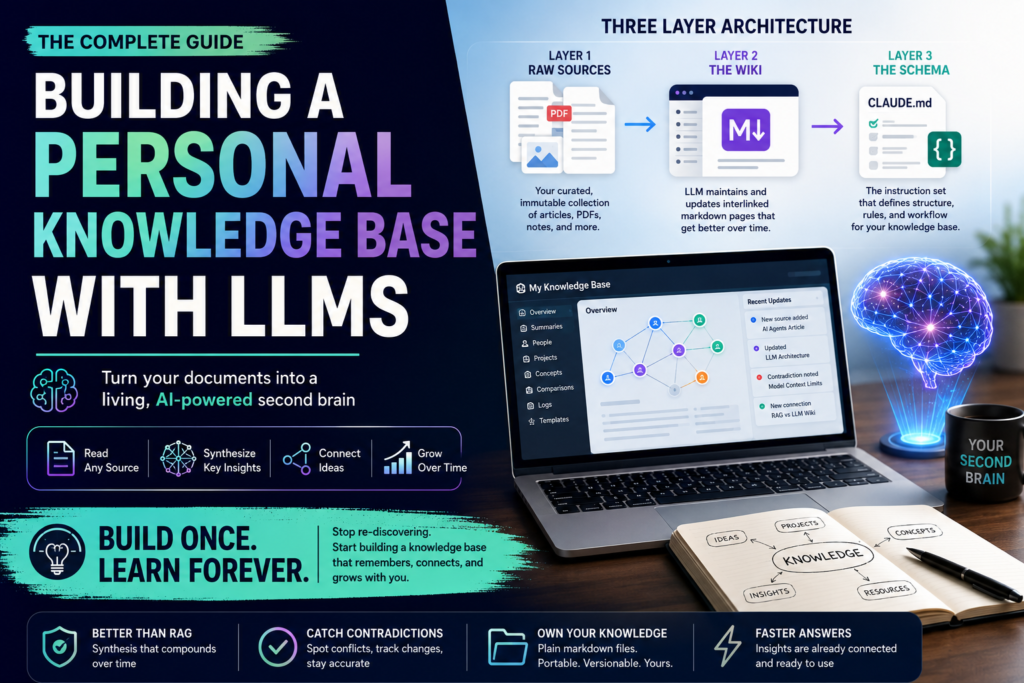
The Three-Layer Architecture
Every functional LLM wiki system, regardless of implementation, comes down to three layers working together.
Layer 1: Raw Sources
This is your curated, immutable collection — articles, PDFs, meeting transcripts, podcast notes, whatever you’re feeding in. The LLM reads from this layer but never modifies it. It’s your ground truth, and it stays untouched so you can always verify a claim against the original.
Layer 2: The Wiki
This is the layer the LLM actually owns. It’s a directory of markdown pages — summaries, entity pages (people, projects, concepts), comparison pages, an overview, and an evolving synthesis. Every time you add a source, the model doesn’t just file it away; it updates the relevant existing pages, notes where new information contradicts something older, and strengthens the connections between ideas.
Layer 3: The Schema
This is the instruction file — often something like a CLAUDE.md or AGENTS.md — that tells the model how your wiki is organized, what page types exist, and what workflow to follow when it ingests a new source or answers a question. Think of it as the constitution for your knowledge base. Without it, the model behaves like a generic chatbot; with it, the model becomes a disciplined maintainer that follows your conventions consistently, session after session.
Question: Do I need special software to build this? Direct answer: No. The minimum viable setup is a folder of markdown files, a text editor (Obsidian is the most popular choice because of its graph view and backlinks), and an LLM agent — such as Claude Code — that can read and write files on your behalf. Everything else (search tools, dashboards, automation) is optional tooling layered on top.
How the System Actually Works: Three Core Operations
Once the architecture is in place, using a personal knowledge base with LLMs comes down to three repeating operations.
1. Ingest
You drop a new source into your raw folder and tell the model to process it. A well-behaved ingest flow will:
- Read the full source
- Write or update a summary page
- Update relevant entity and concept pages elsewhere in the wiki
- Note explicitly if the new source contradicts something already written
- Append an entry to a running log
A single source might touch ten or more existing pages. This is the step that does the actual “compounding” — each new document doesn’t just get filed, it gets woven into everything you already know.
2. Query
This is where you ask questions against the accumulated wiki rather than the raw files. The model searches its own index, pulls the relevant pages, and answers with citations back to your sources. Crucially, a good answer shouldn’t just disappear into a chat transcript — it should get filed back into the wiki as a new page if it’s valuable enough to reference again later.
3. Lint
Periodically, have the model audit the wiki itself: look for pages that contradict each other, claims that newer sources have superseded, orphaned pages nobody links to, and important concepts that are mentioned everywhere but don’t have their own page yet. This maintenance step is what keeps a wiki useful instead of letting it silently drift out of date — and it’s the step people skip most often, to their own detriment.
Setting Up Your Own System: A Practical Starting Point
You don’t need a complex stack to get real value from AI knowledge management built this way. Here’s a lean setup that works well for most individuals:
- Create three folders:
raw/for immutable sources,wiki/for the pages your LLM will maintain, and a single schema file describing conventions. - Pick a viewer. Obsidian is the de facto standard for this pattern — its graph view makes it easy to see the shape of your growing wiki, and its wikilink syntax (
[[Page Name]]) is exactly the kind of cross-referencing an LLM-maintained system relies on. - Write a minimal schema file. Start small: define two or three page types (e.g., “concept,” “source summary,” “entity”) and one instruction — always update the index when a page is added. You’ll refine this as you go.
- Start with an index and a log. An
index.md(a one-line summary per page, organized by category) and alog.md(an append-only timeline of what happened and when) are the two files that keep both you and the model oriented as the wiki grows. - Ingest one source at a time at first. Read what gets written, correct anything off-base, and let the schema evolve based on what you actually need — rather than over-engineering it up front.
At small scale (roughly under a hundred sources), a flat index file is genuinely enough — you don’t need a vector database or embedding infrastructure to make this work.
Common Pitfalls to Avoid
A second brain AI setup fails in fairly predictable ways. Watch for these:
- Skipping the lint step. Contradictions and stale claims accumulate silently if nobody — human or model — ever audits the wiki.
- Over-engineering the schema before you have real content. A thirty-page-type taxonomy designed on day one rarely survives contact with actual sources.
- Letting the model create a new page for everything. Not every insight deserves its own page; some things are better as an update to an existing entity page. Give the model explicit guidance on when to create versus edit.
- Treating the wiki as disposable chat history. The entire value of this approach is that good synthesis gets kept, not regenerated. If answers aren’t being filed back into the wiki, you’re back to plain RAG.
- No versioning. Since the wiki is just markdown, put it in a git repository from day one — you get history, rollback, and diffing for free.
Real-World Applications
This pattern isn’t limited to any one use case. A few places it holds up particularly well:
- Personal growth and journaling — tracking goals, health notes, and reflections over time, with the model building a structured picture of patterns you’d otherwise miss.
- Deep research — accumulating papers, reports, and articles on a single topic over months, with an evolving thesis page that updates as new evidence arrives.
- Reading companion wikis — filing each chapter of a book as you read, building out character and theme pages the way fan wikis do, but generated automatically as you go.
- Team and business knowledge — an internal wiki fed by meeting transcripts, Slack threads, and documents, maintained by the model so the burden doesn’t fall on whichever teammate has the most patience for busywork.
Frequently Asked Questions
Is this the same thing as NotebookLM? Not quite. NotebookLM and similar tools are excellent at retrieval over a fixed source set, but they don’t maintain a persistent, editable synthesis layer that improves independently of any single query. A personal knowledge base with LLMs, in the sense described here, produces an artifact — a wiki — that exists and grows even when you’re not actively asking it questions.
Do I need to know how to code? No. The underlying mechanics (files, folders, markdown) are simple enough that the main requirement is comfort using an LLM-based coding assistant or agent tool to read and write files on your behalf — no programming knowledge required, though some technical comfort helps with initial setup.
How big can a personal wiki like this get before it breaks down? A simple index-file approach comfortably handles around a hundred sources and several hundred pages. Beyond that, most practitioners add lightweight local search (keyword-based or hybrid semantic search) rather than rebuilding the whole system — the underlying pattern doesn’t change, just the retrieval layer.
What happens if the LLM writes something wrong into my wiki? Because raw sources stay untouched and separate from the wiki layer, you can always verify a wiki page against the original source it was derived from. Periodic lint passes and simply reading what gets written (especially early on) catch most errors before they compound.
The Bottom Line
Building a personal knowledge base with LLMs isn’t about finding a fancier search tool — it’s about giving the model a place to keep what it learns, so that understanding accumulates instead of resetting on every question. The architecture is simple (raw sources, a maintained wiki, a schema file), the operations are simple (ingest, query, lint), and the payoff compounds the longer you stick with it. Start small, let the model do the bookkeeping, and the knowledge base will end up doing something a stack of PDFs never could: actually get smarter the more you use it.