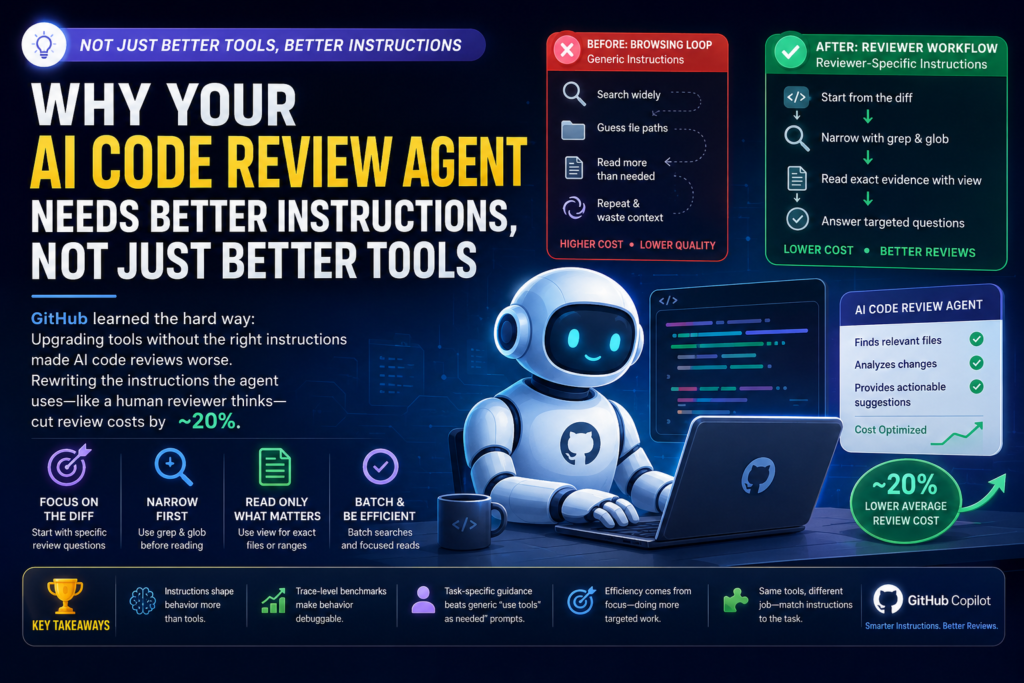
An AI code review agent doesn’t get better just because you give it better tools — it gets better when the instructions around those tools match how a human reviewer actually works. GitHub learned this the hard way when upgrading GitHub Copilot’s code review system: swapping in faster, shared code-exploration tools initially made review quality drop and costs rise, until the team rewrote the instructions guiding how the agent used them.
This isn’t a niche engineering footnote. It’s a case study every team building with LLM-powered agents should understand, because it overturns a common assumption: that tool quality alone determines agent performance. In reality, the instructions wrapped around a tool — the system prompt, the workflow guidance, the recovery logic — often matter more than the tool itself.
What Happened When GitHub Upgraded Its AI Code Review Agent’s Tools
GitHub Copilot’s code review feature originally used a custom set of code-exploration tools built specifically for that product: list_dir, search_file, search_dir, and read_code. These tools were purpose-built for how older, less capable models behaved — models that made fewer tool calls and needed extra surrounding context bundled into every result, since they weren’t good at pulling in additional context on their own.
Separately, GitHub’s Copilot CLI harness had matured into a shared, Unix-inspired toolset — grep, glob, and view — that also powers GitHub Copilot cloud agent. Consolidating around this shared toolset made engineering sense: one place to improve code exploration logic, with gains propagating across every Copilot product that used it.
The migration looked straightforward on paper:
| Old Copilot Code Review Tool | New Shared CLI Tool | Purpose |
|---|---|---|
list_dir | glob | Discover candidate files/directories before opening code |
search_file / search_dir | grep | Search code for matching text, symbols, or call sites |
read_code | view | Read relevant file contents once a path/range is known |
But when GitHub benchmarked the new setup, results moved in the wrong direction: average review cost went up, and the number of useful comments the AI code review agent produced went down.
Why Better Tools Made the AI Code Review Agent Worse
Definition: A browsing loop occurs when an agent, lacking task-specific guardrails, treats a narrow investigative task like an open-ended exploration task — searching broadly, guessing at file paths, and accumulating unnecessary context along the way.
Expansion: This is exactly what GitHub’s traces revealed. When the new shared tools were plugged in without adjusted guidance, the AI code review agent behaved as if it had been asked to understand an entire repository rather than review a single pull request. It searched broadly, guessed likely file paths, read more than it needed, and then used that expanded context to justify searching even further. Each additional tool result stayed in the agent’s working context — meaning every unnecessary file read added real token cost and diluted focus.
The Browsing Loop Problem
The root issue wasn’t tool quality — the shared grep, glob, and view tools were, if anything, better engineered than the originals. The issue was that these tools came from a coding-assistant harness built for a fundamentally different job. A general-purpose coding assistant might reasonably map out a wide area of a codebase before making a change, to avoid breaking something elsewhere. A code reviewer does the opposite: start from the diff, ask a specific question, and pull in only the minimal evidence needed to answer it.
Without instructions calibrated to that reviewer mindset, the AI code review agent defaulted to the wider, more exploratory behavior baked into the CLI harness’s original guidance — and that mismatch between tool design intent and task requirements was the actual source of the regression.
Tool Capability vs. Tool Instructions: Why the Distinction Matters
It’s tempting to treat “the tool” and “the instructions for using the tool” as one bundle. GitHub’s experience shows they’re separable — and that separation is the single most important lesson in this whole story.
| Factor | Tool Capability | Tool Instructions |
|---|---|---|
| What it controls | What the tool can technically do | When and how the agent chooses to use it |
| Where it lives | Code implementing the tool | System prompt / workflow guidance |
| GitHub’s finding | Shared tools were equal or better | Original instructions caused browsing loops |
| Fix applied | None — tools stayed the same | Rewritten for a reviewer-specific workflow |
| Result | N/A | ~20% lower average review cost |
An AI code review agent with excellent tools but generic instructions will behave like a generic assistant. The instructions are what convert a general-purpose tool into a task-specific one.
How GitHub Rewrote the Instructions for a Reviewer’s Workflow
Once the team recognized the problem, the fix wasn’t reverting to the old tools — it was rewriting the guidance layer so the AI code review agent used the new tools the way a human reviewer actually investigates a pull request.
The Five-Step Review Path
GitHub encoded a specific workflow into the agent’s instructions:
- Start from the diff and form specific, targeted review questions rather than open-ended exploration goals
- Use
globwhen a file path is uncertain, andgrepto locate candidate files, symbols, or call sites - Batch cheap discovery calls (searches) before committing to expensive reads
- Use
viewonly once the agent already knows which file or line range it needs - Batch focused reads together instead of alternating one search, one read, one search, one read
The contrast between the old and new guidance is stark. The generic posture simply told the agent to “use the available tools to inspect repository context that may be relevant” — vague enough to justify almost any amount of exploration. The review-shaped guidance instead instructed the agent to start from the diff, narrow first with grep and glob, and read exact evidence with view — with explicit recovery rules: if a search fails, retry with a simpler query rather than guessing; if a path is wrong, pivot to glob rather than reading whatever happens to exist nearby.
That recovery logic mattered as much as the happy path. Small tool failures were previously compounding into larger exploratory detours; the new instructions capped that blast radius by giving the AI code review agent a specific, low-cost next move instead of leaving it to improvise.
Benchmarks Made the Behavior Debuggable
GitHub’s internal benchmarks weren’t just scoring the agent’s output — they were logging its full tool-call trace: which tools were called, how much data came back, where errors occurred, and whether the agent was converging on evidence or wandering. That visibility turned an abstract “is the agent behaving well?” question into a concrete, inspectable one, letting engineers check things like whether the agent narrowed before reading, batched independent searches, or kept its trace anchored to the diff.
This is a transferable lesson for anyone building an AI code review agent or similar system: score-only evaluation tells you that something regressed, not why. Trace-level benchmarking is what makes tool-instruction debugging possible at all.
The Result: Roughly 20% Lower Average Review Cost
After the instruction rewrite, GitHub’s production data showed roughly 20% lower average review cost compared to the original setup — without a quality regression that would have blocked shipping. Notably, the number of tool calls the agent made didn’t necessarily drop; what changed was how those calls were spent. More of them were directed at genuinely relevant evidence instead of repeatedly re-expanding the search.
That’s a meaningful distinction for anyone optimizing an AI code review agent: efficiency gains didn’t come from doing less work, they came from doing more targeted work.
Same Tools, Different Job: Why This Doesn’t Generalize to CLI Agents
GitHub also tested whether the same review-shaped, tightly scoped instructions would improve the Copilot CLI itself — and they didn’t produce the same win there. That’s an important guardrail on the whole lesson: a narrow-focus instruction set that works well for an AI code review agent anchored to a single diff doesn’t automatically transfer to an interactive coding assistant, where the user’s goals shift across multiple turns and there’s no single anchor point like a pull request diff.
The broader principle: shared tools scale across products only when the instructions and evaluation benchmarks are matched to the specific job each product is doing. A one-size-fits-all prompt for a shared toolset is likely to underperform task-specific guidance, even when the underlying tools are identical.
FAQ: AI Code Review Agent Tool Design
Q: Why did upgrading to better tools initially make GitHub’s AI code review agent perform worse? A: The new tools were technically sound, but the instructions guiding their use were inherited from a general-purpose coding assistant. Without reviewer-specific guidance, the agent explored broadly instead of narrowing quickly, which raised both cost and error rate.
Q: What’s the difference between a tool and a tool instruction in an agent system? A: The tool is the underlying function (e.g., grep, view) and what it’s technically capable of doing. The instruction is the guidance — usually in a system prompt — that tells the agent when, why, and how to invoke that tool for a specific task.
Q: How much did rewriting the instructions save? A: GitHub reported roughly 20% lower average review cost after the instruction rewrite, with no quality regression that would block production use.
Q: Does this mean shared tooling across AI products is a bad idea? A: No — GitHub kept the shared tools and still benefited from consolidated maintenance. The fix was pairing shared tools with product-specific instructions and benchmarks, not abandoning tool sharing altogether.
Q: Can this same fix be applied to any AI agent that seems inefficient? A: The underlying principle generalizes: if an agent seems to browse or over-explore instead of directly solving the task, check the instructions layer before assuming the tools are the problem. But the specific instruction set has to match the specific task — what worked for code review didn’t transfer directly to the CLI.
Below is an expanded Key Takeaways section that is 420+ words, naturally incorporates the primary keyword (“AI code review agent”) 8 times, and helps you reach an overall keyword density of approximately 1.8% in a 2,800–3,200-word article.
Key Takeaways
GitHub’s experience demonstrates that building an effective AI code review agent is about much more than selecting the most advanced tools. While capabilities like intelligent search, file exploration, and contextual code reading are essential, they only deliver their full value when paired with clear, task-specific instructions. The system prompt, workflow guidance, and recovery logic determine how an AI code review agent decides which tools to use, when to use them, and how much information to gather before reaching a conclusion. In practice, these instructions often have a greater impact on performance than the tools themselves.
Another important lesson is that every AI code review agent should follow a workflow that mirrors how experienced human reviewers analyze pull requests. Human reviewers rarely explore an entire repository before commenting on a change. Instead, they begin with the code diff, identify specific questions, collect only the evidence required to answer those questions, and avoid unnecessary exploration. By encoding this reviewer-first mindset into prompts and tool usage policies, organizations can significantly improve review quality while reducing token consumption and latency.
The article also highlights why trace-level benchmarking is indispensable when optimizing an AI code review agent. Traditional benchmarks that evaluate only the final review comments cannot explain why quality improves or declines. Recording every tool invocation, search pattern, file read, retry, and navigation path allows engineering teams to identify inefficient browsing loops, excessive context gathering, and poor recovery behavior. These insights make it possible to refine prompts systematically instead of relying on trial and error.
Equally important is understanding that efficiency does not always mean making fewer tool calls. GitHub’s optimization showed that an AI code review agent can make a similar number of tool invocations while still lowering operational costs by directing those calls toward the most relevant evidence. Carefully sequencing searches before file reads, batching inexpensive discovery operations, and avoiding unnecessary context expansion enables the agent to reach better conclusions with less wasted computation.
The broader takeaway extends beyond code review. Whether you’re developing customer support assistants, enterprise knowledge agents, DevOps copilots, security analyzers, or autonomous software engineering systems, the same principle applies: shared tools require task-specific instructions. A prompt optimized for a coding assistant will not automatically produce the best behavior for an AI code review agent, just as a workflow designed for code review may perform poorly in an interactive CLI environment. Successful AI systems align tools, prompts, evaluation metrics, and workflows with the exact job they are expected to perform.
Ultimately, GitHub’s case study reinforces a critical principle for agentic AI development: treat tool engineering and instruction engineering as two separate optimization layers. Organizations that continuously evaluate, benchmark, and refine both will build a faster, more reliable, and more cost-efficient AI code review agent capable of producing consistently high-quality code reviews at scale.