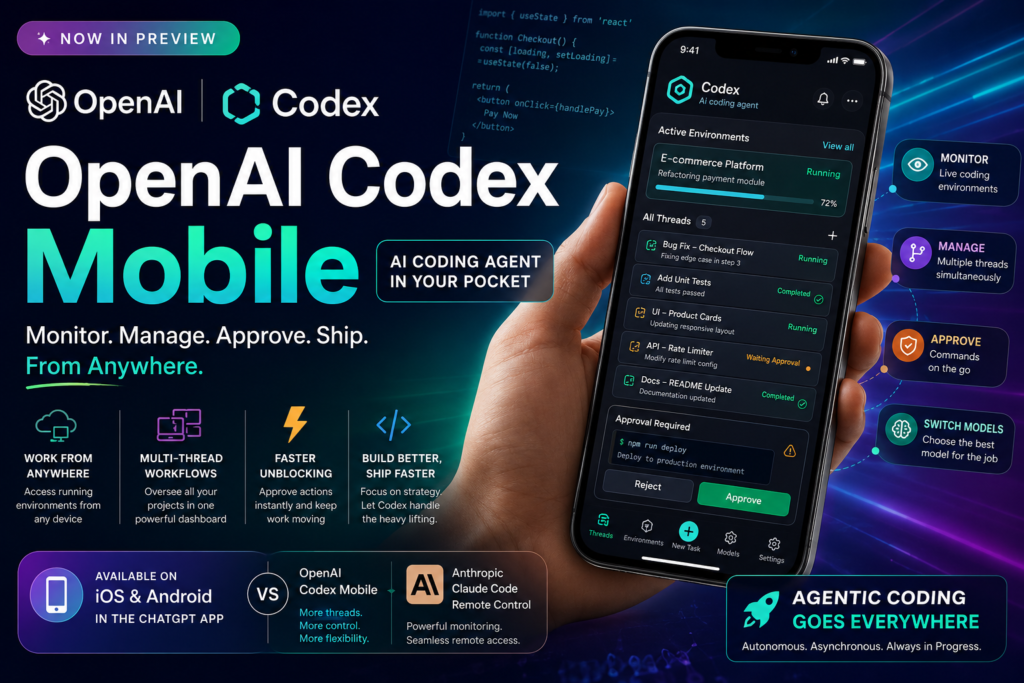
OpenAI Codex mobile is now officially available — and it changes how developers can manage, review, and direct AI-powered coding workflows from anywhere. If you’ve been waiting to take your AI coding agent off the desktop and into your daily routine, here’s the complete picture.
What Is OpenAI Codex Mobile?
https://techcrunch.com/2026/04/16/openai-takes-aim-at-anthropic-with-beefed-up-codex-that-gives-it-more-power-over-your-desktop/Definition: OpenAI Codex mobile refers to the integration of OpenAI’s Codex AI coding agent directly into the ChatGPT iOS and Android apps, allowing users to monitor, manage, and interact with their coding workflows from a smartphone.
Codex is OpenAI’s flagship AI coding agent — a tool capable of autonomously executing multi-step software development tasks. Originally launched in mid-2025 as a cloud-based agent inside ChatGPT, Codex was built to handle tasks like writing code, running tests, fixing bugs, and navigating entire codebases with minimal human input.
The mobile expansion announced on May 14, 2026 takes that power out of the browser and into your pocket. The update — currently in preview — is available to users across all ChatGPT plans on both iOS and Android. According to OpenAI, the feature gives users “enhanced flexibility over how they can manage their workflows,” specifically enabling access to live Codex environments from any device where the agent is running.
This is more than a remote-view tool. It’s a full workflow interface in your hand.
What’s New: Key Features of OpenAI Codex Mobile
Monitor Live Coding Environments Remotely
The most immediate capability is the ability to see your Codex environments in real time from your phone, regardless of where the agent is running. Whether Codex is processing tasks on your desktop, a cloud environment, or a remote machine, you now have a window into that activity from your mobile device.
This is especially valuable for developers who need situational awareness during long-running tasks — code generation jobs, test suites, or background refactoring — without being tied to a desk.
Manage Multi-Thread Workflows
One of the standout features of OpenAI Codex mobile is the ability to work across all of your threads simultaneously. In agentic coding, it’s common to have multiple parallel tasks running — separate branches of a project, simultaneous bug-fix jobs, or concurrent test environments.
The mobile interface lets you switch between these threads, review their outputs, and take action — all from a single app screen. OpenAI explicitly noted: “This is more than the ability to remotely control a single task or dispatch new tasks to your computer. From your phone, you can work across all of your threads, review outputs, approve commands, change models, or start something new.”
Approve Commands and Switch AI Models On the Go
Perhaps the most consequential feature for power users: command approval and model switching are now available on mobile. In agentic workflows, Codex sometimes requires human sign-off before executing a sensitive action — such as modifying a core file, running a deployment script, or making an API call.
Previously, this meant returning to your desktop. With OpenAI Codex mobile, you can review the proposed command, assess its scope, and approve or reject it directly from your phone. You can also switch between AI models mid-task, giving you the flexibility to route simpler tasks to faster models and complex ones to more capable ones.
OpenAI Codex Mobile vs. Anthropic Claude Code Remote Control
The race to put AI coding agents in developers’ pockets is firmly a two-horse competition. Anthropic launched a comparable feature — Claude Code Remote Control — in February 2026, giving users the ability to remotely monitor Claude Code’s work from a mobile device.
Here’s how the two offerings compare as of May 2026:
| Feature | OpenAI Codex Mobile | Anthropic Claude Code Remote Control |
|---|---|---|
| Platform | iOS & Android (ChatGPT app) | iOS & Android |
| Launch Date | May 2026 (Preview) | February 2026 |
| Multi-thread management | Yes — review and manage all threads | Limited — primarily monitoring |
| Command approval on mobile | Yes — approve/reject agent actions | Yes |
| Model switching | Yes — switch models mid-task | Tied to Claude Code model |
| Start new tasks from phone | Yes | Yes |
| Availability | All ChatGPT plans | Claude Code subscribers |
| Background desktop operation | Yes (since April 2026) | Yes |
| Browser integration | Chrome extension (launched May 2026) | Not yet publicly available |
Which is right for you? If you’re already embedded in the OpenAI ecosystem and use ChatGPT as your primary workspace, OpenAI Codex mobile gives you a fluid extension of that environment. If you’re on Anthropic’s side and using Claude Code as your primary agent, the Remote Control feature covers most of the same core use cases. The tools are converging rapidly — the competitive difference today lies in thread management depth and model-switching flexibility, where Codex currently holds an edge.
Why OpenAI Is Bringing Codex to Mobile Now
The Agentic Coding Race Is Intensifying
OpenAI’s mobile announcement doesn’t exist in a vacuum. It’s a direct response to mounting competitive pressure from Anthropic’s Claude Code, which has gained significant popularity among businesses and technical professionals over the past year. The two companies are in a tight race to capture developer mindshare — and that race has moved clearly into the mobile arena.
The timing is strategic. By expanding OpenAI Codex mobile availability to all plans (not just Pro or Teams tiers), OpenAI is lowering the barrier to adoption at scale, making it easier for developers across every workflow tier to keep Codex accessible around the clock.
Agentic Workflows Are Getting Longer and More Autonomous
The deeper reason mobile matters is that AI coding agents are increasingly running long, multi-hour jobs in the background. Codex gained the ability to operate autonomously in desktop environments in April 2026, and a Chrome extension that allows it to work in live browser sessions followed shortly after.
When an agent runs for hours at a time, the developer can’t be tied to a single screen. Mobile access transforms Codex from a desktop tool into a persistent, ambient coding assistant — one you can check on, redirect, or approve actions for during a commute, between meetings, or while away from your primary machine.
What This Means for Developers and AI Power Users
The introduction of OpenAI Codex mobile reshapes how developers can integrate an AI coding agent into their daily routine. Here’s what this practically enables:
- Asynchronous development: Start a complex coding task before you leave the office and check its progress on your phone during your commute.
- Faster unblocking: Approve a Codex command prompt that requires your authorization without having to find a computer — reducing idle time in long workflows.
- Multi-project oversight: Keep tabs on several concurrent Codex threads for different projects or clients from a single mobile interface.
- Model optimization on the fly: If a task turns out to be simpler than expected, switch to a lighter model mid-session to save time and compute resources.
- On-call debugging: Review Codex outputs and identify issues on your phone, then approve follow-up fix tasks — all before you’ve reached your desk.
- Reduced context-switching: Instead of leaving a meeting to handle a Codex approval, handle it in a 10-second phone interaction and stay present.
For freelancers, engineering leads, and anyone running multiple AI-assisted projects simultaneously, OpenAI Codex mobile removes a significant friction point from agentic workflows.
The Bigger Picture: Agentic Coding Goes Everywhere
What “Everywhere” Actually Means for Software Development
The trajectory is clear: AI coding agents are moving from tools you visit to tools that travel with you. OpenAI Codex mobile is a milestone in that shift, but it reflects a broader evolution in how software is built.
Traditional development required a developer to be present, active, and on a specific machine. Agentic coding disrupts all three assumptions. The agent can be present even when you’re not. It can be active while you sleep. And with mobile integration, the constraint of a specific machine dissolves entirely.
This is the beginning of what some in the industry are calling ambient development — a model where coding work proceeds continuously in the background, with the human developer serving as a strategic director and approver rather than a line-by-line author.
The Competitive Stakes Between OpenAI and Anthropic
The OpenAI/Anthropic rivalry over agentic coding tools is one of the most closely watched battles in AI right now. Both companies are shipping features at a rapid clip — desktop autonomy, browser integration, mobile access — and the pace of development suggests neither is willing to cede ground.
For developers, this competition is a genuine win. The pressure to match and exceed each other’s capabilities is producing better, more capable, and more accessible tools faster than any single-competitor market would. Whether you use OpenAI Codex mobile or Claude Code Remote Control, you’re benefiting from a race that has no obvious finish line.
Frequently Asked Questions About OpenAI Codex Mobile
What is OpenAI Codex mobile?
OpenAI Codex mobile is the integration of OpenAI’s Codex AI coding agent into the ChatGPT mobile app (iOS and Android). It allows developers to monitor live coding environments, manage multi-thread workflows, approve agent commands, switch AI models, and start new tasks — all from their smartphone.
Is OpenAI Codex mobile free to use?
As of its preview launch in May 2026, OpenAI Codex mobile is available to users across all ChatGPT plans, including free-tier users. OpenAI has not announced specific usage limits for the mobile interface beyond those that already apply to Codex agent usage on each plan tier.
How is OpenAI Codex mobile different from just using ChatGPT on your phone?
Standard ChatGPT on mobile is a conversational interface — you send a message, you get a reply. OpenAI Codex mobile is an agent management interface: it connects to live, running Codex environments and lets you oversee autonomous coding processes that are actively executing tasks. It’s less like texting a chatbot and more like having a dashboard for an AI developer working on your behalf.
Does OpenAI Codex mobile work with existing Codex setups?
Yes. The mobile feature connects to your existing Codex environments wherever they’re running — on your desktop, in the cloud, or elsewhere. You don’t need to configure a separate mobile workspace.
How does OpenAI Codex mobile compare to Anthropic’s Claude Code Remote Control?
Both tools let you monitor and manage an AI coding agent from your phone. OpenAI Codex mobile currently offers broader multi-thread management and model-switching capability. Claude Code Remote Control launched earlier (February 2026) and covers core monitoring and command-approval workflows. The tools are closely matched and both are evolving quickly.
What operating systems support OpenAI Codex mobile?
The feature is available on iOS and Android through the ChatGPT app. There is no dedicated desktop app for the mobile interface — it’s designed specifically for smartphone use as a companion to the desktop/cloud Codex environments.
Summary: OpenAI Codex Mobile at a Glance
OpenAI Codex mobile represents the next phase of agentic software development — one where the AI coding agent is no longer tethered to a single machine, and the developer is no longer tethered to a desk. Key takeaways:
- Available now in preview on iOS and Android for all ChatGPT plan tiers
- Supports live environment monitoring, multi-thread management, command approval, model switching, and new task creation
- Directly competitive with Anthropic’s Claude Code Remote Control, launched in February 2026
- Part of a broader OpenAI Codex expansion that now also includes desktop background operation (April 2026) and a Chrome extension for browser-based coding sessions
- Signals a broader industry shift toward ambient, always-on AI-assisted development workflows
For developers already using Codex, enabling the mobile features is a straightforward upgrade. For those evaluating AI coding agents for the first time, OpenAI Codex mobile’s cross-plan availability makes it one of the most accessible entry points into agentic development available today.