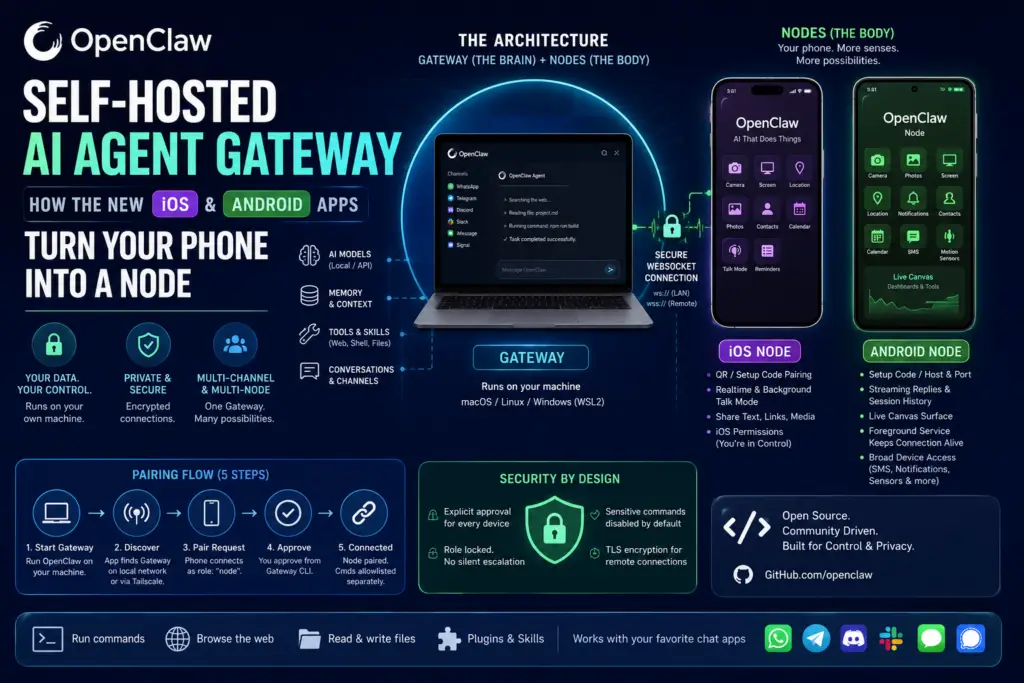
OpenClaw just shipped native iOS and Android apps, but they are not chatbots you talk to directly. They are companion “nodes” that plug your phone’s camera, location, voice, and screen into a self-hosted AI agent gateway running on your own computer. That one design choice — separating the brain (the Gateway) from the body (the phone) — is what makes this release worth understanding.
If you’ve used assistant apps before, the instinct is to assume this is “ChatGPT but on your phone.” It isn’t. OpenClaw flips the usual model: the intelligence, memory, tool access, and conversation history all live on a machine you control, while the phone simply contributes hardware the Gateway doesn’t have. This article breaks down exactly how that architecture works, what the iOS and Android apps actually do, how pairing and security are handled, and where a self-hosted AI agent gateway makes sense compared to a cloud-only assistant.
What Is OpenClaw?
Definition: OpenClaw is an open-source personal AI assistant built around a Gateway-and-Nodes architecture, created by Peter Steinberger with community contributors and not affiliated with Anthropic.
Expansion: Its core runtime is written in TypeScript and runs on Node 24 (recommended) or Node 22.19+. The Gateway runs on macOS, Linux, or Windows via WSL2. Rather than opening a dedicated app to talk to it, you interact with OpenClaw from chat apps you already use, including WhatsApp, Telegram, Discord, Slack, Signal, and iMessage. The agent can browse the web, run shell commands, and read and write files, and it works with hosted, subscription-backed, gateway, or local language models, with users supplying their own API key from a chosen provider. It also keeps persistent memory and supports community-built skills and plugins.
In short, OpenClaw is less a single app and more a personal automation layer that lives wherever you already chat.
What Is a Self-Hosted AI Agent Gateway?
Definition: A self-hosted AI agent gateway is a control-plane server, running on hardware you own, that manages an AI agent’s sessions, routing, tool access, and connected devices instead of relying on a third-party cloud service to do it.
Expansion: In OpenClaw’s case, this isn’t a marketing term — it’s the literal architecture. The Gateway is the single control plane, owning sessions, routing, channels, tools, and events, and you run one Gateway process on your own machine or server. Every conversation, memory entry, and API key stays on that machine. The phone apps never become a second brain; they’re peripherals that extend what the Gateway can sense and do in the physical world.
Why “Gateway,” Not “App”
The naming matters because it sets expectations correctly. Chat messages always land on the Gateway, never on a phone, and a node is simply a companion device that connects to that Gateway. If your phone is off, the Gateway keeps running on your computer or server, processing messages from WhatsApp, Telegram, or Slack as normal. The phone only matters when the agent needs something a desktop computer doesn’t have — like a camera, GPS, or a microphone you’ll actually speak into.
How the Gateway-and-Nodes Architecture Works
This is the technical heart of the release, and it explains every design decision that follows.
Nodes connect over a WebSocket on default port 18789, and each node registers with role: "node" during pairing. Once connected, nodes expose a command surface through node.invoke, with command families including canvas.*, camera.*, device.*, notifications.*, and system.*. The project’s own documentation is blunt about the relationship: “Nodes are peripherals, not gateways.”
Discovery and connection differ depending on where you are relative to the Gateway:
- On a local network: apps discover the Gateway via mDNS/Bonjour, meaning your phone finds it automatically as long as both devices share Wi-Fi.
- Away from home: for remote access, OpenClaw recommends Tailscale with a
wss://endpoint, keeping the connection encrypted even over the public internet.
This is what makes the self-hosted AI agent gateway model functionally different from a typical cloud assistant: there’s no central company server brokering the connection between your phone and your AI. It’s a direct, encrypted link between your own devices.
Pairing Flow Explained
Pairing follows a five-step handshake, and every step requires explicit human approval before a device gains any access:
- Start the Gateway on a supported host machine.
- App discovers the Gateway automatically over the local network, or connects remotely via a Tailscale
wss://endpoint. - Phone sends a pairing request, connecting to the WebSocket with
role: "node"and a device identity. - Operator approves the request from the Gateway’s command line.
- Node is confirmed paired and connected, after which privacy-sensitive commands still remain disabled until separately allowlisted.
Nothing about this flow lets a phone silently upgrade its own privileges — a detail covered in more depth in the security section below.
What the iOS and Android Companion Apps Add
Once paired, the phone effectively gives the agent a body. It contributes sensors and interfaces the Gateway machine simply doesn’t have on its own.
iOS App: “OpenClaw – AI That Does Things”
The iOS app pairs by QR code or setup code, and supports chat, realtime and background Talk mode, and approvals. You can share text, links, and media from iOS directly into OpenClaw, which is useful for quickly handing the agent a webpage or document to act on. Optional capabilities include camera, screen, location, photos, contacts, calendar, and reminders — each one gated behind iOS’s native permission prompts.
Android App: “OpenClaw Node”
The Android app is explicitly described as a companion node, not a standalone gateway. It offers streaming chat replies, image attachments, and full session history, plus Talk Mode using either ElevenLabs or the system text-to-speech engine. A standout feature is the live Canvas surface that lets the agent render dashboards and tools directly on the device. Android grants permissions one by one, and a foreground service keeps the Gateway connection alive in the background.
iOS Node vs. Android Node: Feature Comparison
Both apps serve the same architectural role — extending a self-hosted AI agent gateway with phone hardware — but they differ in a few practical details worth knowing before you pick a platform.
| Capability | iOS — “OpenClaw – AI That Does Things” | Android — “OpenClaw Node” |
|---|---|---|
| Role | Companion node | Companion node |
| Pairing method | QR code or setup code | Setup code or manual host/port |
| Chat | Chat from iPhone | Streaming replies, image attachments, full session history |
| Voice | Realtime and background Talk mode | Talk Mode (ElevenLabs or system TTS) |
| Canvas | Canvas surface | Live Canvas surface |
| Device capabilities | Camera, screen, location, photos, contacts, calendar, reminders | Camera, photos, screen capture, location, notifications, contacts, calendar, SMS, motion sensors |
| Action approvals | Reviewable from the iPhone | Managed on the Gateway |
| Declared data collection | None declared (App Store) | None declared (Google Play) |
| Requirement | iOS 18.0+ and a running Gateway | A running Gateway on macOS, Linux, or Windows (WSL2) |
The biggest functional difference is breadth of device access: Android’s permission set additionally covers notifications, SMS, and motion sensors, which opens up automations like reading and replying to a text message — something iOS’s more locked-down notification and messaging APIs make harder to replicate.
Real-World Use Cases for a Phone-Connected AI Agent Gateway
Because the phone supplies sensors rather than intelligence, the most compelling use cases are ones where the physical world needs to reach the agent, not the other way around:
- Field documentation: the agent uses iOS camera capture to photograph site conditions, while location data tags each photo with GPS coordinates automatically.
- Location-triggered reminders: the agent fires a task the moment you arrive at a specific place, instead of relying on a fixed time.
- Notification triage on Android: the agent reads an incoming notification and drafts a reply before you’ve even unlocked your phone.
- Live dashboards: the agent pushes a Canvas surface to your screen, turning the phone into a glanceable status display.
- Hands-free conversation: Talk Mode holds a continuous voice exchange without you touching the screen.
One operational caveat applies across both platforms: camera and screen capture require the app to be in the foreground, and background calls to those commands simply return an error. This is a deliberate constraint, not a bug — it prevents the agent from silently snapping photos while your phone sits in your pocket.
Setting Up Your Self-Hosted AI Agent Gateway: A Minimal Walkthrough
Getting a working self-hosted AI agent gateway running involves three stages: installing the Gateway, pairing a node, and allowlisting sensitive commands.
1. Install and start the Gateway on a supported host:
bash
# On the Gateway host (macOS, Linux, or Windows via WSL2)
npm install -g openclaw@latest
openclaw onboard --install-daemon
2. Pair the phone. Open the app and select a discovered Gateway, or enter the host and port manually. The app connects with role: "node" and sends a device pairing request, which you approve from the Gateway CLI.
bash
openclaw devices list
openclaw devices approve <requestId>
openclaw nodes status        # confirm the node is paired and connected
3. Allowlist privacy-sensitive commands. Commands like camera.snap, camera.clip, and screen.record stay disabled by default, and you opt in explicitly through gateway.nodes.allowCommands in your configuration file.
json
// ~/.openclaw/openclaw.json
{
  "gateway": {
    "nodes": {
      "allowCommands": ["camera.snap", "screen.record"]
    }
  }
}
Worth noting: a deny list set under gateway.nodes.denyCommands always overrides the allowlist, giving you a hard kill switch for any command regardless of other settings.
Security and Approval Model
How does OpenClaw prevent a paired phone from gaining unauthorized access?
Direct answer: every connection requires explicit operator approval, and the device’s assigned role cannot be silently escalated later, even if its credentials are reused or rotated.
The specifics: pairing credentials are stored on the device, and every node connection requires approval before it reaches the Gateway. The device pairing record functions as the durable role contract, meaning token rotation cannot upgrade a node into a different role. Camera and screen capture remain permission-gated and only run while the app is in the foreground.
Is the connection between phone and Gateway encrypted?
Direct answer: yes, for any connection outside your local network, though plain WebSocket is permitted on trusted local connections.
Cleartext ws:// connections are limited to LAN and .local hosts, while public or Tailscale endpoints require a real wss:// TLS endpoint. That means the moment you’re accessing your self-hosted AI agent gateway from outside your home network, encryption isn’t optional.
Strengths and Limitations
Strengths:
- A local-first design keeps keys, configuration, and data on your own machine, rather than a third party’s servers.
- One Gateway serves many channels and many nodes at once, so a single setup can back WhatsApp, Telegram, and a phone node simultaneously.
- Phones contribute hardware the Gateway lacks: camera, location, voice, and Canvas.
- Both store listings report no data collection.
Limitations:
- The mobile apps need a running Gateway to do anything — they are not functional standalone.
- Setup involves WebSocket pairing, mDNS, and sometimes Tailscale, a meaningfully higher bar than installing a typical consumer app.
- Camera and screen capture require the app to be in the foreground, ruling out fully passive background automation.
- The Android listing shows 10+ downloads, an early-stage signal worth factoring into expectations about polish and community support.
- Full system access is broad and demands careful allowlisting to avoid over-granting permissions.
Frequently Asked Questions
Does OpenClaw’s iOS or Android app work without a computer? No. Both apps are companion nodes, not standalone assistants, and they require an active connection to a self-hosted AI agent gateway running on a separate macOS, Linux, or Windows (WSL2) machine.
Can two phones connect to the same Gateway? The architecture supports multiple simultaneous nodes, since the Gateway is designed as a single control plane serving many channels and devices at once, though each device must go through its own approval step.
Do I need a paid subscription to run OpenClaw? No subscription is required by OpenClaw itself; you bring your own API key from whichever model provider you choose, and costs depend on that provider’s pricing.
What happens if I lose my phone after pairing it as a node? Because pairing credentials are tied to a durable device record rather than a token alone, you can revoke a specific device’s approval from the Gateway without affecting other paired nodes.
Is a self-hosted AI agent gateway harder to maintain than a cloud assistant? It requires more setup — installing and keeping a Gateway process running — but in exchange, you control where your conversation data, memory, and API keys physically live, which is the entire appeal of the self-hosted model.
Conclusion: The Future of Personal AI Hardware Cohesion
The arrival of native mobile applications for OpenClaw fundamentally challenges our assumptions about how smartphone hardware should interact with modern artificial intelligence. By refusing to build a standalone mobile application, the ecosystem introduces a paradigm shift. It proves that the future of ubiquitous computing does not require handing personal telemetry over to third-party cloud infrastructure. Instead, deploying a self-hosted AI agent gateway ensures that the user retains total ownership over the cryptographic keys, underlying models, and systemic automation pipelines that govern their digital life.
Implementing a central, local self-hosted AI agent gateway redefines the mobile device from an independent computing silo into a highly specialized environmental sensor. Your phone stops being a simple consumption screen and becomes a physical extension of your home server. For years, the major limitation of localized large language models was their spatial isolation. They were trapped on powerful desktops or homelab racks upstairs, completely blind to what the user was doing in the physical world. By structuring the architecture so that mobile apps function strictly as peripheral nodes, this barrier is broken down. The self-hosted AI agent gateway gains eyes, ears, and spatial awareness through the phone’s native camera, microphone, and GPS modules.
       [ Local Computer / Server ]
      ┌───────────────────────────┐
      │ SELF-HOSTED AI GATEWAY    │ <── (Brain, Memory, API Keys)
      └─────────────▲─────────────┘
                    │
            (Secure WebSocket)
                    │
       ┌────────────▼────────────┐
       │     MOBILE NODE         │ <── (Body: Camera, GPS, Voice)
       └─────────────────────────┘
However, opting for a self-hosted AI agent gateway is a deliberate choice that prioritizes data sovereignty over frictionless, one-click consumer setups. It requires an active willingness to manage local network topologies, configure persistent background daemons, and orchestrate secure mesh networks like Tailscale for remote traversal. This friction is not a design flaw; it is a structural feature of true digital privacy. The security model ensures that your physical telemetry data cannot be intercepted or monetized. Because the self-hosted AI agent gateway requires explicit, command-line confirmation for every new hardware node and enforces a strict, foreground-only execution policy for ambient tracking, it effectively eliminates the risk of passive, silent corporate surveillance.
Looking ahead, this decoupled engineering philosophy charts a sustainable path forward for the broader open-source AI community. As commercial AI providers increasingly push toward aggressive monetization and closed, opaque data-harvesting practices, running a personal self-hosted AI agent gateway serves as an indispensable privacy firewall. It allows tech-savvy professionals, developers, and privacy advocates to experience cutting-edge agentic workflows—such as real-time voice synthesis and interactive live canvases—without sacrificing their personal data autonomy. Ultimately, OpenClaw demonstrates that you do not need to choose between modern AI capabilities and strict data privacy. By anchoring your automation stack to a robust self-hosted AI agent gateway, you can transform your mobile phone into a secure, private node that acts as the physical embodiment of an intelligence layer completely under your own control.