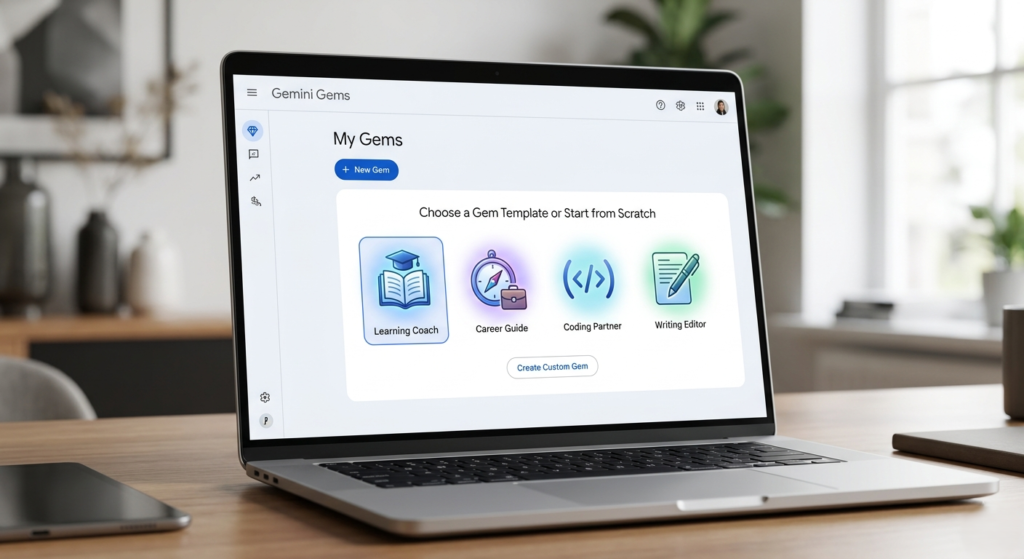
In the rapidly evolving world of artificial intelligence, the ability to tailor technology to your specific needs is a superpower. While general-purpose AI is impressive, it often feels like a jack-of-all-trades and a master of none. Enter Gemini Gems—customized versions of Google’s AI that act as specialized mentors, editors, and technical partners.
If you have ever felt overwhelmed by the sheer volume of information on the internet or struggled to find a consistent learning path, you are not alone. Traditional search often leads to “tab overload,” where you end up with twenty open browser windows and zero progress. By learning how to use Gemini Gems, you can cut through the noise, remove friction, and accelerate your personal and professional growth.
What Are Gemini Gems?
Originally introduced for Gemini Advanced subscribers, Gemini Gems are now available to a broader range of users, allowing anyone to create a personalized AI expert. Think of them as custom instructions on steroids. Instead of repeatedly telling Gemini who you are and what you need, you build a “Gem” that remembers your preferred tone, your level of expertise, and your specific goals.
Whether you want to learn a new language, master the MERN stack, or understand complex legal documents, a dedicated Gem provides a focused, intentional environment for your work.
Why Use Gemini Gems for Skill Acquisition?
The primary advantage of using Gemini Gems lies in their ability to provide a structured learning environment. Unlike the standard Gemini interface, which can be easily distracted by broad queries, a Gem stays within the boundaries you define.
1. Eliminating Learning Friction
When you start learning a new skill, the hardest part is often knowing where to begin. You can prompt a Gem to act as a “Syllabus Architect” that breaks down complex subjects into bite-sized, chronological lessons.
2. Consistent Feedback Loops
If you are practicing coding or writing, you need a critic that understands your specific style. A “Writing Editor” Gem doesn’t just fix grammar; it can be instructed to maintain your unique voice while suggesting structural improvements.
3. Contextual Specialization
By creating a Gem, you can upload specific reference files—like a textbook or a project manual. This ensures the AI isn’t just hallucinating general facts but is providing answers based on the specific material you need to master.
How to Set Up Your First Gemini Gem
Starting with Gemini Gems is straightforward. You can find the Gem Manager on your Gemini desktop dashboard or within the mobile app.
Step-by-Step Configuration:
- Open the Gem Manager: Click on the “Gems” tab in your sidebar.
- Select “New Gem”: You can start from scratch or customize one of Google’s premade options.
- Define the Role: Give your Gem a name (e.g., “SEO Strategy Mentor”).
- Write Instructions: This is the most critical part. Tell the Gem exactly how to behave.
- Example: “You are a senior technical SEO expert. Your tone is professional yet encouraging. Always provide data-backed reasons for your suggestions.”
- Upload Knowledge (Optional): Attach PDF or text files if you want the Gem to reference specific data.
The Best Premade Gemini Gems to Get Started
If you aren’t ready to build your own from scratch, Google provides several high-quality templates. Here is a comparison of the most popular premade Gemini Gems and how they help you learn:
| Gem Name | Primary Function | Best For |
| Learning Coach | Breaks down complex topics into simple terms. | Students and lifelong learners. |
| Brainstormer | Generates creative ideas and inspiration. | Creative writers and event planners. |
| Career Guide | Offers detailed plans for professional growth. | Job seekers and management tracks. |
| Writing Editor | Provides structural and grammatical feedback. | Bloggers and corporate communicators. |
| Coding Partner | Debugs code and suggests architectural improvements. | Software developers and engineers. |
Actionable Insights: Mastering Skills with Custom Gems
To truly leverage Gemini Gems, you should move beyond the templates. Here are three custom Gem configurations designed to help you master skills in record time.
The “Deep Dive” Researcher
Set up a Gem specifically for information synthesis. Instruct it to “Always provide a summary, followed by a list of key terms, and end with three practice questions to test my understanding.” This forces you to engage with the material rather than passively reading it.
The “Socratic Tutor”
Instead of a Gem that gives you the answers, create one that asks the right questions. Tell the Gem: “When I ask a question, do not give me the answer immediately. Instead, provide a hint or a leading question that helps me arrive at the solution myself.” This mimics the Socratic method and significantly improves long-term retention.
The “Simulated Interviewer”
Mastering a skill often culminates in a high-stakes environment like a job interview or a presentation. Use Gemini Gems to simulate these scenarios. Provide the Gem with a job description and instruct it to “Ask me five challenging technical questions and grade my responses based on clarity and accuracy.”
Key Limitations to Keep in Mind
While Gemini Gems are powerful, they are not perfect. It is important to understand their current constraints to manage your expectations:
- No Long-Term Memory: Currently, a Gem does not remember your past conversations from one session to the next. It only remembers the context you gave it during the initial setup.
- Manual Sharing: While you can now share Gems with others (similar to a Google Doc), this feature is primarily for viewing or editing instructions, not for sharing a “live” history of a chat.
- Subscription Requirements: While some features are trickling down to the free tier, the most advanced models and extensive file uploading are often reserved for Gemini Advanced or Business accounts.
[Image showing the sharing settings of a Gemini Gem]
Moving Beyond Search
The era of the “ten-blue-links” search result is fading. When you use Gemini Gems, you aren’t just looking for information; you are interacting with it. You are transforming the internet from a static library into a dynamic, personalized university.
By automating the repetitive parts of your workflow—like setting the tone or defining the scope—you free up your cognitive energy for actual learning. Whether you are an Operations Manager looking to optimize systems architecture or a student trying to pass the bar exam, Gemini Gems provide the tailored support needed to succeed.
Final Thoughts on Personalization
The beauty of these custom AI bots is that they evolve with you. As you become more proficient in a subject, you can go back into the Gem Manager and update the instructions. You can tell your “Coding Partner” to stop explaining basic syntax and start focusing on advanced design patterns. This “leveling up” ensures that your AI assistant remains a valuable asset throughout your entire career journey.
Start experimenting today. Pick one skill you’ve been putting off, build a dedicated Gem for it, and see how much faster you can cross the finish line.