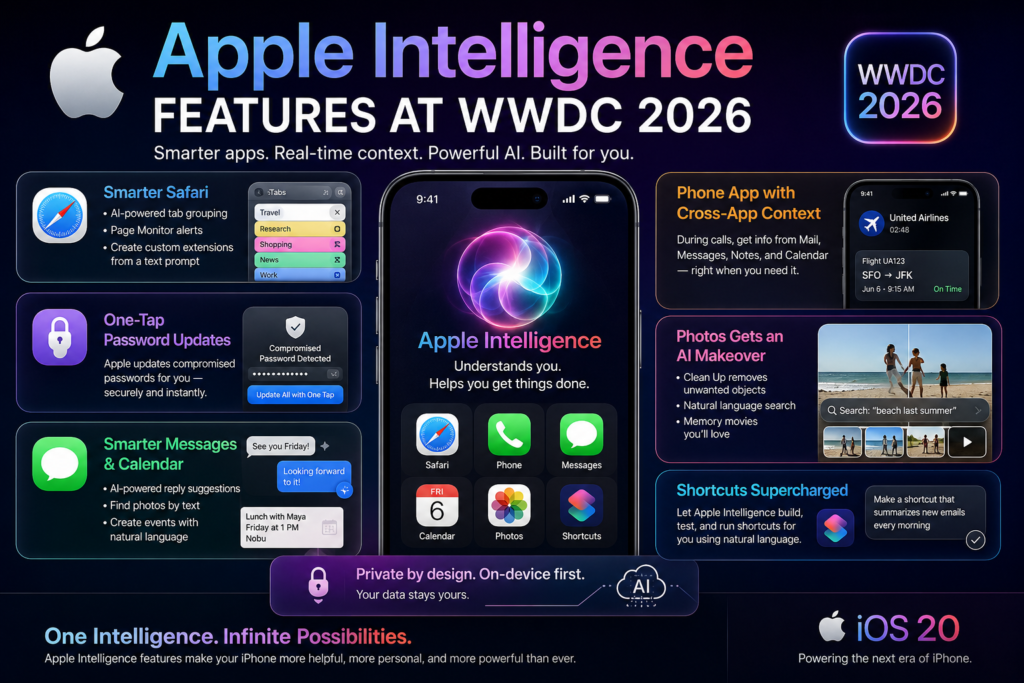
Apple Intelligence features announced at WWDC 2026 represent the most sweeping AI upgrade to the iPhone since the introduction of Siri. From a Safari browser that builds its own extensions to a Phone app that reads your emails mid-call, Apple has repositioned iOS as an operating system that doesn’t just run your apps — it understands what you’re trying to accomplish across all of them.
If you own an iPhone and want to know what actually changed, what it does in practice, and whether your device supports it, this guide breaks it all down.
What Is Apple Intelligence and Why WWDC 2026 Changes Everything
Apple Intelligence is Apple’s umbrella term for its suite of on-device and cloud-assisted AI capabilities, first introduced in 2024 and significantly expanded each year since. Unlike standalone AI apps or chatbots, Apple Intelligence is woven directly into system apps — Safari, Messages, Mail, Calendar, Phone, Shortcuts, Photos — so it works in the background without requiring you to open a separate tool.
At WWDC 2026, Apple shifted Apple Intelligence features from a collection of useful utilities into something more cohesive: a layer of reasoning that spans multiple apps simultaneously. The headline concept is cross-app context awareness — the ability for one app to pull relevant information from another, in real time, without you having to switch screens.
That shift matters because it mirrors how humans actually work. When you’re on a customer service call, you’re also mentally referencing the email you received, the order number you noted, and the calendar event you set. Apple Intelligence features now let the iPhone do that same kind of parallel recall automatically.
Every New Apple Intelligence Feature Announced at WWDC 2026
Safari Gets AI-Powered Tab Management and a Page Monitor
What it is: Safari can now automatically group open tabs by topic using on-device AI, and it can suggest additional related tabs to add to any existing group.
Why it matters: Heavy browser users — researchers, journalists, power users juggling multiple projects — often have dozens of tabs open with no clear organization. The new tab grouping removes the manual overhead of sorting and naming groups, letting Safari infer context from page content.
Beyond tab organization, Safari is gaining a Page Monitor feature that watches specified web pages for changes and sends you a notification when it detects an update. This is directly useful for price tracking, monitoring government announcements, following sports scores, or watching for ticket availability — tasks that previously required a third-party app or browser extension.
The most developer-notable addition: Safari can now generate a custom browser extension from a text prompt. Until now, creating a Safari extension required writing JavaScript and submitting through Xcode. With Apple Intelligence features handling the code generation, non-developers can now describe a page modification — “hide all ads on this site” or “highlight every price in yellow” — and Safari builds the extension automatically.
One-Tap Password Updates for Compromised Credentials
What it is: When Apple identifies a compromised password in your keychain, the Passwords app can now update it automatically — navigating to the site, logging in, generating a new credential, and saving it — all with a single tap.
Why it matters: Security researchers consistently identify “password fatigue” as a top reason people ignore breach notifications. The friction of manually logging into every compromised account, navigating to settings, and updating credentials causes most users to defer or ignore the task entirely. By reducing that process to one tap, this Apple Intelligence feature directly increases the likelihood that users act on security warnings.
Messages and Calendar Gain Natural Language Superpowers
Messages is receiving two AI upgrades at WWDC 2026:
- AI-powered reply suggestions that go beyond the current quick-reply bubbles — these are contextually generated, full-sentence responses based on the conversation thread.
- Photo search by text description — type “the photo of us at the beach last summer” and Apple Intelligence features surface matching images from your library without requiring you to scroll or remember when it was taken.
Calendar is getting a natural language event creation tool. Rather than tapping through date pickers and fields, you can type or dictate something like “lunch with Maya on Friday at 1pm at Nobu” and Calendar creates the event, populates the attendees from your contacts, and suggests the correct location — all from one sentence.
These Apple Intelligence features together make the iPhone’s built-in apps competitive with third-party alternatives that have offered similar features for years, while benefiting from tighter OS integration and on-device processing.
Phone App Pulls Cross-App Context Mid-Call
This is arguably the most consequential Apple Intelligence feature announced at WWDC 2026 for everyday iPhone users.
What it does: During an active phone call, the Phone app can now surface relevant information from other apps — Mail, Messages, Notes, Calendar — in real time, based on what you’re talking about.
Example: You call your airline about a delayed flight. The Phone app detects the context of the conversation and surfaces your flight confirmation from your inbox, your seat number, and any relevant travel alerts — without you leaving the call screen.
This is Apple’s answer to Google’s similar “Magic Cue” capability, and the competition signals that the major AI platforms are increasingly competing at the operating system level, using personal data as the differentiator. Unlike a cloud-based assistant, Apple’s implementation relies on on-device models and its existing privacy architecture, which means the cross-app context never leaves your device.
Shortcuts Learns to Build Itself from Plain Language
What it is: Apple’s Shortcuts app can now generate complete automation workflows from a natural language description.
What it replaces: The existing Shortcuts builder requires users to manually select actions, connect them in sequence, and configure inputs — a process that can take 15–30 minutes for a moderately complex workflow and has a steep learning curve for newcomers.
What the new Apple Intelligence feature does: You describe the outcome you want — “every morning at 7am, send me a summary of my unread emails and today’s calendar events” — and Shortcuts builds the entire workflow automatically. Apple has described this as bringing “vibe-coding” to mainstream iPhone users, borrowing a term from the developer community where you describe intent rather than write explicit instructions.
This could significantly expand the percentage of iPhone users who actually use Shortcuts, which has historically been limited to power users comfortable with workflow logic.
Image Playground and Photos Get Generative Editing Tools
Apple’s creative apps received the most visually striking Apple Intelligence features at WWDC 2026.
Image Playground updates include:
- A new generative model capable of producing more photorealistic images (the previous model was stylized and cartoon-like)
- Natural language editing: tap, circle, or brush-select any object and describe the change
- Adjustable image dimensions to fit different formats (square, landscape, portrait, stories)
- A new API that lets third-party developers access the image generation model directly
- Wallpaper generation and AI-designed contact posters
Photos app updates include:
- Improved Cleanup tool with better object removal and higher-fidelity background infill
- An AI expansion tool that extends the edges of an existing photo — similar to Adobe’s Generative Fill, but on-device
- Spatial Reframing: repositions the subject or objects within a frame using on-device spatial models combined with generative infill to fill in the new perspective
The Spatial Reframing feature is particularly notable because it works on existing photos in your library — not just new ones. That means years of old photos are now potential candidates for recomposition, effectively giving users a retroactive editing capability that didn’t exist before.
Apple Intelligence Features vs. Google AI: How Do They Compare?
The cross-app context awareness in the Phone app draws a direct comparison to Google’s parallel AI work on Android. Here’s how the two ecosystems stack up across the key capability areas announced in 2026:
| Capability | Apple Intelligence (WWDC 2026) | Google AI (Android) |
|---|---|---|
| Cross-app context during calls | Yes — surfaces email, messages, calendar | Yes — “Magic Cue” feature |
| On-device vs. cloud processing | Primarily on-device | Mix of on-device and cloud |
| Browser AI (tab management) | Yes — auto-grouping, page monitor | Yes — via Chrome AI features |
| Photo generative editing | Yes — expansion, reframing, cleanup | Yes — Magic Eraser, Best Take |
| Natural language shortcuts | Yes — full workflow generation | Yes — Gemini-powered routines |
| Browser extension creation | Yes — text-prompt generation | No equivalent announced |
| Password auto-update | Yes — one-tap, AI-assisted | Partial — Google Password Manager |
| Privacy model | On-device first, Private Cloud Compute | Cloud-first with on-device option |
The clearest differentiator Apple maintains is its privacy architecture. Apple Intelligence features default to on-device processing, with Private Cloud Compute handling tasks that require more compute power — but always with the guarantee that Apple cannot see or retain your data. Google’s approach offers more flexibility and broader third-party integration but routes more data through cloud infrastructure.
What These Apple Intelligence Features Mean for Everyday iPhone Users
Not every feature announced at WWDC 2026 will change your daily experience equally. Here’s a practical breakdown of which Apple Intelligence features are most likely to have visible day-to-day impact:
High impact for most users:
- Natural language Calendar event creation (saves clicks on every event you make)
- Messages photo search (solves a real, recurring frustration)
- Compromised password one-tap update (directly improves security with no friction)
- Safari Page Monitor (replaces a need for third-party price-tracker apps)
High impact for power users:
- AI-generated Shortcuts (transforms what’s possible without coding knowledge)
- Cross-app context in Phone (most useful for business users managing many threads)
- Safari extension creation by text prompt (replaces a task that previously required developer skills)
High impact for creative users:
- Spatial Reframing and photo expansion in Photos (retroactive library improvement)
- Image Playground photorealistic model (meaningful upgrade for AI-generated imagery)
- Contact poster generation (personalization without design skills)
The common thread across all of these Apple Intelligence features is the reduction of task-switching friction — the number of times you have to leave what you’re doing to go get something else. The more the OS can anticipate what you need, the less time you spend navigating and the more time you spend doing.
Will Apple Intelligence Features Work on Your Device?
Short answer: Apple Intelligence features require an iPhone 15 Pro, iPhone 16, or later, running iOS 17 or newer. As of WWDC 2026, most of these new capabilities are expected to ship with iOS 27 in autumn 2026.
Why the hardware requirement? Apple Intelligence features use on-device neural processing via the A17 Pro chip or newer. The on-device inference that powers real-time cross-app context, natural language generation, and photo manipulation requires the Neural Engine performance that older chips cannot reliably deliver.
Regional rollout: Some Apple Intelligence features, particularly those involving language generation (reply suggestions, Calendar natural language input), continue to roll out language by language. At launch, English is fully supported; additional languages including French, German, Japanese, Korean, and Chinese are staged throughout the following months.
Third-party app availability: The Image Playground generative API announced at WWDC 2026 opens Apple’s image generation model to third-party developers for the first time. Expect apps in photography, social media, and design categories to integrate this capability shortly after iOS 27’s public release.
Frequently Asked Questions About Apple Intelligence at WWDC 2026
What is the biggest Apple Intelligence feature from WWDC 2026? The cross-app context awareness in the Phone app is the most consequential for most users. It is Apple’s clearest demonstration of AI working across the full operating system rather than within individual apps.
Does Apple Intelligence use my data for training? No. Apple has stated that Apple Intelligence features process data on-device wherever possible. When tasks are sent to Private Cloud Compute servers, Apple uses cryptographic guarantees to ensure the company itself cannot access or retain user data.
Is the AI-powered Shortcuts feature the same as Siri? No. Siri handles voice requests and conversational queries. The Shortcuts AI feature is specifically for creating automation workflows — multi-step sequences that run automatically or on demand. They are separate systems that can work together.
Will the Safari Page Monitor work on any website? Yes, the feature is designed to work on any publicly accessible web page. It detects content changes and can notify you selectively — so you can monitor a product listing price without getting alerts for every other change on the page.
When will iOS 27 ship? Apple has not confirmed an exact date, but iOS major releases follow a consistent autumn schedule. Based on WWDC 2026 timing, iOS 27 is expected in September or October 2026.
The Bottom Line: Apple Intelligence Features Are Now a Platform, Not a Feature Set
When Apple Intelligence launched in 2024, it was easy to characterize it as a collection of productivity tools bolted onto iOS — useful, but optional. What WWDC 2026 makes clear is that Apple’s vision for Apple Intelligence features is fundamentally different: a persistent, cross-app reasoning layer that makes the entire operating system smarter over time.
The shift from “AI features in apps” to “AI across apps” is the real story of WWDC 2026. The Phone app reading your email mid-call, Shortcuts building workflows from a sentence, Safari writing its own extensions — these are not isolated features. They are expressions of a platform bet: that the most valuable AI assistant is not the one with the best model, but the one that knows you best.
For iPhone users, the practical upshot is that iOS 27 will feel meaningfully more capable than iOS 26 — not because of a single headline feature, but because of dozens of small moments where the phone already knows what you need next.