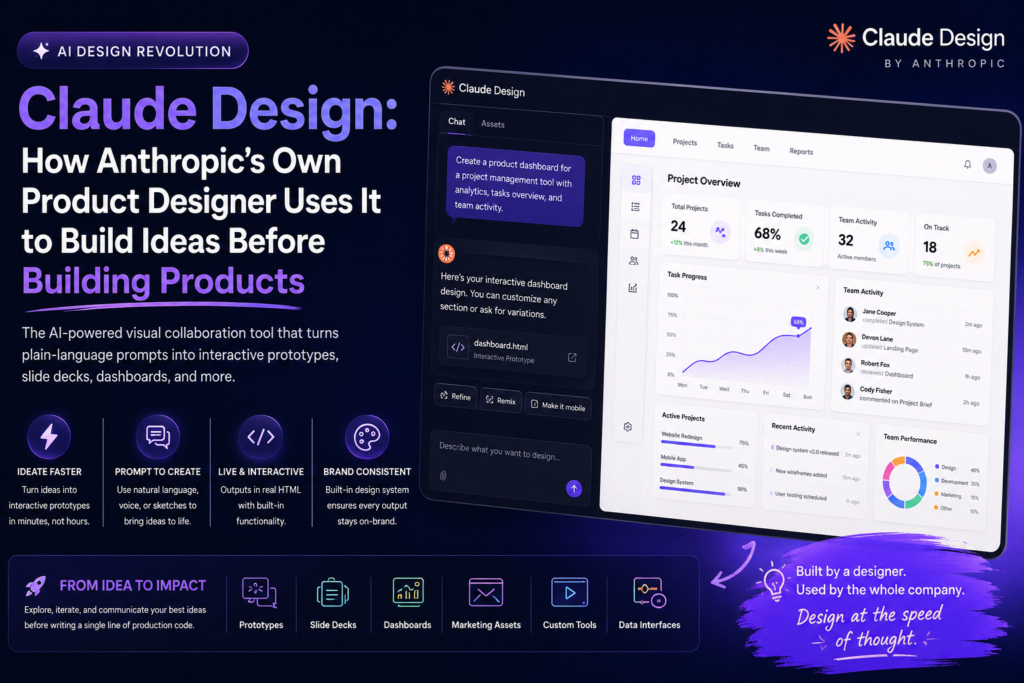
Claude Design is Anthropic’s AI-powered visual collaboration tool that lets designers turn ideas into working prototypes, slide decks, and interactive visuals using plain-language prompts instead of manual mockups. It was built internally by an Anthropic product designer who needed a faster way to keep pace with engineers shipping features at record speed — and it has since grown into a full medium for visual communication across the company.
If you’ve ever wondered whether an AI tool can genuinely replace the slow, screen-by-screen grind of traditional prototyping, this is the closest real-world answer available today. Anthropic didn’t build Claude Design as a marketing exercise — it was built out of necessity, tested internally for months, and only released once designers across the company started finding uses no one had planned for.
What Is Claude Design?
Claude Design is an AI design tool built on top of Claude’s ability to generate and edit HTML in real time. Instead of treating HTML as just “the format websites are made of,” Claude Design treats it as a flexible visual medium — capable of producing anything from a slide deck to an animated prototype to an interactive dashboard.
The tool runs a split-view interface: a chat panel on one side, live visual output on the other. A designer describes what they want, Claude Design generates the artifact, and the designer refines it through further prompts or direct manual edits. Every output comes with a shareable link, similar to sharing a document.
The Origin Story Behind Claude Design
Claude Design didn’t start as a company initiative. It began as a side project by a solo product designer working on Claude Code for VS Code, who found himself falling behind a fast-shipping engineering team. His early attempts — pasting terminal output and screenshots into Claude and asking it to “design a feature” — produced weak results. The breakthrough came when he stopped treating Claude like a text generator and started treating it like a visual tool: prompting it to output full HTML interfaces inside a live preview pane.
From there, he distilled Anthropic’s brand guidelines — fonts, colors, assets, and design principles — directly into the tool’s prompting layer. That meant every output was automatically brand-compliant, which made it usable by other designers on the team almost immediately. What started as an internal prototype eventually became a company-wide product after it visibly transformed how a team pitched and iterated on ideas during a live offsite session.
What Makes Claude Design Different From Traditional Design Tools?
Traditional design software (Figma, Sketch, Adobe XD) requires manually building every screen state and wiring interactions by hand. Claude Design instead generates functional, interactive prototypes directly from natural-language prompts, cutting out much of the manual assembly work.
| Feature | Claude Design | Traditional Design Tools |
|---|---|---|
| Primary input method | Natural language prompts, voice dictation, sketches | Manual drawing, click-based UI construction |
| Interactivity | Built-in; prototypes are functional by default | Requires manual prototyping/wiring of states |
| Output medium | Live HTML (slides, videos, dashboards, apps) | Static frames or limited prototype modes |
| Brand consistency | Automated via uploaded design system | Manual application of style guides |
| Iteration speed | Minutes, via reprompting or remixing options | Hours, via manual screen-by-screen edits |
| Best suited for | Early ideation, pitching, alignment, exploration | Production-ready UI specs and detailed handoff |
| Image generation | Not supported (no image model) | Supported in most modern tools |
This comparison matters because it defines where Claude Design fits in a real workflow: it is not a replacement for detailed interface design systems, but a faster on-ramp to the ideas that eventually get built.
What Claude Design Is Good At
Claude Design shines in the early, exploratory stages of design work — the phase where speed and volume of ideas matter more than pixel-perfect polish. Based on real internal use at Anthropic, Claude Design has been used for:
- Interactive click-through prototypes — handing Claude existing assets and letting it wire together functional flows automatically
- Slide decks and one-pagers — built live, sometimes minutes before a presentation
- Product redesign exploration — teams riffing on entirely new directions for existing tools inside Claude Design itself
- Custom internal tools — such as a bespoke video editor built specifically to produce a brand animation
- Data-driven interfaces — apps with adjustable sliders, physics-based animation controls, and live color systems
- Social and marketing visuals — emails, landing pages, and social media graphics generated from the same brand-aware prompting layer
This breadth is part of why Anthropic stopped describing Claude Design purely as a “prototyping tool” and started describing it as a general medium for visual communication.
What Claude Design Is Not Built For
Claude Design does not include an image generation model, so tasks like logo design or original illustration are outside its intended scope — even though people have tried anyway. The recommended workaround is to upload existing logos and brand assets rather than asking Claude Design to generate them from scratch.
Claude Design is also not meant for shipping production software. That job belongs to Claude Code. The distinction Anthropic draws is simple: Claude Code builds what ships; Claude Design explores what might ship. The two tools are designed to work together — a prototype can move from Claude Code into Claude Design for visual iteration, and a finished concept in Claude Design can be handed back to Claude Code to be built.
10 Best Practices for Using Claude Design
Anthropic’s own product designer, who built the tool, shared a set of working habits that consistently produce better results:
- Write your prompt before you open the tool. Think through what you actually want — dictate it, type it into a notes app, or record a voice memo — before sitting down to prompt Claude Design.
- Specify the aesthetic explicitly. Left unguided, AI models tend to default toward familiar-looking visual patterns. Naming fonts, colors, or providing a moodboard prevents generic output.
- Upload a design system once. Feeding Claude Design your logos, decks, and typography specs lets every future artifact start from your existing brand instead of a blank canvas.
- Generate multiple options, then combine the best parts. Asking for ten variations and merging the strongest elements from a few of them tends to outperform asking for one “perfect” version.
- Upload sketches when words fail. A photographed napkin sketch can communicate a layout faster than a paragraph of description.
- Use point-and-talk commenting. Clicking directly on an element and dictating feedback is faster and more precise than writing out which element you mean.
- Start with wireframes. Asking for low-fidelity wireframes first keeps Claude Design focused on structure rather than visual polish, which speeds up early-stage iteration.
- Do final touches manually. Small adjustments like resizing, alignment, and color tweaks are often faster and more accurate done by hand than by re-prompting.
- Connect real context. Linking GitHub, running web searches, or connecting other data sources lets Claude Design ground its output in your actual product rather than guessing.
- Keep multiple tasks moving. You don’t need to wait for one output before queuing the next prompt or request.
Claude Design vs. Claude Code: When Should You Use Which?
Is Claude Design a replacement for Claude Code? No. Claude Design is built for early-stage ideation, visual exploration, and getting stakeholder buy-in before any commitment to build. Claude Code is built for writing and shipping actual production software.
Can Claude Design and Claude Code work together? Yes. A prototype started in Claude Code can be synced into Claude Design for visual iteration, and a concept refined in Claude Design can be handed off to Claude Code once it’s ready to be built.
Should a solo founder use Claude Design instead of a design tool like Figma? For early concept validation and pitching ideas quickly, Claude Design can replace much of that early workflow. For detailed, production-ready interface specifications and developer handoff, a dedicated design tool may still be necessary alongside it.
Who Should Use Claude Design?
Claude Design is aimed at product designers, founders, marketers, and teams who need to move fast between an idea and something tangible enough to react to. It’s particularly effective for:
- Product and UX designers prototyping new features
- Founders building pitch decks or landing pages without a design team
- Marketing teams producing social and campaign visuals
- Cross-functional teams aligning on direction before committing engineering resources
Because Claude Design runs on Claude’s underlying models — including newer Opus-class models with improved vision capabilities for reading charts, diagrams, and screenshots — the quality of its output has been improving in step with the broader Claude model family.
FAQ: Common Questions About Claude Design
What is Claude Design used for? Claude Design is used for early-stage visual work: interactive prototypes, slide decks, landing pages, one-pagers, animations, and social media visuals — generated from natural-language prompts rather than manual design tools.
Does Claude Design generate images or logos? No. Claude Design has no image generation model, so it’s not suited for logo design or original illustration. Existing brand assets should be uploaded instead.
Is Claude Design available on all Claude plans? Claude Design is currently in beta and available on Claude Pro, Max, Team, and Enterprise plans.
Can Claude Design connect to GitHub or other data sources? Yes. Claude Design supports GitHub connections, web search, and MCP connections, allowing it to pull real components, screens, or outside information into its output.
What is the main advantage of Claude Design over manual prototyping? Claude Design collapses the time between having an idea and seeing a working, shareable version of it — turning a process that might take hours of manual screen-building into one that takes minutes of prompting and refinement.