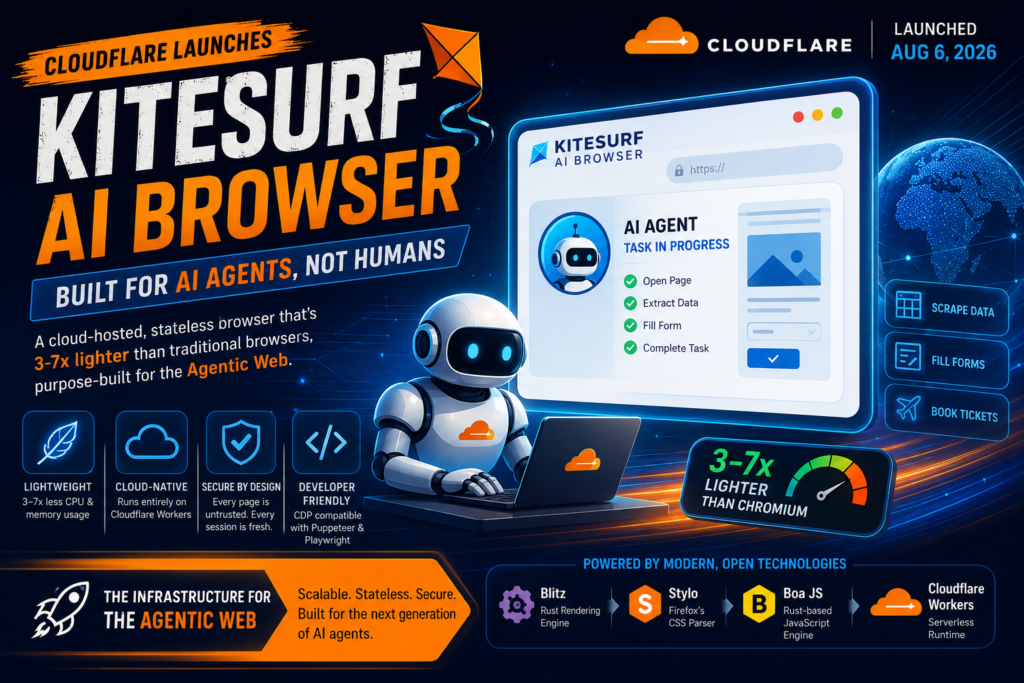
Imagine an AI agent trying to book your train tickets, and instead of loading a full desktop browser just to click a few buttons, it fires up something 3-7x lighter that was purpose-built for exactly that job. That’s the pitch behind Kitesurf, the new Kitesurf AI browser that Cloudflare launched on August 6, 2026. In short, Kitesurf is a cloud-hosted, stateless browser designed specifically for AI agents rather than humans, and it runs entirely inside Cloudflare’s serverless Workers platform, using far less CPU and memory than a traditional Chromium browser for common automation tasks.
If you’ve been following Kalinga.ai’s coverage of the AI agent boom, this launch matters because it signals where the “agentic web” infrastructure race is headed next. Let’s break down what Kitesurf actually is, how it works, and why it’s a big deal for anyone building AI agents in 2026.
What Is the Kitesurf AI Browser?
The Kitesurf AI browser is Cloudflare’s answer to a question the company says it had been debating internally for years: should we build our own browser? Cloudflare finally said yes after concluding that browsers built for humans, like Chrome or Firefox, carry too much overhead for AI agents that don’t need tabs, themes, extensions, or pixel-perfect rendering.
Agentic browser, a web browser built specifically for AI agents instead of human users, optimized for machine-readable output, low compute cost, and scalability rather than visual polish. Kitesurf is a clear example: it skips features people rely on daily and instead focuses on structured content extraction, screenshots, and token-efficient page navigation, which is what an autonomous AI agent actually needs when it’s filling out a form or scraping a page.
Why did Cloudflare build a browser for AI agents instead of adapting Chromium? Because giving every agent its own full Chromium instance is expensive and restricts agentic browsing to only the most well-funded, sophisticated AI systems. A lighter, purpose-built browser lowers that barrier for smaller developers and applications too.
The Origin Story: From Idea to Launch in 12 Weeks
Cloudflare says the Kitesurf AI browser project moved unusually fast. The company built the first working prototype by porting an open-source Rust headless engine called Obscura onto Cloudflare Workers, with heavy use of AI coding agents to accelerate development. From that proof of concept, Cloudflare says it took the team just 12 weeks to go from initial idea to a public beta launch, with the first commit landing in May 2026.
That speed was possible partly because Cloudflare’s engineers used the Web Platform Tests (WPT) suite, a massive collection of standards-conformance tests, to give their own AI coding agents clear, measurable goals to work toward, rather than vague instructions.
How Does the Kitesurf AI Browser Actually Work?
Unlike a browser installed on your laptop, Kitesurf doesn’t run as a single monolithic application. It’s built from several components that each run as isolated Cloudflare Workers, communicating over Cloudflare’s built-in remote procedure call (RPC) system.
- The Engine, the only public-facing component; it handles the Chrome DevTools Protocol (CDP), which is what makes Kitesurf compatible with existing tools like Puppeteer and Playwright without any code changes.
- PageScript, parses HTML and CSS and executes JavaScript inside a fresh, isolated Worker for every page or iframe, using Cloudflare’s Dynamic Workers feature.
- PageRenderer, turns the parsed page into actual pixels (a screenshot, PDF, or image buffer) using a rendering pipeline built on the Blitz engine.
- SandboxOutbound, the single component allowed to fetch assets from the open internet, enforcing CORS rules, filtering responses, and isolating cookies per session.
Question → Direct Answer: What technologies power Kitesurf? Kitesurf is built on Blitz (a modular Rust rendering engine), Stylo (Firefox’s CSS parser), and Boa JS (a Rust-based ECMAScript engine for handling JavaScript eval calls), all compiled to WebAssembly and running on top of Cloudflare Workers.
Stateless design, an architecture where individual components hold no memory of past requests, so failures are cheap to recover from because there’s nothing to reconstruct. Kitesurf’s PageRenderer and PageScript workers are both stateless by design, which lets Cloudflare kill and relaunch a stuck or failed component instantly and spin up thousands of parallel instances during traffic bursts, without losing session data stored separately by the Engine.
A Different Threat Model for AI Agents
One detail that stands out in Cloudflare’s announcement is how differently Kitesurf treats security. Because an AI agent might be pointed at any arbitrary, untrusted webpage as part of its task, Cloudflare built Kitesurf on the assumption that every page load is untrusted input and every session starts completely fresh. This matters because agent-driven browsing introduces new risks like prompt injection, where malicious content on a webpage tries to hijack an AI agent’s instructions, a threat that simply doesn’t exist for human browsing in the same way.
The Engineering Decisions Behind the Kitesurf AI Browser
Before writing a single line of production code, Cloudflare’s team made a handful of deliberate design choices that shaped everything about how the Kitesurf AI browser works today. Understanding these choices helps explain why Kitesurf behaves so differently from a browser built for people.
Rust and WebAssembly wherever possible. Instead of relying on emulation layers like Emscripten, which can produce bulky, slow compiled binaries, Cloudflare chose to write native Rust code and compile it directly to WebAssembly using a tool called wasm-bindgen. This keeps Kitesurf’s components running close to the metal, avoiding unnecessary overhead that would eat into the very CPU and memory savings the project is trying to achieve.
Fail safe, never fail dead. Because a browser has to render the entire unpredictable, sometimes hostile web without ever crashing outright, Cloudflare committed to a rule: any failure should degrade to a blank frame or a missing element, never a dead session. Every component catches faults at its own boundary, defaults to something safe and empty, and logs enough detail for engineers to diagnose what went wrong later.
Isolation as a first principle. An AI agent using the Kitesurf AI browser might be pointed at literally any website a task requires, which means it’s handling arbitrary, untrusted code from arbitrary origins constantly. Cloudflare built Kitesurf so that every page load is treated as untrusted input and every session starts completely fresh, with each internal component given access only to the resources it strictly needs. Cloudflare Workers’ isolate-based security model made this a natural fit, though the team still had to enforce isolation rules at the application level too.
Statelessness by default. State is expensive to protect and expensive to recover when something breaks. By keeping components like PageRenderer and PageScript stateless, Cloudflare made each one disposable: if a rendering task stalls, the system just kills it and starts a fresh one rather than trying to repair a broken session. This design fits automation workloads especially well, since AI agent traffic tends to arrive in unpredictable bursts rather than a steady, predictable stream.
How Cloudflare Tested the Kitesurf AI Browser
Building browser software is notoriously hard to get right, and Cloudflare leaned heavily on automated testing to keep quality under control while still moving fast with AI-assisted development. The team used the Web Platform Tests (WPT) suite as its primary yardstick, since it offers thousands of clearly defined, standards-based success criteria that both human engineers and AI coding agents could work toward.
But WPT alone only measures conformance to web standards, not how well a browser handles messy, real-world websites. To close that gap, Cloudflare also built integration and visual regression tests that run multistep Puppeteer scripts against both Chromium and Kitesurf side by side, comparing not just logical assertions but the actual rendered output at each step to catch unwanted visual differences.
As something of an engineering rite of passage, Cloudflare also confirmed that Kitesurf can render and run Doom, the classic first-person shooter, referencing an earlier internal experiment that got the game running inside Cloudflare Workers. It’s a playful detail, but it’s also a genuine stress test of how well the rendering pipeline handles dynamic, interactive content.
Kitesurf vs. Chromium: How Much More Efficient Is It?
Cloudflare published benchmark data comparing Kitesurf to a warm-pooled Chromium instance across common agentic tasks like taking screenshots and extracting HTML. The numbers, based on the median of five runs across a 14-URL test corpus, show a clear trade-off between speed and resource efficiency.
| Metric | Kitesurf | Chromium (warm pool) | Kitesurf’s Advantage |
| CPU: Screenshot | 380 ms | 1,173 ms | 3.1x less CPU |
| CPU: HTML extraction | 229 ms | 877 ms | 3.8x less CPU |
| Memory: Screenshot | 57.8 MiB | 271.0 MiB | 4.7x less memory |
| Memory: HTML extraction | 39.4 MiB | 273.7 MiB | 7.0x less memory |
| Wall time: Screenshot | 1,148 ms | 637 ms | 1.8x slower |
| Wall time: HTML extraction | 820 ms | 472 ms | 1.7x slower |
Question → Direct Answer: Is Kitesurf faster than Chromium? No, not in raw wall-clock speed, Chromium’s JIT compiler, which has already “seen” a page before, wins the stopwatch by roughly 1.7x. But Kitesurf uses dramatically less CPU and memory, which is what actually drives infrastructure costs at scale for anyone running thousands of AI agent sessions.
This is the core trade-off of the Kitesurf AI browser: it sacrifices some raw rendering speed and visual fidelity in exchange for a much smaller resource footprint, which translates directly into lower hosting costs for developers running large fleets of AI agents.
What Can Kitesurf Do Today, and What Can’t It Do Yet?
Cloudflare has been upfront about Kitesurf’s current limitations, since it’s still a beta product only twelve weeks into development. The agentic browsing capabilities are already solid for a specific set of use cases, but there are real gaps developers should know about before relying on it in production.
Here’s where the Kitesurf AI browser stands today:
- What works well: Rendering structured pages like TodoMVC (in React, Vue, Angular, and vanilla JS), Wikipedia, Hacker News, the Cloudflare Blog, and much of the Cloudflare dashboard.
- What it’s good for: One-shot automation tasks such as extracting page content, generating PDFs, or taking screenshots of compatible websites.
- What it can’t do yet: Play video, render WebGL content, pass bot-detection systems that check real TLS fingerprints, or maintain a long authenticated session with persistent state.
- Test coverage: Kitesurf already passes more than 215,000 Web Platform Tests, with Cloudflare adding hundreds of new passing tests every week.
- Future plans: Cloudflare says it intends to open source Kitesurf once the project matures, letting customers deploy their own versions on their own accounts.
For any workload that needs those unsupported features, Cloudflare recommends sticking with Browser Run’s default Chromium-based option instead.
How Do Developers Access Kitesurf?
Kitesurf is available for free during its beta period through Browser Run, Cloudflare’s existing headless browser automation product. Because Kitesurf speaks the same Chrome DevTools Protocol (CDP) that Chromium does, developers don’t need to rewrite their automation scripts, tools like Puppeteer, Playwright, and chrome-remote-interface all work out of the box.
Definition + Expansion: Browser Run is Cloudflare’s API product that lets developers programmatically control headless browser instances running on Cloudflare’s global network. Kitesurf is now available inside Browser Run as an alternative rendering engine, developers simply add a browser=kitesurf parameter to their existing API calls or CDP endpoint to switch from Chromium to the lighter Kitesurf engine, without changing any other code.
Developers can also explore Kitesurf directly through a public playground, where Cloudflare has embedded Chrome DevTools so users can inspect DOM elements, watch network activity, and check memory usage of individual rendered pages in real time.
Why This Matters for the Broader AI Agent Ecosystem
Kitesurf arrives at a moment when browser-using AI agents are becoming central to how AI products interact with the web, filling forms, comparing prices, extracting research, and more. Every major infrastructure player is now racing to make agentic browsing cheaper and more reliable, and a Kitesurf AI browser built to run natively on Cloudflare’s edge network is a strong signal that the industry sees browser cost, not browser capability alone, as the next bottleneck to solve.
For students and young professionals in India tracking the AI agents space, this is a good example of how “boring” infrastructure choices, like which browser engine an AI agent uses, can quietly determine which companies can afford to scale agentic products and which ones get priced out.
It’s also a useful case study in how AI itself is now being used to build AI infrastructure. Cloudflare’s team has been candid that AI coding agents played a central role in porting the original Obscura prototype to Workers and in reaching the current level of Web Platform Tests coverage, with the WPT suite acting as a structured feedback loop that let the agents iterate quickly while humans focused on higher-level architecture and review. That workflow, humans setting clear goals and reviewing output, AI agents doing the iterative grinding work, mirrors what a lot of software teams globally, including smaller teams here in Odisha, are starting to experiment with in their own development processes.
Frequently Asked Questions About Kitesurf
What is Cloudflare Kitesurf? Kitesurf is a cloud-hosted, stateless web browser built by Cloudflare specifically for AI agents rather than human users. It runs entirely on top of Cloudflare Workers and uses significantly less CPU and memory than Chromium for common agentic tasks like screenshots and HTML extraction.
When was Kitesurf released? Cloudflare announced Kitesurf on August 6, 2026, describing it as a beta product that had been in active development for just twelve weeks since its first commit in May 2026.
Is Kitesurf free to use? Yes, Kitesurf is currently available for free while in beta through Cloudflare’s Browser Run product, subject to per-account usage limits.
How is Kitesurf different from a normal browser like Chrome? Kitesurf strips away features designed for humans, such as tabs, themes, extensions, and pixel-perfect rendering, and instead prioritizes token efficiency, low memory usage, scalability, and machine-readable output, since those are the things AI agents actually need.
Does Kitesurf work with existing automation tools? Yes. Because Kitesurf implements the Chrome DevTools Protocol, tools like Puppeteer, Playwright, and chrome-remote-interface, along with any AI agent that speaks MCP and CDP, work with Kitesurf without code changes.
Will Kitesurf become open source? Cloudflare has stated its intention to open source Kitesurf once the project is ready, with the goal of letting customers run their own versions on their own Cloudflare accounts.
Keep Up With the Agentic Web
Cloudflare’s Kitesurf AI browser is another sign that 2026 is the year AI agent infrastructure gets a serious rebuild, not just chatbots getting smarter. If you’re a student or young professional in Odisha trying to keep pace with these shifts, follow Kalinga.ai for regular breakdowns of what’s actually changing under the hood of the AI industry, and check out our AI agent workshops if you want hands-on experience building with these tools yourself.