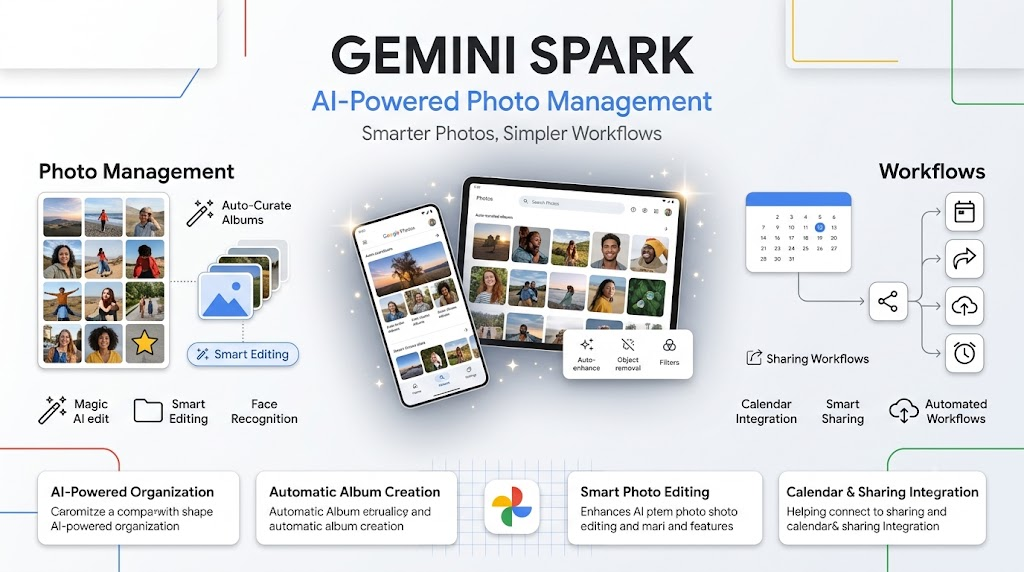
What Is Gemini Spark and Why Does Google Photos Integration Matter?
Definition + Expansion , Gemini Spark: Gemini Spark is Google’s personal AI agent designed to perform tasks across connected Google services rather than simply answer questions.
A conventional chatbot generally responds to a prompt with text, images, or another piece of information. An AI agent goes a step further: it can interpret an instruction, determine the steps required, and interact with connected tools or services to complete a task.
Google is applying that approach to Google Photos. Instead of opening the Photos app, searching through your library, selecting images, creating an album, and then sharing it, you can potentially describe the desired outcome to Gemini Spark.
That difference may sound small, but it represents an important direction for consumer AI. The emphasis is shifting from “AI that tells you something” toward “AI that does something.”
Question → Can Gemini Spark actually manage Google Photos?
Yes. According to the capabilities announced by Google, Gemini Spark can perform a range of Google Photos-related tasks, including editing images, curating albums, creating shared albums, and connecting photo-based information with other workflows such as calendar events.
The feature is designed to reduce the amount of manual work involved in maintaining a large photo library.
What Can Gemini Spark Do Inside Google Photos?
Google’s new integration focuses on practical photo-management tasks rather than simply generating descriptions of your pictures.
The company says users can ask Gemini Spark to execute actions in Google Photos, including:
- Edit images using instructions given through Gemini.
- Curate albums from photos already stored in the library.
- Create shared albums containing selected images.
- Turn concert flyer photos into calendar appointments.
- Run workflows involving connected Google services.
- Perform other supported Google Photos tasks through natural-language instructions.
The key phrase here is natural-language instruction. Instead of navigating a series of menus, the user describes the intended result.
For example, rather than manually searching for photos from a particular event, selecting the best images, and organizing them, an agent-based workflow could allow a user to describe the collection they want.
Question → What makes this different from ordinary Google Photos features?
The major difference is the interface. Google Photos already includes search, automatic organization, editing tools, albums, and sharing features. Gemini Spark adds an AI-driven layer that lets users interact with some of those capabilities through instructions.
In other words, the underlying tools may not be completely new. The new part is having an AI agent operate those tools for you.
Why Is Google Connecting AI to Your Photo Library?
The average digital photo library can become difficult to manage surprisingly quickly. Smartphones make it effortless to take pictures, but they do not automatically solve the problem of deciding which images matter, which should be grouped together, and which should be shared.
A person may accumulate photos from college events, internships, family celebrations, vacations, festivals, presentations, screenshots, and social gatherings. Over several years, that can turn into a huge collection.
Google appears to be positioning AI as an answer to this organizational problem.
Definition + Expansion , AI-powered photo management: AI-powered photo management uses artificial intelligence to interpret a user’s instructions and help organize, edit, retrieve, or transform stored images.
The important distinction is that AI photo management is not necessarily about replacing human decisions. Instead, it can reduce repetitive steps between the user’s intention and the final result.
For example, a user knows they want an album containing memorable photos from an event. The tedious part is finding the images and assembling them. An AI agent can potentially take over some of that repetitive work.
Question → Why would people want AI to organize their photos?
The biggest benefit is convenience. When a photo library becomes large, the problem is often not storage but finding, selecting, organizing, and using the right photos.
Gemini Spark is designed to reduce that friction by allowing users to describe what they want instead of manually completing every step.
Gemini Spark Can Turn Photos Into Useful Actions
One of the more interesting examples in Google’s announcement involves concert flyers.
Imagine photographing a concert poster containing the artist, venue, date, and time. Traditionally, you might have to read the information from the image, open your calendar, create an event, enter the details, and save it.
Google says Gemini Spark can help turn that kind of photo into a calendar appointment.
This illustrates a broader concept: images can become inputs for actions rather than simply objects to store.
The same idea could become useful in many everyday situations. A photograph might contain an event schedule, invitation, appointment information, address, shopping information, or another piece of useful data.
Instead of treating the photo as the final destination, an AI agent can potentially interpret its contents and connect them to another task.
Question → Is Gemini Spark only useful for photo organization?
No. Google’s announcement positions the Google Photos integration as part of a broader agentic workflow. Photos can provide information that Gemini Spark uses to perform actions beyond simply arranging images.
That makes the feature interesting because it connects visual information, personal data, and productivity workflows.
How to Connect Gemini Spark to Google Photos
Using Gemini Spark with Google Photos requires a setup process before the agent can interact with your photo library.
Based on the information provided by Google, users need to:
- Connect Google Photos to Gemini.
- Open the Gemini app.
- Toggle on Spark using the control in the top corner.
- Enter a prompt describing the desired task.
- Review the resulting action or workflow where appropriate.
The feature is not being presented as a completely automatic background process. The user initiates the interaction by connecting Google Photos and giving Gemini Spark an instruction.
That distinction matters because agentic AI can potentially interact with personal services in ways that ordinary conversational AI cannot.
Question → Do you need to manually manage every photo after connecting Gemini Spark?
The purpose of the integration is to reduce manual management. Gemini Spark can execute supported tasks based on your instructions, such as organizing selected photos into albums or creating other supported workflows.
However, users should still review important actions and understand what permissions and connections they have enabled.
Who Can Use Gemini Spark With Google Photos?
The rollout is initially limited.
Google says the new Google Photos capabilities will roll out over the next few weeks to eligible Gemini AI Pro and Ultra subscribers in the United States who use English.
Google has not said in the supplied announcement whether or when the feature will become available more broadly in international markets.
For users in India, including students and professionals following Google’s latest AI features, this means the functionality may not immediately be available in every account or region.
Question → Can Indian users use Gemini Spark’s Google Photos features right now?
The supplied announcement does not confirm an immediate India-wide rollout. Google initially described availability for eligible Pro and Ultra subscribers in the U.S. and English, while leaving broader international availability unspecified.
Users should therefore check their own Gemini account and Google’s official availability information rather than assuming the feature is already active in India.
Gemini Spark vs Traditional Google Photos Management
The difference between conventional photo management and AI-agent management becomes clearer when the two approaches are compared.
| Task | Traditional Google Photos workflow | Gemini Spark approach |
| Find photos | Search and browse manually | Describe what you want |
| Create an album | Select photos and create album | Ask the agent to curate supported albums |
| Edit photos | Open editing tools and make changes | Give supported editing instructions |
| Share selected photos | Choose images and create sharing collection | Ask Spark to create a supported shared collection |
| Use information from a photo | Read information manually | Ask AI to interpret it and trigger supported workflows |
| Create calendar event from flyer | Read details and enter them manually | Ask Gemini to turn supported flyer information into an event |
| Workflow automation | Multiple manual steps | AI agent coordinates supported actions |
The important point is that Gemini Spark does not necessarily invent completely new photo-management capabilities. Instead, it can change how users access and combine existing capabilities.
That distinction is useful when evaluating the significance of Google’s announcement.
Is Gemini Spark Really Revolutionary?
This is where the story becomes more complicated.
Google’s announcement demonstrates a clear direction for consumer AI: companies increasingly want assistants to perform tasks across the apps people already use.
But not every AI-powered feature is automatically transformative.
Creating a photo album, for example, is not normally an extremely difficult task. Google Photos already makes album creation relatively straightforward. Adding an AI interface may make the process more convenient, but convenience alone does not necessarily represent a technological breakthrough.
Question → Is Gemini Spark’s Google Photos integration a major AI breakthrough?
It is better understood as an example of the agentic AI trend than as a revolutionary standalone feature.
Its significance comes from the larger direction: AI assistants are increasingly being connected to personal services so they can execute tasks instead of merely generating answers.
The real test will be whether these integrations become reliable enough to handle complicated, multi-step workflows that users genuinely find difficult or time-consuming.
Why AI Agents Are Becoming More Important
The AI industry has spent years improving models that can write, summarize, code, analyze images, and answer questions.
The next challenge is usefulness.
A powerful model that only provides instructions still requires the user to complete the actual task. An AI agent aims to close that gap.
Definition + Expansion , Agentic AI: Agentic AI refers to AI systems that can plan or execute multiple steps toward a goal using connected tools and services.
Consider the difference:
Traditional assistant:
“Here are the steps for creating a vacation album.”
Agentic assistant:
“Create a vacation album from my selected photos.”
The second interaction is more valuable if the system can reliably complete the task.
This explains why Google, OpenAI, and other AI companies are increasingly interested in agents. The competitive advantage may eventually come less from who has the best chatbot and more from who can build the most useful AI assistant across everyday digital life.
Question → Why are companies pushing AI agents into everyday apps?
Because agents can make AI feel more useful by connecting intelligence to action. Instead of asking users to leave the AI application and complete a task elsewhere, companies want the assistant to participate directly in the workflow.
Google has a particularly large ecosystem for this strategy because its services span search, email, calendars, photos, documents, maps, video, and other consumer products.
The Bigger Google Strategy: AI Everywhere
Gemini Spark’s Google Photos integration should be viewed as part of Google’s broader effort to integrate AI throughout its software ecosystem.
Google has access to services that people use every day. If Gemini can understand a user’s information and perform tasks across those services, the assistant becomes more deeply embedded in daily routines.
For example, a single real-world activity might generate several digital tasks.
You attend a concert. You photograph the ticket or flyer. You take pictures during the event. Later, you want to organize the best photos, share them with friends, and keep information about future events in your calendar.
An AI agent could potentially connect these steps.
Question → What is Google’s long-term opportunity with Gemini Spark?
Google’s opportunity is to turn Gemini from a chatbot into an AI layer across its ecosystem.
The more services Gemini can interact with, the more useful it could become as a personal assistant. But that also means Google’s AI strategy will depend heavily on reliability, user trust, privacy controls, and the quality of its integrations.
Convenience vs Necessity: The Real Consumer AI Challenge
The Gemini Spark announcement also highlights a larger issue facing the AI industry.
AI companies have invested heavily in building increasingly capable models, but convincing ordinary consumers to use AI every day is a different challenge.
A feature can be technically impressive without solving a problem that people urgently have.
Google’s photo-management feature illustrates this tension perfectly.
For someone with tens of thousands of photos, automated organization could be genuinely useful. For someone with a few hundred carefully organized images, asking AI to create an album may feel unnecessary.
Question → What makes an AI feature genuinely useful?
An AI feature becomes genuinely useful when it solves a problem that users experience frequently, saves meaningful time or effort, and works reliably enough that users trust it.
Simply adding AI to an existing feature does not guarantee that users will care.
For Gemini Spark, the strongest argument is therefore not “AI can create an album.” It is “AI can eventually coordinate many personal tasks that currently require several separate actions.”
That is a much bigger proposition.
What Could Gemini Spark Mean for Students and Young Professionals?
For students and young professionals, the most interesting aspect may be the workflow potential.
Digital life is increasingly fragmented across photos, calendars, documents, messages, cloud storage, and productivity applications. Even simple tasks can require switching between several apps.
A personal AI agent could potentially become a bridge between these services.
For example, students frequently photograph:
- Class schedules
- Event posters
- Assignment instructions
- Workshop announcements
- Presentation slides
- Receipts and documents
- Campus event flyers
The value of AI is not necessarily that it can recognize the image. Modern AI systems are already good at interpreting many types of visual information.
The bigger opportunity is turning recognition into action.
Question → How could AI agents change everyday digital work?
AI agents could reduce the number of manual steps required to move information from one application to another. Instead of simply extracting information, an agent can potentially use that information in a connected workflow.
That could make AI more practical for students and professionals who spend significant time managing digital information.
What Should Users Consider Before Giving AI Access to Photos?
A Google Photos library can contain highly personal information: family pictures, travel memories, screenshots, documents, location-related information, and images involving other people.
That makes AI access different from asking a chatbot a general question.
Before connecting a personal service to an AI agent, users should think about:
- What data the AI can access
- Which actions it can perform
- What permissions are enabled
- Whether actions require confirmation
- How personal information is handled
- Whether the feature is available in their region
- How to disconnect the integration if they no longer want it
Question → Should you connect your entire Google Photos library immediately?
Users should understand the permissions and capabilities of the integration before enabling it, especially because photo libraries can contain sensitive personal information.
Start by understanding what the connection allows and use the feature for tasks where the convenience is meaningful.
The Future of AI-Powered Photo Management
Gemini Spark’s current capabilities are only one possible step toward a more automated photo library.
Future AI assistants could potentially move beyond creating albums or editing pictures and become much more proactive.
Imagine asking an assistant to prepare a photo collection for a family event, identify images that need attention, organize photos from a trip, or coordinate information found in images with a calendar and other productivity tools.
The challenge will not simply be whether AI can technically perform these actions. It will be whether the system can do so accurately, predictably, and with appropriate user control.
That is especially important when an AI agent moves from generating content to modifying personal data.
Question → What will determine whether AI photo agents succeed?
Three factors will matter most: reliability, control, and usefulness.
If an agent consistently selects the wrong photos, makes unwanted changes, or creates unnecessary events, users will stop trusting it. If it saves substantial time while allowing users to review important actions, adoption becomes much more likely.
Gemini Spark’s Potential: Small Feature, Bigger Direction
It is easy to dismiss AI-powered album creation as another minor software update. And in isolation, that criticism is reasonable.
But the larger significance lies in the direction of consumer software.
For years, applications have required users to understand menus, buttons, settings, and workflows. AI agents introduce another possibility: users describe the outcome, while software figures out the steps.
Gemini Spark’s Google Photos integration is an early example of that model.
The feature may not completely change how everyone manages photos. But it demonstrates how Google’s AI strategy is moving toward an assistant that can interact with the services people already depend on.
For users, that could eventually mean fewer repetitive digital tasks and more natural ways to control their personal technology.
Is Gemini Spark Worth Trying for Google Photos?
If you regularly struggle with a large Google Photos library, Gemini Spark’s new capabilities could be worth exploring once they become available for your account.
The strongest use cases are likely to be situations where a task involves multiple repetitive steps rather than a single simple action.
For example, asking an agent to organize a complex collection could provide more value than asking it to perform a task that takes only a few seconds manually.
The feature is also currently limited by its rollout. Google’s announcement says the new capabilities are initially intended for eligible Gemini AI Pro and Ultra subscribers in the U.S. using English.
Question → Who is most likely to benefit from Gemini Spark in Google Photos?
People with large, messy, or frequently changing photo libraries are likely to benefit most. Users who regularly create albums, share collections, or convert visual information into other digital tasks may also find agentic photo management useful.
For people with smaller libraries, the convenience may be less significant.
Frequently Asked Questions About Gemini Spark and Google Photos
What is Gemini Spark?
Gemini Spark is Google’s personal AI agent designed to perform tasks using connected services. Its Google Photos integration allows eligible users to use natural-language instructions for supported photo-management and workflow tasks.
Can Gemini Spark edit Google Photos?
Yes. Google says Gemini Spark can execute supported image-editing tasks in Google Photos. The user connects Google Photos to Gemini, enables Spark, and provides an appropriate prompt.
Can Gemini Spark create Google Photos albums?
Yes. Google says Gemini Spark can curate albums and create supported shared collections from photos in Google Photos.
Can Gemini Spark turn a photo into a calendar event?
Google specifically gives the example of turning a concert flyer photo into a calendar appointment. This demonstrates how Gemini can use information contained in an image as part of a broader workflow.
Who gets the Gemini Spark Google Photos features?
The announced rollout is for eligible Gemini AI Pro and Ultra subscribers in the U.S. using English. Google has not specified in the supplied announcement when the capabilities will expand to other international markets.
Is Gemini Spark available in India?
The announcement does not confirm broad availability in India. Because the initial rollout is described as U.S.-only in English, Indian users should check their Gemini account and Google’s latest availability information for eligibility.
What Gemini Spark Says About the Future of Consumer AI
The most important takeaway from Google’s Google Photos integration is not that AI can make an album.
It is that consumer AI is increasingly moving from answering questions to executing tasks.
That transition could fundamentally change how people interact with software. Instead of learning every feature inside every application, users may increasingly communicate their goals to an AI agent and let it coordinate the underlying tools.
Gemini Spark’s Google Photos capabilities are still limited by availability and the specific tasks Google supports. But the direction is clear: Google wants Gemini to become more deeply connected to everyday digital life.
For consumers, the question is no longer simply “What can AI generate?”
It is becoming:
“What can AI actually do for me?”
If you’re following the rapid shift toward AI agents and practical consumer AI, keep exploring Kalinga.ai for explainers that break down what these technologies mean for students, professionals, and India’s growing digital ecosystem. explore kalinga.ai for more.