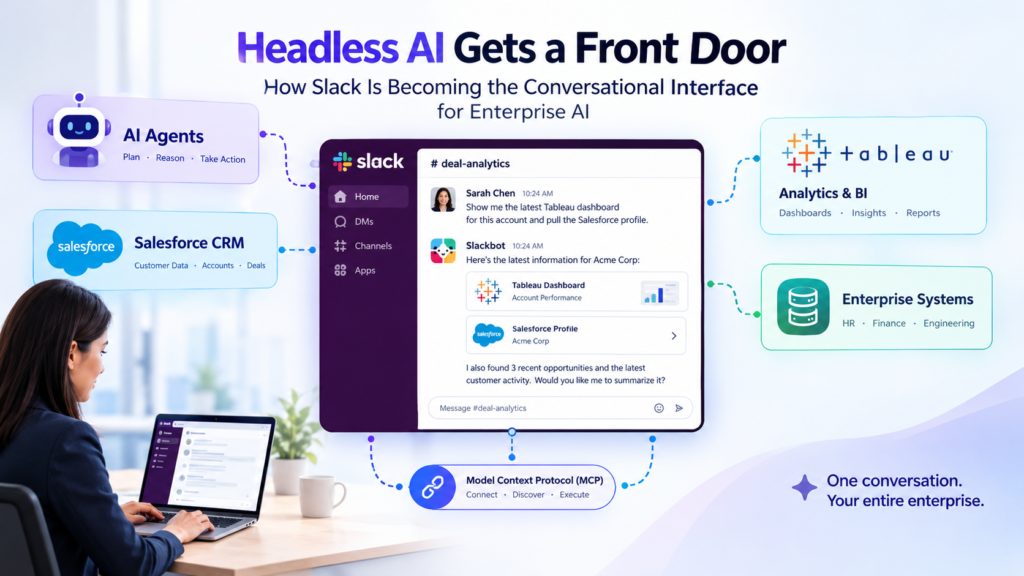
Slack is positioning Slackbot as the conversational interface for headless AI: the models, agents, and tools that work behind the scenes without a screen of their own. The mechanism is the Slackbot MCP Client, which uses the open Model Context Protocol (MCP) to discover and run tools across enterprise systems. An employee can ask for a Tableau dashboard or a Salesforce profile without leaving the conversation.
For companies investing in headless AI, the open question is no longer whether to build capabilities. It is where employees will actually use them. Slack’s answer is the place where work conversations already happen.
Key facts at a glance
- What happened: Slack is promoting a webinar titled “Where AI Works: Slack is the Conversational Interface for Headless AI.” It describes connecting an entire enterprise stack inside Slack via MCP. slack
- The core technology: The Slackbot MCP Client lets developers connect MCP servers to Slack, after which Slackbot discovers each server’s tools and invokes them based on user prompts. slack
- The pitch: Agents, models, and automated workflows should operate in the same shared space as teams, so the whole organization can see, question, and build on their outputs. slack
- The demos: Sales and analytics converge as Slackbot pulls live Tableau dashboards and Salesforce profiles into deal channels. slack
- Who it affects: Anyone running CRM, HR, finance, or engineering platforms who wants AI to work with those systems of record.
What Is Headless AI?
Headless AI is artificial intelligence that exposes its capabilities through APIs and protocols instead of a dedicated user interface. Slack’s event page does not define the term, so treat this as a working definition rather than an official one.
The idea borrows from “headless” content management and commerce systems, where the back end is separated from the front end. In a headless AI setup, the model, the agent logic, and the data connections all exist, but no chat window or dashboard ships with them. Anything that can speak the right protocol can use them.
Separating the two layers has real benefits:
- One capability can serve many front ends: a web app, a mobile app, a chat tool, or another agent.
- Teams can swap models or tools without rebuilding the experience people use.
- Specialist systems can keep their own logic while still being reachable from a common surface.
The cost is discoverability. A capability nobody can find or reach does nothing, however good it is.
Why does headless AI need an interface?
Headless AI needs an interface because capability without a place to use it goes unused. People still have to ask questions, see results, and challenge answers. That requires a surface.
Slack’s webinar description makes this argument directly. Companies have invested heavily in systems of record such as CRM, HR, and engineering platforms, and Slack sees AI as a way to get more value from those investments where decisions are made. The interface is the missing piece between a well-built backend and an employee with a question. slack
What Did Slack Announce?
What is the Slackbot MCP Client?
The Slackbot MCP Client is a Slack feature that lets Slackbot act as an MCP client, connecting to remote MCP servers and using their tools in conversation. Slack introduced it in a developer changelog entry as a way to “superpower” Slackbot with whatever tools a team wants. The changelog URL is dated June 18, 2026. slack
In plain terms, a developer exposes a system’s functions through an MCP server. Slackbot connects to that server, learns what it can do, and calls the right function when a user asks for something relevant.
What is the Model Context Protocol?
The Model Context Protocol (MCP) is an open standard for how AI applications connect to external tools and data. The protocol has three parts: a host, a client, and a server. The host is the user-facing application, the client handles communication on the host’s side, and the server is the gateway to a specific tool or data source. In this setup, Slack’s Slackbot is the host and client, and each enterprise system sits behind a server. slack
Is the webinar the product launch?
No. The webinar is a promotional event built around the product. The page I reviewed did not list a date, a speaker lineup, or a full agenda beyond the themes above. Check Slack’s event page for registration details before you publish anything that depends on timing.
How Does Slackbot Connect to Headless AI Systems?
Slackbot connects to headless AI systems by acting as an MCP client that discovers and calls the tools each MCP server advertises. Three mechanics matter: discovery, authentication, and how results come back.
How does tool discovery work?
Tool discovery works at runtime: the client asks the server what it can do, and the server answers with machine-readable descriptions. That differs from a traditional API integration, where a developer reads documentation and writes code against specific endpoints. With MCP, the agent can ask the server which tools it offers while it is running. slack
For headless AI, this is the practical unlock. A team can add a capability to its MCP server, and Slackbot can find it without a separate integration project for each new function. Slack’s webinar copy says Slackbot dynamically discovers and securely executes tools across the stack, whether those are native Salesforce tools, partner integrations, or custom apps. slack
How are users authenticated?
Slack supports four authentication methods for connecting to MCP servers. They are Slack identity auth, no auth, Dynamic Client Registration, and manual OAuth. slack
- Slack identity auth suits servers that map Slack user and team IDs to features, with no separate sign-in step for end users.
- No auth fits servers that return the same answer regardless of who asks.
- Dynamic Client Registration fits servers that support standard OAuth discovery, with Slack handling registration.
- Manual OAuth is for servers where credentials are registered by hand with the provider.
The choice matters for any headless AI service that touches sensitive data. A server that returns the same result for everyone is a different risk from one that must respect each user’s permissions.
Can results look like native Slack?
Yes. MCP servers can return native Block Kit responses, so results can include buttons, menus, and structured layouts. Slack says this lets existing apps bring their current Block Kit interface into Slackbot conversations without rebuilding it. When a user clicks a button, Slack translates the interaction into a tool call back to the server. slackslack
That means a headless AI service is not limited to plain text. It can return something a person can act on.
Why Is a Conversational Interface the Right Home for Headless AI?
A conversational interface suits headless AI because people already ask questions in conversation, and answers are most useful where the next decision happens. The alternative is a growing list of separate AI tools, each with its own login, its own habits, and its own silo.
The webinar copy names context-switching as the problem to eliminate. Its demo shows live Tableau dashboards and Salesforce profiles appearing directly inside deal channels. A seller discussing a deal sees the account details and the analytics next to the discussion, rather than juggling tabs. slack
Does shared visibility change how teams use AI?
Yes. Shared visibility means AI output becomes something a team can inspect and correct together. Slack’s argument is that agents, models, and workflows should operate in the same shared space as people, producing outputs the whole organization can see, question, and build on. slack
Compare that with a private chat window. An answer there is seen by one person, who may or may not verify it. An answer posted in a channel can be challenged by a colleague, corrected by a subject expert, and reused later. For headless AI, that public review is a quiet but real quality control.
It also has a trade-off. Posting AI output in shared channels means mistakes are visible too, and teams will need norms for when an answer is trustworthy enough to act on.
How Do the Delivery Models Compare?
Three delivery models dominate how teams expose AI to employees: standalone AI apps, embedded AI features in individual tools, and a shared conversational layer. The table below compares them on the criteria that decide most buying choices.
| Criteria | Standalone AI app | Embedded AI inside each tool | Shared conversational layer (Slackbot with MCP) |
|---|---|---|---|
| Where employees use it | A separate destination | Inside each system | In the chat where work is discussed |
| Context-switching | High | Medium (switch per tool) | Low |
| Cross-system questions | Limited to connected data | Usually limited to that tool | Possible across connected MCP servers |
| Visibility of outputs | Often private | Often private | Shareable in channels |
| Integration effort | Per-app | Built in, per vendor | One protocol, many servers |
| Main risk | Low adoption | Fragmented experience | Permission and governance complexity |
| Best fit | Specialist deep work | Single-system tasks | Cross-team collaboration |
When does each model win?
Choose a standalone app for deep specialist work, embedded AI for single-system tasks, and a conversational layer for questions that cross systems and teams. The models are not mutually exclusive. Most large organizations will run all three.
For headless AI that serves many teams, the conversational layer has the clearest reach, because the interface already has users. The standalone approach has to win adoption from scratch.
What Use Cases Does the Webinar Highlight?
The webinar highlights sales and analytics first, then HR, finance, and engineering through guest partners. Slack says guest partners will share live use cases across HR, Finance, and Engineering. The page I reviewed did not name those partners, so I have not either. slack
Sales and analytics
The headline demo shows Slackbot pulling live Tableau dashboards and Salesforce profiles into deal channels. The value is simple: the data a team needs to discuss a deal arrives inside the discussion. slack
HR, finance, and engineering
Slack says attendees will learn how to surface native insights from their core systems, and how to speed up sprint tracking and incident response. The details of those demos are not public in the page text, but the pattern is consistent. An enterprise system exposes functions through MCP, and Slackbot makes them available in conversation. slack
For engineering teams, incident response is a natural fit. People are already talking in a channel when something breaks, so a headless AI tool that can pull status or run a check there saves the trip to another console.
How Does the Slackbot MCP Client Differ from the Slack MCP Server?
The Slackbot MCP Client brings outside tools into Slack, while the Slack MCP Server lets outside AI apps work inside Slack. The two are easy to confuse. Slack’s documentation describes both: the client connects remote MCP servers to Slack, and the server lets AI apps search channels, send messages, and manage canvases through any MCP-compatible client. slack
| Aspect | Slackbot MCP Client | Slack MCP Server |
|---|---|---|
| Direction | Tools flow into Slack | Slack actions flow out to other AI apps |
| Who initiates | A Slack user prompting Slackbot | An AI app using an MCP-compatible client |
| Typical example | Pulling a dashboard into a deal channel | An agent searching channels or posting a message |
| Role of Slack | Host and client | Server |
This two-way design matters for headless AI strategy. The same company can consume capabilities in Slack and also let its own agents operate in Slack. The webinar focuses on the first direction.
What Should Enterprise Teams Do Now?
Teams should start by inventorying what they could expose, deciding who may use it, and piloting a narrow use case. The following steps follow from the announcement and Slack’s documentation.
- Inventory your headless AI assets. List the models, agents, and internal tools that currently have no user interface.
- Pick one system of record. Start where the questions are frequent and the data is well governed, such as account lookups or sprint status.
- Match authentication to sensitivity. Use the strictest of the four supported methods that the use case justifies.
- Write tool descriptions for a machine reader. Because discovery relies on descriptions, clear ones help Slackbot choose the right tool.
- Define channel norms. Decide where AI answers are posted and how people flag a wrong one.
- Measure before expanding. Track adoption and time saved before adding more servers.
What Are the Risks and Open Questions?
The main risks are permissions, accuracy, and timing, and the public materials leave several questions open.
Permissions and data exposure
Posting live CRM or HR data into a channel can expose it to people who should not see it. Authentication choices help, but channel membership is its own control. Teams should confirm how permissions behave before connecting sensitive systems.
Accuracy in public view
Shared output makes errors visible, which is both a risk and a safeguard. Without clear norms, a wrong answer in a busy channel can spread before anyone checks it.
Operational limits
Developers who have built on the Slackbot MCP Client have reported practical constraints. One community write-up notes that Slack gives a tool call about 60 seconds, so slow back ends can fail. Treat that as a developer’s report, not an official specification, and check Slack’s documentation for current limits.
What the sources do not say
The webinar page does not state pricing, availability by plan, or a date. It also does not publish the guest partner names or detailed results. Anything beyond the description above would be speculation.
Frequently Asked Questions
What does “headless AI” mean in the Slack context?
It means AI capabilities, such as models, agents, and tools, that run without their own interface and are reached through Slackbot. Slack uses the phrase in the webinar title but does not publish a formal definition.
Is headless AI the same as agentic AI?
No. Headless AI describes how AI is delivered, while agentic AI describes how it behaves. An agent that plans and acts can be headless or have its own interface. The two ideas often overlap in enterprise AI agents, which is why Slack frames agents, models, and workflows together.
Do I need to build an MCP server to use this?
Yes, if you want to connect a custom system. Slack describes connecting native Salesforce tools, partner integrations, or custom enterprise apps via an MCP server. Prebuilt options may exist for common systems, so check what your vendors already offer. slack
Is the Slackbot MCP Client the same as a Slack bot I build myself?
No. It is a capability of Slackbot that connects to MCP servers, rather than a custom bot you code from scratch. Custom bots remain possible, and the open-source community has built its own Slack-to-MCP bridges.
Where can I find the official documentation?
Slack’s developer site hosts the MCP overview, the Slackbot MCP Client guide, and the changelog announcement. Start with the MCP overview page and follow the client links.
Bottom Line
Slack is betting that the best home for headless AI is the conversation where work already happens. The Slackbot MCP Client gives that bet a technical foundation: an open protocol, runtime tool discovery, four authentication options, and native-looking responses.
What remains to be seen is how well it handles permissions, accuracy, and scale in real organizations. For now, the sensible move is a small pilot that tests one system, one channel, and one clear measure of success. Teams that treat headless AI as infrastructure, and the conversation as its front door, will be better placed to use whatever comes next.