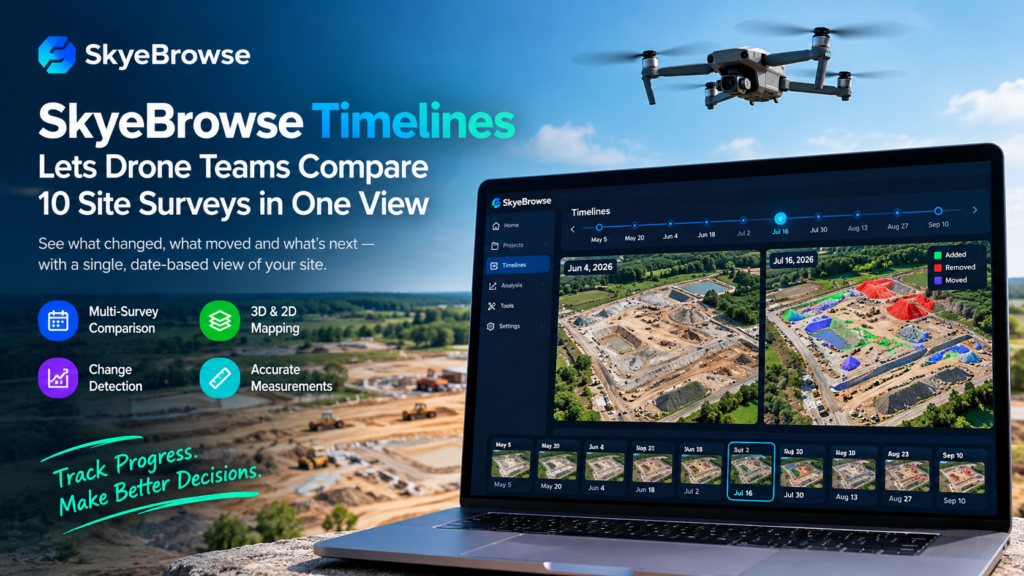
SkyeBrowse Timelines is a new feature that places up to 10 drone surveys of the same site on a single date-based view, so teams can see what appeared, disappeared or moved between flights without exporting data into other software. SkyeBrowse announced the feature on October 20, 2026, and it is live now in the SkyeBrowse web app.
For crews that fly the same job every month, the update turns a folder of past scans into a project history. SkyeBrowse Timelines leads a wider release that adds Cut/Fill, Cross-Sections, Stockpile Inventory, Bare Earth, a ground control point (GCP) accuracy check and a security planning tool called Camera Coverage. Together, they push this drone survey software further into analysis and verification, not just capture.
Key Takeaways
- What it is: SkyeBrowse Timelines compares up to 10 surveys of one site on a single timeline.
- What else shipped: five construction tools, a GCP accuracy check and Camera Coverage for security planning.
- Who it serves: construction managers, surveyors, aggregate yard operators, public safety agencies and event security teams.
- Price: Pro models at $49.99 per model, plus Public Safety and Enterprise plans.
- The catch: the $5 first Commercial model offer for new organizations does not include Timelines.
What Is SkyeBrowse Timelines?
SkyeBrowse Timelines is a multi-survey comparison view inside SkyeBrowse, the Texas-based videogrammetry platform that turns drone video into 3D and 2D maps. Videogrammetry means building measurable models from video footage rather than from a separately planned grid of still photos.
In practice, the feature gathers every survey of a site into one workspace. Instead of opening separate models and comparing them by eye, a user moves along a date rail and watches the site change. The same view supports measurements, so the comparison is not just visual. It is quantitative.
Why repeat surveys need a timeline
Drone programs on active jobsites rarely fly once. They fly weekly or monthly to document grading, track material and prove progress. Each flight produces a model, and over a project’s life those models add up to a detailed history. The problem is that history usually sits in separate files, and comparing them takes manual work or extra software.
DroneLife’s coverage points out that teams flying the same site every month already hold that history in their SkyeBrowse models. The new view organizes it.
The company behind the release
SkyeBrowse is led by co-founder and CEO Bobby Ouyang. According to DroneDJ, the platform is used by more than 1,200 public safety agencies worldwide, and that base helps explain why this release also includes a security planning tool. Ouyang said the person who flew the site should be able to “answer the dirt question before lunch.” Customers had been juggling exports, spreadsheets and CAD round trips for answers already inside their scans, so SkyeBrowse built those answers onto the model.
How Does SkyeBrowse Timelines Work?
Short answer: you add surveys of the same site, each new survey aligns to a base survey, and you move along a date rail to compare any two dates. The details below show how each part behaves.
The date rail, Play and Changes
Users scrub along a date rail to crossfade between surveys. A Play button steps through every date in order, which suits progress reviews. A Changes toggle colors what appeared, disappeared or moved between two chosen dates. That last mode is the core of change detection: it lets a reviewer skip hunting for differences and go straight to the areas that matter.
Automatic alignment and 3-point picking
Each new survey auto-aligns to the base survey. When the fit is off by about 4 inches (10 centimeters) or more, the platform opens 3-point picking, where the user matches three points by hand to correct the alignment. Alignment matters because a small offset between dates can look like real change. Because SkyeBrowse Timelines handles the common case automatically and asks for human input only when the error is noticeable, most users should not need to touch it.
Measurements on any date
Measurements work on any date in the timeline. A user can measure a pile, a trench or a slab on last quarter’s survey and on this week’s survey without switching tools. For construction progress monitoring, that means comparing like with like across time.
Satellite imagery and public links
Surveys can also be viewed against satellite imagery for geographic context. Teams can share a timeline through a read-only public link, and the recipient does not need to log in. That is practical for owners, inspectors or clients who want to see progress but do not want another account.
What Construction Tools Ship With SkyeBrowse Timelines?
The release adds five construction tools and a GCP accuracy check. Timelines answers “what changed?”, while these tools answer “how much?” According to DroneLife, these questions previously required exporting the scan into CAD. They include how much dirt remains to move, what grade a haul road holds and how many tons of material sit in a yard.
Cut/Fill analysis
Definition: Cut/Fill analysis compares an existing surface with a design surface to show how much earth must be removed (cut) or added (fill).
Expansion: SkyeBrowse’s Cut/Fill compares the captured model against a design surface imported as LandXML, DXF or a GeoTIFF elevation file. It drapes a heatmap over the scan and reports remaining cut, fill and net volumes. Crews can see where earthwork stands against the design instead of waiting for a separate calculation.
Cross-Sections and haul-road grade
Cross-Sections cuts station-and-offset sections along a centerline at an interval the user sets. It can also produce a haul-road grade report, which helps confirm that a temporary road holds the slope a project needs. Results export to CSV, DXF and PDF, according to DroneDJ.
Stockpile Inventory
Drone stockpile measurement is a staple of aggregate yards, mines and large construction sites. SkyeBrowse’s Stockpile Inventory measures many piles in one operation instead of one at a time. Users assign each pile a name, a material and a density, and the tool converts volume to weight. Base options include triangulated toe, best-fit plane, average, lowest point and a custom base. Inventory reports export as CSV or PDF.
Bare Earth: DSM versus DTM
Definition: A digital surface model (DSM) represents everything a drone sees, including trees, buildings and vehicles. A digital terrain model (DTM) represents the ground alone.
Expansion: The Bare Earth tool classifies ground points so the topographic map can switch between DSM and DTM. That separation matters for grading and drainage work, where vegetation or equipment can distort contours. Outputs include GeoTIFF and classified LAS files.
GCP accuracy check
SkyeBrowse says its platform can deliver survey-grade accuracy without ground control points. Even so, some clients and specifications require documented proof against surveyed reference points. The new GCP tool covers that.
- Imports: control points or checkpoints from CSV, TXT or XYZ files
- Setup: coordinate system by EPSG code, with a choice of ellipsoidal or orthometric heights
- Reports: error in X, Y and Z, root mean square error (RMSE), bias and NSSDA 95% accuracy
- Result: a pass or fail verdict against the user’s own tolerance, in PDF and CSV reports
- Safeguard: the check does not alter the processed model
What Is Camera Coverage?
Camera Coverage is a planning tool that lets users place virtual security cameras on a 3D model of a site and see what each one can view before anything is installed.
Users set each camera’s mount point, direction, height, field of view, range and tilt. SkyeBrowse shades the visible area and reports what share of the site at least one camera covers. A Suggest function recommends up to 10 camera positions or finds the best spot for one more camera.
Two environmental checks add realism. A weather check shows how snow and plow piles block views, and a sun-glare check uses a year of sun positions to show when each camera will face the sun. For public safety agencies, event security teams and site managers, the point is to find blind spots on screen instead of after installation.
How Do the New SkyeBrowse Tools Compare?
| Tool | Question it answers | Key inputs | Key outputs |
|---|---|---|---|
| SkyeBrowse Timelines | What changed between surveys? | Up to 10 surveys of one site | Date rail, Changes coloring, measurements, public link |
| Cut/Fill | How much earth is left to move? | LandXML, DXF or GeoTIFF design surface | Heatmap with cut, fill and net volumes |
| Cross-Sections | What does the grade look like along a line? | Centerline and interval | Sections and haul-road grade report |
| Stockpile Inventory | How much material is on site? | Piles, material and density | Volume and weight reports (CSV, PDF) |
| Bare Earth | What does the ground look like without objects? | Classified ground points | DSM/DTM switch, GeoTIFF, classified LAS |
| GCP check | Does the model meet our accuracy spec? | CSV, TXT or XYZ control points | RMSE, bias, NSSDA 95%, pass/fail |
| Camera Coverage | Where are the camera blind spots? | Camera placement settings | Coverage percentage and suggested positions |
How Much Does SkyeBrowse Timelines Cost?
SkyeBrowse Timelines is available on SkyeBrowse Pro models at $49.99 per model and on Public Safety and Enterprise plans. Camera Coverage and the construction tools are included at the same levels.
New organizations have a cheaper way in. A $5 first Commercial model offer includes Camera Coverage and every construction tool except Timelines. Teams that want to evaluate the tools on one model can start there, but they need a Pro model or a higher plan to use the timeline view.
| Access path | Timelines | Camera Coverage | Construction tools |
|---|---|---|---|
| Pro model ($49.99 per model) | Yes | Yes | Yes |
| Public Safety and Enterprise plans | Yes | Yes | Yes |
| $5 first Commercial model (new organizations) | No | Yes | All except Timelines |
Pricing has moved this autumn. DroneLife notes the update follows SkyeBrowse’s September move to per-model pricing, and a DroneDJ report on that change cited a different Pro figure ($199 per model per year). Check SkyeBrowse’s site for current terms before you budget.
Who Should Use SkyeBrowse Timelines?
SkyeBrowse Timelines suits any team that surveys the same location more than once and needs to prove or monitor change.
- Construction managers: track progress from flight to flight and share a read-only link with owners.
- Earthwork contractors: pair timeline views with Cut/Fill and Cross-Sections to track remaining volumes.
- Aggregate and materials yards: combine Stockpile Inventory with repeat surveys to follow inventory over time.
- Surveyors: use the GCP check to document accuracy and Bare Earth to produce terrain outputs.
- Public safety and event security teams: plan camera placement and check sun and snow effects before installing hardware.
An Example Monthly Workflow With SkyeBrowse Timelines
This is an illustrative workflow, not an official SkyeBrowse procedure.
- Fly the site on a regular schedule and process each flight into a SkyeBrowse model.
- Add the surveys to a timeline, starting from a base survey.
- Check alignment, and use 3-point picking if a survey is off by about 4 inches or more.
- Turn on Changes between the last two dates to find new earthwork, stored material or structures.
- Run Cut/Fill against the design surface and export Cross-Sections where grades matter.
- Share the read-only link with the client or project owner.
The advantage of this approach is that each step happens on the same model, which cuts the file handoffs that used to slow reporting.
How the Release Fits SkyeBrowse’s 2026 Direction
SkyeBrowse has shipped quickly this autumn. DroneLife reports that SkyeBrowse Timelines follows the company’s September move to per-model pricing and its crash analysis and crowd count tools later that month. Crush Analysis and Claims are free on every plan through October 31, 2026, and SkyeBrowse says they will then be included with Public Safety & Enterprise models.
The pattern is a platform expanding from fast model creation into analysis, reporting and verification. DroneDJ framed the release as giving mapping teams more reasons to stay inside the platform.
Limits to Check Before Adopting SkyeBrowse Timelines
No announcement answers every question, so teams should confirm a few things first:
- Survey cap: a single timeline holds up to 10 surveys of a site, so long projects may need to choose which dates to include.
- Plan access: the timeline view is not part of the $5 first Commercial model offer.
- Alignment: an offset of about 4 inches or more triggers manual 3-point picking, which takes user time.
- Accuracy claims: the GCP check verifies a model against your points but does not change it, so a failed result means reviewing capture or control, not fixing the file in place.
- Pricing: confirm current per-model terms, since reports differ on Pro pricing.
Frequently Asked Questions
How many surveys can SkyeBrowse Timelines compare?
SkyeBrowse Timelines holds up to 10 surveys of the same site on one timeline. Users can move between any of them, play through the dates or color the changes between two dates.
Can clients view SkyeBrowse Timelines without an account?
Yes. Users can share a timeline through a read-only public link that requires no login, according to DroneLife.
Is Timelines included in the $5 first Commercial model offer?
No. That offer includes Camera Coverage and every construction tool except Timelines.
What happens if two surveys do not line up?
Each new survey auto-aligns to the base survey. If the fit is off by about 4 inches (10 centimeters) or more, SkyeBrowse prompts the user to match three points manually.
Do I need ground control points to use SkyeBrowse Timelines?
The coverage does not say they are required. SkyeBrowse says its platform can deliver survey-grade accuracy without GCPs, and the new GCP tool exists for teams whose clients or specifications demand documented verification against surveyed points.
Conclusion
SkyeBrowse Timelines gives repeat-survey teams a single place to see change over time, and the companion tools answer the volume, grade, accuracy and camera questions that used to mean exports and CAD. For construction and earthwork teams already flying the same sites, SkyeBrowse Timelines is the headline feature to evaluate. Weigh it against the Pro price, the 10-survey cap and the current per-model terms, then test it on a site you already scan.
What the release signals for drone survey software
The broader message is about where drone survey software is heading. Capturing a model quickly is no longer the differentiator. The value now lies in what happens after the flight: comparing dates, measuring earthwork against a design, documenting accuracy for a client and sharing results without a pile of file handoffs. SkyeBrowse is building those steps into the same model, and the September per-model pricing change and the crash analysis and crowd count tools show a steady push in that direction.
How to evaluate it on your own site
The most reliable test is a practical one. Pick a site you have already flown at least a few times, add those surveys to a timeline and check how cleanly they align. Turn on Changes between two dates and see whether the highlighted areas match what you know happened on the ground. Then run Cut/Fill against a real design surface, and if your clients require it, run the GCP check against your own control points. If the results save you an export, a spreadsheet or a CAD round trip, the Pro price is easier to justify.
Who gains the most
Teams with frequent repeat flights, regular client reporting and material to track stand to benefit first. Teams that fly a site once or twice may find the $5 first Commercial model offer a better starting point, since it includes Camera Coverage and every construction tool except Timelines. Whichever path you choose, confirm current terms on SkyeBrowse’s site before you commit.