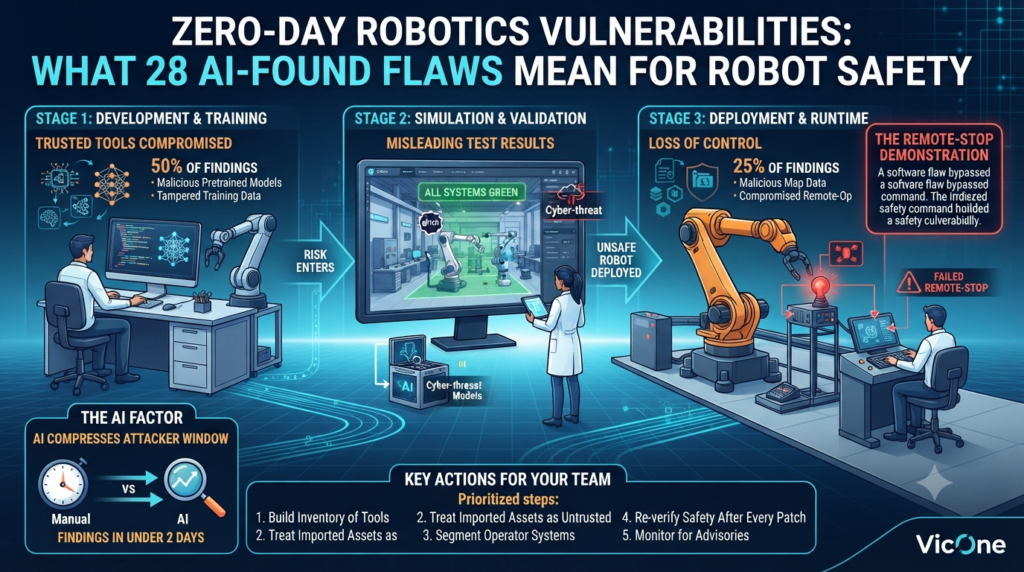
Imagine approving a robot for the factory floor because every safety test came back green, only to discover later that the test environment itself had been quietly manipulated. No alarms, no crash, just false confidence. That scenario sits at the center of a recent disclosure from security firm VicOne, which reported 28 zero-day findings across software that supports the Physical AI ecosystem, uncovered with AI-assisted research in under two days.
If you build, buy, or operate robots, zero-day robotics vulnerabilities are no longer a someday problem. The affected tools touch how robots are trained, how they are tested, and how they are controlled once deployed. And because AI compresses the time it takes to find weaknesses, the window for responding keeps shrinking.
This guide covers what was reported, why it matters at each stage of the robot lifecycle, and what your team can do about it this quarter. One note on sourcing up front: the research appeared in IEEE Spectrum as a sponsored article by VicOne, so the numbers are vendor-reported and may change after vendor and vulnerability-authority review. I’ll flag where I’m relaying their claims and where I’m adding my own analysis.
Key Takeaways
- Scale and speed: VicOne reports 28 initial findings in under two days, all classified as zero-days after initial validation. The count may change, and some findings don’t yet have CVE tracking numbers.
- Who’s affected: The findings include projects developed or maintained by Google, NVIDIA, and Meta, among others.
- Where the risk concentrates: Roughly 75% of findings involved development, training, simulation, or validation tools, which means risk can enter a robot before it ever ships.
- What’s at stake: Corrupted models, misleading test results, and operators losing visibility or control.
- Safeguards can be targeted too: Researchers demonstrated a flaw that stopped a robot’s remote-stop command from working.
- Patching needs proof: A released fix still has to be checked for compatibility and safe behavior.
What Are Zero-Day Robotics Vulnerabilities?
A zero-day is a weakness that is previously unknown and has no available fix. Defenders have had zero days to prepare, which is where the name comes from. In robotics, the term covers flaws in the software ecosystem around a robot: the frameworks used to train machine-learning models, the simulators used to validate behavior, the tools that carry commands, and the interfaces operators rely on to watch and control machines.
That is a broad attack surface, and it is the main reason this research deserves attention. Most people picture robot hacking as someone seizing control of a machine in the field. These findings point to a quieter path: compromise a trusted tool upstream, and let its output flow downstream into the robot.
Why robots raise the stakes
When a typical web application is compromised, the usual damage is data exposure or downtime. A robot is a cyber-physical system, so manipulated software can translate into physical motion, or into a decision that a machine is safe when it isn’t. The consequences depend on the robot (a warehouse arm, a mobile platform, a humanoid), but the pattern is consistent: the information that safety decisions rely on becomes a target.
Why the toolchain is the soft spot
Robotics teams lean heavily on shared components: pretrained models, simulation scenes, robot description files, map data, and remote-operation software. Each one is a point of trust. Engineers import them because they save weeks of work, and they rarely get the same scrutiny as code written in-house. That trust is exactly what an attacker wants to borrow.
How AI Is Changing Vulnerability Discovery
Finding a vulnerability involves reading code, tracing how components communicate, and testing whether a suspected weakness can actually be exploited. AI can accelerate parts of that work, letting researchers analyze more software in less time. As the source notes, attackers could use similar capabilities.
My read: the notable number isn’t 28, it’s “under two days.” Patch cycles in robotics tend to be slow, because updates may need hardware-in-the-loop testing, recertification, or scheduled downtime. When discovery speeds up and remediation doesn’t, the gap between “a flaw exists” and “a flaw is fixed” widens. That is why finding zero-day robotics vulnerabilities is turning into an operations problem and not only a research curiosity.
What faster discovery does to your response window
- Less warning: A zero-day has no fix by definition, so teams may have little time between disclosure and exposure.
- More surface to track: Every additional tool in the pipeline adds a dependency you need to monitor.
- Exposure is not compromise: The source is explicit that a weakness existing does not mean an attack has occurred. The job is to work out whether you use the affected software and what an attacker could access or change.
How Zero-Day Robotics Vulnerabilities Map to the Robot Lifecycle
VicOne’s findings span three lifecycle stages. Weaknesses at each one could affect what a robot learns, how it is tested, and how it is controlled.
| Lifecycle stage | Share of findings | Example scenario | Why it matters |
|---|---|---|---|
| Development and training | About 50% | A malicious pretrained model file gives an attacker access to the training system | Models or data can be altered before deployment |
| Simulation and validation | About 25% | A compromised scene or robot model alters simulated sensors or test results | Unsafe behavior can pass tests |
| Deployment and runtime | About 25% | Altered motion-planning files, malicious map data, or a compromised remote-operation computer | Movement can change or operators can lose visibility |
Shares are taken from VicOne’s chart as published in IEEE Spectrum. Together, the first two rows account for the 75% of findings that sit before deployment.
Stage 1: Development and training
Here is the scenario VicOne describes. A team downloads a pretrained model and adapts it for its robot. Loading a malicious file could give an attacker access to the training system, and from there to the training data or the model itself. The result is a manipulated model that behaves normally in routine testing but responds incorrectly to a particular object, scene, or command after deployment.
What makes this stage notable is that the risk arrives through a tool the team already trusts, before anyone attacks the robot directly. Conventional QA is built to catch behavior that is wrong most of the time. A condition-triggered failure can slip right past it.
Stage 2: Simulation and validation
Importing a compromised scene or robot model could give an attacker access to the simulation environment. With enough control, they might alter simulated sensor readings, physical conditions, or test results. A robot could then appear to pass tests that should have exposed unsafe behavior, and the team approves it for real-world use on the basis of misleading evidence.
Here is the insight I’d underline: simulation results are evidence, and evidence needs a chain of custody. If you can’t show that the simulator, its assets, and its results weren’t altered, a green dashboard proves less than it appears to.
Stage 3: Deployment and runtime
At runtime, the source describes attackers exploiting weaknesses to change files that influence motion planning, or sending malicious map data that crashes an operator’s monitoring display. Compromising a remote-operation computer could also put the instructions sent to the robot at risk. Depending on the system and its safeguards, these weaknesses could alter robot movement or leave operators unable to see what is happening and respond promptly.
A caution on interpretation
These are potential consequences, not demonstrated outcomes for every finding. Real impact depends on the attacker’s access, the system’s design, and whether other safeguards stop changes from reaching physical behavior. Use the lifecycle map as a prioritization tool, not a prediction.
The Remote-Stop Demonstration: Safeguards Need Security Too
In a separate demonstration, VicOne researchers exploited a vulnerability to prevent a robot’s remote-stop command from working. It is a concrete example of a weakness hitting a protective function, and it raises an uncomfortable question for any team: if the software around your safety function is compromised, does the safety function still work?
The following are my recommendations, not claims from the source:
- Threat-model the stop path end to end. Map where the command originates, what it travels through, and what processes it.
- Keep one stop mechanism independent. At least one way to halt the machine, such as a hardware-level emergency stop, should not depend on the software stack that could be compromised.
- Test safeguards under adversarial conditions. Normal-condition tests aren’t enough.
- Alert on unacknowledged stops. If a stop command is issued and the robot doesn’t confirm it, that should page someone.
A Published Patch Still Needs to Be Proven Safe
AI can shorten the search for weaknesses, but a robotics team still has to decide whether a fix is safe to deploy. Even after a maintainer ships a patch for one of these zero-day robotics vulnerabilities, teams must identify affected systems, check compatibility, and verify that the update preserves intended behavior. An earlier passing test remains useful evidence, but a newly discovered weakness may reveal conditions that test never examined.
Three questions help structure the response:
- Where do we use the affected software? Include training computers, simulation environments, and deployed robots.
- What could the weakness change? Consider models, test results, operator visibility, and robot behavior.
- How do we verify protection? Confirm the fix addresses the weakness and that the updated system still operates as intended.
When immediate updating is impractical, temporary safeguards, such as restricting access to an affected service, can buy time while a validated fix is prepared.
Playbook: How to Prepare for Zero-Day Robotics Vulnerabilities
The steps below are my synthesis of the research’s three questions plus common security practice. Scale them to your team’s size.
Step 1: Build an inventory
- List every framework, simulator, middleware component, remote-operation tool, pretrained model, and third-party asset in use.
- Cover training machines, simulation rigs, and fielded robots separately, because they often run different versions.
- Record versions and sources. A software bill of materials (SBOM) helps if you can generate one.
Step 2: Rank components by blast radius
Score each item on what it could change (models, test results, visibility, motion), whether it touches a safety function, and whether it is reachable over a network. A simulator that approves robots for release outranks a rarely used visualization script.
Step 3: Treat imported models and assets as untrusted input
- Verify provenance and checksums before use.
- Open unfamiliar models, scenes, and robot description files in an isolated sandbox first.
- Prefer file formats that don’t execute code on load, where alternatives exist.
- Make approval of a pretrained model a formal step, not a quick download.
Step 4: Protect simulation like production
Restrict access, log changes, and version-control scenes and configurations. Store reference test results in tamper-evident storage so unexpected drift becomes visible.
Step 5: Segment operator-side systems
Remote-operation computers and monitoring displays sit close to the robot’s instructions. Limit their network exposure, apply least-privilege access, and keep them separate from general-purpose workstations.
Step 6: Re-verify safety after every patch
Regression-test safety functions, including remote-stop, speed and separation limits, and monitoring, every time you update. A fix that closes one hole shouldn’t quietly change safe behavior.
Step 7: Monitor and track advisories
Details are emerging through coordinated disclosure, and the source points to advisories listed by the Zero Day Initiative. Assign someone to watch for them, and add runtime monitoring that flags anomalous commands.
Who Owns the Risk? A Role-by-Role View
| Role | Main concern | First move |
|---|---|---|
| Robotics and software engineers | Trusted libraries and assets in the build | Inventory dependencies and sandbox imports |
| ML engineers | Tampered models and training data | Add provenance checks and an approval gate |
| Safety engineers | Safeguards that depend on compromised software | Re-test safety functions under adversarial conditions |
| Security teams | Little visibility into robot-specific tooling | Add robotics tools to asset and vulnerability management |
| Leadership and procurement | Vendor and open-source exposure | Ask for disclosure and patch commitments |
Questions to ask vendors and open-source maintainers
- How do you track and disclose vulnerabilities in your software and its dependencies?
- What is your typical time from disclosure to a validated patch?
- Can safety functions operate independently if the control software is compromised?
- Do you provide a dependency list or SBOM?
- How do you confirm an update preserves safe behavior?
A Note on Vendor Claims and Healthy Skepticism
This research comes from a company that sells robot security products. VicOne says its Radeis product helps teams identify potential zero-day vulnerabilities, assess AI model and system security, and use simulation to evaluate how risks could affect robot behavior before deployment, while Rthena supports threat detection and response within approved policies during operation. Whether those fit your needs is a procurement decision. The playbook above is tool-agnostic.
Also remember that specifics are still emerging. Findings are moving through coordinated disclosure, some lack CVE identifiers, and the count may shift. Wait for published advisories before drawing conclusions about any particular product.
Frequently Asked Questions
Are robots being attacked through these flaws?
The source doesn’t claim that. It states that exposure does not necessarily mean an attack has occurred. The concern is that teams must quickly determine whether they use affected software and what an attacker could change.
Are all 28 findings confirmed?
Based on initial validation, VicOne classifies all 28 as zero-days. That count may change after vendor and vulnerability-authority review.
Which software is affected?
The findings include projects developed or maintained by Google, NVIDIA, and Meta, among others. Product-level specifics will become clearer as coordinated disclosure proceeds.
How should small teams handle zero-day robotics vulnerabilities?
Start small and practical: inventory what you run, sandbox anything imported, keep an independent hardware stop, and re-test safety functions after each update. You don’t need a large security program to get most of the benefit.
Does AI make robotics less secure?
Not inherently. AI speeds up discovery for researchers and potentially for attackers. Defenders come out ahead when they convert faster findings into faster, verified action.
Conclusion
The headline number is 28, but the real story is a shift in tempo and in where the risk sits. Most of the reported findings live in the tools that shape a robot before it ever ships, which means safety evidence can be compromised upstream of the machine itself. Teams that treat zero-day robotics vulnerabilities as a lifecycle problem, with an inventory, a ranking by blast radius, and verification after every change, will be far better placed than teams waiting for a patch to solve everything.
Faster discovery only matters when you can turn findings into action: identify what needs attention, verify that safeguards still hold, and confirm that a fix doesn’t introduce new risk. Start with the inventory this week.