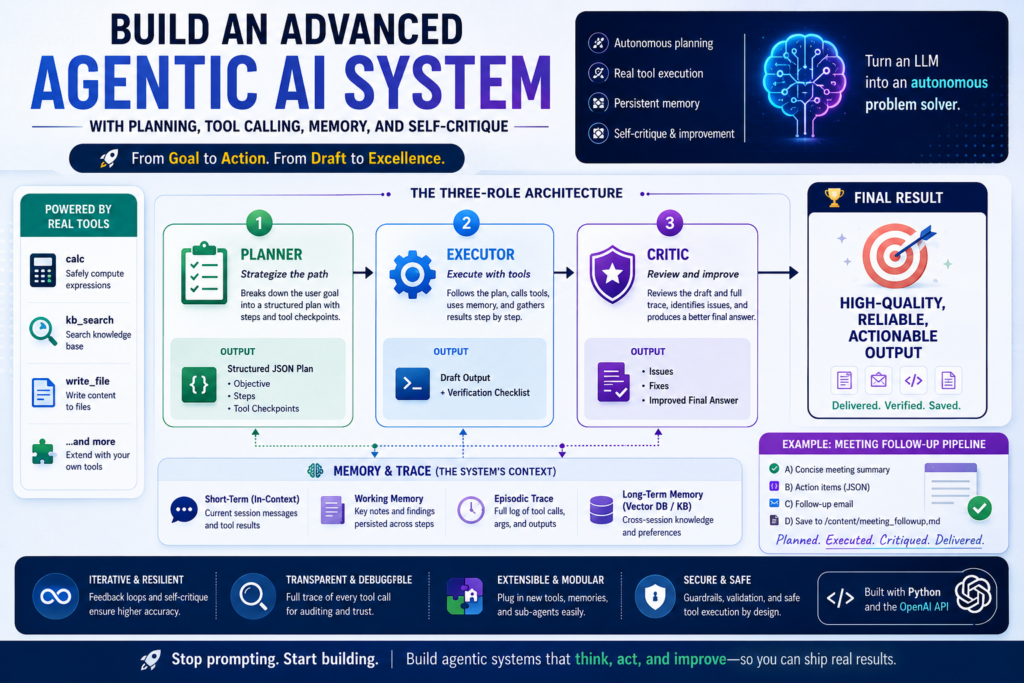
Building an advanced agentic AI system is now within reach for any developer with access to the OpenAI API — and the payoff is dramatic. Instead of a single-shot text generator, you get an autonomous pipeline that plans its own approach, calls real tools, remembers past context, and critiques its own output before delivering a final answer.
This guide walks you through every layer of that architecture, from environment setup to a working end-to-end demo, using Python and the OpenAI API.
What Is an Agentic AI System?
Definition: An agentic AI system is an AI pipeline in which a language model acts as an autonomous agent — it breaks down a goal, takes sequential actions, uses external tools, and refines its output through iterative self-evaluation, all without requiring a human to guide each step.
The key distinction from a standard LLM call is autonomy over time. A basic chatbot responds to one prompt. An agentic AI system reasons about what to do next, calls a calculator or database, stores intermediate results in memory, and applies a self-critique loop before producing the final deliverable.
Agentic frameworks have accelerated rapidly in 2026. Microsoft’s ARTIST, Google’s multi-agent RAG systems, and OpenAI‘s own function-calling infrastructure all point to the same insight: LLMs become dramatically more useful when they can act, not just generate. (advanced agentic ai ai tool calling ai memory systems self-critique ai architecture
)
The Three-Role Architecture: Planner, Executor, and Critic
The most reliable way to build an advanced agentic AI system is to separate responsibilities across three specialized roles. Each role uses a distinct system prompt and interacts with the model in a distinct way.
This separation of concerns prevents a single context from becoming cluttered with conflicting instructions and makes each role independently testable and replaceable.
The Planner Role
What does the Planner do? The Planner receives the user’s goal and returns a structured execution plan — typically a JSON object with an objective, a list of steps, and checkpoints where tools should be used.
Using a strict JSON schema instruction for the Planner is critical. It keeps the downstream executor from having to parse prose instructions, which reduces errors in long-horizon tasks.
python
PLANNER_SYS = """You are a senior planner.
Return STRICT JSON with keys:
objective (string), steps (array of strings), tool_checkpoints (array of strings)."""
The Planner should use a low temperature (0.1) to make its outputs deterministic and consistent. The goal here is strategy, not creativity.
The Executor Role (Tool-Calling Layer)
What does the Executor do? The Executor receives the plan and loops through model calls, detecting tool invocations, running them in Python, and feeding results back into the conversation.
This is where tool calling becomes central to the agentic AI system. The Executor doesn’t just generate text — it actively invokes functions like a safe calculator, a knowledge-base search, a JSON extractor, or a file writer. Each tool returns a structured dictionary that the model can interpret and reason over.
python
EXECUTOR_SYS = """You are a tool-using executor.
Use tools when needed. Keep intermediate notes short.
When done, return:
1) DRAFT output
2) Verification checklist"""
The Executor loop runs up to a configurable iteration limit (e.g., 12 turns), catching tool calls, executing them locally, and appending results as tool role messages. This creates a genuine feedback loop rather than a static generation.
The Critic Role (Self-Critique)
What does the Critic do? The Critic receives the original goal, the draft output, and the full tool-call trace, then returns a structured critique — identifying issues, proposing fixes, and producing an improved final answer.
Self-critique is what separates a robust agentic AI system from a fragile one. Without it, errors introduced during tool execution accumulate silently. The Critic acts as an integrated quality-control layer, reviewing the full chain of evidence before the user sees anything.
python
CRITIC_SYS = """You are a critic.
Given goal + draft, return:
- Issues (bullets)
- Fixes (bullets)
- Improved final answer (clean)"""
By including the tool trace in the Critic’s context, the system can catch numeric errors, missing action items, and structural gaps that wouldn’t be visible from the draft text alone.
Setting Up Your Environment with the OpenAI API
Before building the agent pipeline, configure your environment cleanly. Using getpass() to collect the API key prevents it from appearing in notebook outputs or version-controlled files.
python
import os, json, re, math, hashlib
from dataclasses import dataclass, field
from typing import Any, Dict, List
from getpass import getpass
from openai import OpenAI

if not os.environ.get("OPENAI_API_KEY"):
    os.environ["OPENAI_API_KEY"] = getpass("Enter OPENAI_API_KEY (hidden): ").strip()

client = OpenAI()
MODEL = "gpt-4o"  # or your preferred model
Setting the model string once at the top and referencing it throughout the codebase avoids silent mismatches, especially if you need to swap to a different model during development.
Building Structured Tool Calling in Python
Tool calling is the mechanism that turns a language model into an agentic AI system capable of affecting the world. Rather than hallucinating numeric results or inventing facts, the model calls a declared function and receives a real answer.
Defining Tool Schemas
Each tool requires a JSON schema that describes its name, purpose, and expected parameters. The OpenAI API uses these schemas to guide the model in formatting its tool calls correctly.
python
TOOL_SCHEMAS = [
    {
        "type": "function",
        "function": {
            "name": "calc",
            "description": "Safely compute a numeric expression.",
            "parameters": {
                "type": "object",
                "properties": {"expression": {"type": "string"}},
                "required": ["expression"]
            }
        }
    },
    {
        "type": "function",
        "function": {
            "name": "kb_search",
            "description": "Search internal knowledge base.",
            "parameters": {
                "type": "object",
                "properties": {
                    "query": {"type": "string"},
                    "k": {"type": "integer", "default": 3}
                },
                "required": ["query"]
            }
        }
    },
    {
        "type": "function",
        "function": {
            "name": "write_file",
            "description": "Write content to a file path.",
            "parameters": {
                "type": "object",
                "properties": {
                    "path": {"type": "string"},
                    "content": {"type": "string"}
                },
                "required": ["path", "content"]
            }
        }
    }
]
Well-designed tool schemas do two things: they constrain what the model can call (preventing hallucinated function names) and they document the agent’s capabilities in a machine-readable format that can be audited later.
Executing Tools Safely
On the Python side, each tool maps to a callable function. A dispatcher handles routing by name and returns a structured dictionary — always including an ok field — so the model can detect and reason about failures.
python
TOOLS = {
    "calc": lambda expression: _safe_calc(expression),
    "kb_search": lambda query, k=3: _kb_search(query, int(k)),
    "write_file": lambda path, content: _write_file(path, content),
}

def run_tool(name, args):
    fn = TOOLS.get(name)
    if not fn:
        return {"ok": False, "error": f"Unknown tool: {name}"}
    try:
        return fn(**args)
    except Exception as e:
        return {"ok": False, "error": str(e), "args": args}
The _safe_calc function is worth emphasizing: it whitelists only numeric characters and operators before calling eval, preventing arbitrary code execution. This kind of defensive implementation is essential in any agentic AI system that processes untrusted input.
Implementing Agent Memory
Memory is what makes an agentic AI system capable of learning within a session and coordinating across long-horizon tasks. Without it, every turn starts from scratch and the agent cannot accumulate context.
Short-Term vs. Long-Term Memory in AI Agents
| Memory Type | Scope | Implementation | Use Case |
|---|---|---|---|
| Short-term (in-context) | Current session only | Appended to message history | Passing tool results forward |
| Working memory | Current task | AgentState.memory list | Persisting intermediate findings |
| Long-term (external) | Cross-session | Vector DB or key-value store | Remembering user preferences |
| Episodic trace | Current session | AgentState.trace list | Debugging and critique |
For the pipeline in this guide, working memory and an episodic trace are sufficient. Both are stored in the AgentState dataclass.
python
@dataclass
class AgentState:
    goal: str
    memory: List[str] = field(default_factory=list)
    trace: List[Dict[str, Any]] = field(default_factory=list)
The memory list holds short directives the executor should keep in mind (e.g., “use kb_search for formatting guidance”). The trace records every tool call, its arguments, and its output — giving the Critic full visibility into how the answer was produced.
For production deployments, extending this pattern with a vector store like Chroma or Pinecone enables persistent memory across sessions, turning a single-task agentic AI system into a persistent AI assistant with evolving context.
Agentic AI Architecture Comparison: Simple vs. Advanced
Understanding the upgrade from a basic LLM call to a full agentic AI system helps clarify which components to prioritize for your use case.
| Feature | Basic LLM Call | Advanced Agentic AI System |
|---|---|---|
| Goal handling | Single prompt, single response | Multi-step planning with structured JSON |
| Tool access | None | Calculator, KB search, file I/O, custom APIs |
| Memory | None (stateless) | In-context working memory + episodic trace |
| Self-correction | None | Dedicated Critic role reviews and improves draft |
| Output format | Unstructured text | Structured deliverables (JSON, Markdown, files) |
| Iteration | 1 LLM call | Up to N turns with tool feedback loops |
| Debuggability | Low (no trace) | High (full tool trace for auditing) |
| Best for | Q&A, summarization | Multi-step workflows, automated pipelines |
The right architecture depends on task complexity. For simple retrieval or summarization, a basic LLM call is faster and cheaper. Once a task involves calculation, structured outputs, knowledge retrieval, or saving artifacts, the full agentic AI system pattern pays for itself immediately.
Running the Full Agentic AI Pipeline End-to-End
Putting all three roles together, the run_agent() function orchestrates the complete pipeline in five stages.
python
def run_agent(goal: str):
    # 1. Initialize state
    state = AgentState(goal=goal)
    state.memory.append(
        "Use kb_search if you need internal guidance or formatting playbooks."
    )

    # 2. Plan
    plan_obj = plan(state)

    # 3. Execute with tool calling
    draft = execute(state, plan_obj)

    # 4. Critique and refine
    final = critique(state, draft)

    # 5. Return structured result
    return {
        "plan": plan_obj,
        "draft": draft,
        "final": final,
        "trace": state.trace
    }
Each stage feeds into the next. The Planner’s structured JSON becomes the Executor’s roadmap. The Executor’s tool trace becomes the Critic’s evidence. The Critic’s improved output becomes the user’s deliverable.
Demo goal — meeting follow-up pipeline:
python
demo_goal = """
From this transcript, produce:
A) Concise meeting summary
B) Action items as JSON array with fields: owner, action, due_date
C) Follow-up email (subject + body)
D) Save output to /content/meeting_followup.md using write_file

Transcript:
- Decision: Ship v2 dashboard on March 15.
- Risk: Data latency might spike; Priya will run load tests.
- Amir will update the KPI definitions doc and share with finance.
- Next check-in: Tuesday. Owner: Nikhil.
"""

result = run_agent(demo_goal)
print(result["final"])
Running this demo triggers the following sequence in the agentic AI system:
- The Planner returns a JSON plan with four steps and a
write_filecheckpoint. - The Executor calls
kb_searchfor formatting guidance, generates the summary and action items JSON, drafts the email, then callswrite_fileto save the output. - The Critic reviews the draft against the tool trace, checks that all action items have owners and due dates, and produces a polished final response.
The result includes a Markdown file on disk, a verified JSON array, and a follow-up email — all from a single run_agent() call.
Common Pitfalls When Building an Agentic AI System
Even well-designed pipelines hit avoidable errors. These are the most common failure modes.
- Missing
tool_choiceguard: Passingtool_choice="auto"without atoolslist raises a 400 error from the OpenAI API. Always wrap tool parameters in a conditional: only include them when tools are actually provided. - Unguarded
eval()in tool functions: Passing user input directly to Python’seval()is a critical security vulnerability. Whitelist allowed characters explicitly, as shown in_safe_calc. - No iteration limit in the Executor loop: Without a maximum turn count, a stuck tool call can run indefinitely. Set a hard ceiling (e.g., 12 iterations) and return a graceful error message if it’s reached.
- Planner JSON parse failure with no fallback: If the model returns a plan with prose instead of valid JSON, the pipeline should degrade gracefully — either retrying with a stricter prompt or falling back to a minimal default plan rather than crashing.
- Ignoring the tool trace in the Critic: Passing only the draft to the Critic loses the most valuable debugging signal. The trace shows whether a calculation actually ran, what the KB returned, and whether file I/O succeeded — all evidence the Critic needs to catch real errors.
- Shallow memory (no working state): An agentic AI system without persistent memory between sub-tasks forces the Executor to re-derive context on every turn. Maintain a
memorylist and inject it into every Executor prompt. - Oversized tool outputs in context: Tools like file writers or KB searches can return large payloads. Truncate tool outputs before adding them to the message history to avoid context overflow on long tasks.
Extending the Pipeline: What Comes Next
The architecture described here is deliberately minimal — just enough to be production-credible for real workflows. Natural next steps include:
- Parallel sub-agents: Decompose complex goals into concurrent tasks handled by specialized executor instances, then merge results in a synthesis step.
- Vector memory: Replace the in-memory KB with a proper embedding-based retrieval store for cross-session recall.
- Tool retry policies: Wrap
run_tool()in an exponential backoff decorator so transient failures don’t cascade. - Evaluation harnesses: Log plan quality, tool utilization rate, and Critic improvement scores across runs to benchmark the agentic AI system over time.
- Human-in-the-loop approval: Add a checkpointing mechanism that pauses the Executor before irreversible actions (file writes, API calls, emails) and requests explicit confirmation.
Each of these extensions preserves the three-role structure — they add capability without changing the core logic. That’s the real benefit of the Planner/Executor/Critic pattern: it scales horizontally by adding roles, not vertically by bloating a single prompt.
Conclusion
An advanced agentic AI system built on the OpenAI API isn’t a research artifact — it’s a practical pattern you can implement today. By separating planning, tool-augmented execution, and self-critique into distinct roles, you get a pipeline that is debuggable, extensible, and genuinely useful for real-world tasks like meeting follow-ups, structured data extraction, and automated report generation.
The core insight is architectural: once you treat the LLM as an orchestrator rather than a generator, every component — memory, tools, critique — has a natural home in the pipeline. That is what distinguishes a true agentic AI system from a clever prompt.