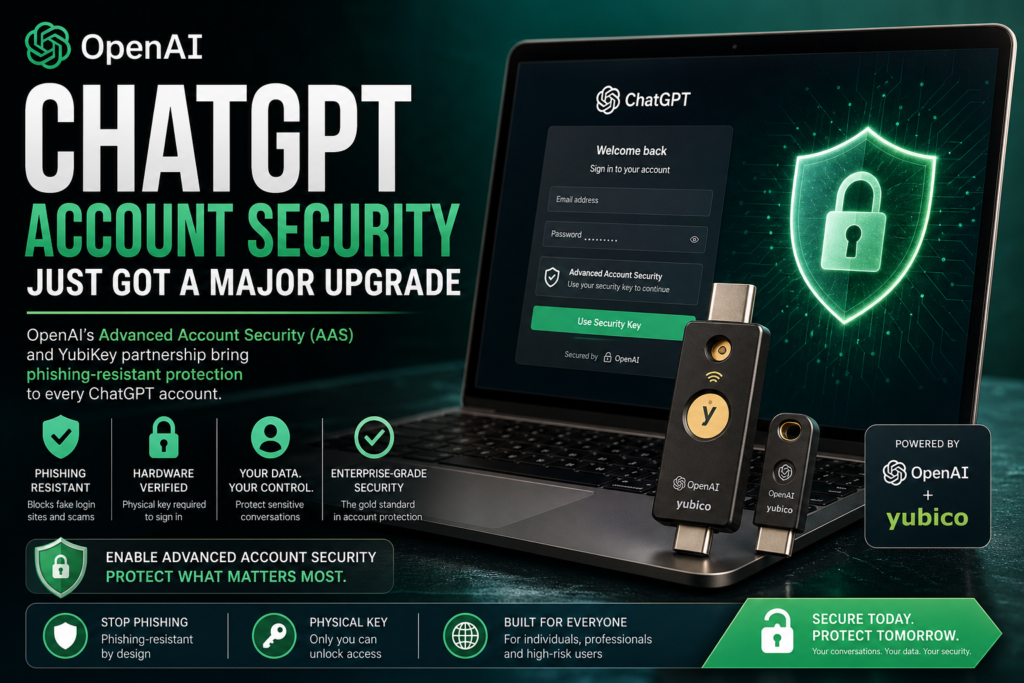
Your ChatGPT account may contain your most sensitive conversations — and now OpenAI has introduced enterprise-grade tools to protect them. On April 30, 2026, OpenAI launched its Advanced Account Security (AAS) program alongside a hardware key partnership with Yubico, marking the most significant step the company has taken yet to harden ChatGPT account security for high-risk users and everyday people alike.
What Is OpenAI’s Advanced Account Security?
OpenAI Advanced Account Security (AAS) is a suite of opt-in protections designed to significantly reduce the risk of unauthorized access to ChatGPT accounts. Unlike basic two-factor authentication, AAS is built around phishing-resistant hardware keys — physical devices that must be present to log in.
The program is voluntary, meaning any ChatGPT user can enable it, though OpenAI has specifically called out certain high-risk groups as the primary audience.
Who Is AAS Designed For?
OpenAI has singled out the following groups as the ideal candidates for Advanced Account Security:
- Political dissidents operating in hostile environments
- Investigative journalists who handle sensitive sources
- Academic and scientific researchers working on proprietary studies
- Elected officials and government staff handling policy-sensitive information
- Enterprise users whose corporate intelligence lives in ChatGPT sessions
That said, the opt-in nature of the program means any user who values their ChatGPT account security can activate it — regardless of profession or risk profile.
The OpenAI–Yubico Partnership Explained
As the cornerstone of its AAS rollout, OpenAI announced a formal partnership with Yubico, the industry-leading manufacturer of hardware security keys. The goal: bring phishing-resistant authentication directly into the ChatGPT ecosystem.
Yubico CEO Jerrod Chong stated that the intent is to “drastically reduce the threat of unauthorized access to sensitive data in OpenAI accounts worldwide.” TechCrunch
What Are the Co-Branded YubiKeys?
The partnership has produced two new co-branded hardware security keys:
| Product | Form Factor | Connectivity | Best For |
|---|---|---|---|
| YubiKey C NFC | Standard USB-C | USB-C + NFC | Laptops and NFC-enabled phones |
| YubiKey C Nano | Ultra-compact USB-C | USB-C only | Always-plugged-in desktop use |
Both keys carry co-branding from OpenAI and Yubico and are designed specifically for use with ChatGPT accounts. They store a unique cryptographic identifier on-device, meaning only the person physically holding the key can authenticate the login — even if an attacker has the username and password.
Why ChatGPT Account Security Matters More Than Ever
It is easy to underestimate the value of what lives inside a ChatGPT account. But consider what a typical power user stores there: strategic business plans, legal drafts, medical research notes, personal relationship advice, source code, and financial projections. For enterprise users especially, a compromised account is not an inconvenience — it is a data breach.
The Growing Threat of Chatbot Phishing
There is a growing body of literature showing that bad actors are increasingly targeting chatbot users, with cybercriminals seeking extortion-worthy information given the intimate nature of most chatbot conversations. TechCrunch
This threat is not hypothetical. Stolen ChatGPT session tokens and credentials have appeared on dark web marketplaces, with threat actors specifically targeting AI platform accounts because of the rich, unstructured personal and professional data they contain. Standard username-and-password logins — even with SMS-based two-factor authentication — offer little resistance against modern phishing kits, which can intercept one-time codes in real time.
Phishing-resistant authentication, by contrast, is fundamentally different. Because a hardware key responds only to the specific website it was registered with, even a perfect-looking fake login page cannot trick the key into responding. The cryptographic handshake simply fails if the domain does not match.
How Hardware Security Keys Work
Understanding hardware security keys is key to appreciating why OpenAI chose this technology over alternatives like authenticator apps or biometrics.
Definition: A hardware security key is a small physical device — typically the size of a USB drive — that stores a unique cryptographic credential and must be physically present to complete an authentication event.
Here is how the technology stacks up against other authentication methods:
| Authentication Method | Phishing Resistant | Requires Physical Device | Interceptable via SIM Swap | Works Offline |
|---|---|---|---|---|
| Password only | ❌ | ❌ | N/A | ✅ |
| SMS one-time code | ❌ | ❌ | ✅ Yes | ✅ |
| Authenticator app (TOTP) | ❌ | ✅ Partial | ❌ | ✅ |
| Push notification (e.g., Duo) | ❌ | ✅ Partial | ❌ | ❌ |
| Hardware security key (YubiKey) | ✅ | ✅ | ❌ | ✅ |
| Passkey (device-bound) | ✅ | ✅ | ❌ | ✅ |
The core insight: software-based second factors are vulnerable because they produce a code that can be intercepted. Hardware keys produce a signed cryptographic response to a server challenge, and that response is domain-bound and non-replayable. It cannot be phished.
How to Enable Advanced Account Security on ChatGPT
Getting started with AAS is straightforward once you have a compatible YubiKey or FIDO2-compliant hardware security key. Here is the general process:
- Step 1 — Acquire a compatible key. The co-branded YubiKey C NFC or YubiKey C Nano are purpose-built for this integration, but any FIDO2-certified hardware key should work.
- Step 2 — Log into your ChatGPT account and navigate to your security settings.
- Step 3 — Locate the Advanced Account Security toggle in the security or account section and opt in to the program.
- Step 4 — Register your hardware key by following the on-screen prompts. You will be asked to insert the key and tap its capacitive button to confirm registration.
- Step 5 — Register a backup key (strongly recommended). Yubico and security professionals universally advise keeping a second registered key stored safely offline in case the primary is lost.
- Step 6 — Test the login flow by signing out and back in to confirm the key works before relying on it.
- Step 7 — Acknowledge the recovery tradeoff (see the section below). OpenAI is explicit that if you lose your only registered key, account recovery will not be possible.
Enabling AAS upgrades your ChatGPT account security from “standard” to a level used by governments, financial institutions, and high-value enterprise environments.
Tradeoffs: What You Gain and What You Risk
No security measure is without tradeoffs, and OpenAI has been candid about the most significant one here.
What You Gain
- Near-total phishing immunity. Hardware key authentication cannot be intercepted by even sophisticated real-time phishing proxies.
- Protection from credential stuffing. Even if your password appears in a data breach, the attacker cannot log in without physical possession of your key.
- Enterprise-grade assurance. The same FIDO2/WebAuthn standard that secures banking and government systems now secures your ChatGPT account.
What You Risk
If the key is lost, OpenAI has stated it will not be able to help recover access — meaning conversations could be lost permanently. TechCrunch
This is not a policy quirk — it is a deliberate design feature. True phishing-resistant authentication works because there is no backdoor. A support channel that can bypass the key requirement would be exactly the attack surface that bad actors would exploit via social engineering. The security guarantee and the recovery limitation are two sides of the same coin.
Practical mitigation: Register two keys. Store one in a safe location physically separated from your primary device. This is standard operational security for any hardware-key-protected account.
How This Fits Into the Broader AI Security Landscape
OpenAI’s AAS announcement is not happening in isolation. Several weeks prior, Anthropic announced a new cybersecurity model called Mythos, and OpenAI has also released a broader framework for digital defense. The AI industry is converging on a shared recognition: as AI platforms become repositories of sensitive information and workflow automation hubs, the security standards applied to them must rise to match. TechCrunch
This represents a maturation in the AI industry’s posture. In the early days of ChatGPT, account security was an afterthought — a username, a password, and maybe an email-based OTP. Today, OpenAI is positioning ChatGPT account security at the same level as the tools used by intelligence agencies and financial regulators.
For enterprise decision-makers, this is a meaningful signal. If your organization already mandates hardware key authentication for email, VPN, or code repositories, extending that policy to your AI platform accounts now has a clear, supported path.
For individual users, even if you are not a political dissident or a journalist, the question is simple: How much would you lose if someone else had full access to every conversation you have ever had with ChatGPT?
If the answer gives you pause, Advanced Account Security is worth enabling.
Frequently Asked Questions
Does Advanced Account Security cost anything?
OpenAI has positioned AAS as a feature available to ChatGPT users — however, the YubiKey hardware itself must be purchased separately. Yubico’s keys typically range from roughly $25 to $85 depending on the model.
Can I use a non-Yubico hardware key?
Any FIDO2/WebAuthn-certified hardware security key should be compatible with the AAS program. The co-branded Yubico keys are optimized for the integration but are not strictly required.
What happens if I lose my security key?
If you have not registered a backup key, you will be locked out of your account permanently. OpenAI has confirmed it cannot assist with recovery in this scenario — by design. Always register at least two keys.
Is Advanced Account Security available on mobile?
The YubiKey C NFC model supports NFC-enabled smartphones, making mobile authentication possible. Tap-to-authenticate works on compatible Android and iOS devices without needing a USB port.
Who should not enable AAS right now?
Users who do not have reliable access to their hardware key at all times — for example, those who frequently work across many devices without carrying the key — may find the friction disruptive. For those users, a passkey or authenticator app remains a reasonable interim upgrade over SMS-based 2FA.
The Bottom Line
ChatGPT account security has reached an inflection point. OpenAI’s Advanced Account Security program, powered by the Yubico YubiKey partnership, brings genuinely phishing-resistant authentication to AI platform accounts for the first time. For journalists, researchers, executives, and anyone who has had a candid conversation with an AI assistant, this is no longer a nice-to-have — it is the new standard.
Enable AAS. Buy two keys. Store them separately. Your future self — and your future conversations — will thank you.