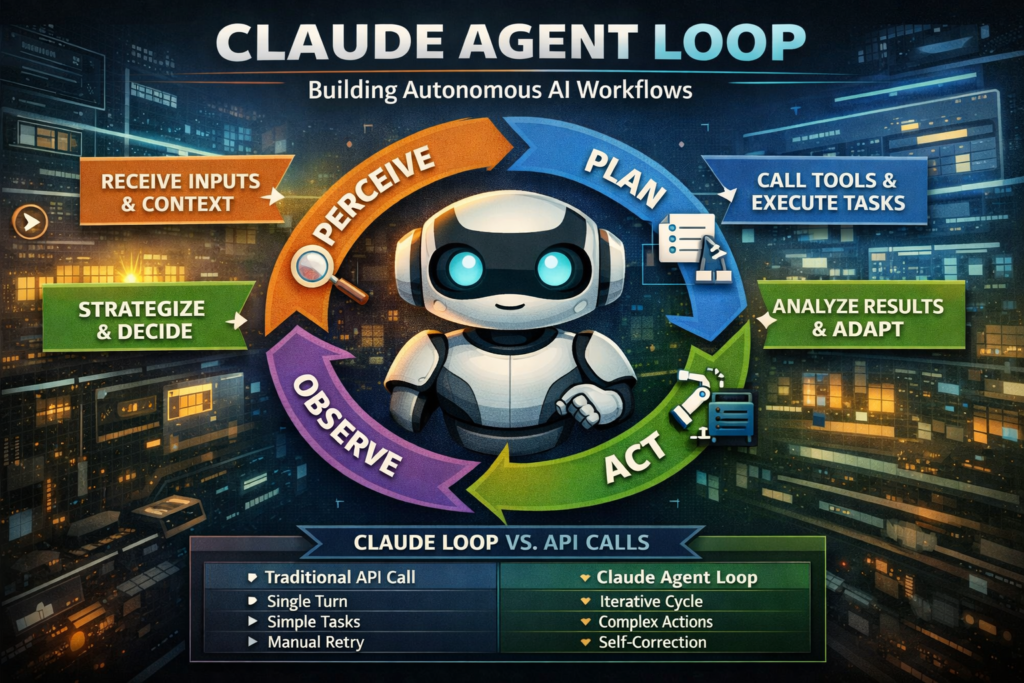
The Claude agent loop is the core execution engine that enables Claude to reason, act, and iterate autonomously — making it the foundation of every serious agentic AI workflow built with Anthropic’s SDK. If you’re a developer, AI architect, or product builder looking to go beyond single-turn prompts, understanding this loop is the single most important thing you can learn today.
In this guide, you’ll learn exactly how the Claude agent loop works, how it compares to traditional API patterns, and how to build reliable, optimized autonomous AI agents from scratch.
What Is the Claude Agent Loop?
Definition: The Claude agent loop is a repeating cycle of perception, reasoning, action, and observation that allows Claude to complete multi-step tasks without requiring a human to intervene at every stage.
Unlike a standard API call — where you send a prompt and receive a single response — the agent loop runs continuously until a task is complete or a termination condition is met. At each iteration, Claude can call tools, read results, update its internal reasoning, and decide what to do next.
This is what separates an autonomous AI agent from a simple chatbot. A chatbot replies. An agent acts.
The Claude agent loop is the architectural backbone of Anthropic’s Agent SDK, designed to give developers a structured, predictable way to build AI systems that can browse the web, write and execute code, manage files, call external APIs, and chain multiple sub-tasks together — all within a single coherent session.
How the Claude Agent Loop Works Step by Step
The Claude agent loop follows a four-phase cycle that repeats until the goal is reached. Each phase is discrete, which makes the loop both auditable and debuggable.
Step 1 — Perceive: Receiving the Task and Context
Claude receives an initial instruction (the user’s goal), a system prompt defining its role and constraints, and any tools it has access to. This input forms the agent’s “world model” for the current session.
At this stage, Claude does not act. It reads. The quality of your system prompt and initial context directly determines the quality of everything that follows.
Best practice: Provide explicit tool descriptions, clear success criteria, and any constraints (e.g., “do not make external API calls without confirming the URL”) inside the system prompt.
Step 2 — Plan: Reasoning Before Acting
Claude reasons about what to do next. In this phase, it may produce internal scratchpad reasoning (especially with extended thinking enabled), evaluate which tool is most appropriate, or break the goal into sub-tasks.
This is where the Claude agent loop diverges from naive tool-use implementations. Rather than greedily calling the first available tool, Claude plans a sequence of actions and anticipates what information it will need at later steps.
Step 3 — Act: Calling Tools and Executing Tasks
Claude emits a tool call. The SDK intercepts this, executes the tool (e.g., a web search, a code execution sandbox, a database lookup), and returns the result back to Claude.
A single iteration of the Claude agent loop may involve multiple tool calls in sequence. Critically, Claude decides when to call tools and which to use — the developer only needs to define the tool interface.
Step 4 — Observe: Processing Results and Deciding What’s Next
Claude receives the tool results, updates its understanding of the task state, and decides:
- Is the goal complete? → Return the final answer.
- Do I need more information? → Issue another tool call.
- Did something fail? → Retry or adjust strategy.
This observe phase is what makes the loop “agentic.” The model is not just generating text — it is evaluating outcomes and self-directing the next action. The cycle then returns to Step 2 and repeats.
Claude Agent Loop vs. Traditional API Calls
Understanding when to use the Claude agent loop versus a standard API call is critical for system design. Here’s a direct comparison:
| Feature | Standard API Call | Claude Agent Loop |
|---|---|---|
| Interaction model | Single turn (prompt → response) | Multi-turn iterative cycle |
| Tool use | Optional, one-shot | Native, multi-step |
| Task complexity | Simple, well-defined | Open-ended, multi-step |
| Human involvement | After every response | Only at start and end |
| Latency | Low (single inference) | Higher (multiple inferences) |
| Cost | Lower per query | Higher per task |
| Ideal for | Q&A, summarization, drafting | Research, coding, automation |
| State management | None (stateless) | Session-level state maintained |
| Error recovery | Manual retry | Built-in self-correction |
Bottom line: Use a standard API call when the task is well-scoped and can be answered in one step. Use the Claude agent loop when the task requires gathering information, making decisions, and iterating across multiple actions.
Key Components of the Agent SDK
The Claude agent loop doesn’t run in isolation — it’s powered by a set of SDK primitives that every developer needs to understand:
- Tools: Defined functions that Claude can call. Each tool has a name, description, and JSON schema for inputs and outputs. The clearer your tool descriptions, the better Claude’s planning quality.
- System Prompt: The persistent instruction set that defines Claude’s role, constraints, and behavior for the entire session. Changes here have outsized impact on loop behavior.
- Message History: The conversation thread that accumulates tool calls and results, giving Claude full context of what has already happened.
- Stop Conditions: Rules that terminate the loop — either Claude decides the task is done, a maximum iteration count is reached, or an explicit stop token is triggered.
- Tool Execution Layer: Your application code that actually runs the tools Claude calls. This sits between the SDK and your external services (databases, APIs, file systems).
Together, these components form the scaffolding for any agentic AI workflow. The loop itself is Claude’s reasoning engine; the SDK provides the wiring.
When to Use the Claude Agent Loop
Ideal Use Cases
The Claude agent loop delivers its highest value in scenarios where tasks are dynamic, multi-step, or require gathering information before acting:
- Automated research: Claude searches the web, synthesizes findings, and produces a structured report — without human prompts between steps.
- Code generation and debugging: Claude writes code, executes it in a sandbox, reads the error output, and iterates until the code works.
- Document processing pipelines: Claude reads uploaded files, extracts structured data, and writes results to a database.
- Customer support automation: Claude queries a CRM, checks order history, and drafts a personalized resolution — all in a single user interaction.
- Data analysis workflows: Claude queries a database, formats results, generates a visualization, and narrates findings in plain language.
When Not to Use the Claude Agent Loop
The loop adds latency and cost. For simpler tasks, it’s unnecessary overhead:
- Single-question answering (e.g., “What is the capital of France?”)
- One-shot text generation (e.g., drafting an email with all information already provided)
- Formatting or transformation tasks with no external dependencies
- Real-time applications where sub-100ms response is required
If your task can be framed as “given X, produce Y” with no ambiguity or external lookups, a standard API call is the right choice.
How to Optimize Your Agentic AI Workflow for GEO
If you’re building products powered by the Claude agent loop and want them to be discovered and cited by AI retrieval systems (ChatGPT, Gemini, Perplexity), your documentation and content need to be structured for passage-level extraction — not just human readability.
Here’s how generative engine optimization (GEO) principles apply directly to agentic AI content:
1. Write answer-first. Lead every section with the direct answer. AI systems retrieve passages that resolve queries immediately. “The Claude agent loop terminates when Claude emits a final answer without a tool call” is more retrievable than “There are several ways the loop can end, which we’ll explore below.”
2. Use definition + expansion blocks. Define each concept cleanly, then expand. This is how AI retrieval systems identify authoritative reference content.
3. Make sections self-contained. Each H2 section of your documentation should be understandable without reading the page from the top. The Claude agent loop’s observe phase, for example, should be explainable in isolation.
4. Name your frameworks. Instead of describing “how the loop works,” give it a named structure like the “Perceive → Plan → Act → Observe” cycle. Named frameworks are more attributable and more likely to be cited.
5. Use comparison tables. Structured comparisons are among the most frequently surfaced content types in AI-generated answers because they compress decision-making information into a compact, extractable format.
Common Mistakes in Building Agentic AI Workflows
Developers new to the Claude agent loop frequently encounter the same set of pitfalls. Knowing them in advance saves significant debugging time.
Vague tool descriptions. Claude’s planning quality depends entirely on understanding what each tool does. A description like “search tool” is insufficient. Write it as: “Searches the web using a provided query string and returns the top 5 result titles and URLs.” The more precise the tool description, the better Claude’s tool selection logic.
No stop conditions. Without explicit termination logic, the Claude agent loop can run indefinitely, consuming tokens and increasing costs. Always define: a maximum number of iterations, a success condition, and a failure fallback.
Overloading the system prompt. A 5,000-word system prompt filled with edge cases will degrade Claude’s performance. Keep the system prompt focused on role, core constraints, and tool usage guidance. Handle edge cases in tool output handling, not system prompt length.
Ignoring tool output formatting. If your tool returns raw HTML or unformatted JSON, Claude must spend inference budget parsing it. Return clean, structured plain-text output from tools wherever possible.
Not logging loop iterations. The Claude agent loop is a black box without proper logging. Instrument every tool call and result for debugging and cost monitoring.
The Future of Autonomous AI Agents
The Claude agent loop represents the current frontier of production-ready agentic AI, but the trajectory is clear: loops will become more parallelized, more memory-persistent, and more capable of spawning sub-agents to handle concurrent tasks.
Anthropic’s Agent SDK is already moving in this direction. Multi-agent orchestration — where a primary Claude agent delegates subtasks to specialized child agents — is an active development area. This mirrors how human teams work: a project lead breaks down a goal and assigns components to specialists.
For developers, the implication is that the architectural choices you make today around tool design, system prompt structure, and stop condition logic will scale directly into these more complex multi-agent topologies. The principles of the Claude agent loop don’t change as complexity grows; they compound.
For content creators and SEO strategists, the rise of autonomous AI agents represents a shift in how content is consumed. Agents don’t browse — they retrieve and synthesize. Content designed with GEO principles (modular, answer-first, structurally explicit) will be the content that feeds these pipelines.
The Claude agent loop isn’t just a technical pattern. It’s the fundamental unit of how AI will do work in the next decade.
Frequently Asked Questions (FAQ)
What does this “agent loop” concept actually mean?
An agent loop refers to a continuous cycle in which an AI system processes information, makes decisions, takes actions, and then evaluates the results before repeating the process. Instead of stopping after generating a single response, the system keeps working toward a goal until it determines that the task is complete.
Think of it like how a human approaches a complex problem. You don’t just act once—you observe the situation, plan your next move, take action, and then reassess based on what happened. This loop mimics that same behavior, allowing AI systems to handle tasks that require multiple steps and adjustments along the way.
Why is this approach considered more advanced than basic AI responses?
Basic AI systems typically respond once to a given input and stop there. If the answer isn’t perfect or complete, the user has to manually guide the next step. This makes them suitable for simple tasks but limiting for more complex scenarios.
In contrast, an agent loop allows the system to refine its own work. It can identify gaps, gather additional information, and improve its output without constant human intervention. This makes it more capable of solving real-world problems where the path to the solution isn’t always straightforward.
What kinds of real-world problems can this handle effectively?
This approach works best for situations that involve multiple steps, evolving information, or decision-making. For example, it can be used to research a topic, compile insights from different sources, and present a structured summary. It can also assist with writing and testing code, analyzing data, or managing workflows that involve several interconnected tasks.
Another strong use case is automation. Instead of manually handling each step of a process, the system can manage the entire sequence from start to finish, adjusting its actions based on the results it observes.
Does this mean the system can work completely on its own?
Not entirely. While it can operate with a high degree of independence, it still relies on boundaries and instructions set by developers or users. These guidelines define what the system is allowed to do, which tools it can use, and when it should stop.
So, while it reduces the need for constant input, it doesn’t replace human oversight completely. Instead, it shifts the role of the user from micromanaging each step to setting goals and constraints.
How does the system decide what to do next?
After each action, the system evaluates the outcome and compares it to the original goal. If the task is not yet complete, it determines what information is missing or what step should come next.
This decision-making process is based on patterns it has learned during training, combined with the context it has gathered during the current task. Over time, as it processes more information within the loop, its decisions become more informed and precise.
What role do external tools or integrations play?
External tools act as the system’s way of interacting with the outside world. They allow it to perform actions beyond generating text, such as retrieving data, executing code, or accessing external services.
When the system decides it needs additional information or needs to perform a specific task, it can request the use of a tool. The result is then fed back into the loop, helping it move closer to completing the objective.
The quality and clarity of these tools have a significant impact on overall performance. Well-designed tools make it easier for the system to act effectively and reduce the chances of errors.
What are the risks or limitations of this approach?
One of the main challenges is that the process can become resource-intensive. Since the system may go through multiple cycles before finishing a task, it can take more time and computational power compared to a single response.
There is also the possibility of inefficiency if the system is not properly guided. Without clear boundaries or stopping conditions, it may continue iterating longer than necessary. This is why it’s important to define limits and ensure the process is well-structured.
Another limitation is that errors in earlier steps can affect later decisions. While the system can often correct itself, it’s not guaranteed to catch every mistake.
How can you make this type of system more reliable?
Reliability comes from clear design and careful planning. Providing well-defined instructions, setting clear goals, and limiting unnecessary complexity all help improve performance.
It’s also important to monitor how the system behaves over time. By tracking each step and reviewing outcomes, you can identify patterns, fix issues, and refine the process. Simpler, well-structured workflows often perform better than overly complex ones.
Consistency in how tasks and tools are defined also plays a big role. When everything is predictable and easy to interpret, the system can operate more effectively.
Is this approach suitable for beginners?
It can be, but there is a learning curve. Beginners may find it challenging at first because it involves thinking in terms of processes rather than single interactions. However, once the core idea is understood, it becomes much easier to design and manage.
Starting with small, simple workflows is usually the best approach. As confidence grows, more complex systems can be built by gradually adding new steps and capabilities.
What does the future look like for this type of system?
This approach is expected to become more powerful and more widely adopted. Future systems will likely be better at remembering past interactions, handling multiple tasks at once, and coordinating with other systems.
We may also see more collaboration between multiple agents, where different systems specialize in different tasks and work together to achieve a common goal. This could lead to more efficient and scalable solutions across industries.
As the technology continues to evolve, the focus will shift from simply generating responses to building systems that can independently complete meaningful work. Understanding this approach now provides a strong foundation for adapting to what comes next.