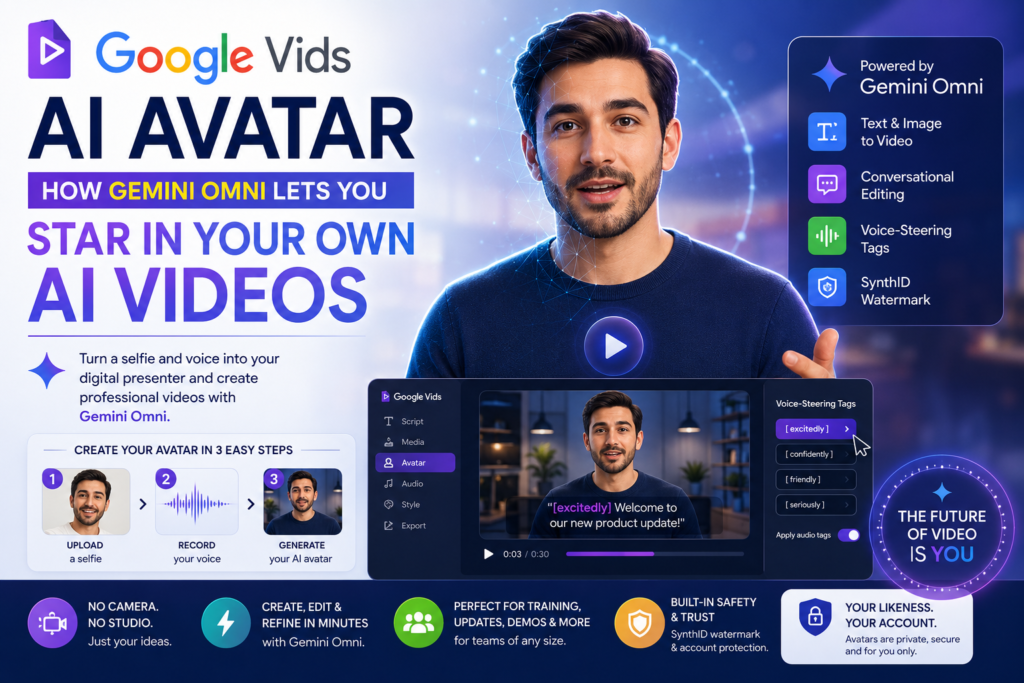
Google has added a Google Vids AI avatar feature that turns a single selfie and a short voice recording into a digital version of you, one that can deliver any script you type. Paired with the new Gemini Omni model, Vids can now generate, edit, and narrate entire videos from a text prompt alone, with no camera, microphone, or timeline-based editing required.
If you’ve ever wanted to appear in a training video, a product demo, or a company update without actually filming yourself, this update was built for exactly that scenario. Below, we break down how the personal avatar tool works, what Gemini Omni adds to the mix, how the update compares to rivals like HeyGen and Synthesia, and what to know before you try it.
What Is the Google Vids AI Avatar Feature?
The Google Vids AI avatar is a personalized digital likeness, face and voice combined, that users can generate inside Vids, Google’s AI-powered video tool within Google Workspace, and then direct to speak any script they write. Instead of hiring a presenter or recording yourself on camera, you upload one selfie and a brief voice sample, and the platform builds an avatar modeled on your own appearance and vocal tone.
This isn’t Google’s first attempt at avatars in Vids. The company previously introduced studio-style AI presenters and, back in December, rolled out what it called its most realistic avatars yet, powered by Veo 3.1. What’s new with this release is the personal angle: rather than picking from a library of generic stock presenters, users can now generate a digital stand-in built directly from their own face and voice, tied to their Google account.
In plain terms, this new personal avatar capability exists to solve one specific problem: letting anyone put a human face on a video without ever stepping in front of a camera. That’s a meaningful shift for solo creators, small marketing teams, and internal communications staff who don’t have access to a studio or a willing on-camera presenter.
How the Feature Actually Works
Step 1: Uploading Your Selfie and Voice Sample
Creating your avatar starts with two uploads inside Vids: a single selfie and a short voice recording. The platform processes both to build a digital model that replicates your appearance and vocal tone, then lets you type any script for that model to “perform.” Once generated, the avatar functions like a cast member you can drop into any video project, meaning no reshoots are needed if you decide to change the script later, adjust the pacing, or reuse the same likeness across multiple videos.
SynthID Watermarking and Likeness Protection
Every clip generated with the tool carries an invisible SynthID watermark, Google’s digital fingerprinting system for AI-generated content. This means the resulting footage can, in principle, be verified as AI-made even though the mark itself isn’t visible to the eye. Google has also tied avatar generation to the account holder’s own likeness and Google account, a deliberate guardrail against the kind of impersonation controversies that dogged earlier AI video tools, including OpenAI’s Sora, which briefly let users generate videos featuring public figures before that app shut down earlier this year.
Age and Region Restrictions
Access to the personal avatar feature is limited to account holders aged 18 and older in supported regions. Google has framed this as a safety measure specific to identity-based generation, since the output is modeled directly on a real person’s face and voice rather than a synthetic, non-identifiable character. Regional availability is also being rolled out gradually rather than made global on day one.
Gemini Omni: The Engine Behind the New Avatar Tools
The Google Vids AI avatar doesn’t work in isolation; it’s powered by Gemini Omni, Google’s multimodal model that generates video from a mix of text, images, and audio. Omni is the second half of this update, and arguably the more technically significant one, because it changes how the entire video gets built and edited, not just who appears in it.
Text-and-Image-to-Video Generation
With Gemini Omni active in Vids, users can generate a clip by combining a written prompt with reference images. You might upload a product photo and describe the scene you want, and Omni merges both inputs into a finished clip. This mirrors a broader shift happening across AI video tools, where a prompt plus a reference asset increasingly replaces a full production shoot, a camera crew, and hours of manual editing.
Conversational, Step-by-Step Editing
Perhaps the most practical addition is Omni’s support for step-by-step edits. Previously, adjusting an AI-generated clip often meant regenerating it entirely from scratch, discarding whatever had already worked. Now, users can request changes conversationally, swapping the background, fixing uneven lighting on phone-recorded footage, or adding a visual effect, all without rebuilding the whole video. For anyone producing multiple takes of the same script with their avatar, this editing loop is what makes iteration realistic rather than tedious.
Voice-Steering Tags for Emotion and Pacing
Google has also added bracketed voice-steering commands, typing something like “[excitedly]” directly into a script, to control an avatar’s tone, pacing, or emphasis. Vids suggests available tags as you type, and an “Apply audio tags” option can insert appropriate cues automatically throughout a longer script. This gives the finished performance a noticeably more expressive delivery than a flat, single-tone narration, which has historically been one of the weaker points of synthetic presenters.
Comparing Vids to Other AI Avatar Platforms
Personalized digital avatars aren’t new. HeyGen, Synthesia, Captions, and D-ID have each built entire businesses around synthetic presenters for marketing, training, and enterprise video. Here’s how Google’s approach compares on the fundamentals:
| Feature | Google Vids | HeyGen | Synthesia | D-ID |
|---|---|---|---|---|
| Personal avatar from selfie + voice | Yes | Yes | Yes | Yes |
| Underlying video model | Gemini Omni / Veo 3.1 | Proprietary | Proprietary | Proprietary |
| Conversational step-by-step editing | Yes | Limited | Limited | Limited |
| Invisible watermarking | SynthID (built-in) | Varies by plan | Varies by plan | Varies by plan |
| Bundled with a productivity suite | Yes (Google Workspace) | No | No | No |
| Minimum age for personal avatars | 18+, select regions | Varies by market | Varies by market | Varies by market |
| Voice emotion/pacing tags | Yes, bracketed tags | Limited | Limited | Limited |
The biggest structural difference is distribution. The Google Vids AI avatar ships inside Workspace, a suite already used by millions of businesses, rather than as a standalone subscription product a team has to evaluate and purchase separately. That bundling is likely to be Google’s main competitive lever against dedicated avatar startups, several of which have built loyal customer bases around avatar quality alone.
Why Google Is Repositioning Vids as a Full Video Platform
Vids originally launched as a fairly narrow tool, an AI-assisted way to turn Slides presentations or scripts into polished workplace videos, aimed at use cases like company updates and internal announcements. The addition of a personal avatar and full Gemini Omni generation changes that positioning considerably. Vids is no longer just a presentation-to-video converter; it’s shaping up as an all-in-one video creation platform that competes directly with dedicated AI video startups rather than sitting quietly inside a productivity suite.
By keeping the feature inside Workspace, Google is signaling two things at once: that avatar-based video is now a mainstream business tool rather than a novelty, and that it wants existing Workspace customers to have less reason to pay for a separate avatar subscription elsewhere. That’s a meaningful competitive threat to standalone players, since switching costs are low once a company is already paying for Google Workspace seats.
There’s also a broader industry backdrop worth noting. OpenAI’s Sora, once seen as the most talked-about entrant in AI video, shut down earlier this year after facing sustained criticism over how easily it could be used to generate videos of real people without their consent. Google appears to have taken that lesson directly into this launch: identity-based generation is locked to the account holder’s own likeness, watermarked by default, and gated behind an age requirement. That’s a notably more conservative approach than the free-for-all early days of some competing tools, and it suggests Google is betting that enterprise trust matters more than unrestricted creative freedom for this category of product.
Practical Use Cases
The combination of a personal avatar and prompt-based editing opens up several practical applications for teams and individuals alike:
- Employee training videos — record a script once, then update the avatar’s delivery whenever the material changes, without scheduling a reshoot.
- Internal company updates — leadership can deliver announcements on camera without coordinating a video shoot or studio time.
- Product walkthroughs and demos — pair a reference image of the product with a spoken explanation generated by the avatar.
- Localized or repurposed content — swap in a new script for a different audience while keeping the same on-screen presenter and voice.
- Social and marketing clips — small teams without production budgets can still put a consistent, recognizable face on their content.
- Accessibility and convenience — team members who are camera-shy, remote, or unavailable can still appear in polished, finished video output.
- Rapid iteration — because Omni supports conversational edits, teams can test multiple versions of a message without re-recording anything.
Each of these use cases benefits from the same core advantage: the tool decouples “appearing on camera” from actually being filmed, which removes a real production bottleneck for teams that make video content regularly.
Current Limitations to Keep in Mind
No avatar tool is without trade-offs, and this rollout is no exception. A few limitations are worth knowing before you build a workflow around the feature:
- Tiered availability. The tool isn’t open to every Google account. It’s currently restricted to paid AI Pro and AI Ultra subscribers and to eligible Workspace business plans, so free-tier users will need to upgrade to try it.
- Regional rollout. Personal avatars are launching in select regions first, with broader availability expected to follow rather than arriving everywhere at once.
- Single-source likeness. Because the avatar is built from one selfie and one voice sample, results can vary depending on lighting, audio quality, and how representative that single sample is of your normal appearance and speaking style.
- Administrative oversight. Enterprise administrators may still want to review how the feature fits into existing content-approval workflows, especially in regulated industries where synthetic media use needs a documented policy.
- Competitive catch-up. Dedicated platforms like Synthesia and HeyGen have iterated on avatar realism for longer, so early comparisons may still favor specialist tools on certain quality benchmarks, even as Google closes that gap with each Veo update.
Treating this as a fast-moving beta rather than a finished, universal replacement for video production is the more realistic way to plan around it for now.
Is the Google Vids AI Avatar Safe to Use?
Does the feature require consent from the person being modeled? Yes. Avatar generation is tied to the account holder’s own selfie and voice sample and linked to their Google account, which limits it to creating a likeness of yourself rather than someone else.
Can someone use it to impersonate a public figure? Google has structured the feature specifically to prevent this outcome. Because the avatar is generated from the account holder’s own uploaded selfie and voice, and tied to that specific account, it isn’t designed to let one person generate a video of another person, including public figures, the way some earlier AI video tools allowed.
How can I tell if a video was made with the Google Vids AI avatar? Every AI-generated clip carries an invisible SynthID watermark, which allows the content to be identified as AI-generated even though the mark isn’t visible to viewers during normal playback.
Who can currently access the feature? Access is limited to Google AI Pro and Google AI Ultra subscribers, plus eligible Google Workspace business customers, and personal avatars specifically require users to be 18 or older in supported regions. Google has said the rollout is region-limited for now, with broader availability expected over time.
How to Get Started
- Confirm your account is eligible: Google AI Pro, Google AI Ultra, or an eligible Google Workspace business plan.
- Open Google Vids and locate the personal avatar creation option in the tool’s interface.
- Upload a clear selfie and record a short voice sample when prompted.
- Once your avatar is generated, type or paste the script you want it to deliver.
- Use bracketed voice-steering tags, like “[excitedly],” to adjust tone and pacing, or apply them automatically across the script.
- Use Gemini Omni’s conversational editing tools to refine backgrounds, lighting, or effects without regenerating the whole clip.
- Export your finished video, which will carry an invisible SynthID watermark by default.
Frequently Asked Questions
Is the Google Vids AI avatar free to use? No. It’s available to Google AI Pro and Google AI Ultra subscribers and to eligible Google Workspace business customers rather than as a free, unrestricted feature open to every Google account.
What model powers the avatar and video generation? The tool runs on Google’s Gemini Omni multimodal model, alongside Veo 3.1 for higher-fidelity avatar rendering and more natural motion.
Can I edit a video after my avatar has already recorded it? Yes. Gemini Omni supports step-by-step conversational editing, so you can adjust a clip, its background, lighting, or effects, without starting the whole generation process over.
How is this different from Google’s earlier Vids avatars? Earlier Vids avatars were largely stock, studio-style presenters chosen from a preset library. This new capability is generated from your own selfie and voice, creating a likeness that is personally yours rather than a generic on-screen narrator.
Does this compete directly with HeyGen and Synthesia? Yes, directly. Industry coverage of the launch has explicitly framed it as Google moving into territory long occupied by dedicated avatar platforms like HeyGen, Synthesia, Captions, and D-ID, with the added advantage of Workspace distribution.
The Bottom Line
This update marks Google’s clearest move yet into personalized, identity-based AI video, built directly into a productivity suite that businesses already use every day. Combined with Gemini Omni’s prompt-based generation and conversational editing, it gives Workspace users a fast path to on-camera-style video without a camera, while leaning on SynthID watermarking and account-tied identity checks to keep the tool closer to a business utility than an open-ended synthetic media generator. Whether that positioning is enough to pull users away from dedicated platforms like HeyGen and Synthesia will depend on how avatar quality, editing depth, and pricing hold up once the rollout reaches more regions and more Workspace tiers.