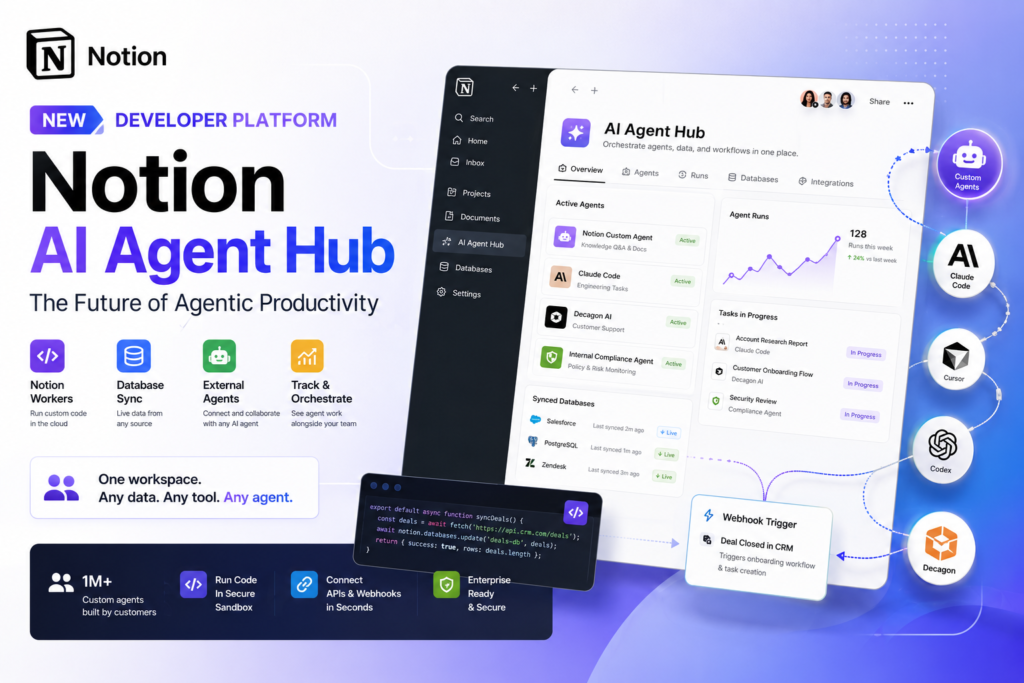
Notion just stopped being a note-taking app. With its new Developer Platform, Notion has become a Notion AI agent hub — a single workspace where teams can deploy custom code, sync live data from any source, and orchestrate both internal and third-party AI agents. If your team still thinks of Notion as a wiki with pretty databases, this update changes that calculus entirely.
What Is the Notion AI Agent Hub?
Definition: The Notion AI agent hub refers to Notion’s newly launched Developer Platform, an orchestration layer built directly into the Notion workspace. It allows teams to connect AI agents, run custom cloud code, sync external databases, and interact with third-party agents — all from within a single collaborative environment.
Expansion: Rather than bolting AI onto an existing product, Notion built an architecture where agents are first-class citizens. The platform supports Notion’s own custom agents, external agents from partners like Claude Code, Cursor, Codex, and Decagon, and custom agents teams build internally for their own use cases. The result is a workspace that doesn’t just contain your work — it can do your work.
This release marks the clearest signal yet that productivity software is entering what Notion co-founder and CEO Ivan Zhao called the “agentic era.” According to the company’s May 2026 announcement, Notion customers had already built over one million custom agents since the February launch of Notion’s original Custom Agents feature — underscoring how fast demand for agentic tools inside workspaces has scaled.
Why Notion’s Shift to Agentic Productivity Matters
The rise of AI agents in the workplace is not a trend — it is a platform shift. Businesses are no longer asking whether to use AI for knowledge work; they are asking where that AI should live. Notion’s bet is that the answer is the workspace itself.
From Note-Taking App to Orchestration Layer
Until recently, Notion’s custom agents had a critical limitation: they were isolated. They could not pull data from external systems, execute custom logic, or communicate with the third-party agents that many enterprises already rely on. Teams had to stitch everything together with workarounds — third-party automation platforms, scripts running on separate infrastructure, and manual data pipelines.
The Notion Developer Platform eliminates that friction. By building an orchestration layer directly into the product, Notion positions itself as the connective tissue between people, agents, and data — not just a place where people record what happened, but a platform where agents make things happen.
This shift matters for three reasons:
- Consolidation: Teams currently juggling Notion plus Zapier, Make, or custom scripts can begin centralizing agentic workflows in one place.
- Context: Agents operating inside Notion have direct access to the workspace’s databases, documents, and history — making their outputs more relevant than agents operating in isolation.
- Accountability: Work assigned to agents in the Notion AI agent hub is visible and trackable alongside human work, solving a critical gap in most enterprise AI setups.
Key Features of the Notion Developer Platform
The Notion Developer Platform is not a single feature — it is a set of interlocking capabilities that together form the Notion AI agent hub.
Notion Workers: Custom Code in the Cloud
What it is: Notion Workers is a cloud-based runtime environment that lets teams deploy custom code directly inside Notion, running in a secure, isolated sandbox.
Why it matters: Previously, any logic that went beyond what Notion’s built-in tools supported had to live outside Notion — on AWS, on a developer’s laptop, or inside a third-party platform. Workers brings that logic inside the workspace.
With Workers, teams can:
- Sync data from external systems into Notion databases on a schedule or via webhook triggers
- Build custom tools and business logic that agents can use
- Automate multi-step workflows without relying on external infrastructure
The company announced Workers will use the same credit system as Custom Agents but will be free through August 2026, giving developers time to experiment before billing begins. Crucially, you do not need to write the code yourself — Notion explicitly notes that any AI coding agent can generate it for you, which effectively makes Workers accessible to non-developers as well.
Database Sync: Live Data From Any Source
What it is: Powered by Workers, the database sync feature pulls live data from any system with an API directly into a Notion database and keeps it current.
Why it matters: One of the biggest barriers to using Notion as a hub for AI agents has been data freshness. Agents are only as useful as the data they have access to. With database sync, Notion workspaces can mirror live records from Salesforce, Zendesk, Postgres, and any other API-connected system.
As Zhao put it in the product announcement: teams can now “use your Notion database as a sheer canvas to power both your workflows and your agents.” That framing is significant. A Notion database is no longer just a place to organize past information — it becomes a real-time data layer that agents can query, act on, and update.
External Agent API and Partner Integrations
What it is: The External Agent API allows any AI agent — including custom internal agents — to connect with the Notion workspace, receive task assignments, and report progress. At launch, supported partner agents include Claude Code, Cursor, Codex, and Decagon.
Why it matters: Most enterprise teams do not use just one AI agent. They might use Claude Code for engineering, Decagon for customer support automation, and a custom internal agent for compliance workflows. Until now, those agents had no standardized way to interface with Notion. The External Agent API changes that.
From within the Notion AI agent hub, team members can now:
- Chat directly with external agents as if they were human teammates
- Assign work to external agents and track their progress in the workspace
- Connect custom-built internal agents via the External Agent API
- Use Notion’s own Custom Agents alongside partner agents in a unified interface
The platform also supports MCP (Model Context Protocol), an emerging standard for connecting AI tools to external data and services, for cases where standard integrations are sufficient.
Notion AI Agent Hub vs. Traditional Productivity Tools
How does the Notion Developer Platform compare with the tools teams currently use for workflow automation and AI integration?
| Feature | Notion Developer Platform | Traditional Automation Platforms (e.g., Zapier, Make) | Standalone AI Agent Frameworks |
|---|---|---|---|
| Native workspace integration | Yes — runs inside Notion | No — external connector layer | No — requires separate deployment |
| Custom code execution | Yes — Notion Workers (cloud, sandboxed) | Limited — mostly no-code logic | Yes — but requires developer infrastructure |
| Live external database sync | Yes — any API-connected source | Yes — via pre-built connectors | No — data input is manual or custom |
| Multi-agent orchestration | Yes — internal + external agents | No | Varies — framework-dependent |
| Agent visibility & tracking | Yes — alongside human work | No | No |
| Non-developer accessible | Yes — AI coding agents generate code | Yes — no-code UI | No — typically developer-only |
| Available on Business/Enterprise | Yes | Separate subscription required | Requires separate infrastructure |
The Notion AI agent hub’s core advantage is context: agents operating inside Notion have direct access to the same databases, documents, and history that your team uses. Automation platforms route data between systems; Notion makes that data available to agents that can reason about it.
How Agentic Productivity Changes Your Team’s Workflow
The shift from passive software to an active Notion AI agent hub has concrete implications for how teams operate day to day. Here are the workflow changes that become possible with the Notion Developer Platform:
- Automated status reporting: A custom agent monitors project databases and compiles weekly status updates without any human input, posting results directly to a shared Notion page.
- Live CRM context: Sales teams sync Salesforce data into Notion databases so agents helping with account planning always have current deal information.
- Cross-tool task delegation: Engineering managers assign work to Claude Code or Cursor directly in Notion and track progress without switching to a separate agent interface.
- FAQ automation at scale: Customer success teams deploy Custom Agents that answer frequently asked questions using knowledge stored in Notion, routing complex issues to humans.
- Webhook-triggered workflows: When a deal closes in a CRM, a webhook fires a Notion Worker that creates an onboarding project, populates it with relevant data, and assigns tasks to both human teammates and agents.
- Internal agent deployment: Teams that have built proprietary AI agents for their specific industry or compliance needs connect those agents to Notion via the External Agent API, bringing them into the same coordinated workspace.
Each of these use cases was technically possible before the Notion Developer Platform — but they required assembling a patchwork of tools, credentials, and infrastructure that few teams had the resources to maintain.
Who Is the Notion Developer Platform For?
Question: Does your team need to be a developer shop to benefit from the Notion AI agent hub?
Direct answer: No. The platform is designed with multiple access levels in mind, and Notion explicitly positions AI coding agents as a way to make Workers accessible to non-technical users.
That said, different roles will engage with it differently:
For developers and technical teams: The Notion CLI, Workers, and External Agent API offer programmable control over Notion’s infrastructure. Teams can build sophisticated internal agents, custom integrations, and multi-step workflows that go far beyond what no-code tools support. The platform is available on Business and Enterprise plans.
For operations and knowledge management teams: Database sync and partner agent integrations (Claude Code, Decagon, etc.) are usable without writing code. Teams can configure live data pipelines and assign work to partner agents through Notion’s interface, not a terminal.
For leadership and executives: The ability to track agent work alongside human work inside a single workspace is primarily an accountability and oversight feature. For the first time, managers can see what their human team and their AI agents are each doing — in one place.
What This Means for the Future of AI Workspaces
The Notion AI agent hub represents more than a product update. It reflects a strategic bet on where enterprise software is heading: toward platforms that coordinate intelligent work, not just store it.
The Workspace as Infrastructure
Zhao’s stated vision — “any data, any tool, any agent” — is a positioning statement as much as a product roadmap. Notion is claiming the workspace layer as core infrastructure for AI-powered organizations, competing not just with productivity apps like Confluence or Coda, but with workflow automation platforms and, eventually, purpose-built agentic frameworks.
This is a credible claim because Notion already holds something its competitors do not: the place where most knowledge work is already recorded. The company’s existing user base represents millions of workspaces filled with decisions, documentation, and institutional knowledge. Making that content accessible to agents — and making agents visible within that context — creates a flywheel that is difficult for a greenfield platform to replicate.
The Broader Agentic Platform Trend
Notion’s move follows a broader pattern among software companies in 2025 and 2026. Atlassian has added agentic capabilities to Jira. Salesforce has extended Agentforce. Microsoft continues deepening Copilot’s integration into Teams and Office. The race is not to build the best AI model — it is to build the platform where AI agents do useful work at scale.
What makes the Notion AI agent hub distinctive is its emphasis on the workspace as the coordination layer, rather than treating AI as a feature inside existing workflows. Agents in Notion are not pop-up assistants — they are assignable, trackable entities that participate in work the same way people do.
What Teams Should Watch
As the Notion Developer Platform matures, several developments will determine how transformative it becomes:
- Expansion of partner agents: The launch roster (Claude Code, Cursor, Codex, Decagon) is promising but narrow. The breadth of the partner ecosystem will define how useful the Notion AI agent hub is for teams outside software development.
- Pricing post-August 2026: Workers are free through August 2026. How Notion prices them after that will determine adoption velocity, particularly among smaller teams.
- Enterprise security and compliance: Organizations in regulated industries will need clarity on data governance for Workers running in Notion’s cloud sandbox before broad adoption is feasible.
- MCP ecosystem maturation: Model Context Protocol is still emerging. As it standardizes, the integrations available to Notion agents will expand significantly.
The Bottom Line
Notion has built something that is genuinely new: a workspace that is also a Notion AI agent hub, where custom code runs, live data flows, and AI agents — yours, Notion’s, and your partners’ — collaborate in a single coordinated environment. The February launch of Custom Agents was a preview. The Developer Platform is the infrastructure.
For teams already living in Notion, the opportunity is immediate. For teams evaluating whether to consolidate their productivity and automation stack, the Notion AI agent hub now deserves a serious place in that conversation.