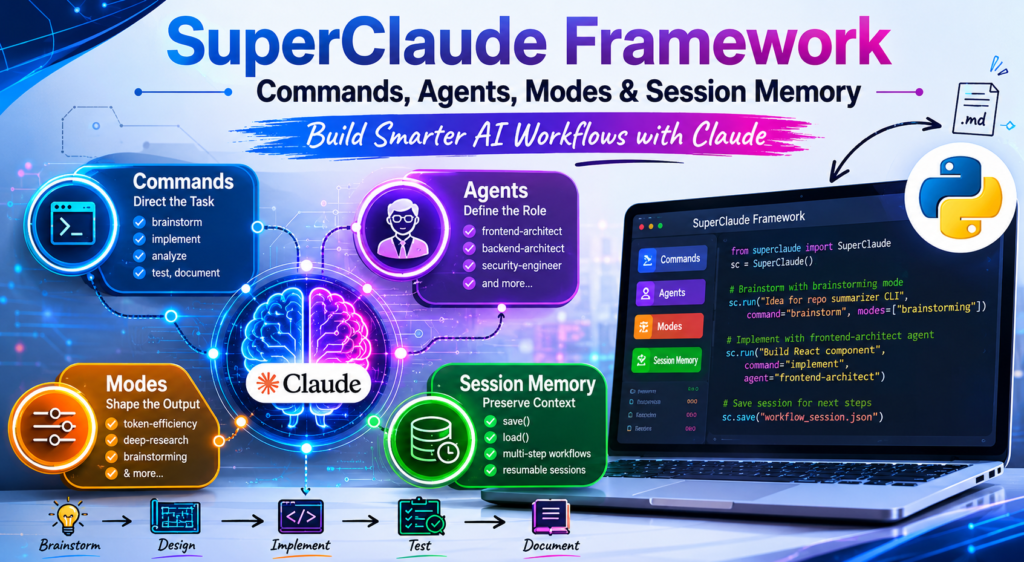
The SuperClaude Framework transforms the raw Anthropic API into a structured, role-aware development platform — and you can set it up in under 30 lines of Python. If you’ve ever wished Claude could switch seamlessly between acting as a security engineer, a frontend architect, or a deep-research planner within the same codebase, this guide is for you.
By the end of this post, you’ll understand exactly how the SuperClaude Framework layers commands, agents, cognitive modes, and persistent session memory on top of Claude — and you’ll have working Python code to run your own multi-step agentic workflows. SuperClaude Framework Workflow
What Is the SuperClaude Framework?
The SuperClaude Framework is an open-source, Markdown-driven behavioral layer built on top of the Anthropic Claude API. Instead of writing long, repetitive system prompts from scratch for every task, the framework provides a structured library of reusable .md files that encode specialized behaviors: how Claude should think when doing a security audit, how it should format output when conserving tokens, how it should reason when operating as a backend architect.
In short, the SuperClaude Framework does for prompt engineering what a design system does for UI development — it standardizes and scales your behavioral contracts so every model call is consistent, purposeful, and repeatable.
SuperClaude vs. Vanilla Claude API: Key Differences
| Dimension | Vanilla Claude API | SuperClaude Framework |
|---|---|---|
| System prompt | Hand-written per request | Auto-assembled from .md assets |
| Role specialization | Manual, inconsistent | Agent files define expert personas |
| Task orientation | Relies on user prompt alone | Commands direct task-specific behavior |
| Response style control | Ad hoc instructions | Modes (e.g., token-efficiency, deep-research) |
| Multi-step context | No built-in persistence | save() / load() session memory |
| Reusability | Low | High — swap commands/agents/modes freely |
| Suitable for | One-off queries | Complex agentic AI development pipelines |
The difference isn’t just cosmetic. When you call Claude with the security-engineer agent loaded alongside the analyze command, the model receives a richly specified behavioral contract before it ever sees your prompt. That’s why responses feel more expert, more structured, and more consistent compared to plain API calls.
The Four Core Building Blocks of the SuperClaude Framework
Understanding the four primitives of the SuperClaude Framework is the fastest way to unlock its full potential. Each one targets a different layer of Claude’s behavior.
1. Commands — Directing Claude’s Task Mode
What is a command? A command is a Markdown file that tells Claude what kind of task it is performing. Commands like /sc:brainstorm, /sc:implement, /sc:analyze, /sc:test, and /sc:document function as behavioral entry points.
Why it matters: Without a command, Claude must infer your intent from context alone. With /sc:implement active, Claude knows it is in code-generation mode — prioritizing runnable output, correct syntax, and usage examples over abstract explanations.
How it works: The Python bridge reads the relevant .md command file and injects it into the system prompt under a <framework> XML block before every API call.
2. Agents — Role-Based Behavioral Profiles
What is an agent? Agents are expert persona definitions. Examples from the framework include frontend-architect, backend-architect, and security-engineer. Each agent file encodes domain knowledge, preferred patterns, and communication style.
Why it matters: An agent doesn’t just change the vocabulary Claude uses — it reshapes how Claude frames problems and what trade-offs it prioritizes. A security-engineer agent flags injection vulnerabilities and rates them by severity. A frontend-architect agent thinks in terms of component reusability and accessibility.
Combining agents with commands: The real power emerges when you pair them. Running /sc:implement with the frontend-architect agent produces structured, component-level React code — not just a working snippet, but idiomatic, architecture-aware code.
3. Modes — Fine-Tuning Response Style
What is a mode? Modes adjust how Claude responds, independent of what task it is performing or what persona it has adopted. The SuperClaude Framework ships with modes like token-efficiency, brainstorming, and deep-research.
Why it matters: The same analysis prompt should produce a dense, well-cited research plan under deep-research mode, and a crisp, bullet-minimal comparison table under token-efficiency mode. Modes let you control the shape of the output without rewriting your prompt.
Stacking modes: Multiple modes can be combined in a single call — for example, pairing deep-research with brainstorming for exploratory research that still generates speculative hypotheses.
4. Session Memory — Preserving Context Across Steps
What is session memory? The SuperClaude Framework’s save() and load() methods serialize the full conversation history to a JSON file and restore it later. This simulates the kind of persistent, long-running session that complex AI-assisted development requires.
Why it matters for agentic AI development: Claude has no memory between API calls by default. Session memory bridges that gap, allowing a multi-step workflow — brainstorm, design, implement, test, document — to share context across all five turns without re-explaining the project each time.
Setting Up the SuperClaude Framework in Python
Here is how to go from zero to a working SuperClaude bridge in four steps.
Step 1 — Install Dependencies and Clone the Repository
python
import subprocess, sys, os, json, textwrap, getpass, time
from pathlib import Path

def _pip(pkg):
    subprocess.run([sys.executable, "-m", "pip", "install", "-q", pkg], check=True)

for mod, pkg in [("anthropic", "anthropic>=0.40.0"), ("rich", "rich")]:
    try:
        __import__(mod)
    except ImportError:
        _pip(pkg)

from anthropic import Anthropic
from rich.console import Console

console = Console()
REPO_DIR = Path("/content/SuperClaude_Framework")

if not REPO_DIR.exists():
    subprocess.run(
        ["git", "clone", "--depth", "1",
         "https://github.com/SuperClaude-Org/SuperClaude_Framework.git",
         str(REPO_DIR)],
        check=True, capture_output=True,
    )
console.print(f"✅ Framework ready at {REPO_DIR}", style="green")
This installs anthropic and rich, clones the SuperClaude Framework repository locally, and verifies that all framework assets are accessible.
Step 2 — Discover and Load Framework Assets
python
def discover_assets(root: Path) -> dict:
    buckets = {"commands": {}, "agents": {}, "modes": {}}
    for md in root.rglob("*.md"):
        rel = str(md.relative_to(root)).lower().replace("\\", "/")
        name = md.stem.lower()
        if "/commands/" in f"/{rel}":
            buckets["commands"].setdefault(name, md)
        elif "/agents/" in f"/{rel}":
            buckets["agents"].setdefault(name, md)
        elif "/modes/" in f"/{rel}" or "mode" in name:
            buckets["modes"].setdefault(name, md)
    return buckets

ASSETS = discover_assets(REPO_DIR)
This function walks the cloned repository and categorizes every Markdown file into commands, agents, or modes. It uses folder path matching so new files you drop into the correct directory are picked up automatically — no registry to update.
Step 3 — Build the SuperClaude Python Bridge
The core class assembles system prompts dynamically and manages conversation history:
python
class SuperClaude:
    BASE_SYSTEM = textwrap.dedent("""
    You are operating inside the SuperClaude Framework — a structured
    development platform layered on top of Claude. Treat the <framework>
    block as your behavioral contract for this turn.
    """).strip()

    def __init__(self, model="claude-sonnet-4-5"):
        self.model, self.history = model, []

    def _load(self, kind, name):
        if not name: return ""
        p = ASSETS[kind].get(name.lower())
        return p.read_text(encoding="utf-8", errors="ignore") if p else \
               f"# {kind}:{name} (not found — using inline defaults)"

    def _system(self, command=None, agent=None, modes=None, extra=None):
        parts = [self.BASE_SYSTEM, "<framework>"]
        if command: parts += [f"## Command /sc:{command}", self._load("commands", command)]
        if agent:   parts += [f"## Agent {agent}",         self._load("agents",   agent)]
        for m in (modes or []):
            parts += [f"## Mode {m}", self._load("modes", m)]
        if extra:   parts += ["## Extra directives", extra]
        parts.append("</framework>")
        return "\n\n".join(parts)

    def run(self, prompt, *, command=None, agent=None, modes=None,
            max_tokens=1800, remember=True):
        sys_prompt = self._system(command, agent, modes)
        msgs = self.history + [{"role": "user", "content": prompt}]
        # ... (streaming call to Anthropic API)

    def save(self, path="/content/sc_session.json", note=""):
        Path(path).write_text(json.dumps(
            {"meta": {"note": note, "model": self.model},
             "history": self.history}, indent=2))

    def load(self, path="/content/sc_session.json"):
        d = json.loads(Path(path).read_text())
        self.history = d["history"]
The _system() method is the heart of the SuperClaude Framework. It reads the selected Markdown assets, concatenates them into a single coherent system prompt, and wraps everything in an XML <framework> tag that Claude treats as its behavioral contract.
Step 4 — Configure Your API Key
python
client = Anthropic(api_key=os.environ.get("ANTHROPIC_API_KEY"))
sc = SuperClaude()
Store your key as an environment variable or, in Google Colab, use userdata.get("ANTHROPIC_API_KEY"). Never hard-code keys in notebooks.
Practical SuperClaude Workflow Examples
Once your bridge is running, the SuperClaude Framework unlocks a range of specialized Claude API workflows that would otherwise require extensive manual prompt engineering. Here are the most useful patterns:
- Brainstorming with scope and constraints: Use
command="brainstorm"withmodes=["brainstorming"]to drive structured ideation — covering target users, must-have features, differentiators, risks, and an MVP cut in a single call. - Frontend component implementation: Pair
command="implement"withagent="frontend-architect"to generate production-quality React + TypeScript components, complete with Tailwind styling and usage examples. - Security code review: Activate
command="analyze"withagent="security-engineer"to receive severity-ranked vulnerability reports (Critical / High / Medium / Low) with concrete remediation for each issue. - Business strategy panels: Use
command="business-panel"for structured GTM planning, ICP definition, milestone timelines, and kill criteria — ideal for early-stage product strategy. - Deep research planning: Run
command="research"undermodes=["deep-research"]to generate multi-hop research plans, including source quality thresholds and synthesis of known information. - Token-efficient comparisons: Apply
modes=["token-efficiency"]to comparative prompts (e.g., OAuth 2.0 vs. OIDC vs. SAML) and get a dense table instead of verbose prose. - End-to-end chained development: Run a full sequence — brainstorm → design → implement → test → document — sharing history across all five turns using session memory.
Commands vs. Agents vs. Modes — At a Glance
A common point of confusion when starting with the SuperClaude Framework is knowing which primitive to reach for. This table clarifies their roles:
| Primitive | Controls | Example Values | When to Use |
|---|---|---|---|
| Command | What task Claude is doing | brainstorm, implement, analyze, test, document | Always — sets the task frame |
| Agent | Who Claude is acting as | frontend-architect, security-engineer, backend-architect | When domain expertise matters |
| Mode | How Claude formats output | token-efficiency, deep-research, brainstorming | When style or verbosity matters |
| Session Memory | Continuity across turns | save() / load() JSON | Multi-step or resumable workflows |
The cleanest mental model: commands answer “what are we doing?”, agents answer “who is doing it?”, and modes answer “how should the output look?” Session memory answers “what do we already know?”.
Building Multi-Step Workflows with Session Persistence
This is where the SuperClaude Framework earns its name. A multi-step workflow chains several specialized calls through a shared conversation history, making the model aware of all prior context at each stage.
Here is the pattern for building a CLI tool that summarizes any GitHub repository from its URL:
python
sc.history = []  # fresh session

sc.run("Project: CLI tool that summarizes a GitHub repo from its URL. "
       "Brainstorm scope and constraints.",
       command="brainstorm", max_tokens=900)

sc.run("Design the architecture: modules, data flow, key dependencies, "
       "and an ASCII component diagram.",
       command="design", max_tokens=1100)

sc.run("Implement the core `summarize_repo(url: str) -> dict` in Python. "
       "Standard library + requests only. Return a structured dict.",
       command="implement", max_tokens=1500)

sc.run("Generate pytest tests for `summarize_repo`. Mock all network calls.",
       command="test", max_tokens=900)

sc.run("Write a concise README.md (install, usage, example, limitations).",
       command="document", max_tokens=900)

sc.save(note="repo-summarizer-cli end-to-end build")
Several things make this pattern powerful for agentic AI development:
History is cumulative. By the time Claude reaches the implement step, it has already seen the brainstorm output and the architecture diagram. The resulting code is contextually grounded — Claude knows the module boundaries it is supposed to respect.
Commands shift behavior, not knowledge. Switching from design to implement doesn’t clear Claude’s understanding of the project. It only changes which behavioral lens is applied to the shared context.
Session save enables resumability. If you close your environment and return later, sc.load() restores the full conversation. You can pick up from any point in the pipeline — for instance, regenerating just the test suite without redoing the implementation.
Extending the pipeline is trivial. Drop a new .md file into the correct Commands/ folder, call discover_assets() again, and the new command is immediately available. No code changes required.
Why Structured Prompts Outperform Plain Prompts
If you’ve used the raw Claude API, you may have noticed that response quality is highly sensitive to how you phrase the system prompt. The SuperClaude Framework solves this at the framework level through a principle called behavioral contracts — explicit, Markdown-encoded descriptions of what Claude should do, how it should reason, and what it should prioritize for a given task type.
Three reasons this outperforms improvised prompting in structured prompt engineering:
Consistency at scale. When ten developers on a team all call command="analyze" with agent="security-engineer", they get structurally equivalent responses — same severity taxonomy, same fix format — regardless of how they word their individual prompts.
Composability. Because commands, agents, and modes are independent primitives, they compose cleanly. You can pair any command with any agent and any mode without editing any of them. The framework handles the assembly.
Auditability. Because all behavioral instructions live in version-controlled .md files, you can track exactly what behavioral contract was in effect for any given model call. This matters enormously for teams building production agentic AI development pipelines.
Frequently Asked Questions
What is the SuperClaude Framework, exactly? It is an open-source library of Markdown behavior files (commands, agents, modes) and a Python bridge that loads them into Claude’s system prompt dynamically. Think of it as a structured prompt engineering layer that sits between your application code and the Anthropic API.
Does the SuperClaude Framework work with all Claude models? The framework is model-agnostic at the API level. The tutorial uses claude-sonnet-4-5, but you can pass any valid model string to SuperClaude(model="..."). More capable models tend to follow behavioral contracts more precisely.
Can I add my own commands or agents? Yes. Drop a new .md file into the appropriate Commands/, Agents/, or Modes/ folder in the cloned repository, then re-run discover_assets(). Your custom command is immediately available to the Python bridge.
How does session memory work under the hood? The save() method writes the self.history list (a standard Anthropic messages array) to a JSON file. The load() method reads it back. Since the Anthropic API is stateless, this JSON becomes the “memory” — it is injected as prior conversation turns at the start of each new session.
Is this the same as Claude Code’s internal behavior? The framework mimics the pattern that Claude Code uses at session start: reading Markdown behavior files and constructing a rich system prompt. It is not the same codebase, but it reproduces the key structural idea in a portable, API-accessible form.
Can I stack multiple agents? The current bridge design supports one agent per call. If you need multi-agent behavior, you can chain calls — passing the output of one agent as the input prompt of the next — while sharing session history.
Conclusion
The SuperClaude Framework isn’t just a prompt-engineering convenience — it’s a structural pattern for building reliable, composable, and auditable Claude API workflows. By separating what task Claude is doing (commands), who it’s acting as (agents), how it formats output (modes), and what it already knows (session memory), the framework gives you fine-grained control over model behavior without sacrificing flexibility.
Whether you’re building a personal development copilot, a multi-step code review pipeline, or an end-to-end research assistant, the SuperClaude Framework gives you a repeatable foundation. Start with a single command. Add an agent when domain expertise matters. Apply a mode when output style is important. Save your session when the work spans more than one sitting.
That’s four primitives. Infinite workflows.