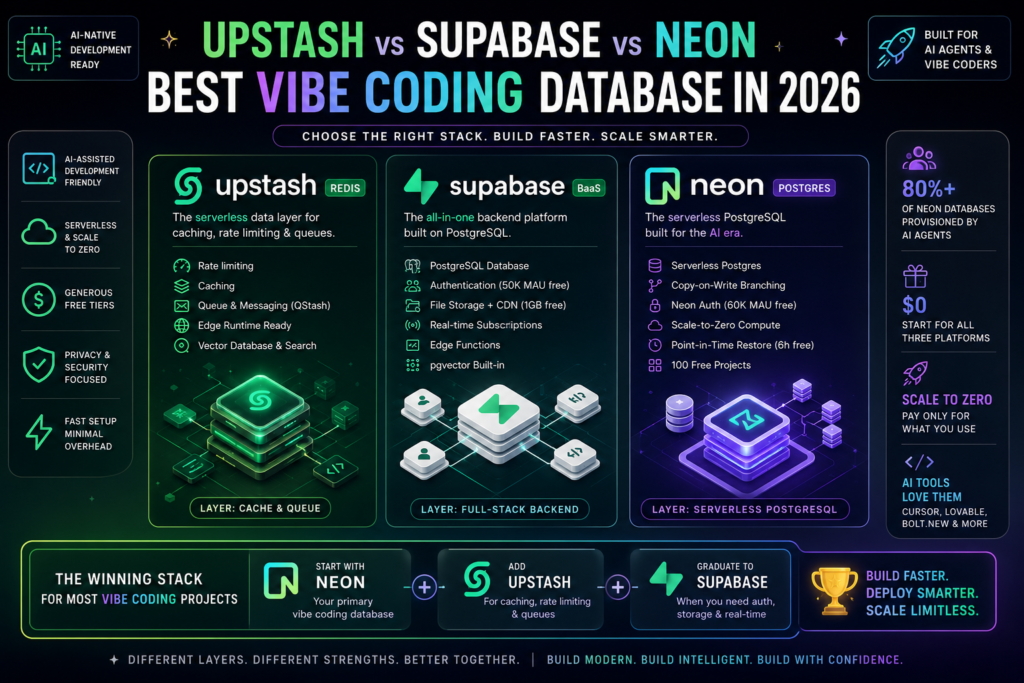
The short answer: If you are building an AI-assisted app and need one recommendation — use Neon for your primary vibe coding database, add Supabase if you need auth and file storage bundled in, and layer Upstash on top when you need rate limiting or caching. They are not interchangeable; they solve different layers of the same stack.
If you have been prompting Cursor, Lovable, or Bolt.new to scaffold your next project and you are staring down a choice between Upstash, Supabase, and Neon, this guide will save you a costly pivot. These three platforms are not direct competitors — but the wrong pick early in a vibe coding workflow can mean rewriting backend glue code at exactly the wrong moment.
What “Vibe Coding Database” Actually Means in 2026
Definition: A vibe coding database is the data persistence layer chosen specifically to complement AI-assisted development workflows — tools like Cursor, v0, Lovable, and Bolt.new — where speed of scaffolding, minimal configuration overhead, and generous free tiers matter as much as raw database performance.
In 2026, over 80% of new Neon databases are provisioned not by human developers typing connection strings, but by AI agents doing it programmatically. That single statistic tells you how dramatically the selection criteria for a vibe coding database have changed. The question is no longer just “which database is most powerful?” It is: “which database does my AI coding tool understand best, set up fastest, and cost least while I am iterating?”
The framing of Upstash vs Supabase vs Neon as a three-way race contains a category error that most comparison articles miss. These tools occupy different infrastructure layers:
- Upstash is a caching and queuing layer (serverless Redis), not a primary database.
- Supabase is a full-stack backend platform built on PostgreSQL.
- Neon is a serverless PostgreSQL database.
The true comparison for your vibe coding database is Supabase versus Neon. Upstash is the layer you add on top of either one. (Upstash vs Supabase vs Neonserverless PostgreSQL databasebest database for AI coding toolsAI-assisted development stack
)
Upstash for Redis — What It Does and When You Need It
What is Upstash? Upstash is a managed Redis service built specifically for serverless environments. Traditional Redis requires a persistent TCP connection and a long-running server. Upstash replaces all of that with a REST-based HTTP API, meaning every request is stateless — no connection pooling, no cold-start connection errors, no persistent server to manage.
This architectural decision has a specific and important consequence: Upstash is one of the only Redis-compatible options that works on Cloudflare Workers and Vercel Edge Functions, where TCP connections are simply not available. If your vibe coding database stack runs on edge runtimes, Upstash is often the only viable caching choice, not just the most convenient one.
Best Use Cases for Upstash in Vibe Coding
Upstash solves three backend problems that AI-generated code encounters constantly:
- Rate limiting API routes — The
@upstash/ratelimitSDK supports sliding window, fixed window, and token bucket strategies in roughly three lines of code. For AI-powered apps that hit external APIs, this is essential. - Session and token caching — Short-lived session data that doesn’t belong in your primary relational database.
- Expensive query result caching — Preventing repeated database reads for frequently requested, rarely changing data.
Beyond Redis, Upstash also offers QStash (a serverless message queue with 1,000 free messages per day), a Vector database with 10,000 free daily queries, and a Search product — all on the same pay-per-request model. For vibe-coded apps that need background job queuing or embedding storage, these products reduce the number of external services you need to configure.
What Upstash is not: It is not a relational database. It cannot replace your primary vibe coding database. Think of it as the caching membrane that sits in front of Supabase or Neon, not instead of them.
Upstash Pricing at a Glance
| Tier | Storage | Commands | Bandwidth | Price |
|---|---|---|---|---|
| Free | 256 MB | 500K/month | 10 GB/month | $0 |
| Pay-as-you-go | 100 GB max | $0.20/100K cmds | — | Usage-based |
| Fixed plans | — | — | — | From $10/month |
| Vector free | — | 10K queries/day | — | $0 |
Supabase — The Full-Stack BaaS Option
What is Supabase? Supabase is a backend-as-a-service platform built on standard, open-source PostgreSQL. It bundles a relational database together with authentication, file storage with CDN, real-time subscriptions via Postgres change notifications, auto-generated REST and GraphQL APIs, and serverless edge functions — all under one dashboard, one SDK, and one connection string.
For vibe coding, Supabase’s single-platform model is its most important feature. AI coding tools like Lovable and v0 have extensive knowledge of Supabase’s patterns. When you ask an AI assistant to scaffold authentication, file uploads, and data queries together, the generated code tends to be correct on the first pass when targeting Supabase — because the platform’s conventions are well-represented in training data.
What Supabase Includes
Choosing Supabase as your vibe coding database gives you access to:
- PostgreSQL database with auto-generated REST and GraphQL APIs
- Authentication supporting 50,000 monthly active users on the free tier, covering email/password, magic links, OAuth (Google, GitHub, etc.), and phone OTP
- File storage with 1 GB free and CDN delivery included
- Real-time subscriptions for live-updating UIs without polling
- Edge Functions for serverless compute close to your users
- pgvector built-in on all plans, including free — meaning AI-powered semantic search and RAG pipelines require no separate vector database service
This bundle makes Supabase uniquely appealing when your AI-coded project touches multiple backend concerns simultaneously. You do not need to compose a separate auth service, a separate file storage layer, and a separate database. It is all there.
The Real Cost of Supabase in Production
Here is what most comparisons get wrong: the Supabase Pro plan starts at $25/month per project, but that number does not reflect real production costs.
Compute upgrades are not included in the base price. The Micro compute tier adds approximately $15/month (with a $10 compute credit applied). Moving to Small adds around $30/month. A typical small production app on Supabase will cost $35–$75/month before you add storage overages or extra bandwidth — not the $25 figure that usually appears in comparison tables.
Additionally, the free tier pauses projects after 7 days of inactivity. If you are managing multiple prototype projects simultaneously, each idle project gets suspended and requires a manual wake-up. For active vibe coding workflows with frequent context-switching between projects, this friction adds up.
| Feature | Free Tier | Pro Tier |
|---|---|---|
| Database storage | 500 MB | 8 GB included |
| File storage | 1 GB | 100 GB included |
| Auth MAUs | 50,000 | 100,000 |
| Compute | Shared | Micro (extra cost) |
| Project pause | After 7 days idle | No pause |
| Monthly price | $0 | $25+ (real cost $35–75) |
| Daily backups | Yes (DB only) | Yes + PITR add-on |
Neon — Serverless Postgres Built for AI Workflows
What is Neon? Neon is a serverless PostgreSQL platform that separates compute from storage at the architectural level. Your data persists in cloud object storage; database compute spins up on demand and scales to zero when there are no active connections. An idle Neon database costs effectively nothing — there is no minimum monthly charge, and the free tier supports 100 simultaneous projects.
Neon was acquired by Databricks in May 2025 for approximately $1 billion, a move that reflects the platform’s position as the default serverless Postgres choice for AI-native and agentic development. More than 80% of Neon databases are now provisioned by AI agents, which means the platform’s API-first design and branching model have become core infrastructure for the vibe coding ecosystem.
Copy-on-Write Branching: Why It Matters for Fast Iteration
The architectural standout in Neon for a vibe coding database workflow is its copy-on-write branching model. When you branch a Neon database, you get an instant clone that shares unchanged storage blocks with the parent. You pay only for the storage consumed by writes that diverge from the parent — not for a full copy of the entire dataset.
This is meaningfully different from how branching works elsewhere. Supabase’s branch databases are data-less by default: they carry schema but require explicit seeding with data. Neon branches start with the parent’s full schema and actual data, making them practical for:
- Preview environments where each pull request gets its own isolated database with realistic data
- Schema migration testing against production-shaped data before deploying
- CI/CD pipelines where each test run needs a throwaway database that mirrors production
- Rapid feature experimentation without risk to the main database
For vibe coding, where schema is often evolving rapidly as AI tools generate and regenerate backend code, this branching model provides a safety net that is genuinely useful — not just a checkbox feature.
Neon Auth and Free Tier Advantages
Neon now includes Neon Auth, a managed authentication service built on Better Auth and integrated directly into the platform. The free tier supports up to 60,000 monthly active users — slightly more than Supabase’s 50,000 MAU free limit. Paid plans scale to 1 million MAUs.
It is worth noting that Neon Auth has current limitations: it is not available in all AWS regions, and there are restrictions when used alongside IP Allow lists and private networking configurations. If your project requires these features, verify compatibility before committing to Neon Auth as your authentication layer.
Even without Neon Auth, the free tier makes Neon the most practical vibe coding database for development-phase projects:
- 100 free projects — dramatically more than the 2-project free tier on Supabase
- True scale-to-zero — no 7-day pause, no manual wake-up; the database sleeps and wakes automatically
- 100 compute unit hours per project per month at no cost
- 0.5 GB of storage per project on the free tier
- No minimum monthly invoice — usage below $0.50 in a month is not charged
- 6-hour point-in-time restore window included free, with one manual snapshot
Upstash vs Supabase vs Neon: Side-by-Side Comparison
| Feature | Upstash (Redis) | Supabase | Neon |
|---|---|---|---|
| Category | Cache / Queue layer | Full-stack BaaS | Serverless Postgres |
| Primary use | Rate limiting, caching, queuing | Full backend (DB + auth + storage) | Relational database only |
| Free projects | N/A (pay-per-request) | 2 (pauses after 7 days idle) | 100 (auto scale-to-zero) |
| Free tier storage | 256 MB Redis | 500 MB DB + 1 GB files | 0.5 GB/project |
| Auth included | No | Yes — 50K MAU free | Yes (Neon Auth) — 60K MAU free |
| File storage | No | Yes — 1 GB free | No |
| Real-time | No | Yes | No |
| Vector support | Upstash Vector (10K q/day free) | pgvector on all plans free | pgvector extension |
| DB branching | N/A | Data-less by default | Copy-on-write, full data |
| Edge runtime support | Yes (HTTP-based) | Partial | Partial |
| Paid entry | $0.20/100K cmds | $25/mo (real: $35–75) | Usage-based, no minimum |
| AI agent provisioning | High | High | Very high (80%+ of DBs) |
| Scale-to-zero | Yes (inherent) | No (pauses only) | Yes (automatic) |
Which Vibe Coding Database Should You Actually Use?
Use Supabase if…
You want a single platform to handle your entire backend. Supabase is the right vibe coding database choice when your project requires auth, file uploads, real-time features, and a relational database — and you do not want to compose these pieces from separate services. The AI tool ecosystem knows Supabase well, generated code tends to be accurate, and the platform’s breadth reduces integration work.
Budget honestly: Expect $35–$75 per month in production once compute upgrades are factored in. The $25 base price is a starting point, not a ceiling.
Use Neon if…
You want a pure, high-quality serverless Postgres database at near-zero idle cost, with the ability to run 100 projects simultaneously on the free tier. Neon is the right vibe coding database for developers who are comfortable assembling their own stack — choosing a separate auth provider, a separate file storage service, and their own real-time layer — in exchange for maximum flexibility and the most generous free tier in the category.
The copy-on-write branching model is a genuine advantage if your schema is changing rapidly, which is common in AI-assisted development.
Add Upstash when…
Your app needs rate limiting, caching, or background job queuing — or when you are building on Cloudflare Workers or Vercel Edge Functions where TCP Redis is unavailable. Upstash does not replace your vibe coding database; it protects and accelerates it. Think of it as always additive to whichever primary database you choose.
The Winning Stack for Most Vibe Coding Projects
Solo developer, budget-conscious, active development:
Start with Neon as your vibe coding database. Add Neon Auth to handle authentication if your region and networking setup is compatible. Layer in Upstash for rate limiting once you start exposing public API routes. Total cost at low traffic: effectively $0/month. Graduate to Supabase when you need bundled file storage or real-time subscriptions and the monthly cost becomes justifiable.
Team building a full-stack product quickly:
Start with Supabase. The bundled auth, storage, and real-time subscriptions reduce the number of integration decisions your AI coding tool needs to make correctly, which means faster scaffolding and fewer debugging cycles. Add Upstash for rate limiting and caching as you approach production. Budget $35–$75/month for Supabase’s real production cost.
AI-native apps with heavy agentic workflows:
Neon is the natural fit. Its API-first design, copy-on-write branching for agent-generated schema changes, and the fact that most AI agents already know how to provision Neon databases programmatically make it the lowest-friction vibe coding database for agentic architectures. Pair with Upstash QStash for background job queuing when agents need to trigger asynchronous tasks.
Key Takeaways
- Upstash is not a primary vibe coding database — it is a caching, rate-limiting, and queuing layer that sits in front of Supabase or Neon, not instead of them.
- Neon offers the most generous free tier for active development: 100 projects, true scale-to-zero, no forced 7-day pause, and no monthly minimum charge.
- Supabase’s real production cost is $35–$75/month, not $25 — compute upgrades are separate and necessary for real workloads.
- Neon Auth now covers basic authentication with 60,000 free monthly active users, narrowing the feature gap with Supabase for lean stacks.
- Over 80% of Neon databases are provisioned by AI agents, making it the de facto serverless Postgres choice for vibe coding and agentic development workflows.
- Copy-on-write database branching in Neon is practically useful for vibe coding — instant full-data clones for preview environments, migration testing, and CI pipelines.
- Supabase remains the better single-platform choice when you need auth, file storage, and real-time subscriptions bundled together without composing a custom stack.
The best vibe coding database is not the one with the best marketing — it is the one that eliminates the most setup friction, integrates with the AI tools you are already using, and grows with your workload without forcing a rewrite. In 2026, that usually means starting with Neon, layering in Upstash, and graduating to Supabase when the bundled features justify the cost.