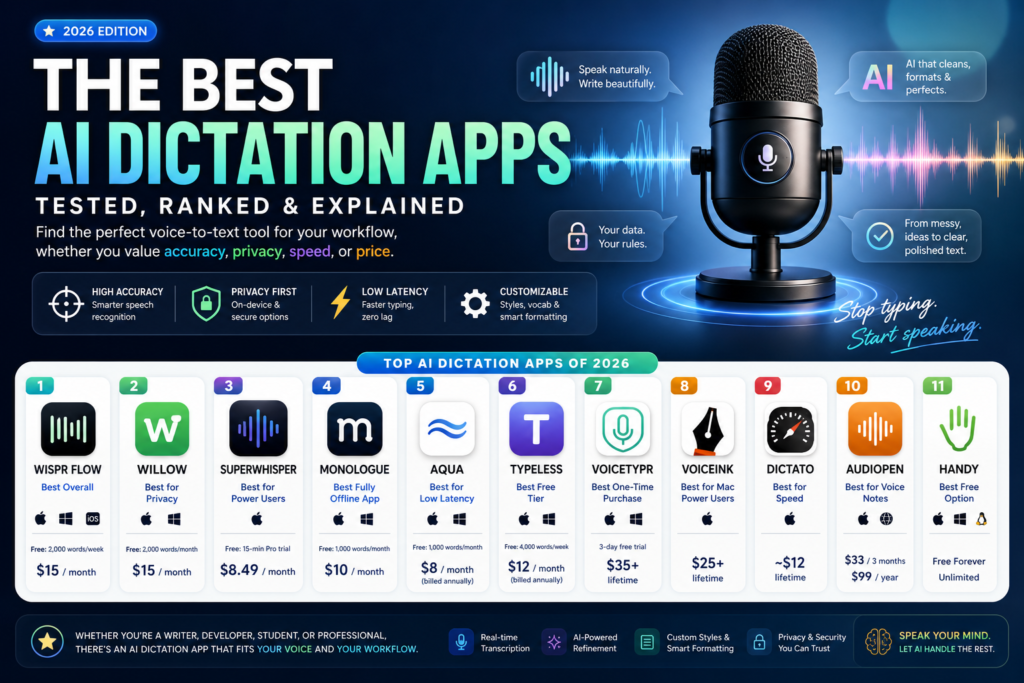
The short answer: The best AI dictation apps in 2026 are Wispr Flow, Willow, Superwhisper, and Monologue — each excelling in different areas like accuracy, privacy, and price. If you want to stop typing and start speaking, one of these tools will change how you work.
AI dictation apps have undergone a quiet revolution. A few years ago, voice-to-text software was frustrating — it misread words, stumbled over accents, and required slow, deliberate speech. Today, the best AI dictation apps are fast, accurate, and smart enough to clean up your grammar, remove filler words, and even reformat your thoughts before they hit the page.
This guide covers every major AI dictation app available right now, breaks down their features and pricing, and helps you choose the one that fits your workflow.
What Is an AI Dictation App?
Definition: An AI dictation app is a software tool that converts spoken words into written text using artificial intelligence — specifically, large language models (LLMs) and speech-to-text models — to produce clean, formatted output in real time.
Unlike older dictation software that simply transcribed audio word-for-word, modern AI dictation apps go further. They understand context, remove filler words like “um” and “uh,” fix grammatical stumbles, handle punctuation automatically, and often let you define custom vocabularies, writing styles, and output formats.
The result is text that reads as if you typed it carefully — even when you didn’t.
Why AI Dictation Apps Have Gotten So Much Better
The leap in quality has been driven by two parallel advances in AI research:
Better speech recognition models. Modern speech-to-text engines — like OpenAI’s Whisper, Nvidia’s Parakeet, and Apple’s on-device models — are dramatically more accurate than rule-based systems, handling different accents, background noise, and fast speech with far greater reliability.
LLM-powered post-processing. Once audio is transcribed, large language models rewrite the raw output into polished prose. This is why today’s AI dictation apps can take a rambling, hesitant spoken passage and turn it into clean, readable sentences without manual editing.
The combination means you spend less time correcting and more time communicating.
How We Evaluated These AI Dictation Apps
The apps below were evaluated based on the following criteria:
- Transcription accuracy — Does it get the words right, especially with technical vocabulary and natural speech patterns?
- Latency — How quickly does text appear after you speak?
- Privacy controls — Is your audio processed on-device or sent to the cloud? Can you opt out of training?
- Platform support — Which operating systems and devices does it support?
- Customization — Can you set writing styles, custom dictionaries, or per-app rules?
- Pricing — Is there a meaningful free tier? Is the paid plan good value?
The Best AI Dictation Apps of 2026
1. Wispr Flow — Best Overall
What it is: Wispr Flow is a well-funded AI dictation app with native apps for macOS, Windows, and iOS (Android is in development).
Why it stands out: Wispr Flow lets you choose between “formal,” “casual,” and “very casual” writing styles — a small feature that makes a big difference when you’re switching between a work email and a Slack message. It also has developer-friendly integrations: if you use AI coding tools like Cursor, it can recognize variable names and tag files in chat.
Free tier: Up to 2,000 words per week on desktop; 1,000 words per month on iOS. Paid plans: Start at $15/month for unlimited transcription.
Best for: Professionals who write across multiple contexts and need style-aware dictation.
2. Willow — Best for Privacy-Conscious Users
What it is: Willow is an AI dictation app that stores all transcripts locally on your device and gives you full opt-out of model training.
Why it stands out: Beyond its privacy-first stance, Willow uses LLMs to generate full, coherent passages of text from just a few dictated words — a useful feature for anyone who thinks faster than they speak. It also supports custom vocabulary for industry-specific terminology.
Free tier: 2,000 words per month on desktop. Paid plans: $15/month, unlocking unlimited dictation and personalized writing style memory.
Best for: Users who handle sensitive information and want their data to stay on-device.
3. Superwhisper — Best for Power Users
What it is: Superwhisper is a feature-rich AI dictation app that transcribes from live voice, audio files, and video files.
Why it stands out: Superwhisper gives you direct control over the AI model running under the hood. You can choose from Superwhisper’s own models at different speed/accuracy trade-offs, or use Nvidia’s Parakeet models. You can write custom prompts to shape the output, and view both the raw and processed transcripts side by side. The paid tier lets you bring your own API keys and connect unlimited cloud or local models.
Free tier: Unlimited basic voice-to-text; 15-minute trial of Pro features. Paid plans: $8.49/month, $84.99/year, or $249.99 lifetime.
Best for: Technical users who want to customize their AI transcription pipeline.
4. Monologue — Best Fully Offline App
What it is: Monologue is an AI dictation app that runs entirely on-device by downloading its AI model locally — no internet connection required for transcription.
Why it stands out: Unlike cloud-based AI dictation apps, Monologue never sends your audio or text off your machine. It also adjusts its tone automatically depending on which app you’re using it with. Power users receive a physical shortcut device called the Monokey.
Free tier: 1,000 words per month. Paid plans: $10/month or $100/year.
Best for: Users who need air-gapped privacy or work in environments with restricted internet access.
5. Aqua — Best for Low Latency
What it is: Aqua is a Y Combinator-backed voice-typing app for Windows and macOS that claims the lowest latency in the category.
Why it stands out: Latency — the gap between when you stop speaking and when text appears — is one of the most underrated factors in dictation apps. Aqua prioritizes making this delay nearly imperceptible. It also lets you create text autofill shortcuts: say “my address” and it types your address. Aqua also offers its own speech-to-text API so other developers can build on top of it.
Free tier: 1,000 words per month. Paid plans: From $8/month (billed annually) for unlimited words and 800 custom dictionary entries.
Best for: Anyone frustrated by lag in other AI dictation apps.
6. Typeless — Best Free Tier
What it is: Typeless is an AI dictation app for Windows and macOS with the most generous free word limit among all major competitors.
Why it stands out: At 4,000 words per week (roughly 16,000 words per month) on its free tier, Typeless is in a different league from apps offering 1,000–2,000 words per month. It also rewrites fumbled sentences automatically and claims zero data retention.
Free tier: 4,000 words per week. Paid plans: $12/month (billed annually) for unlimited words.
Best for: Casual or light-professional users who want maximum free usage before committing to a subscription.
7. VoiceTypr — Best One-Time Purchase
What it is: VoiceTypr is an offline-first, open-source AI dictation app for Mac and Windows that supports over 99 languages and uses local models.
Why it stands out: VoiceTypr is built for users who are philosophically opposed to subscriptions. Pay once, use forever. Its open-source codebase is available on GitHub for self-hosting. With 99+ language support, it’s one of the most internationally versatile AI dictation apps available.
Pricing: 3-day free trial, then $35 (1 device), $56 (2 devices), or $98 (4 devices) — lifetime license.
Best for: International users and those who prefer a one-time payment over recurring subscriptions.
8. VoiceInk — Best for Mac Power Users
What it is: VoiceInk is an open-source Mac-only AI dictation app with context-aware formatting and an assistant mode.
Why it stands out: VoiceInk reads what’s currently on your screen and adjusts its output format to match the context — say, writing differently in a code editor versus a notes app. You can define custom rules per app or URL. It also has a built-in assistant mode that can answer questions, functioning as a lightweight voice AI interface.
Pricing: $25 (1 device), $39 (2 devices), $49 (3 devices) — lifetime access.
Best for: Mac users who want context-intelligent AI dictation with a one-time payment.
9. Dictato — Best for Speed
What it is: Dictato is a Mac-only AI dictation app that uses local models — including Parakeet, Whisper, and Apple Speech Analyzer — to achieve an 80ms transcription latency.
Why it stands out: 80 milliseconds is barely perceptible to the human eye. Dictato achieves this by processing everything on-device with Apple Intelligence handling filler word removal. If transcription lag has ever broken your flow, Dictato is worth considering.
Pricing: €9.99 (approximately $12) — lifetime access with two years of updates included.
Best for: Mac users who prioritize raw speed above all else.
10. AudioPen — Best for Voice Notes and Long-Form Thinking
What it is: AudioPen started as a web-based voice notes app and has evolved into a full AI dictation app for Mac with cross-platform note storage and style rewriting.
Why it stands out: AudioPen is less about instant transcription and more about capturing and refining ideas. You can store audio notes, combine notes into summaries, upload audio files, and rewrite notes in different styles at any time. It’s the best AI dictation app for thinkers who process ideas out loud before writing.
Pricing: $33 for 3 months, $99/year, $159 for 2 years.
Best for: Writers, researchers, and knowledge workers who think out loud and want an AI to help organize their thoughts.
11. Handy — Best Free Option
What it is: Handy is a free, open-source transcription tool for Mac, Windows, and Linux.
Why it stands out: There’s no subscription, no word limit, and no paywall — Handy just works. It’s minimal by design: push-to-talk, a customizable hotkey, and not much else. If you want to try hands-free typing without spending anything, Handy is the honest starting point.
Pricing: Free.
Best for: Beginners who want to try AI dictation for free before committing to a paid app.
Comparison Table: AI Dictation Apps at a Glance
| App | Platform | Free Tier | Starting Price | On-Device Option | Best For |
|---|---|---|---|---|---|
| Wispr Flow | Mac, Win, iOS | 2,000 words/week | $15/month | No | Best overall |
| Willow | Mac, Win | 2,000 words/month | $15/month | Yes | Privacy |
| Superwhisper | Mac | 15-min Pro trial | $8.49/month | Yes | Power users |
| Monologue | Mac, Win | 1,000 words/month | $10/month | Yes (fully offline) | Air-gap privacy |
| Aqua | Mac, Win | 1,000 words/month | $8/month | No | Low latency |
| Typeless | Mac, Win | 4,000 words/week | $12/month | No | Free tier |
| VoiceTypr | Mac, Win | 3-day trial | $35 lifetime | Yes | One-time payment |
| VoiceInk | Mac only | — | $25 lifetime | Yes | Context-aware |
| Dictato | Mac only | — | ~$12 lifetime | Yes | Speed (80ms) |
| AudioPen | Mac + Web | — | $33/3 months | No | Voice notes |
| Handy | Mac, Win, Linux | Unlimited | Free | No | Free option |
How to Choose the Right AI Dictation App for You
Not every AI dictation app is built for the same person. Here’s how to think through your decision:
If you’re a professional writer or knowledge worker: Start with Wispr Flow or Willow. Both offer style-aware transcription and enough free words to test properly before committing.
If data privacy is non-negotiable: Monologue (fully offline) or Willow (local storage, no training) are your two best options among AI dictation apps. Dictato and VoiceInk also process on-device.
If you hate subscriptions: VoiceTypr and VoiceInk both offer lifetime licenses. Dictato is the cheapest lifetime option at around $12.
If you’re on Linux: Handy is currently the only option on the list with Linux support.
If you’re a developer: Superwhisper’s bring-your-own-API-key model and Aqua’s built-in transcription API are worth exploring.
If you want to try before you buy: Typeless has the most generous free tier among subscription-based AI dictation apps, at 4,000 words per week.
Frequently Asked Questions
What is the most accurate AI dictation app in 2026?
Accuracy varies by accent, environment, and vocabulary. Among AI dictation apps, Superwhisper and Wispr Flow are consistently rated highest for general accuracy. Superwhisper’s support for multiple underlying models — including Nvidia Parakeet — gives it an edge for users who want to fine-tune.
Can AI dictation apps work without internet?
Yes. Monologue, VoiceTypr, VoiceInk, and Dictato all run entirely on-device using locally downloaded models. Superwhisper also supports local models alongside cloud options.
Are AI dictation apps good for medical or legal transcription?
Most of the AI dictation apps above support custom vocabulary, which helps with specialized terminology. VoiceTypr’s 99-language support and Wispr Flow’s custom word lists are especially useful in professional settings. However, none of these are certified medical transcription platforms — always verify accuracy for clinical or legal documentation.
How much do AI dictation apps cost per month?
Paid plans for AI dictation apps range from free (Handy) to $15/month (Wispr Flow, Willow). Mid-tier options like Aqua start at $8/month and Typeless at $12/month. Lifetime licenses are available from VoiceTypr ($35+), VoiceInk ($25+), and Dictato (~$12).
What’s the difference between a dictation app and a transcription app?
Dictation apps are designed for real-time, live voice-to-text input — you speak and text appears immediately. Transcription apps typically process pre-recorded audio or video files. Many of the AI dictation apps above (especially Superwhisper and AudioPen) support both modes.
The Bottom Line
AI dictation apps are no longer niche productivity experiments or clunky voice tools that require endless corrections. In 2026, AI dictation apps have matured into practical software solutions that genuinely help people work faster, think more freely, and reduce the constant friction of typing. Whether you are drafting emails, writing blog posts, documenting meetings, coding, or capturing spontaneous ideas, the right tool can significantly improve both speed and workflow quality.
What makes modern AI dictation apps different from older speech-to-text tools is their intelligence beyond transcription. Instead of only converting voice into raw text, today’s platforms understand sentence flow, punctuation, grammar, and even writing intent. This means users no longer need to speak like a robot or manually fix every sentence afterward. Good AI dictation apps now transform natural conversation into polished text that is ready to send, publish, or edit with minimal effort.
For most professionals, AI dictation apps are becoming a productivity advantage rather than just a convenience. Writers can brainstorm faster, marketers can outline campaigns while walking, founders can capture business ideas instantly, and developers can reduce repetitive typing. In many workflows, speaking is now measurably faster than typing, especially when paired with tools that automatically remove filler words and structure thoughts cleanly.
The biggest decision when choosing among AI dictation apps comes down to your priorities. If you want the most balanced experience, Wispr Flow remains a strong overall recommendation. If privacy matters most, tools like Monologue, Willow, and VoiceTypr offer local or offline processing. If flexibility and customization are more important, Superwhisper gives technical users deeper control over transcription models and outputs. Meanwhile, budget-conscious users can explore Typeless or Handy before committing to a paid subscription.
Another reason AI dictation apps are growing rapidly is accessibility. Not everyone prefers typing for long hours, and some users experience fatigue, repetitive strain, or simply think more clearly when speaking. In these cases, AI dictation apps are not just productivity boosters—they can fundamentally change how someone interacts with technology.
The smartest approach is simple: test two or three AI dictation apps using their free tiers, compare accuracy with your accent and workflow, and then invest in the one that feels invisible in daily use. The best software is rarely the one with the longest feature list—it is the one that disappears into your routine.
As voice interfaces continue improving, AI dictation apps are likely to become a standard part of digital work. Typing is not disappearing anytime soon, but for many people, it is no longer the default. If your goal is to write faster, think out loud, and reduce manual effort, adopting one of these AI dictation apps in 2026 is a practical upgrade worth making.