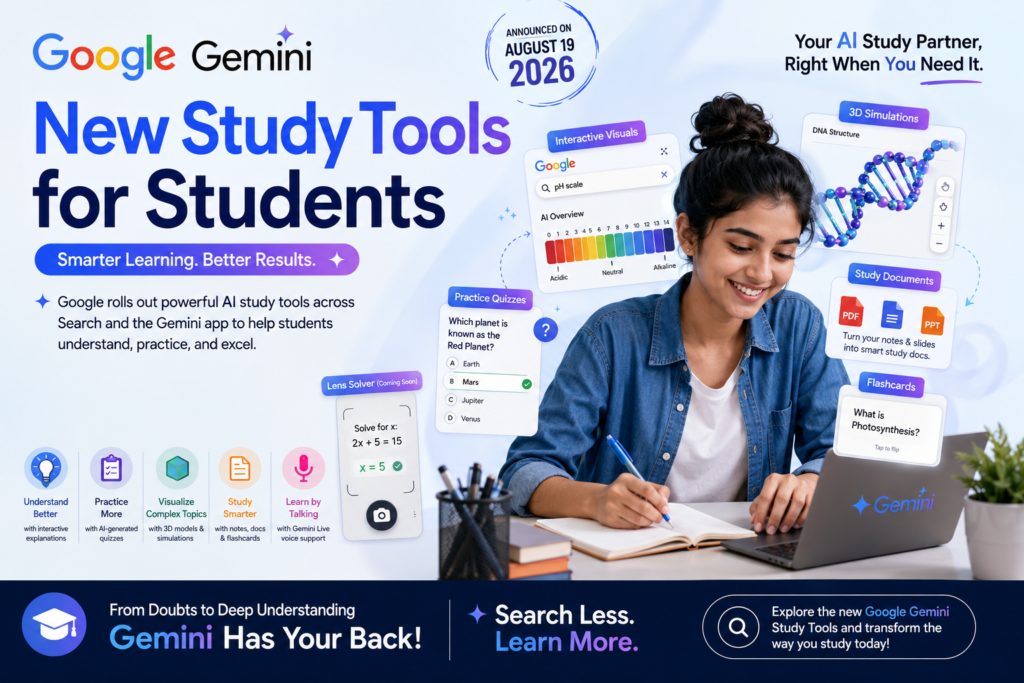
Picture this: it’s 11 PM, your board exam or semester test is two days away, and you’re staring at a chemistry chapter that makes zero sense on the page. On August 19, 2026, Google gave students exactly this kind of moment a new answer. The company announced a fresh set of Google Gemini study tools spread across both Search and the Gemini app, interactive visuals, 3D simulations, personalized practice quizzes, and a dedicated study hub, all designed to make Gemini the assistant students reach for first when they’re stuck on schoolwork, according to TechCrunch.
In short: Google has packed AI-generated visuals, quizzes, note-summarizing tools, and 3D models directly into Search and Gemini, and it’s rolling them out specifically to compete for the attention of students who might otherwise turn to ChatGPT or dedicated study apps. Let’s break down exactly what’s new, how each feature works, and how students in India can actually put these Google Gemini study tools to use.
What Did Google Just Announce, Exactly?
Google announced a wave of new study features across both Search and Gemini, aimed squarely at students. The rollout includes AI-generated interactive visuals and 3D simulations, a dedicated learning hub inside the Gemini app, customized practice quizzes on demand, and tools that turn uploaded notes and slides into clean study documents.
This isn’t a single product launch, it’s a coordinated push across two of Google’s biggest surfaces. Search gets study-focused upgrades inside AI Overviews and AI Mode, while the Gemini app gets its own dedicated space for research, flashcards, and quizzes. Together, these form what Google is now positioning as its core AI study tools for students.
Why does this matter for students specifically? Because it signals that Google no longer sees “search” and “studying” as separate activities, the two are being merged into one continuous AI-assisted workflow, from asking a quick question to generating a full practice test.
Google Gemini Study Tools vs. Google Search AI Features: What’s the Difference?
Google Search AI Mode is a conversational search experience that generates follow-up answers, visuals, and interactive tools directly on the search results page, without requiring a separate app. Think of it as “search that talks back and builds things for you”, you type a question, and instead of just links, you get an interactive visual or simulation built for that specific query.
The distinction matters because students often assume “Gemini” refers to one single app, when in reality Google is now delivering study assistance through two connected but separate front doors:
- Search / AI Mode: best for quick, in-the-moment questions while browsing or revising, like looking up “pH scale” mid-homework.
- Gemini app: best for longer, structured study sessions, research reports, flashcards, and an ongoing study notebook.
Which one should a student use first? If it’s a fast doubt during homework, Search is faster since there’s no app-switching involved. If it’s exam prep spanning several days, the Gemini app’s dedicated hub is built for that continuity.
Comparison: Google Search AI Study Features vs. Gemini App Study Hub
| Feature | Google Search (AI Mode / AI Overviews) | Gemini App (Study Hub) |
| Best for | Quick doubts, on-the-spot concepts | Extended study sessions, exam prep |
| Interactive visuals & simulations | Yes, generated inline in AI Overviews | Yes, includes 3D simulations |
| Practice quizzes | Yes, generated directly in Search | Yes, inside the study hub |
| Research reports | Not available | Yes, via Gemini Live, runs in background |
| Notes-to-study-document conversion | Yes, from uploaded PDFs, docs, slides | Available via study notebook |
| Flashcards | No | Yes |
| Camera/photo problem-solving | Yes, via Lens (rolling out) | Limited |
| Voice discussion of results | No | Yes, via Gemini Live |
The New AI Study Tools Arriving in Google Search
Google’s Search AI Mode upgrades are built around one idea: turning a static answer into something a student can actually manipulate and explore.
Interactive Visuals and Simulations Inside AI Overviews
When a student searches for a concept like “pH scale,” Search now generates an interactive visual directly inside the AI Overview, rather than a static explanation, according to TechCrunch. If the student wants to go deeper, they can ask a follow-up question, say, plotting specific citrus fruits on that same pH scale, and AI Mode builds a fresh, tailored interactive experience around that exact question.
Interactive AI Overview, a Google Search result format that generates a visual, tool, or simulation on the fly instead of returning only text and links. Instead of reading three paragraphs about acidity, a student sees a scale they can actually interact with, which is especially useful for visual learners tackling science and math concepts.
Custom Practice Quizzes, Generated on Demand
Students can now type a prompt directly into Search, something like “create a quiz with the most commonly tested vocabulary words to help me prep for the SAT”, and get back an interactive, generated quiz on the spot, per TechCrunch. This works across subjects, including science, math, humanities, and foreign languages.
Can Indian students use this for board exams and entrance tests too? Yes, since the quiz generator responds to natural-language prompts, students can adapt the same approach for CBSE, ICSE, or state board topics, or even competitive exams like JEE and NEET, by simply describing the subject and difficulty level they want.
Lens-Based Problem Solving (Rolling Out Soon)
In the coming weeks, Lens inside the Google app will get a new interactive learning mode. Students will be able to tap the Lens camera icon, snap a photo of whatever they’re working on, a tricky physics problem, a half-finished algebra equation, and get AI-generated explanations, mistake identification, and step-by-step guidance if they’re stuck, according to TechCrunch.
This effectively turns a phone camera into a homework tutor that doesn’t just hand over the answer, it’s designed to walk through where a student went wrong.
Turning Notes and Slides Into Study Documents
Search can now generate study documents from a student’s own uploaded material, PDFs, Google Docs, lecture slides, and more. A student could, for example, upload a photo of handwritten class notes alongside a set of lecture slides and receive back a single one-pager summarizing the key concepts, as reported by TechCrunch.
Why does this matter before exams? Because it removes the most tedious part of revision, manually consolidating scattered notes, and turns it into a single prompt.
The New Gemini Study Tools: 3D Simulations, Research Reports, and a Learning Hub
While Search focuses on speed, the Gemini app upgrades are built for depth, multi-step research, richer visualizations, and a home base for ongoing study.
Gemini Live Can Now Run Background Research Reports
Students can now ask Gemini Live to research a topic and then simply close the chat or move on with other tasks while the research runs in the background. Once the multi-step report is ready, the student gets a notification and can discuss the findings conversationally, using their voice, and ask follow-up questions in real time, per TechCrunch.
Background research report, a Gemini feature where the AI independently gathers and synthesizes information on a topic over multiple steps, without requiring the user to stay in the chat. This matters for students juggling multiple subjects, since they can kick off research on a history topic and keep studying something else while Gemini works.
Gemini 3D Simulations for Complex Topics
One of the more visually striking updates: Gemini can now generate functional 3D simulations as part of its responses, with results that include tables, grids, and simulations built specifically around the prompt. Google’s own example is telling, ask “show me how DNA works in 3D,” and the result is an interactive 3D DNA structure that a student can rotate and zoom into, according to TechCrunch.
Which subjects benefit most from Gemini’s 3D simulations? Anything spatial or structural, biology (cell structures, DNA, anatomy), chemistry (molecular geometry), and physics (mechanics, wave behavior) are the clearest early use cases, since these topics are traditionally hard to grasp from diagrams in a textbook alone.
A Dedicated Learning Hub Inside Gemini
Google is also launching a dedicated study hub inside the Gemini app that consolidates its various learning tools into one place. Within this hub, students can start a study notebook, generate flashcards, and take practice quizzes, all without switching between separate tools or apps, as noted by TechCrunch.
Here’s a quick summary of what lives inside the new Gemini learning hub:
- Study notebook, a running workspace to organize notes and research on a topic
- Flashcards, generated automatically from study material
- Practice quizzes, created on demand, matching the notebook’s subject
- 3D simulations and visuals, embedded directly into responses
- Voice-based follow-up, via Gemini Live, for discussing research findings hands-free
Why Is Google Launching These Study Tools Now?
This launch is Google’s latest move to make Gemini the default AI assistant for students, at a moment when the competition for that role is intensifying. TechCrunch frames the update as part of Google’s ongoing effort to win student mindshare away from OpenAI, alongside dedicated education startups such as Knowt and Gauth, which already offer their own learning and practice tools.
That competitive framing matters because it explains why these features are showing up simultaneously across Search and Gemini rather than in just one product. Google already owns the moment when a student types a doubt into a search bar, these updates are an attempt to make sure that moment increasingly resolves inside Google’s own ecosystem instead of sending students to a separate app.
Is this the first time Google has targeted students specifically? No, Google has steadily added education-oriented features to Search and Gemini over time, but this update is notable for how many student-specific tools (quizzes, flashcards, a dedicated hub) are landing together in a single announcement.
How Students in India Can Start Using Google Gemini Study Tools Today
Since the Search-based features are rolling out broadly and the Gemini app updates are arriving through the existing app, most students won’t need to do anything beyond updating their apps. Here’s a practical starting checklist:
- Update the Google app and Gemini app on your phone to make sure you’re on the latest version before looking for these features.
- Start with a simple AI Overview search on a concept you’re currently studying (like a scale, cycle, or process) to see the new interactive visuals in action.
- Try a quiz prompt in Search, specifying your exact exam or subject, for example, “quiz me on organic chemistry reactions for Class 12 boards.”
- Upload your handwritten or scanned notes to Search to test the study-document generator before a revision session.
- Open the Gemini app’s new study hub to set up a study notebook for your toughest subject and generate flashcards from it.
- Use Gemini Live for background research on a topic you need summarized, then review it hands-free while commuting or doing chores.
Google Gemini Study Tools vs. ChatGPT vs. Dedicated Study Apps
Students juggling multiple AI tools often want a quick sense of how these compare. Here’s a straightforward breakdown based on what’s publicly known about each:
| Aspect | Google Gemini Study Tools | ChatGPT (OpenAI) | Dedicated Study Apps (Knowt, Gauth) |
| Built into Search | Yes, natively in AI Overviews/AI Mode | No | No |
| 3D simulations | Yes | Not standard | No |
| Photo-based problem solving | Yes, via Lens (rolling out) | Yes, via image upload | Yes, core feature (Gauth) |
| Flashcards & notebooks | Yes, in Gemini study hub | Limited, via custom GPTs | Yes, core feature |
| Background/async research | Yes, via Gemini Live | Limited | No |
| Cost to access core features | Free tier available | Free tier available | Free/freemium |
Frequently Asked Questions About Google’s New Gemini Study Tools
What are the new Google Gemini study tools announced in August 2026? Google announced AI-generated interactive visuals and 3D simulations, customized practice quizzes, a new Lens-based problem-solving mode, notes-to-study-document conversion, background research reports in Gemini Live, and a dedicated learning hub inside the Gemini app.
Are Google’s new study tools available in Search, Gemini, or both? Both. Some features, like interactive visuals, practice quizzes, and study documents, are built into Search’s AI Overviews and AI Mode, while others, like 3D simulations, the study hub, flashcards, and Gemini Live research reports, live inside the Gemini app.
Do I need a paid Gemini subscription to use these study tools? The TechCrunch report on the announcement doesn’t specify a paywall for the core study features described, so students should check within the Google and Gemini apps directly for current availability in their region.
How do Gemini’s 3D simulations work for subjects like biology or chemistry? When a student asks a question like how DNA works in 3D, Gemini generates a functional, interactive 3D model that can be rotated and zoomed into, making structural and spatial concepts easier to visualize than static textbook diagrams.
Can I turn my handwritten class notes into a study guide using these tools? Yes. Search can now generate study documents from uploaded files, including photos of handwritten notes combined with lecture slides or PDFs, producing a consolidated one-page summary of key concepts.
Why is Google focusing so heavily on students right now? Google is competing directly with OpenAI’s ChatGPT and education-focused startups like Knowt and Gauth for the attention of students, and this coordinated rollout across Search and Gemini is aimed at making Gemini the first AI assistant students think to open when studying.
Things to Keep in Mind Before Relying on Gemini for Exam Prep
As exciting as these updates are, students shouldn’t treat any AI tool, including the new Google Gemini study tools, as a replacement for actual understanding. AI-generated quizzes and visuals are aids for revision and concept-building, not a substitute for solving problems independently under exam conditions.
Should students fully trust AI-generated study documents without double-checking them? No. Like any generative AI output, summaries and quizzes can occasionally miss nuance or context, so it’s worth cross-checking key facts against your textbook or teacher’s notes, especially for board exams and competitive tests where precision matters.
A few practical guardrails worth following:
- Use quizzes for self-testing, not first-time learning, read the concept first, then quiz yourself with the generated questions.
- Treat 3D simulations as a supplement to diagrams, not a replacement for labeled textbook figures your exam may expect you to reproduce.
- Verify facts in AI-generated study documents against your syllabus before including them in exam answers.
- Don’t skip manual note-taking entirely, the act of writing notes by hand still supports memory retention, even if AI helps consolidate them afterward.
Used this way, the new Gemini study tools become a genuine study accelerator rather than a shortcut that leaves gaps in understanding.
What This Means for the Next Wave of AI in Education
Google’s push to embed Google Gemini study tools across Search and its own app isn’t just a feature update, it’s a signal that AI-assisted studying is becoming the default expectation for students everywhere, including here in Odisha. If you’re building your own AI skills alongside tools like this, explore Kalinga.ai’s ongoing coverage of AI product launches and our hands-on LLM and AI engineering workshops to go beyond just using these tools and start understanding how they’re built.