What makes Siri different in iOS 27?
If you stopped talking to Siri years ago because it could barely understand anything beyond a timer or alarm, iOS 27 gives Apple’s assistant a surprisingly good reason to earn your attention again.
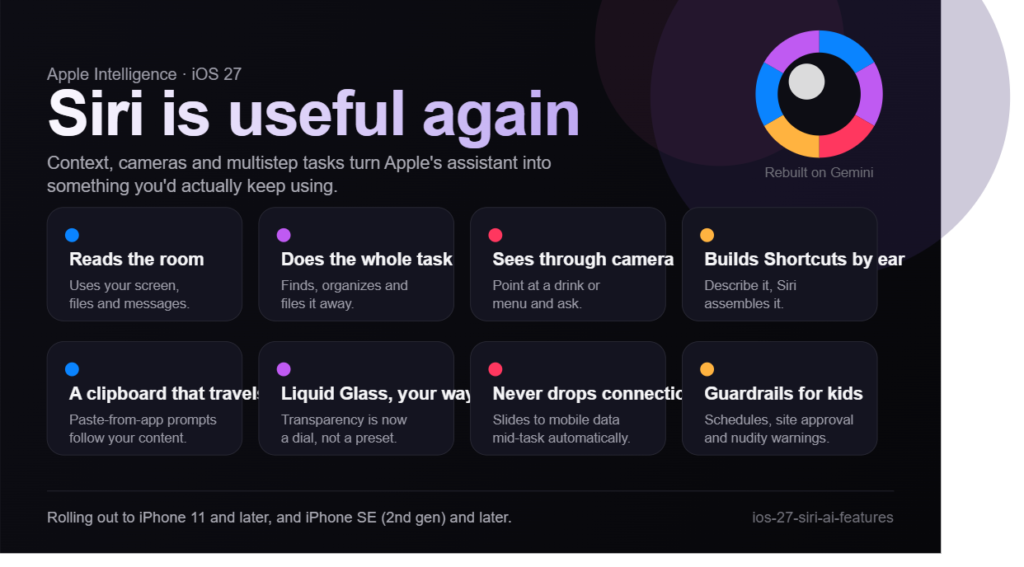
The biggest change is simple: Siri is no longer limited to answering isolated voice commands. With iOS 27, Siri can understand more complex requests, work with information from your screen, access relevant information from files, messages and email, and perform multistep tasks. Apple is also bringing its redesigned Siri into a broader Apple Intelligence experience.
Question → Direct Answer: Why is Siri more useful in iOS 27?
Siri is more useful because it can understand context instead of treating every request as a completely separate command. According to TechCrunch’s testing of the software, the assistant can handle complex requests, interact with information on-screen, work with personal content such as messages and email, and complete certain actions for users.
Siri gets smarter and more contextual
Apple first introduced Apple Intelligence, its suite of AI-powered features, more than two years ago. One of the most anticipated parts of that announcement was a more capable Siri, but the company’s revamped assistant faced multiple delays before finally arriving with iOS 27.
The new Siri is reportedly built using Google’s Gemini models, giving it considerably stronger language and reasoning capabilities than the previous version. Rather than relying primarily on Apple’s traditional voice-assistant architecture with a limited ChatGPT integration, the redesigned assistant is intended to behave more like a modern AI assistant.
That distinction matters because conversational AI is most useful when you don’t have to phrase every request like a rigid command.
For example, you can ask Siri about sports information, including World Cup matches, scores and team lineups. You can also give it a multistep task, such as finding useful but lesser-known iOS features and putting them into a note.
Definition + Expansion
Context-aware AI is artificial intelligence that uses information surrounding a request to produce a more relevant response or action.
In practical terms, context means Siri doesn’t have to treat your voice command as an isolated sentence. What is currently displayed on your iPhone, information in your messages or files, and the task you’re trying to accomplish can all become relevant to the interaction.
That makes the assistant feel less like a voice-controlled search box and more like an interface for getting things done.
Siri can handle multistep requests
One of the most important improvements in iOS 27 is the ability to give Siri instructions that involve multiple actions.
Imagine asking an assistant to find useful information, organize it and put it somewhere specific. Older voice assistants often struggled with this because each action had to be explicitly defined. The new Siri is designed to understand the overall objective and execute several steps.
TechCrunch’s testing included asking Siri to identify useful hidden features in the operating system and add them to a note. The assistant was able to complete the task successfully.
Siri can also draft a message and send it to someone. It can use relevant information from files, messages and email, allowing you to find a conversation,for example, one concerning a delivery,and then create a return-related message.
This is where Siri AI becomes substantially more interesting. Instead of simply telling you information, it can potentially connect information with an action.
What can Siri do with on-screen context?
One of the most impressive parts of iOS 27 is Siri’s ability to understand what you are currently looking at.
Previously, if you were reading something on your iPhone and wanted an AI assistant to explain it, you often had to copy text, take a screenshot or move to another app. The new Siri reduces that friction by allowing you to ask questions about information currently displayed on your screen.
Question → Direct Answer: What is on-screen context in iOS 27?
On-screen context allows Siri to understand relevant information displayed on your iPhone and answer questions about it. For example, you can ask about people, text or information shown on a webpage or app without manually explaining everything to Siri.
Ask Siri about what you’re seeing
Suppose you’re looking at two football or World Cup lineups and want to know which player is older. Instead of searching separately for both players, you can ask Siri while the lineups are on screen.
In TechCrunch’s testing, Siri could answer questions such as identifying the oldest player on the pitch based on the displayed information.
It can also read text on your screen aloud when you don’t want to read it yourself.
The usefulness extends beyond sports. While looking at a startup’s website, you could ask Siri to research its funding information and competitors. The key idea is that you can start with what is already in front of you rather than rebuilding the context manually.
For students and young professionals, this could be particularly useful when researching online. You might be reading about a company, studying a technical concept or comparing products and want an AI assistant to help interpret what you are already viewing.
Siri comes to the Camera app
The camera becomes another interface for Siri AI in iOS 27.
The idea is straightforward: point your iPhone at something and ask Siri about it.
During testing, TechCrunch used the Camera app to identify a drink. Siri initially identified the drink as green juice based on its appearance. After being told that the restaurant was Indian, it correctly narrowed the possibilities to Jaljeera or Aam Panna. The drink turned out to be Aam Panna.
That’s a small example, but it demonstrates an important change in how people can interact with AI.
Instead of describing an object to an assistant, you can show it.
You can also photograph a restaurant sign and ask Siri to suggest items from its menu. Similarly, a coffee bag can become the starting point for asking how that particular coffee should be brewed.
Question → Direct Answer: Why is camera-based Siri important?
Camera-based Siri makes the assistant multimodal, meaning it can work with visual information as well as language. This can make everyday tasks,from identifying objects to understanding signs and products,less dependent on manual searches.
How does Apple Intelligence improve iOS 27?
Siri is the headline feature, but Apple Intelligence powers several other changes in iOS 27.
Apple is increasingly moving AI away from being a separate chatbot-style feature and into everyday parts of the operating system. That means AI can appear inside Shortcuts, Safari, Photos, Messages and other workflows.
Natural-language Shortcuts bring “vibe coding” to iPhone
One of the more interesting iOS 27 features is a natural-language Shortcut creation tool.
Traditionally, creating an automation in Apple’s Shortcuts app requires you to understand which actions are available and how they should be arranged. With the new approach, you can describe what you want in ordinary language.
For example, you could ask for a Shortcut that shows your daily to-do items every morning at 8 a.m.
You could also request something like converting a photo to JPEG. Once that basic automation exists, you can make it more sophisticated by adding additional instructions, such as converting selected photos to JPEG and sharing them through AirDrop.
This is sometimes described as vibe coding: instead of manually constructing every technical step, you describe the desired result in natural language and let AI help create the workflow.
Question → Direct Answer: Does iOS 27 let users create automations with natural language?
Yes. The new Shortcuts experience allows users to describe an automation in natural language and have the system create the Shortcut, after which additional steps can be added or modified.
A particularly practical example from TechCrunch’s testing was creating a Shortcut that uses Shazam to identify a song and then saves the track and location. For people who discover music in cafes, bars or other places, that kind of automation could turn a recurring annoyance into a one-tap workflow.
Safari can monitor changes to webpages
Another useful addition is custom alerts in Safari.
You can configure Safari to watch a webpage for changes. That could be useful for tracking a blog, a product price or a privacy policy.
The feature is less flashy than a new chatbot, but it reflects an important philosophy behind Apple Intelligence: AI and automation don’t always need to produce spectacular answers. Sometimes the best feature is one that quietly saves you time.
Photos gets new editing tools
The Photos app also receives new AI-powered capabilities, including tools called Reframe and Extend.
These features can help alter or expand images, although TechCrunch’s testing found that they do not work perfectly in every situation.
Apple has also improved its object-erasing functionality. Removing unwanted objects from photographs can now produce fewer strange artifacts, making the result look more natural in some cases.
That illustrates an important reality of AI image editing: the feature can be extremely useful without being perfect.
Smart suggestions connect information to actions
Apple Intelligence can also identify certain information in incoming messages and offer suggestions for what to do with it.
For example, information related to an event or location can trigger suggestions to add the details to Calendar or Notes.
This reduces the number of steps between receiving useful information and actually doing something with it.
The broader theme across iOS 27 features is therefore automation. Instead of simply showing you information, Apple is trying to help turn information into an action.
Passwords can change automatically
The Passwords app gets another potentially valuable upgrade: it can automatically change passwords on your behalf by logging into a website.
For users who regularly postpone password updates because they are inconvenient, this could remove one of the biggest barriers to maintaining better account security.
The important distinction is that this is not simply an AI chatbot telling you to change your password. The operating system is attempting to complete the process for you.
What are the best everyday iOS 27 features?
The most talked-about part of iOS 27 is undoubtedly Siri, but several smaller changes could have a bigger effect on daily smartphone use.
These are the kinds of improvements that may not dominate Apple’s presentation but become features you use repeatedly after discovering them.
Question → Direct Answer: What are the most useful everyday changes in iOS 27?
Some of the most practical changes include a new clipboard experience, adjustable Liquid Glass transparency and intelligent network switching. Together, they reduce friction in common tasks such as copying content, using the interface and maintaining an internet connection.
The new clipboard may be the underrated winner
TechCrunch’s testing particularly praised the new clipboard feature.
The feature allows users to move different types of content,including links, photos, videos and text,from one app to another more easily.
After content enters the clipboard, the keyboard can show a shortcut such as “paste from Safari,” allowing you to paste that content into another app without going through a more complicated copy-and-paste process.
For students, imagine researching an assignment and moving a webpage, image or piece of text directly into another app. For professionals, the same system can simplify moving information between work apps.
It is a good example of a feature that sounds minor but can have a significant cumulative impact.
Liquid Glass becomes more customizable
Apple’s Liquid Glass interface introduced a major visual change, but not everyone liked its transparency.
With iOS 27, users can adjust Liquid Glass transparency based on their preference. The control is granular rather than limited to a handful of fixed presets.
That gives users more control over how much of the visual effect they want.
Intelligent network switching keeps you connected
Another practical addition is intelligent network switching.
The system can automatically move from Wi-Fi to mobile data when the wireless connection is experiencing problems.
The benefit is most obvious when you’re doing something important and don’t notice that Wi-Fi has stopped working properly. Instead of waiting for the connection to recover or manually switching networks, the iPhone can transition automatically.
Question → Direct Answer: Why does intelligent network switching matter?
It helps prevent interruptions when a Wi-Fi connection becomes unreliable by automatically switching to mobile data. For people working on calls, uploading files or completing time-sensitive tasks, that seamless transition can be more useful than a flashy new feature.
How does iOS 27 improve child safety?
Apple is also making child safety a significant part of iOS 27.
The operating system introduces a new setup flow that recommends essential apps for children. Parents and guardians can establish different schedules, time limits and allowances depending on the day of the week.
That flexibility matters because weekday and weekend phone usage often look very different.
Parents can also receive notifications when children access new websites and can remotely approve that access.
Another safety feature warns children when they are exposed to nudity in Messages, FaceTime and other apps.
Question → Direct Answer: What parental controls are included in iOS 27?
iOS 27 adds tools for managing children’s app access and screen time, including schedules, daily allowances, website-access notifications and remote approval. The system also includes warnings for exposure to nudity in supported apps.
These features show that Apple’s AI strategy isn’t only about making Siri smarter. The company is also using intelligence and automation to make the operating system more responsive to different users and situations.
iOS 27 vs older Siri: What has actually changed?
The difference between the old Siri and the new Siri is easiest to understand by looking at what each assistant is designed to do.
| Capability | Older Siri experience | Siri in iOS 27 |
| Basic commands | Strong | Strong |
| Timers and alarms | Yes | Yes |
| Complex requests | Limited | Much stronger |
| Multistep tasks | Limited | Supported for more workflows |
| On-screen context | Limited | Supported |
| Camera-based questions | Limited | Supported |
| Personal context | More limited | Can work with relevant files, messages and email |
| Message drafting | Limited | Can draft and send messages |
| AI conversation history | Limited | Dedicated Siri AI app with previous chats |
| Natural-language automation | Limited | AI-assisted Shortcuts creation |
| Third-party app potential | Limited | Designed for broader app handoffs |
The biggest difference is not simply that Siri knows more facts.
It’s that Siri is becoming a way to interact with the information and actions already available on your iPhone.
Question → Direct Answer: Is the new Siri just another chatbot?
No. While Siri now has stronger conversational AI capabilities, its main advantage is its integration with the operating system. It can understand screen context, interact with personal information and perform actions rather than functioning only as a standalone question-and-answer chatbot.
That integration could become even more important as developers update their apps.
Apple has positioned the new assistant to work with third-party applications, potentially allowing Siri to hand tasks off to other apps. The quality of that experience will depend heavily on how developers implement the new capabilities.
What makes the new Siri different from ChatGPT or Gemini?
For years, a common smartphone workflow was to use Siri for simple tasks and then open ChatGPT or Gemini whenever the question became complicated.
iOS 27 challenges that habit by moving more advanced AI functionality directly into the operating system.
ChatGPT and Gemini remain useful as dedicated AI assistants, especially for longer conversations, research, writing and other tasks. Siri’s advantage is convenience: it already has access to the device environment and can potentially perform actions across it.
| Use case | Siri in iOS 27 | Dedicated AI chatbot |
| Set an alarm | Excellent | Unnecessary |
| Ask about screen content | Strong | Usually requires sharing context |
| Modify an iPhone workflow | Strong through Shortcuts | More limited |
| Access device actions | Strong | Depends on integration |
| Long-form research | Improving | Generally stronger |
| Complex conversation | Much better than old Siri | Core strength |
| Camera-based questions | Integrated into Camera | Usually requires uploading/sharing an image |
| Personal device context | Stronger through Apple integration | Depends on permissions and integrations |
The distinction is therefore less about which AI is universally “smarter” and more about where the AI lives.
Siri AI is embedded into the iPhone experience. That could make it the assistant you use because it is already there.
Should you update to iOS 27?
For compatible iPhone owners, the answer depends partly on how much you value AI and everyday convenience.
According to the source article, iOS 27 is rolling out to iPhone 11 and later, as well as iPhone SE (second generation) and later. Users can update through Settings > General > Software Update.
The strongest reason to update is not necessarily one headline feature. It is the combination of a significantly more capable Siri with dozens of smaller quality-of-life improvements.
Consider these reasons to update:
- You want a more capable voice assistant.
- You regularly use AI tools such as ChatGPT or Gemini.
- You want Siri to understand what’s on your screen.
- You frequently move links, photos or text between apps.
- You use Shortcuts but find manual automation creation complicated.
- You want better parental controls.
- You want automatic network switching.
- You want more control over Liquid Glass.
- You want improved AI-assisted photo editing.
Question → Direct Answer: Is iOS 27 worth updating for Siri alone?
For users who previously abandoned Siri because it was too limited, the redesigned assistant could be a compelling reason to update. However, the overall value of the update comes from Siri combined with Apple Intelligence, automation, clipboard improvements, connectivity features and safety controls.
There is also an important caveat: some of the most ambitious capabilities depend on how well Apple and third-party developers implement them.
A smart assistant is only as useful as the actions it can reliably perform. If app integrations are inconsistent, the experience could still fall short of Apple’s larger vision.
But the early experience described by TechCrunch suggests that Apple has finally moved Siri beyond the basic voice-assistant model many users had stopped relying on.
Why iOS 27 could change how people use AI on smartphones
The most interesting thing about iOS 27 may not be Siri itself. It may be the changing relationship between AI and the operating system.
For the last few years, using generative AI on a phone often meant opening a dedicated app, typing a question and copying the answer somewhere else.
Apple’s approach is different.
AI is being placed directly into the workflows people already use.
You’re looking at a webpage? Ask Siri about it.
You’re holding a drink? Ask Siri what it might be.
You’re looking at a coffee bag? Ask how to brew it.
You receive event information in a message? Add it to Calendar.
You need an automation? Describe what you want instead of manually building it.
You need to monitor a webpage? Set an alert.
That is a meaningful shift because the AI disappears into the interface.
Definition + Expansion
Ambient AI refers to AI capabilities that are integrated into the tools and environments people already use instead of requiring a separate application for every interaction.
The goal is not necessarily to make users think about AI more. In fact, the best version of ambient AI may make users think about AI less because it simply helps complete tasks in the background.
That could be the direction Apple is taking with Siri and Apple Intelligence.
What should users expect next from Siri?
The current Siri experience is only part of the story.
Apple is positioning the assistant to work with third-party apps, creating the possibility of more sophisticated handoffs between Siri and applications. For example, an assistant could potentially understand what the user wants and then ask a specialized app to complete part of the task.
The success of that strategy will depend on developers.
If third-party apps expose useful actions and Siri can reliably understand when to use them, the assistant could become much more powerful. If integrations remain inconsistent, users may continue opening dedicated apps for anything beyond basic tasks.
The redesigned Siri also gets a dedicated app where users can return to previous chats. In Settings, users can change Siri’s voice and expressiveness, giving the assistant a more customizable personality.
Question → Direct Answer: What will determine whether Siri succeeds long term?
The biggest factor will be reliability and integration. If Siri consistently understands context, completes multistep tasks and works smoothly with third-party apps, users have a strong reason to make it their default assistant again.
That is ultimately the test for Apple’s AI strategy.
A clever demonstration is interesting once. An assistant that saves you several minutes every day is something you keep using.
Frequently Asked Questions About iOS 27
What is iOS 27?
iOS 27 is Apple’s latest iPhone operating system update, bringing a redesigned Siri, Apple Intelligence improvements, new automation tools, enhanced photo editing, clipboard improvements, network switching and additional child-safety controls.
What is new in Siri with iOS 27?
The new Siri can handle more complex and multistep requests, understand on-screen context, access relevant information from files, messages and email, interact with the Camera app and perform actions such as drafting and sending messages.
Is Siri in iOS 27 powered by Gemini?
According to TechCrunch’s report and testing, the redesigned Siri is built on the back of Google’s Gemini models. Apple is integrating that intelligence into its own Siri and operating-system experience.
Which iPhones support iOS 27?
The update is rolling out to iPhone 11 and later, plus iPhone SE (second generation) and later, according to the source article. Users can check for the update under Settings > General > Software Update.
What is Apple Intelligence in iOS 27?
Apple Intelligence is Apple’s collection of AI-powered features integrated into the operating system. In iOS 27, it supports capabilities including the redesigned Siri, natural-language Shortcut creation, image-editing tools, smart suggestions and other automated workflows.
Can Siri understand what is on my iPhone screen?
Yes. The redesigned Siri can use on-screen context to answer questions about information you’re viewing. It can also read on-screen text aloud and can use context from webpages and other supported content.
Conclusion: Siri finally has a reason to stay on your iPhone
For years, Siri was the assistant many iPhone owners used only when they didn’t want to touch their phone.
iOS 27 changes that equation.
The redesigned Siri can understand more complicated requests, use on-screen and personal context, interact with the Camera app and perform useful actions. Combined with Apple Intelligence, smarter Shortcuts, a better clipboard, intelligent network switching and new safety features, the update feels less like a single AI upgrade and more like Apple making the entire iPhone more intelligent.
The real test will be whether users keep using Siri after the novelty disappears. Based on the early experience described by TechCrunch, Apple may finally have given them a reason to do exactly that.
Take the Next Step With Kalinga.ai
Want to understand how AI is changing everyday technology, careers, and digital skills? Explore more practical AI explainers, tech insights, and learning resources on Kalinga.ai to stay ahead of the next wave of innovation.