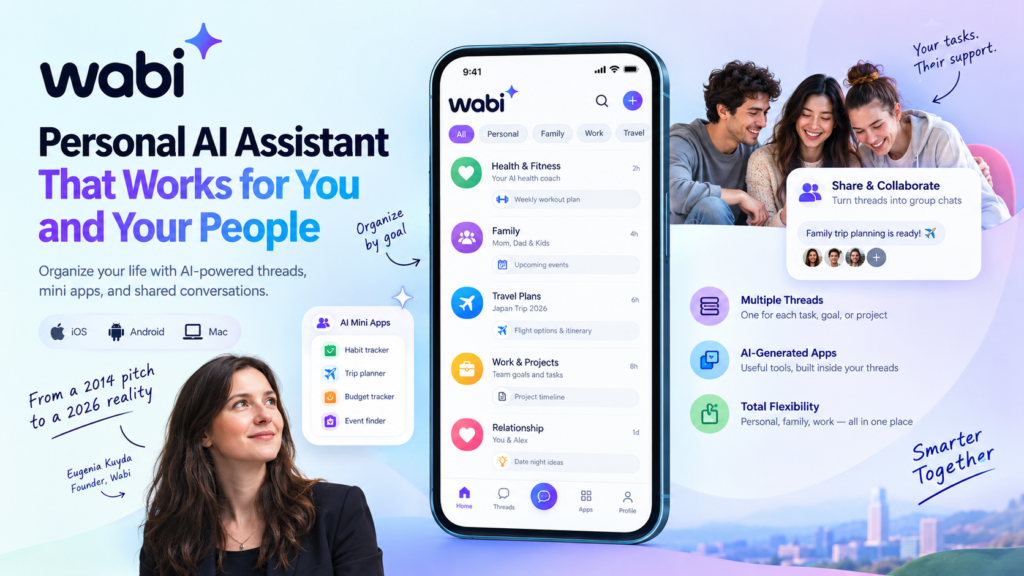
A personal AI assistant is an AI agent that handles tasks, schedules, and information on your behalf, and the newest one to try is Wabi, which Eugenia Kuyda opened to all users on October 19, 2026. The Wabi AI assistant is free on iOS, Android, and Mac, and its defining feature is that each task lives in its own thread that you can share with other people.
Here’s the hook: twelve years ago to the day, Kuyda stood on the TechCrunch Disrupt stage and pitched a chatbot concierge called IO. The technology wasn’t ready for her vision then. In 2026, it is. This guide explains what Wabi does, how it compares with other assistants, what to check on privacy, and how to decide whether this kind of personal AI assistant deserves a place on your phone.
Wabi at a Glance
Here are the key facts about the Wabi AI assistant as of October 20, 2026:
- What it is: a multiplayer AI assistant that works like a messenger app, with separate threads for different tasks and goals.
- Founder: Eugenia Kuyda, who previously founded Replika and left as its CEO last year.
- Launch: open to all users on October 19, 2026, after an invite-only rollout that began September 28.
- Platforms: iOS, Android, and Mac.
- Price: free for now, with no business model settled.
- Funding: a $20 million pre-seed round led by Andreessen Horowitz in 2025, and the company is in talks to raise more.
- Security posture: SOC 2 compliant, cloud-only, with most user data stored in the U.S.
What Is a Personal AI Assistant?
A personal AI assistant is an AI-powered agent that works from your own accounts, calendar, and goals to help you get things done, instead of answering generic questions for anyone.
In practice, it connects to sources such as your email and calendar, keeps track of your context, and handles or prepares tasks like planning a trip, tracking a habit, or surfacing an event you would otherwise miss. The word “personal” is doing real work here. The value comes from the assistant knowing your information, your relationships, and your priorities.
How Is a Personal AI Assistant Different From a Chatbot?
A chatbot answers what you type, while a personal AI assistant works from your data and your long-term goals.
A general chatbot starts most conversations knowing little about your life. An assistant is designed to maintain continuity. It knows your schedule, remembers that you are planning a family trip, and can act on that knowledge without being re-briefed every time. The trade-off is that continuity requires access to sensitive information, which is why privacy design matters so much (more on that below).
Why Is 2026 a Breakout Year for AI Assistants?
Models have become capable enough to make the original vision workable, and competition has arrived. According to TechCrunch, Wabi enters a field of new assistants such as Muse and Instinct, which promise to do everything from managing your inbox to finding the best flight deals. The personal AI assistant category is getting crowded quickly, so design differences, not just raw capability, are what to watch.
Kuyda’s own history illustrates the shift. IO predated the deep learning breakthroughs that led to today’s large language models. She told TechCrunch that it felt magical in its day but was nowhere near what’s possible now.
The 12-Year Story Behind Wabi
Why Did Eugenia Kuyda Pitch IO at TechCrunch Disrupt in 2014?
Kuyda pitched IO as a lifestyle concierge: a conversational chatbot that helped people book restaurants and vacations and handle other tasks.
IO was the first product from her startup, Luka. The concept was simple and ahead of its time. Instead of searching and filling out forms, you would message an assistant and let it do the legwork. What was missing was the language-model technology to make that experience reliable across everyday life.
How Did Luka Become Replika?
Luka evolved into Replika, the popular AI companion company. Last year, Kuyda left her role as CEO of Replika and founded Wabi.
Replika centered on AI that helps people feel less lonely. Kuyda says part of that mission carries into Wabi through the idea that AI can bring people together. Unite.AI, citing an Andreessen Horowitz post, reports that Replika has 40 million users, which is a company-reported figure worth treating with appropriate caution.
What Did Kuyda Say About Building Agents Early?
On October 7, 2026, Kuyda posted Luka’s 2015 launch video and noted that her team was building personal agents 11 years ago. For anyone studying the AI assistant market, the lesson is that timing and technology matter as much as the idea itself.
What Is Wabi?
Wabi is a multiplayer personal AI assistant that functions as a messenger app, letting you keep multiple agent-powered threads dedicated to different tasks and long-term goals.
Wabi’s first public version, covered by TechCrunch in 2025 alongside its $20 million pre-seed round, was closer to a social platform where people created mini apps with prompts and shared them. The new release is a pivot that Kuyda describes as an evolution. After a year of watching users, her team concluded that people like personal software but don’t want to spend much time, or any time, building it.
Threads: One Conversation for Each Goal
A thread is a dedicated conversation for one task or long-term goal, such as health, family, or travel.
Inside a thread, the assistant and the user can build and use custom apps. Two examples from launch coverage are a weight-loss tracker inside a health thread and an app showing nearby children’s events inside a family thread. Because each thread has a narrow purpose, the assistant works with a smaller, more relevant slice of context.
AI Mini Apps: Software the Agent Builds for You
AI mini apps are small, single-purpose tools that an AI agent generates inside a conversation to help with a specific job, such as tracking a habit or planning an outing.
In Wabi 2.0, the agent decides which apps to build. The moment you connect your email, it automatically spins up a number of starter threads and apps, and you can add more by requesting custom apps or opening new threads. This is the core upgrade from the first version, where users had to prompt apps into existence themselves. Kuyda summarizes the pitch by saying Wabi does what assistants like Instinct and Muse do, plus it has the apps layer to help users do more.
Multiplayer: Threads That Double as Group Chats
A multiplayer AI assistant lets several people share one assistant and one set of tasks, rather than each person talking to their own AI separately.
In Wabi, threads can be shared and then function as group chats. Kuyda’s argument is that today’s agentic apps are mostly one-on-one conversations between a person and an agent, and that the bigger opportunity is bringing people together. In most one-on-one tools, a personal AI assistant sees only your world. Wabi lets part of that world be shared, on purpose, with the people you choose.
How Does Wabi Work?
How Do You Get Started With Wabi?
Download the app on iOS, Android, or Mac, connect your email, and let the assistant generate starter threads and apps. From there, you can request custom apps or open new threads for specific goals. This summary is based on launch reporting rather than hands-on testing, so check the app itself for current setup steps.
Can You Share a Wabi Thread With Other People?
Yes. Threads can be shared and then work as group chats.
TechCrunch walked through some of Kuyda’s own shared threads. In the one with her boyfriend, a row of apps along the top includes a live music tracker, a daily question about their relationship, a running list of restaurant suggestions, important events from their shared calendar, and a list of books they’re reading together with suggestions for what to read next. In her family thread, there is an app tracking her daughter’s schedule, another that finds kid-friendly events nearby, and another that quizzes her daughter on Japanese.
What Can Other People in a Thread See?
Only what you choose to share. Within any shared chat, users can share as much or as little as they want, from email and calendar information to bank account details.
Kuyda noted that access is scoped to individual chats, and everyone in a chat can see when someone’s personal information is requested. In practice, a partner can ask the assistant in the chat whether you’re free next Thursday or whether you bought tickets, and that request is visible to everyone in that thread.
Wabi vs. Single-Thread Assistants: A Side-by-Side Comparison
Kuyda positions Wabi against assistants such as Muse and Instinct. The table below summarizes the differences as she describes them. Verify details with each product before you decide, since features change quickly.
| Criteria | Wabi | Single-thread assistants (as Kuyda describes them) |
|---|---|---|
| Conversation design | Multiple threads, one per task or goal | One continuous conversation with the agent |
| Collaboration | Threads can be shared as group chats | Mostly one-on-one between you and the agent |
| Built-in apps | The agent builds mini apps inside threads | Core assistant features without Wabi’s app layer |
| Context over time | Context is split across focused threads | Context accumulates in one endless conversation |
| Data controls | Access scoped to each chat; requests visible to chat members | Varies by product |
| Price | Free for now | Varies by product |
| Likely best fit | Couples, families, small groups, goal-based planning | Individuals who want one inbox-and-travel helper |
When Should You Choose Wabi, and When a Single-Thread Tool?
Choose Wabi if you want to organize life by goal and share parts of it with a partner, family member, or group. Choose a single-thread tool if you mainly want one assistant for inbox and travel help and don’t need collaboration. Whichever route you pick, the best personal AI assistant is the one whose structure matches how you actually live and work.
Why Do Single-Thread Assistants Get Worse Over Time?
Single-thread assistants can degrade because one endless conversation piles up context, and more context can make an AI model more likely to lose the thread.
Kuyda argues these experiences get worse over time and that users can get buried in the information the agent sends every day. TechCrunch adds that, according to interviews with AI researchers, longer chatbot conversations are more likely to produce hallucinations, lost context, or responses that safety guardrails would otherwise block.
Splitting work into separate threads is one design response. TechCrunch’s report doesn’t cite independent testing of Wabi’s approach, so treat it as a promising design bet rather than a proven fix. A personal AI assistant that keeps each goal in its own container may stay more focused, but real-world results will decide.
Real-World Use Cases for a Shared Personal AI Assistant
Shared assistants are most useful where several people coordinate around the same information. Here are use cases drawn from Kuyda’s own threads and launch coverage:
- Health goals: a weight-loss tracker inside a dedicated health thread.
- Family logistics: a child’s schedule, nearby kid-friendly events, and language quizzes.
- Couple planning: a live music tracker, a daily relationship question, restaurant suggestions, shared calendar events, and a joint reading list.
- Calendar coordination: a partner checking availability or ticket purchases directly in the chat.
- Group planning: a calendar, trip plan, or tracker created inside a shared chat, according to TokenPost’s coverage.
The common thread is that the assistant doesn’t just reply. It produces something reusable, such as a tracker, a list, or a calendar, that stays in the thread for everyone to use.
Privacy and Security: What to Check Before You Trust Any Personal AI Assistant
Is Wabi Secure?
Wabi says it is SOC 2 compliant, which means its data security controls have been independently audited. Kuyda told TechCrunch that Wabi runs entirely in the cloud and that most user data is stored in the U.S. Access is also scoped to individual chats, with personal-information requests visible to everyone in the chat.
Those are meaningful signals, but compliance is a baseline, not a guarantee that nothing can go wrong. Sharing email, calendar, or bank details is also optional, so you control how much risk you take on.
What Should You Ask Before Connecting Your Data?
Before connecting email or financial accounts to any personal AI assistant, ask these five questions:
- What data does it actually need, and can I get value with less?
- Who in a shared thread can see what, and when?
- Where is data stored, and how does the company describe retention?
- Has an independent party audited its security controls, such as through SOC 2?
- Can I disconnect accounts and delete my data easily?
Business Model, Funding, and What Happens Next
Wabi is free for now, and the company hasn’t settled on a business model. Andreessen Horowitz led a $20 million pre-seed round in 2025, and Kuyda says Wabi is in talks to raise more funds.
Free is attractive, but watch how a free personal AI assistant eventually pays for itself. Pricing, usage limits, and subscription options remain open questions. Early adopters should expect terms to change and avoid building critical workflows without a backup plan for their data.
How to Choose a Personal AI Assistant: A Six-Question Checklist
Use this checklist to evaluate Wabi or any competitor:
- Solo or shared? Decide whether you need an assistant just for yourself or for a household or team.
- Single thread or multiple threads? Consider how your context will be organized as it grows.
- Does it build or only answer? Look for assistants that produce trackers, lists, and apps.
- What does it connect to? Email and calendar are common. Financial accounts raise the stakes.
- How transparent are the privacy controls? Look for scoped access, visible requests, and independent audits.
- What does it cost, and where does it run? Check platform support and pricing, and watch for changes.
Frequently Asked Questions
What Is Wabi?
Wabi is a free multiplayer AI assistant from Eugenia Kuyda that organizes tasks into threads and builds mini apps inside them. It launched to all users on October 19, 2026.
Who Founded Wabi?
Eugenia Kuyda founded Wabi. She previously founded Replika, which began as Luka, and left as its CEO last year.
Is Wabi Free?
Yes, for now. The company hasn’t settled on a business model and is in talks to raise more funding.
Which Devices Support Wabi?
Wabi is available on iOS, Android, and Mac.
How Is Wabi Different From Replika?
Replika is an AI companion built to help people feel less lonely. Wabi is a task-oriented personal AI assistant with threads and mini apps, though Kuyda says it carries over the theme of using AI to bring people together.
Is It Safe to Connect Email to a Personal AI Assistant?
It depends on the provider’s controls and on what you choose to connect. Look for scoped access, visible data requests, independent security audits, and clear deletion options, and share only what the task requires.
Bottom Line: What Wabi Means for the Personal AI Assistant Market
Wabi is a bet that the next stage of the personal AI assistant isn’t a smarter single chat but a better-organized, shareable one. Kuyda’s 2014 pitch for IO described a messaging concierge. Her 2026 product adds the pieces that were missing: capable language models, agent-built mini apps, and threads that people can share.
Three takeaways stand out. First, structure is becoming a competitive feature, with separate threads aimed at the context problems of one endless conversation. Second, multiplayer design turns an assistant from a private helper into a coordination tool. Third, trust will decide adoption, so scoped access and visible requests matter as much as clever features. Wabi is free to try, so it is easy to test against your own routines and the checklist above.