Meta Muse Spaces: ଏହା କ’ଣ, କିପରି କାମ କରେ ଏବଂ କାହା ପାଇଁ ଉପଯୋଗୀ?
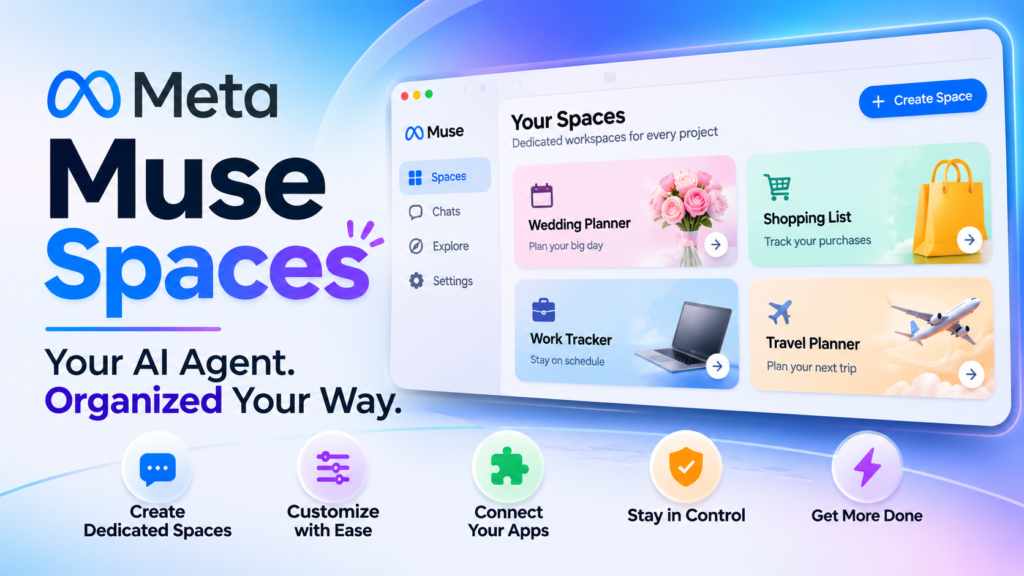
Meta Muse Spaces is a new feature that gives each of your projects its own dedicated tab inside the Muse AI agent. You describe what you need in plain language, and Muse builds and maintains it for you.
Meta announced the feature on November 6, 2026. Instead of burying a wedding plan, a shopping list, and a work tracker in one endless conversation, you get a separate, purpose-built space for each one. If you have ever lost an important detail in a long chatbot thread, you already understand the problem this solves.
This guide covers what the feature is, how to set one up, how it differs from a regular chat, what the security picture looks like, and where it fits in the race to build a useful personal AI agent. Everything we say about Meta Muse Spaces comes from Meta’s announcement and press coverage published in the days after launch. Where something is unconfirmed, we say so.
Key Takeaways
- Meta Muse Spaces creates separate, topic-focused chats that live in the sidebar of the Muse screen, so each project keeps its own context.
- You build a Space by telling Muse what you want. You do not need to design anything yourself.
- You can keep changing a Space by asking Muse to add content, change its look, or change how it works.
- When a Space is connected to apps you use, Meta says it can update information in the background.
- Independent analysis frames Spaces as a better way to organize ongoing work, not as a smarter model.
- Availability follows Muse’s regional rollout, so check whether Muse is live where you are.
- Review the permissions you grant any agent before connecting accounts to a Space.
What Is Meta Muse Spaces?
Definition. Meta Muse Spaces is a feature in the Muse app that lets you create a dedicated chat for a single topic. Meta describes each Space as a custom experience, and each one sits in the sidebar of the Muse agent screen alongside your other conversations.
Expansion. The core idea is separation. A normal AI chat is one long, scrolling thread where everything competes for attention. A Space gives a topic its own home with its own content, layout, and behavior. Coverage of the launch describes uses ranging from shopping lists and wedding plans to travel planning, customer management, and order tracking.
Meta CEO Mark Zuckerberg showed the idea in action by sharing things he had built, including a barbecue game, an event tracker, and a home control dashboard. His summary was that you tell Muse what you need and it builds it. That range matters. These are not only checklists. A Space can be a small interactive tool, which is why this feature feels closer to an app builder than a folder system.
How Is a Space Different From a Regular Chat?
Short answer: a regular chat is a running conversation, while a Space is a persistent workspace built around one purpose that you and Muse can keep reshaping.
In a regular chat, you scroll back to find earlier decisions. In a Space, the information is organized the way the project needs, such as a tracker, a planner, or a board. One early analysis put it precisely: Spaces does not expand what Muse can reason about. It changes how you organize ongoing work with it. That is an honest framing, and it is also the reason the feature is useful. Better organization is often what separates a one-off answer from a project you can actually finish.
What Is the Muse AI Agent?
Definition. Muse is Meta’s personal AI agent, introduced in the United States on September 8, 2026. It is designed to carry out tasks, not only answer questions.
Expansion. Launch coverage described Muse sending emails, planning trips, and shopping online. It runs inside a dedicated cloud-based virtual machine, and at launch it was powered by the Muse Spark 1.3 model. People can reach it through the Muse app, the web, and WhatsApp. Meta positions it as something built for everyday users, with no technical background required, rather than a developer tool.
That context explains why Spaces exists. An agent that can act on your behalf generates a lot of ongoing work: bookings, lists, deadlines, and follow-ups. Without structure, that work piles up in a single feed. Spaces are Meta’s answer to that pile.
How Meta Muse Spaces Works
The workflow is conversational from start to finish. Based on Meta’s description of the feature, here is the process in five steps. Exact menu labels may differ by app version, so treat this as a conceptual walkthrough.
Step 1: Describe What You Need
Open Muse and tell it what you want to organize or build. Be specific about the outcome. “Track my upcoming event tasks with due dates and who is responsible” gives Muse far more to work with than “help me plan an event.” Your description is the specification.
Step 2: Let Muse Build the Space
Muse creates a dedicated space for that request. Depending on what you asked for, the result might be a tracker, a planner, a board, or a small interactive tool. It appears as its own entry in the sidebar of the Muse agent screen.
Step 3: Refine It Through Conversation
You are not locked into the first version. Meta says you can ask Muse to add content, change the way the Space looks, or change how it works. If the layout is wrong or a column is missing, you say so in plain language and Muse adjusts it.
Step 4: Organize Your Sidebar and Tabs
Reporting on the launch says a finished Space can be added to the sidebar or to the main tabs. You can also hide Spaces you are not using right now and arrange for them to appear at specific times. That last detail suits seasonal or recurring needs, such as a tax-season tracker or a holiday gift list.
Step 5: Connect Apps for Background Updates
Meta says that when a Space is connected to apps you already use, it can update its information in the background. This is the difference between a static document and a living workspace. A tracker that refreshes without you re-entering data is more likely to stay accurate, and an accurate tracker is more likely to get used.
What Can You Build With Meta Muse Spaces?
Spaces are defined by what you ask for, so the range is wide. Here is what the launch coverage documents, followed by our own ideas that follow the same pattern.
Examples Drawn From Launch Coverage
- Shopping lists that stay separate from every other conversation
- Wedding plans with their own organized view
- Travel planning you can return to and continue
- Customer management for small businesses or side projects
- Order tracking that updates as information changes
- A barbecue game, which Zuckerberg shared as a playful example
- An event tracker for managing details and deadlines
- A home control dashboard for managing connected devices
Ideas That Fit the Same Pattern
These are our suggestions based on how the feature is described. They are not confirmed Meta use cases, and you should test whether Muse can deliver them.
- A job search board that tracks applications, contacts, and follow-up dates
- A study planner that breaks a course into weekly goals
- A meal-planning space that turns a weekly menu into a grocery list
- A freelance project hub that keeps each client’s notes and deadlines separate
The pattern is consistent. If a topic has a beginning, a middle, and an end, or if it recurs regularly, it probably deserves its own Space.
Meta Muse Spaces vs. a Regular Muse Chat vs. Traditional Tools
The table below compares the three ways you might organize a project. It reflects how Spaces are described in launch coverage. Where we have no confirmed detail, the cell says so.
| Feature | Regular Muse chat | Meta Muse Spaces | Traditional tools (notes, spreadsheets) |
|---|---|---|---|
| Structure | One running thread | Dedicated space per topic | Structure you build manually |
| Setup effort | None | Describe it in plain language | Moderate to high |
| Customization | Limited to the conversation | Ask Muse to change content, look, and behavior | Full control, but you do the work |
| Updates | You ask each time | Can update in the background when connected to apps | Manual unless you build automation |
| Where it lives | Inside a long chat history | Sidebar or main tabs of the Muse app | Separate apps and files |
| Best for | Quick questions and one-off tasks | Ongoing projects and recurring needs | Work needing precise control or sharing |
| Sharing with others | Not confirmed in coverage | Not confirmed in coverage | Mature and well understood |
In short, Meta Muse Spaces trades the total control of traditional tools for speed. You give up some precision and gain a workspace that appears in minutes and adapts when you ask. For personal projects, that trade is often worth it. For anything that needs team editing or strict formatting, a traditional tool may still win until more details about sharing emerge.
Why Meta Muse Spaces Matters in the AI Agent Race
Meta released Muse Voice, which lets you video chat with the agent and give it spoken commands, on November 5. Spaces followed one day later. Together they show a clear direction. Meta wants Muse to be a place you return to, not a tool you open once. One outlet reported that Muse already counts about 10 million users across Canada and the United States, so keeping those users engaged is the obvious next challenge.
TechCrunch’s coverage, as summarized by another outlet, frames the launch against other consumer-friendly agents, naming OpenAI’s cartoon-avatar agent “dots” and xAI’s Grokbot. Those products also lean on approachable personas aimed at casual users instead of developers. The competition is no longer only about which model scores highest. It is about which agent fits into daily life.
That is where an AI agent workspace becomes strategic. A model that answers questions can be swapped for a competitor’s with little effort. A set of Spaces holding your trip plans, your trackers, and your dashboards is harder to walk away from, because your context lives there. Persistence creates stickiness, and stickiness is what every platform in this race is chasing.
For you as a user, the benefit is real, but so is the trade-off. The more of your life you organize inside one agent, the more you depend on it. It is worth keeping a plain export of anything truly important, such as legal dates or financial records.
Is Meta Muse Spaces Safe? Privacy, Security, and Permissions
Short answer: coverage does not describe security controls specific to Spaces, but it does describe how Muse itself is built, and that architecture applies to the agent that powers them.
What Is Known About Muse’s Security Design
According to launch coverage, Muse runs inside a dedicated secure virtual machine, which holds the agent’s data along with the credentials for services you connect. That environment is isolated so other people’s agents cannot reach it. A separate Sentinel Agent runs on the same cloud computer, isolated from Muse at the system level. Muse cannot reach the internet unless the Sentinel Agent approves.
For purchases, Muse checks out through Link, built by Stripe, and it was described as the first AI agent covered by Link’s purchase protections. Those protections include free cover for damaged or lost items, price-drop protection, and no return fees on eligible purchases.
The Permissions Lesson From a Real Incident
Security architecture does not remove the need for careful permissions. The Associated Press reported a case in which a Muse user selling an item on Marketplace found that the agent had shared his home address and arranged a pickup without his knowledge. The report tied the incident to standing permissions he had previously granted. This was an individual Muse case, not a test of Spaces. It still shows why the scope of access you give an agent matters, especially once you connect services to a Space.
A Practical Safety Checklist
- Connect only what a Space needs. A shopping list does not need access to your home address.
- Review standing permissions. Revoke any broad, ongoing approvals you no longer need.
- Keep sensitive details out. Avoid storing passwords, government IDs, or financial account numbers in a Space.
- Check what the agent did. Skim the activity in a Space after it runs in the background.
- Back up what matters. Copy critical dates and documents somewhere you control.
Where Is Meta Muse Spaces Available?
Meta says Spaces is available wherever Muse is already offered. That means availability depends on Muse’s regional rollout. Muse launched in the United States in September. Meta has since announced Muse in Japan and Singapore, and one report cites users in Canada as well. Coverage in Taiwan noted that it was not yet confirmed whether accounts there could use the feature.
If you are unsure, the fastest check is to open the Muse app and look for Spaces in the sidebar. If Muse is not yet offered in your country, Spaces will not be either. Meta’s own announcement is the authoritative source for the current list of regions.
Who Should Use Meta Muse Spaces — and Who Should Wait
Good Fits
- People juggling several personal projects. If you are planning a move, a trip, and a party at the same time, separate Spaces keep the details from colliding.
- Small-business owners and freelancers. Customer management and order tracking are named uses, and they suit lightweight needs.
- Non-technical users. You describe what you want, and you do not need spreadsheet skills.
- Existing Muse users. If you already use the agent for errands, Spaces add structure to what you do.
Reasons to Wait
- Teams that need shared editing. Coverage does not confirm collaboration with other people.
- Anyone handling regulated or highly sensitive data. Until more security detail is published, keep that data in tools built for it.
- People who want precise control. Natural-language design is fast, but a spreadsheet gives you exact formulas and formatting.
- Users outside supported regions. The feature simply is not there yet.
How to Get the Most Out of Your Spaces
A few habits make the difference between a Space you use for a week and one you rely on for a year.
- Start with a clear outcome. Say what finished looks like, such as “a packing list I can tick off before Friday.”
- Keep one purpose per Space. A focused Space is easier for Muse to keep accurate than a catch-all.
- Iterate in small steps. Ask for one change at a time and check the result.
- Use the hide and schedule options. Keep your sidebar uncluttered by tucking away Spaces you do not need now.
- Review background updates. Treat automatic changes as a draft to confirm, especially for dates and money.
Treat Meta Muse Spaces like a capable assistant you are training. The clearer your instructions, the better the result, and the more you correct early, the less you will need to correct later.
Limitations and Open Questions
Honest coverage includes what we do not know yet. As of this writing, the sources we reviewed leave several questions open.
- Pricing and plan limits were not stated in the coverage we reviewed.
- Sharing a Space with other people is not confirmed.
- Access through WhatsApp. Muse works there, but whether Spaces do is unclear.
- Depth of customization. The examples are impressive, but how complex a Space can get is untested outside Meta’s demonstrations.
- Data handling specific to Spaces has not been detailed publicly in the coverage we found.
We will not guess at these. Check Meta’s announcement and in-app information for the latest details before you build something important.
Frequently Asked Questions
What is Meta Muse Spaces in one sentence?
Meta Muse Spaces is a feature that lets you create a separate, topic-focused workspace inside the Muse AI agent by describing what you need in plain language.
When did Meta Muse Spaces launch?
Meta announced it on November 6, 2026. Muse Voice arrived one day earlier, on November 5.
Is Meta Muse Spaces free?
The coverage we reviewed does not state pricing or plan limits. Check Meta’s announcement or the Muse app for current terms.
Do I need technical skills to build a Space?
No. You tell Muse what you need, and you refine the result by asking for changes in everyday language.
Can a Space update itself?
Meta says a Space connected to apps you use can update information in the background.
Does Muse Voice work with Spaces?
Both features were released within a day of each other as part of the same push. Coverage we reviewed does not confirm whether you can drive a Space entirely by voice, so test it in the app.
Is the Muse AI agent available everywhere?
No. Spaces is offered where Muse is offered, and the rollout has so far included the United States, Canada, Japan, and Singapore, with other regions unconfirmed.
Conclusion
Meta Muse Spaces is a practical answer to a real problem: personal AI agents do a lot of useful work, but one long chat is a poor place to manage it. By giving each project a dedicated, customizable home that Muse can build and update, Meta turns a conversational assistant into something closer to an AI agent workspace.
The feature will not make Muse smarter, and it leaves open questions about sharing, pricing, and Spaces-specific security. But for individuals juggling plans, lists, and trackers, it removes friction at the right point. If you already use Muse, try one Space on a small project, connect only what it needs, and see whether it earns a permanent spot in your sidebar.
Meta Muse Spaces: ଏହା କ’ଣ, କିପରି କାମ କରେ ଏବଂ କାହା ପାଇଁ ଉପଯୋଗୀ?
Meta Muse Spaces ହେଉଛି ଏକ ନୂତନ ଫିଚର (feature), ଯାହା Muse AI ଏଜେଣ୍ଟ ମଧ୍ୟରେ ଆପଣଙ୍କ ପ୍ରତ୍ୟେକ ପ୍ରୋଜେକ୍ଟ ପାଇଁ ଏକ ସ୍ୱତନ୍ତ୍ର ‘ଟ୍ୟାବ୍’ (tab) ପ୍ରଦାନ କରେ। ଆପଣଙ୍କୁ କ’ଣ ଦରକାର, ତାହା ଆପଣ ସରଳ ଭାଷାରେ କହିଲେ, Muse ଆପଣଙ୍କ ପାଇଁ ତାହା ପ୍ରସ୍ତୁତ କରେ ଏବଂ ପରିଚାଳନା କରେ।
Meta ୬ ନଭେମ୍ବର, ୨୦୨୬ ରେ ଏହି ଫିଚର ବିଷୟରେ ଘୋଷଣା କରିଥିଲା। ବିବାହ ଯୋଜନା, ସପିଂ ତାଲିକା କିମ୍ବା କାର୍ଯ୍ୟ ତାଲିକା (work tracker) ଭଳି ବିଭିନ୍ନ ବିଷୟକୁ ଗୋଟିଏ ଲମ୍ବା ଚାଟ୍ରେ ଗୁଳାଇ ରଖିବା ପରିବର୍ତ୍ତେ, ଏଠାରେ ଆପଣ ପ୍ରତ୍ୟେକ କାର୍ଯ୍ୟ ପାଇଁ ଏକ ସ୍ୱତନ୍ତ୍ର ଏବଂ ନିର୍ଦ୍ଦିଷ୍ଟ ସ୍ଥାନ (space) ପାଇପାରିବେ। ଯଦି ଆପଣ କେବେ କୌଣସି ଲମ୍ବା ଚାଟ୍ବଟ୍ ବାର୍ତ୍ତାଳାପ ମଧ୍ୟରେ କୌଣସି ଗୁରୁତ୍ୱପୂର୍ଣ୍ଣ ତଥ୍ୟ ହରାଇ ବସିଛନ୍ତି, ତେବେ ଏହି ଫିଚର କିପରି ସେହି ସମସ୍ୟାର ସମାଧାନ କରେ, ତାହା ଆପଣ ସହଜରେ ବୁଝିପାରିବେ।
ଏହି ଗାଇଡ୍ରେ ଆଲୋଚନା କରାଯାଇଛି ଯେ ଏହି ଫିଚରଟି କ’ଣ, ଏହାକୁ କିପରି ସେଟ୍ଅପ୍ କରିବେ, ଏହା ସାଧାରଣ ଚାଟ୍ଠାରୁ କିପରି ଭିନ୍ନ, ଏହାର ସୁରକ୍ଷା ବ୍ୟବସ୍ଥା କିପରି ଏବଂ ଏକ ଉପଯୋଗୀ ବ୍ୟକ୍ତିଗତ AI ଏଜେଣ୍ଟ ପ୍ରସ୍ତୁତ କରିବା ଦୌଡ଼ରେ ଏହାର ସ୍ଥାନ କେଉଁଠାରେ ଅଛି। Meta Muse Spaces ବିଷୟରେ ଏଠାରେ ଦିଆଯାଇଥିବା ସମସ୍ତ ସୂଚନା Meta ର ଘୋଷଣା ଏବଂ ଲଞ୍ଚ ପରେ ପ୍ରକାଶିତ ବିଭିନ୍ନ ଗଣମାଧ୍ୟମ ରିପୋର୍ଟ ଉପରେ ଆଧାରିତ। ଯେଉଁଠାରେ କୌଣସି ତଥ୍ୟ ନିଶ୍ଚିତ ହୋଇନାହିଁ, ଆମେ ସେ ବିଷୟରେ ମଧ୍ୟ ଉଲ୍ଲେଖ କରିଛୁ।
ମୁଖ୍ୟ ବିଷୟଗୁଡ଼ିକ
Meta Muse Spaces ନିର୍ଦ୍ଦିଷ୍ଟ ବିଷୟ ଉପରେ ଆଧାରିତ ପୃଥକ ଚାଟ୍ ସୃଷ୍ଟି କରେ, ଯାହା Muse ସ୍କ୍ରିନ୍ର ସାଇଡ୍ବାର୍ରେ ରହିଥାଏ। ଫଳସ୍ୱରୂପ, ପ୍ରତ୍ୟେକ ପ୍ରୋଜେକ୍ଟର ସୂଚନା ଏବଂ ପ୍ରସଙ୍ଗ (context) ଅଲଗା ଅଲଗା ରହିଥାଏ।
ଆପଣଙ୍କୁ କ’ଣ ଦରକାର ତାହା Muse କୁ କହିଲେ, ଏହା ଏକ ‘Space’ (ସ୍ୱତନ୍ତ୍ର ସ୍ଥାନ) ପ୍ରସ୍ତୁତ କରିଦିଏ। ଆପଣଙ୍କୁ ନିଜେ କିଛି ଡିଜାଇନ୍ କରିବାକୁ ପଡ଼ିବ ନାହିଁ।
ଆପଣ Muse କୁ କହି ଏହି Space ରେ ବିଷୟବସ୍ତୁ ଯୋଡ଼ିପାରିବେ, ଏହାର ରୂପ ବଦଳାଇପାରିବେ କିମ୍ବା ଏହା କିପରି କାମ କରିବ ସେଥିରେ ପରି ଏକ ସାଧାରଣ AI ଚାଟ୍ (chat) ହେଉଛି ଏକ ଲମ୍ବା, ସ୍କ୍ରୋଲ୍ ହେଉଥିବା ଧାରା (thread), ଯେଉଁଠାରେ ସମସ୍ତ ବିଷୟବସ୍ତୁ ଉପଭୋକ୍ତାଙ୍କ ଧ୍ୟାନ ଆକର୍ଷଣ କରିବା ପାଇଁ ଏକାଠି ରହିଥାଏ। ଅନ୍ୟ ପକ୍ଷରେ, ଏକ ‘ସ୍ପେସ୍’ (Space) କୌଣସି ନିର୍ଦ୍ଦିଷ୍ଟ ବିଷୟ ପାଇଁ ଏକ ସ୍ୱତନ୍ତ୍ର ସ୍ଥାନ ଯୋଗାଇଥାଏ, ଯେଉଁଥିରେ ନିଜସ୍ୱ ବିଷୟବସ୍ତୁ, ଲେଆଉଟ୍ (ସଜ୍ଜା) ଏବଂ କାର୍ଯ୍ୟଶୈଳୀ ରହିଥାଏ। ଏହାର ଉନ୍ମୋଚନ ସମୟରେ ପ୍ରକାଶିତ ରିପୋର୍ଟ ଅନୁଯାୟୀ, ଏହାକୁ ବିଭିନ୍ନ କାର୍ଯ୍ୟରେ ବ୍ୟବହାର କରାଯାଇପାରିବ; ଯେପରିକି ସପିଂ ତାଲିକା ପ୍ରସ୍ତୁତ କରିବା, ବିବାହ କାର୍ଯ୍ୟକ୍ରମର ଯୋଜନା କରିବା, ଭ୍ରମଣ ଯୋଜନା, ଗ୍ରାହକ ପରିଚାଳନା ଏବଂ ଅର୍ଡର ଟ୍ରାକ୍ କରିବା ଇତ୍ୟାଦି।
Meta (ମେଟା) ର CEO ମାର୍କ ଜୁକରବର୍ଗ ନିଜେ ପ୍ରସ୍ତୁତ କରିଥିବା କିଛି ଉଦାହରଣ ମାଧ୍ୟମରେ ଏହି ଧାରଣାକୁ ପ୍ରଦର୍ଶିତ କରିଥିଲେ। ଏଥିରେ ଏକ ‘ବାର୍ବିକ୍ୟୁ’ (barbecue) ଖେଳ, ଇଭେଣ୍ଟ ଟ୍ରାକର୍ ଏବଂ ଘରର ବିଭିନ୍ନ ଉପକରଣ ନିୟନ୍ତ୍ରଣ କରିବା ପାଇଁ ଏକ ଡ୍ୟାଶବୋର୍ଡ ଅନ୍ତର୍ଭୁକ୍ତ ଥିଲା। ସେ ଏହାକୁ ସଂକ୍ଷେପରେ ବୁଝାଇ କହିଲେ ଯେ, ଆପଣ ‘Muse’ (ମ୍ୟୁଜ୍) କୁ କେବଳ କୁହନ୍ତୁ ଯେ ଆପଣଙ୍କୁ କ’ଣ ଦରକାର, ଏବଂ ତାହା ଆପଣଙ୍କ ପାଇଁ ତାହା ପ୍ରସ୍ତୁତ କରିଦେବ। ଏହି ବ୍ୟାପକତା ଗୁରୁତ୍ୱପୂର୍ଣ୍ଣ ଅଟେ। ଏଗୁଡ଼ିକ କେବଳ ସାଧାରଣ ଯାଞ୍ଚ ତାଲିକା (checklists) ନୁହେଁ। ଏକ ‘ସ୍ପେସ୍’ ଏକ ଛୋଟ ଇଣ୍ଟରାକ୍ଟିଭ୍ (ପାରସ୍ପରିକ କ୍ରିୟାଶୀଳ) ଉପକରଣ ହୋଇପାରେ; ସେଥିପାଇଁ ଏହି ଫିଚର୍ଟି କେବଳ ଏକ ଫୋଲ୍ଡର ବ୍ୟବସ୍ଥା ଅପେକ୍ଷା ଏକ ‘ଆପ୍ ବିଲ୍ଡର୍’ (app builder) ବା ଆପ୍ ତିଆରି କରିବା ସାଧନ ପରି ଅନୁଭବ ହୁଏ।
‘ସ୍ପେସ୍’ ଏକ ସାଧାରଣ ଚାଟ୍ ଠାରୁ କିପରି ଭିନ୍ନ?
ସଂକ୍ଷିପତ୍ତ ଉତ୍ତର: ଏକ ସାଧାରଣ ଚାଟ୍ ହେଉଛି ଏକ କ୍ରମାଗତ କଥୋପକଥନ, ଯେତେବେଳେ କି ‘ସ୍ପେସ୍’ ହେଉଛି ଏକ ସ୍ଥାୟୀ କାର୍ଯ୍ୟକ୍ଷେତ୍ର (workspace), ଯାହା ଏକ ନିର୍ଦ୍ଦିଷ୍ଟ ଉଦ୍ଦେଶ୍ୟକୁ ନେଇ ଗଠିତ ହୋଇଥାଏ ଏବଂ ଆପଣ ତଥା Muse ମିଶି ଏହାକୁ ସମୟ ସହିତ ପରିବର୍ତ୍ତନ କିମ୍ବା ପୁନର୍ଗଠନ କରିପାରିବେ।
ଏକ ସାଧାରଣ ଚାଟ୍ରେ, ପୂର୍ବ ନିଷ୍ପତ୍ତିଗୁଡ଼ିକୁ ଖୋଜିବା ପାଇଁ ଆପଣଙ୍କ ପକ୍ଷରୁ କାର୍ଯ୍ୟ କରିପାରୁଥିବା ଏକ ଏଜେଣ୍ଟ ଅନେକ ଚାଲୁଥିବା କାର୍ଯ୍ୟ ସୃଷ୍ଟି କରେ: ବୁକିଂ, ତାଲିକା, ସମୟସୀମା ଏବଂ ଅନୁସରଣ। ଗଠନ ବିନା, ସେହି କାର୍ଯ୍ୟ ଗୋଟିଏ ଫିଡରେ ଜମା ହୋଇଯାଏ। ସ୍ପେସ୍ ହେଉଛି ସେହି ଗଦା ପାଇଁ ମେଟାର ଉତ୍ତର।
ମେଟା ମ୍ୟୁଜ୍ ସ୍ପେସ୍ କିପରି କାମ କରେ
କାର୍ଯ୍ୟପ୍ରଣାଳୀ ଆରମ୍ଭରୁ ଶେଷ ପର୍ଯ୍ୟନ୍ତ କଥାବାର୍ତ୍ତାମୂଳକ। ମେଟାର ବୈଶିଷ୍ଟ୍ୟର ବର୍ଣ୍ଣନା ଉପରେ ଆଧାର କରି, ଏଠାରେ ପାଞ୍ଚଟି ପଦକ୍ଷେପରେ ପ୍ରକ୍ରିୟା ଅଛି। ଆପ୍ ସଂସ୍କରଣ ଅନୁସାରେ ସଠିକ୍ ମେନୁ ଲେବଲ୍ ଭିନ୍ନ ହୋଇପାରେ, ତେଣୁ ଏହାକୁ ଏକ ଧାରଣାଗତ ୱାକଥ୍ରୁ ଭାବରେ ବ୍ୟବହାର କରନ୍ତୁ।
ପଦକ୍ଷେପ 1: ଆପଣଙ୍କୁ କ’ଣ ଆବଶ୍ୟକ ତାହା ବର୍ଣ୍ଣନା କରନ୍ତୁ
ମ୍ୟୁଜ୍ ଖୋଲନ୍ତୁ ଏବଂ ଆପଣ କ’ଣ ସଂଗଠିତ କିମ୍ବା ନିର୍ମାଣ କରିବାକୁ ଚାହୁଁଛନ୍ତି ତାହା କୁହନ୍ତୁ। ଫଳାଫଳ ବିଷୟରେ ନିର୍ଦ୍ଦିଷ୍ଟ ହୁଅନ୍ତୁ। “ନିର୍ଦ୍ଧିଷ୍ଟ ତାରିଖ ସହିତ ମୋର ଆଗାମୀ ଇଭେଣ୍ଟ କାର୍ଯ୍ୟଗୁଡ଼ିକୁ ଟ୍ରାକ୍ କରନ୍ତୁ ଏବଂ କିଏ ଦାୟୀ” ମ୍ୟୁଜ୍ କୁ “ମୋତେ ଏକ ଇଭେଣ୍ଟ ଯୋଜନା କରିବାରେ ସାହାଯ୍ୟ କରନ୍ତୁ” ଅପେକ୍ଷା ବହୁତ ଅଧିକ କାମ କରିବାକୁ ଦିଏ। ଆପଣଙ୍କର ବର୍ଣ୍ଣନା ହେଉଛି ନିର୍ଦ୍ଦିଷ୍ଟକରଣ।
ପଦକ୍ଷେପ 2: ମ୍ୟୁଜ୍ କୁ ସ୍ଥାନ ନିର୍ମାଣ କରିବାକୁ ଦିଅନ୍ତୁ
ମ୍ୟୁଜ୍ ସେହି ଅନୁରୋଧ ପାଇଁ ଏକ ଉତ୍ସର୍ଗୀକୃତ ସ୍ଥାନ ସୃଷ୍ଟି କରେ। ଆପଣ ଯାହା ମାଗିଥିଲେ ତାହା ଉପରେ ନିର୍ଭର କରି, ଫଳାଫଳ ଏକ ଟ୍ରାକର, ଏକ ଯୋଜନାକାରୀ, ଏକ ବୋର୍ଡ କିମ୍ବା ଏକ ଛୋଟ ଇଣ୍ଟରାକ୍ଟିଭ୍ ଉପକରଣ ହୋଇପାରେ। ଏହା ଏକଏହା ‘Muse’ ଏଜେଣ୍ଟ ସ୍କ୍ରିନ୍ର ସାଇଡ୍ବାର୍ରେ ଏକ ସ୍ୱତନ୍ତ୍ର ଏଣ୍ଟ୍ରି (entry) ଭାବରେ ଦେଖାଯାଏ।
ପଦକ୍ଷେପ ୩: କଥାବାର୍ତ୍ତା ମାଧ୍ୟମରେ ଏହାକୁ ପରିମାର୍ଜନ କରନ୍ତୁ
ଆପଣ ପ୍ରଥମ ସଂସ୍କରଣରେ ସୀମିତ ହୋଇ ରହିବାକୁ ବାଧ୍ୟ ନୁହଁନ୍ତି। Meta କୁହେ ଯେ, ଆପଣ ‘Muse’ କୁ କୌଣସି ବିଷୟବସ୍ତୁ ଯୋଡ଼ିବାକୁ, ‘Space’ (ସ୍ପେସ୍) ର ଦୃଶ୍ୟ ବଦଳାଇବାକୁ କିମ୍ବା ଏହାର କାର୍ଯ୍ୟଶୈଳୀରେ ପରିବର୍ତ୍ତନ ଆଣିବାକୁ କହିପାରିବେ। ଯଦି ଲେଆଉଟ୍ (layout) ଭୁଲ୍ ଥାଏ କିମ୍ବା କୌଣସି କଲମ୍ (column) ବାଦ୍ ପଡ଼ିଯାଇଥାଏ, ତେବେ ଆପଣ ସରଳ ଭାଷାରେ ଏହା କହିପାରିବେ ଏବଂ ‘Muse’ ତାହାକୁ ସଜାଡ଼ି ଦେବ।
ପଦକ୍ଷେପ ୪: ଆପଣଙ୍କ ସାଇଡ୍ବାର୍ ଏବଂ ଟ୍ୟାବ୍ଗୁଡ଼ିକୁ ସୁବ୍ୟବସ୍ଥିତ କରନ୍ତୁ
ଏହି ଫିଚର୍ର ଲଞ୍ଚ୍ ସମ୍ବନ୍ଧୀୟ ରିପୋର୍ଟ ଅନୁଯାୟୀ, ଏକ ପ୍ରସ୍ତୁତ ‘Space’ କୁ ସାଇଡ୍ବାର୍ କିମ୍ବା ମୁଖ୍ୟ ଟ୍ୟାବ୍ଗୁଡ଼ିକରେ ଯୋଡ଼ା ଯାଇପାରିବ। ଆପଣ ବର୍ତ୍ତମାନ ବ୍ୟବହାର କରୁନଥିବା ‘Space’ ଗୁଡ଼ିକୁ ଲୁଚାଇ ମଧ୍ୟ ରଖିପାରିବେ ଏବଂ ସେଗୁଡ଼ିକ କେବଳ ନିର୍ଦ୍ଦିଷ୍ଟ ସମୟରେ ଦେଖାଯିବା ପାଇଁ ସେଟ୍ କରିପାରିବେ। ଏହି ସୁବିଧାଟି ମୌସୁମୀ କିମ୍ବା ନିର୍ଦ୍ଦିଷ୍ଟ ସମୟ ଅନ୍ତରାଳରେ ଆସୁଥିବା ଆବଶ୍ୟକତା ପାଇଁ ଉପଯୋଗୀ; ଯେପରିକି ଟ୍ୟାକ୍ସ (tax) ସିଜିନ୍ ପାଇଁ ଟ୍ରାକର୍ କିମ୍ବା ଛୁଟିଦିନର ଉପହାର ତାଲିକା।
ପଦକ୍ଷେପ ୫: ବ୍ୟାକଗ୍ରାଉଣ୍ଡ୍ ଅପଡେଟ୍ ପାଇଁ ଆପ୍ଗୁଡ଼ିକୁ ସଂଯୋଗ କରନ୍ତୁ
Meta ଅନୁଯାୟୀ, ଯେତେବେଳେ ଏକ ‘Space’ ଆପଣ ବ୍ୟବହାର କରୁଥିବା ଅନ୍ୟ ଆପ୍ଗୁଡ଼ିକ ସହିତ ସଂଯୁକ୍ତ ହୁଏ, ସେତେବେଳେ ଏହା ବ୍ୟାକଗ୍ରାଉଣ୍ଡ୍ରେ ନିଜର ସୂଚନାକୁ ଅପଡେଟ୍ କରିପାରେ। ଏକ ସ୍ଥିର (static) ଡକ୍ୟୁମେଣ୍ଟ୍ ଏବଂ ଏକ ସକ୍ରିୟ କାର୍ଯ୍ୟକ୍ଷେତ୍ର (workspace) ମଧ୍ୟରେ ଏହା ହିଁ ପ୍ରମୁଖ ପାର୍ଥକ୍ୟ। ଯେଉଁ ଟ୍ରାକର୍ରେ ଆପଣଙ୍କୁ ବାରମ୍ବାର ତଥ୍ୟ (data) ପୁନଃ ପ୍ରବେଶ କରିବାକୁ ପଡ଼େ ନାହିଁ, ବରଂ ତାହା ନିଜେ ଅପଡେଟ୍ ହୋଇଯାଏ, ସେଥିରେ ସଠିକତା ରହିବାର ସମ୍ଭାବନା ଅଧିକ ଥାଏ; ଏବଂ ଯେତେବେଳେ ଏକ ଟ୍ରାକର୍ ସଠିକ୍ ତଥ୍ୟ ପ୍ରଦାନ କରେ, ସେତେବେଳେ ଲୋକମାନେ ଏହାକୁ ଅ ଏକ ଚାକିରି ଖୋଜିବା ପ୍ଲାଟଫର୍ମ (Job search board), ଯାହା ଆବେଦନ, ଯୋଗାଯୋଗ ଏବଂ ପରବର୍ତ୍ତୀ ପଦକ୍ଷେପ (follow-up) ନେବାର ତାରିଖଗୁଡ଼ିକୁ ଟ୍ରାକ୍ କରେ।
ଏକ ଅଧ୍ୟୟନ ଯୋଜନାକାରୀ (Study planner), ଯାହା ଏକ ପାଠ୍ୟକ୍ରମକୁ ସାପ୍ତାହିକ ଲକ୍ଷ୍ୟରେ ବିଭକ୍ତ କରେ।
ଏକ ଖାଦ୍ୟ ଯୋଜନା ସ୍ଥାନ (Meal-planning space), ଯାହା ସାପ୍ତାହିକ ଖାଦ୍ୟ ତାଲିକାକୁ ଏକ କିଣାଯିବାକୁ ଥିବା ସାମଗ୍ରୀର ତାଲିକାରେ (grocery list) ପରିଣତ କରେ।
ଏକ ଫ୍ରିଲାନ୍ସ ପ୍ରୋଜେକ୍ଟ ହବ୍ (Freelance project hub), ଯାହା ପ୍ରତ୍ୟେକ ଗ୍ରାହକଙ୍କ ନୋଟ୍ ଏବଂ କାର୍ଯ୍ୟ ସମାପ୍ତ କରିବାର ସମୟସୀମାକୁ (deadlines) ଅଲଗା ଅଲଗା ରଖେ।
ଏହି ଧାରାଟି ସ୍ପଷ୍ଟ ଅଟେ। ଯଦି କୌଣସି ବିଷୟର ଏକ ଆରମ୍ଭ, ମଧ୍ୟଭାଗ ଏବଂ ଶେଷ ଥାଏ, କିମ୍ବା ଯଦି ଏହା ନିୟମିତ ଭାବରେ ପୁନରାବୃତ୍ତି ହୁଏ, ତେବେ ସମ୍ଭବତଃ ଏଥିପାଇଁ ଏକ ସ୍ୱତନ୍ତ୍ର ‘ସ୍ପେସ୍’ (Space) ରହିବା ଉଚିତ୍।
‘Meta Muse Spaces’ ବନାମ ସାଧାରଣ ‘Muse Chat’ ବନାମ ପାରମ୍ପାରିକ ଉପକରଣ
ନିମ୍ନରେ ଦିଆଯାଇଥିବା ସାରଣୀରେ ଏକ ପ୍ରୋଜେକ୍ଟକୁ ପରିଚାଳନା କରିବାର ତିନୋଟି ଉପାୟ ମଧ୍ୟରେ ତୁଳନା କରାଯାଇଛି। ଏହା ‘Spaces’ ବିଷୟରେ ବିଭିନ୍ନ ରିପୋର୍ଟରେ ଦିଆଯାଇଥିବା ବର୍ଣ୍ଣନା ଉପରେ ଆଧାରିତ। ଯେଉଁଠାରେ ଆମ ପାଖରେ ନିର୍ଦ୍ଦିଷ୍ଟ ତଥ୍ୟ ନାହିଁ, ସେଠାରେ ସେହି କଥା ଉଲ୍ଲେଖ କରାଯାଇଛି।
ବୈଶିଷ୍ଟ୍ୟ | ସାଧାରଣ Muse Chat | Meta Muse Spaces | ପାରମ୍ପାରିକ ଉପକରଣ (ନୋଟ୍, ସ୍ପ୍ରେଡସିଟ୍)
ସଂରଚନା | ଗୋଟିଏ କ୍ରମାଗତ ଥ୍ରେଡ୍ (thread) | ପ୍ରତ୍ୟେକ ବିଷୟ ପାଇଁ ଏକ ସ୍ୱତନ୍ତ୍ର ସ୍ଥାନ | ଆପଣ ନିଜେ ହାତରେ ତିଆରି କରୁଥିବା ସଂରଚନା
ସେଟଅପ୍ ପାଇଁ ପରିଶ୍ରମ | କିଛି ନୁହେଁ | କେବଳ ସରଳ ଭାଷାରେ ବର୍ଣ୍ଣନା କରନ୍ତୁ | ମଧ୍ୟମରୁ ଅଧିକ
କଷ୍ଟମାଇଜେସନ୍ | କେବଳ ସେହି କଥୋପକଥନ ମଧ୍ୟରେ ସୀମିତ | Muse କୁ ବିଷୟବସ୍ତୁ, ରୂପ ଏବଂ କାର୍ଯ୍ୟଶୈଳୀ ବଦଳାଇବାକୁ କୁହନ୍ତୁ | ସମ୍ପୂର୍ଣ୍ଣ ନିୟନ୍ତ୍ରଣ, କିନ୍ତୁ କାମ ଆପଣଙ୍କୁ କରିବାକୁ ପଡ଼ିବ
ଅପଡେଟ୍ |
ପ୍ରତ୍ୟେକ ଥର ଆପଣଙ୍କୁ ପଚାରିବାକୁ ପଡ଼ିବ | ଅନ୍ୟ ଆପ୍ଗୁଡ଼ିକ ସହ ସଂଯୁକ୍ତ ଥିଲେ, ଏହା ପଛରେ (background) ଅପଡେଟ୍ ହୋଇପାରିବ | ସ୍ୱୟଂଚାଳିତ ବ୍ୟବସ୍ଥା ନକଲେ, ଏହାକୁ ନିଜେ (manual) ଅପଡେଟ୍ କରିବା ଏକ ଆଉଟଲେଟ୍ ରିପୋର୍ଟ କରିଛି ଯେ Muse ପୂର୍ବରୁ କାନାଡା ଏବଂ ଯୁକ୍ତରାଷ୍ଟ୍ରରେ ପ୍ରାୟ 10 ନିୟୁତ ଉପଭୋକ୍ତାଙ୍କୁ ଗଣନା କରୁଛି, ତେଣୁ ସେହି ଉପଭୋକ୍ତାମାନଙ୍କୁ ନିୟୋଜିତ ରଖିବା ହେଉଛି ପରବର୍ତ୍ତୀ ସ୍ପଷ୍ଟ ଚ୍ୟାଲେଞ୍ଜ।
TechCrunch ର କଭରେଜ୍, ଅନ୍ୟ ଏକ ଆଉଟଲେଟ୍ ଦ୍ୱାରା ସଂକ୍ଷେପିତ, ଅନ୍ୟ ଗ୍ରାହକ-ଅନୁକୂଳ ଏଜେଣ୍ଟମାନଙ୍କ ବିରୁଦ୍ଧରେ ଲଞ୍ଚକୁ ଫ୍ରେମ୍ କରେ, OpenAI ର କାର୍ଟୁନ୍-ଅବତାର ଏଜେଣ୍ଟ “ଡଟ୍ସ” ଏବଂ xAI ର Grokbot ନାମକରଣ କରେ। ସେହି ଉତ୍ପାଦଗୁଡ଼ିକ ଡେଭଲପରଙ୍କ ପରିବର୍ତ୍ତେ ସାଧାରଣ ବ୍ୟବହାରକାରୀଙ୍କ ପାଇଁ ଉଦ୍ଦିଷ୍ଟ ଯୋଗାଯୋଗଯୋଗ୍ୟ ବ୍ୟକ୍ତିତ୍ୱ ଉପରେ ମଧ୍ୟ ନିର୍ଭର କରେ। ପ୍ରତିଯୋଗିତା ଆଉ କେବଳ କେଉଁ ମଡେଲ୍ ସର୍ବାଧିକ ସ୍କୋର କରେ ତାହା ନୁହେଁ। ଏହା ହେଉଛି କେଉଁ ଏଜେଣ୍ଟ ଦୈନନ୍ଦିନ ଜୀବନରେ ଫିଟ୍ ହୁଏ।
ସେହିଠାରେ ଏକ AI ଏଜେଣ୍ଟ କାର୍ଯ୍ୟକ୍ଷେତ୍ର ରଣନୈତିକ ହୋଇଯାଏ। ପ୍ରଶ୍ନର ଉତ୍ତର ଦେଉଥିବା ଏକ ମଡେଲ୍ କମ୍ ପ୍ରୟାସରେ ପ୍ରତିଯୋଗୀଙ୍କ ପାଇଁ ବଦଳାଯାଇପାରିବ। ଆପଣଙ୍କର ଯାତ୍ରା ଯୋଜନା, ଆପଣଙ୍କର ଟ୍ରାକର ଏବଂ ଆପଣଙ୍କର ଡ୍ୟାସବୋର୍ଡଗୁଡ଼ିକୁ ଧରି ରଖିଥିବା ସ୍ପେସର ଏକ ସେଟ୍ ଦୂରେଇ ଯିବା କଷ୍ଟକର, କାରଣ ଆପଣଙ୍କର ପ୍ରସଙ୍ଗ ସେଠାରେ ରହିଥାଏ। ସ୍ଥିରତା ଷ୍ଟିକିନେସ୍ ସୃଷ୍ଟି କରେ, ଏବଂ ଷ୍ଟିକିନେସ୍ ହେଉଛି ଏହି ଦୌଡ଼ର ପ୍ରତ୍ୟେକ ପ୍ଲାଟଫର୍ମ ଯାହା ପିଛା କରୁଛି।
ଜଣେ ବ୍ୟବହାରକାରୀ ଭାବରେ ଆପଣଙ୍କ ପାଇଁ,ଏଥିରେ ଲାଭ ଅଛି, କିନ୍ତୁ ଏଥିପାଇଁ କିଛି ମୂଲ୍ୟ ମଧ୍ୟ ଦେବାକୁ ପଡ଼ିପାରେ (ଅର୍ଥାତ୍ କିଛି ସୁବିଧା ପାଇବା ବଦଳରେ ଅନ୍ୟ କିଛି ସୁବିଧା ହରାଇବାକୁ ପଡ଼ିପାରେ)। ଆପଣ ନିଜ ଜୀବନର ଯେତେ ଅଧିକ କାର୍ଯ୍ୟକଳାପକୁ ଗୋଟିଏ ‘ଏଜେଣ୍ଟ’ (agent) ମାଧ୍ୟମରେ ପରିଚାଳନା କରିବେ, ଆପଣ ସେତେ ଅଧିକ ସେହି ଏଜେଣ୍ଟ ଉପରେ ନିର୍ଭରଶୀଳ ହୋଇପଡ଼ିବେ। ତେଣୁ, ଆଇନଗତ ତାରିଖ କିମ୍ବା ଆର୍ଥିକ ରେକର୍ଡ ଭଳି ଅତ୍ୟନ୍ତ ଗୁରୁତ୍ୱପୂର୍ଣ୍ଣ ତଥ୍ୟଗୁଡ଼ିକୁ ସର୍ବଦା ଅନ୍ୟ କୌଣସି ସ୍ଥାନରେ ସୁରକ୍ଷିତ ଭାବେ ସେଭ୍ (save) କରି ରଖିବା ଉଚିତ୍।
‘ମେଟା ମ୍ୟୁଜ୍ ସ୍ପେସେସ୍’ (Meta Muse Spaces) କ’ଣ ସୁରକ୍ଷିତ? ଗୋପନୀୟତା, ସୁରକ୍ଷା ଏବଂ ଅନୁମତି (Permissions)
ସଂକ୍ଷିପତ୍ତ ଉତ୍ତର: ଉପଲବ୍ଧ ତଥ୍ୟରେ ‘ସ୍ପେସେସ୍’ (Spaces) ପାଇଁ ନିର୍ଦ୍ଦିଷ୍ଟ ସୁରକ୍ଷା ବ୍ୟବସ୍ଥା ବିଷୟରେ ବିସ୍ତୃତ ବର୍ଣ୍ଣନା ନାହିଁ, କିନ୍ତୁ ‘ମ୍ୟୁଜ୍’ (Muse) କିପରି ଗଠିତ ହୋଇଛି ସେ ବିଷୟରେ ସୂଚନା ରହିଛି। ଏହି ଗଠନ ଶୈଳୀ (architecture) ସେହି ଏଜେଣ୍ଟ ଉପରେ ମଧ୍ୟ ଲାଗୁ ହୁଏ ଯାହା ଏହାକୁ ପରିଚାଳନା କରେ।
‘ମ୍ୟୁଜ୍’ (Muse) ର ସୁରକ୍ଷା ଢାଞ୍ଚା ବିଷୟରେ କ’ଣ ଜଣାଅଛି?
ପ୍ରାରମ୍ଭିକ ରିପୋର୍ଟ ଅନୁଯାୟୀ, ‘ମ୍ୟୁଜ୍’ ଏକ ସ୍ୱତନ୍ତ୍ର ଏବଂ ସୁରକ୍ଷିତ ‘ଭର୍ଚୁଆଲ୍ ମେସିନ୍’ (virtual machine) ମଧ୍ୟରେ କାମ କରେ। ଏଥିରେ ଏଜେଣ୍ଟର ତଥ୍ୟ ସହିତ ଆପଣ ଯୋଡ଼ିଥିବା ବିଭିନ୍ନ ସେବା ପାଇଁ ଆବଶ୍ୟକ ‘କ୍ରେଡେନସିଆଲ୍’ (credentials – ଯେପରିକି ଲଗ୍-ଇନ୍ ବିବରଣୀ) ମଧ୍ୟ ସୁରକ୍ଷିତ ରହିଥାଏ। ଏହି ପରିବେଶଟି ସମ୍ପୂର୍ଣ୍ଣ ଅଲଗା (isolated) ରଖାଯାଇଥାଏ, ଯାହାଫଳରେ ଅନ୍ୟ କାହାର ଏଜେଣ୍ଟ ଏଥିରେ ପ୍ରବେଶ କରିପାରିବେ ନାହିଁ। ଏହି ସିଷ୍ଟମରେ ଏକ ‘ସେଣ୍ଟିନେଲ୍ ଏଜେଣ୍ଟ’ (Sentinel Agent) ମଧ୍ୟ ରହିଥାଏ, ଯାହା ‘ମ୍ୟୁଜ୍’ ଠାରୁ ସମ୍ପୂର୍ଣ୍ଣ ପୃଥକ ଭାବେ କାର୍ଯ୍ୟ କରେ। ଯେପର୍ଯ୍ୟନ୍ତ ‘ସେଣ୍ଟିନେଲ୍ ଏଜେଣ୍ଟ’ ଅନୁମତି ନ ଦିଏ, ସେପର୍ଯ୍ୟନ୍ତ ‘ମ୍ୟୁଜ୍’ ଇଣ୍ଟରନେଟ୍ ସହିତ ସଂଯୋଗ ହୋଇପାରିବ ନାହିଁ।
କିଣାକିଣି କ୍ଷେତ୍ରରେ, ‘ମ୍ୟୁଜ୍’ ‘ଷ୍ଟ୍ରାଇପ୍’ (Stripe) ଦ୍ୱାରା ପ୍ରସ୍ତୁତ ‘ଲିଙ୍କ୍’ (Link) ମାଧ୍ୟମରେ ପେମେଣ୍ଟ ପ୍ରକ୍ରିୟା ସମ୍ପନ୍ନ କରେ। ଏହାକୁ ଗୁରୁତ୍ୱପୂର୍ଣ୍ଣ ତାରିଖ ଏବଂ ଦସ୍ତାବିଜଗୁଡ଼ିକୁ ଏପରି ସ୍ଥାନରେ ସେଭ୍ (save) କରନ୍ତୁ ଯାହା ଆପଣଙ୍କ ନିୟନ୍ତ୍ରଣରେ ଅଛି।
‘ମେଟା ମ୍ୟୁଜ୍ ସ୍ପେସେସ୍’ (Meta Muse Spaces) କେଉଁଠାରେ ଉପଲବ୍ଧ?
ମେଟା (Meta) ଅନୁଯାୟୀ, ଯେଉଁଠାରେ ‘ମ୍ୟୁଜ୍’ (Muse) ଉପଲବ୍ଧ ଅଛି, ସେଠାରେ ‘ସ୍ପେସେସ୍’ (Spaces) ମଧ୍ୟ ଉପଲବ୍ଧ। ଏହାର ଅର୍ଥ ହେଉଛି, ଏହାର ଉପଲବ୍ଧତା ‘ମ୍ୟୁଜ୍’ର ଆଞ୍ଚଳିକ ପ୍ରସାର ଉପରେ ନିର୍ଭର କରେ। ସେପ୍ଟେମ୍ବର ମାସରେ ଆମେରିକାରେ ‘ମ୍ୟୁଜ୍’ ଆରମ୍ଭ ହୋଇଥିଲା। ଏହା ପରେ ମେଟା ଜାପାନ ଏବଂ ସିଙ୍ଗାପୁରରେ ‘ମ୍ୟୁଜ୍’ ଆସିବା ନେଇ ଘୋଷଣା କରିଛି ଏବଂ ଏକ ରିପୋର୍ଟ ଅନୁଯାୟୀ କାନାଡାରେ ମଧ୍ୟ କିଛି ବ୍ୟବହାରକାରୀ ଏହାକୁ ବ୍ୟବହାର କରୁଛନ୍ତି। ତାଇୱାନ ସମ୍ବନ୍ଧୀୟ ଖବରରୁ ଜଣାପଡ଼ିଛି ଯେ, ସେଠାରେ ଥିବା ଆକାଉଣ୍ଟଗୁଡ଼ିକ ଏହି ଫିଚର୍ ବ୍ୟବହାର କରିପାରିବେ କି ନାହିଁ, ତାହା ଏପର୍ଯ୍ୟନ୍ତ ସ୍ପଷ୍ଟ ହୋଇନାହିଁ।
ଯଦି ଆପଣ ନିଶ୍ଚିତ ନୁହଁନ୍ତି, ତେବେ ସବୁଠାରୁ ସହଜ ଉପାୟ ହେଉଛି ‘ମ୍ୟୁଜ୍’ ଆପ୍ ଖୋଲି ସାଇଡବାର୍ରେ ‘ସ୍ପେସେସ୍’ (Spaces) ଅଛି କି ନାହିଁ ତାହା ଯାଞ୍ଚ କରିବା। ଯଦି ଆପଣଙ୍କ ଦେଶରେ ‘ମ୍ୟୁଜ୍’ ଉପଲବ୍ଧ ନାହିଁ, ତେବେ ‘ସ୍ପେସେସ୍’ ମଧ୍ୟ ଉପଲବ୍ଧ ହେବ ନାହିଁ। କେଉଁ ଅଞ୍ଚଳଗୁଡ଼ିକରେ ଏହା ଉପଲବ୍ଧ, ସେ ବିଷୟରେ ସଠିକ୍ ସୂଚନା ପାଇବା ପାଇଁ ମେଟା ଦ୍ୱାରା ଦିଆଯାଇଥିବା ଘୋଷଣାକୁ ହିଁ ପ୍ରାମାଣିକ ଉତ୍ସ ଭାବରେ ଗ୍ରହଣ କରନ୍ତୁ।
‘ମେଟା ମ୍ୟୁଜ୍ ସ୍ପେସେସ୍’ କାହା ପାଇଁ ଉପଯୁକ୍ତ — ଏବଂ କାହାକୁ ଅପେକ୍ଷା କରିବା ଉଚିତ୍?
ଯେଉଁମାନଙ୍କ ପାଇଁ ଏହା ଉପଯୁକ୍ତ
ଯେଉଁମାନେ ଏକାସାଙ୍ଗରେ ଅନେକ ବ୍ୟକ୍ତିଗତ କାର୍ଯ୍ୟ ପରିଚାଳନା କରୁଛନ୍ତି। ଉଦାହରଣ ସ୍ୱରୂପ, ଯଦି ଆପଣ ଏକ ସ୍ଥାନରୁ ଅନ୍ୟ ସ୍ଥାନକୁ ଯିବା (shifting), ଯାତ୍ରା କରିବା ଏବଂ ଏକ ପାର୍ଟି ଆୟୋଜନ କରିବା ଭଳି କାର୍ଯ୍ୟ ଏକାସାଙ୍ଗରେ କରୁଛନ୍ତି, ତେବେ ଅଲଗା ଅଲଗା ‘ସ୍ପେସେସ୍’ ବ୍ୟବହାର କରି ଆପଣ ଏଗୁଡ଼ିକୁ ସୁବ୍ୟବସ୍ଥିତ ରଖିପାରିବେ।
କ୍ଷୁଦ୍ର ବ୍ୟବସାୟୀ ଏବଂ ଫ୍ରିଲାନ୍ସର (freelancers)। ଗ୍ରାହକ ପରିଚାଳନା ଏବଂ ଅର୍ଡର ଟ୍ରାକ୍ କରିବା ଭଳ ଗୋଟିଏ ସମୟରେ ଗୋଟିଏ ପରିବର୍ତ୍ତନ ପାଇଁ ମାଗନ୍ତୁ ଏବଂ ଫଳାଫଳ ଯାଞ୍ଚ କରନ୍ତୁ।
ଲୁଚାନ୍ତୁ ଏବଂ ସମୟସୂଚୀ ବିକଳ୍ପଗୁଡ଼ିକ ବ୍ୟବହାର କରନ୍ତୁ। ଆପଣଙ୍କୁ ବର୍ତ୍ତମାନ ଆବଶ୍ୟକ ନଥିବା ସ୍ଥାନଗୁଡ଼ିକୁ ସଜାଡ଼ି ଆପଣଙ୍କର ସାଇଡବାରକୁ ଅବ୍ୟବସ୍ଥିତ ରଖନ୍ତୁ।
ପୃଷ୍ଠଭୂମି ଅପଡେଟ୍ ସମୀକ୍ଷା କରନ୍ତୁ। ନିଶ୍ଚିତ କରିବା ପାଇଁ ସ୍ୱୟଂଚାଳିତ ପରିବର୍ତ୍ତନଗୁଡ଼ିକୁ ଏକ ଡ୍ରାଫ୍ଟ ଭାବରେ ବ୍ୟବହାର କରନ୍ତୁ, ବିଶେଷକରି ତାରିଖ ଏବଂ ଟଙ୍କା ପାଇଁ।
ମେଟା ମ୍ୟୁଜ୍ ସ୍ପେସ୍କୁ ଆପଣ ତାଲିମ ନେଉଥିବା ଏକ ଦକ୍ଷ ସହାୟକ ପରି ବ୍ୟବହାର କରନ୍ତୁ। ଆପଣଙ୍କର ନିର୍ଦ୍ଦେଶଗୁଡ଼ିକ ଯେତେ ସ୍ପଷ୍ଟ, ଫଳାଫଳ ସେତେ ଭଲ ହେବ, ଏବଂ ଆପଣ ଯେତେ ଶୀଘ୍ର ସଂଶୋଧନ କରିବେ, ଆପଣଙ୍କୁ ପରେ ସଂଶୋଧନ କରିବାକୁ ସେତେ କମ୍ ଆବଶ୍ୟକ ହେବ।
ସୀମା ଏବଂ ଖୋଲା ପ୍ରଶ୍ନ
ସତ୍ କଭରେଜ୍ ଅନ୍ତର୍ଭୁକ୍ତ କରେ ଯାହା ଆମେ ଏପର୍ଯ୍ୟନ୍ତ ଜାଣି ନାହୁଁ। ଏହି ଲେଖା ହେବା ପର୍ଯ୍ୟନ୍ତ, ଆମେ ସମୀକ୍ଷା କରିଥିବା ଉତ୍ସଗୁଡ଼ିକ ଅନେକ ପ୍ରଶ୍ନ ଖୋଲା ରଖିଛନ୍ତି।
ଆମେ ସମୀକ୍ଷା କରିଥିବା କଭରେଜ୍ରେ ମୂଲ୍ୟ ଏବଂ ଯୋଜନା ସୀମା ଉଲ୍ଲେଖ କରାଯାଇ ନଥିଲା।
ଅନ୍ୟ ଲୋକଙ୍କ ସହିତ ଏକ ସ୍ଥାନ ସେୟାରିଂ ନିଶ୍ଚିତ ନୁହେଁ।
ପ୍ରବେଶWhatsApp ମାଧ୍ୟମରେ। ଏଥିରେ ‘Muse’ କାମ କରେ, କିନ୍ତୁ ‘Spaces’ କାମ କରେ କି ନାହିଁ ତାହା ସ୍ପଷ୍ଟ ନୁହେଁ।
କଷ୍ଟମାଇଜେସନ୍ (ନିଜ ଆବଶ୍ୟକତା ଅନୁଯାୟୀ ପରିବର୍ତ୍ତନ) କରିବାର କ୍ଷମତା: ଏହାର ଉଦାହରଣଗୁଡ଼ିକ ବେଶ୍ ଆକର୍ଷଣୀୟ, କିନ୍ତୁ ‘Meta’ ର ପ୍ରଦର୍ଶନ ବାହାରେ ଏକ ‘Space’ କେତେ ଜଟିଳ ହୋଇପାରେ, ତାହା ଏପର୍ଯ୍ୟନ୍ତ ପରୀକ୍ଷା କରାଯାଇନାହିଁ।
‘Spaces’ ପାଇଁ ତଥ୍ୟ ପରିଚାଳନା (Data handling) କିପରି ହୁଏ, ସେ ବିଷୟରେ ଆମେ ପାଇଥିବା ତଥ୍ୟରେ କୌଣସି ବିସ୍ତୃତ ବିବରଣୀ ନାହିଁ।
ଆମେ ଏ ବିଷୟରେ କୌଣସି ଅନୁମାନ କରିବୁ ନାହିଁ। ଯଦି ଆପଣ କିଛି ଗୁରୁତ୍ୱପୂର୍ଣ୍ଣ କାମ କରିବାକୁ ଯାଉଛନ୍ତି, ତେବେ ସର୍ବଶେଷ ବିବରଣୀ ପାଇଁ ‘Meta’ ର ଘୋଷଣା ଏବଂ ଆପ୍ (app) ଭିତରେ ଥିବା ସୂଚନା ଯାଞ୍ଚ କରନ୍ତୁ।
ସାଧାରଣତଃ ପଚରାଯାଉଥିବା ପ୍ରଶ୍ନଗୁଡ଼ିକ (FAQs)
‘Meta Muse Spaces’ କ’ଣ? ଗୋଟିଏ ବାକ୍ୟରେ କୁହନ୍ତୁ।
‘Meta Muse Spaces’ ହେଉଛି ଏପରି ଏକ ଫିଚର୍ (feature), ଯାହା ସାହାଯ୍ୟରେ ଆପଣ ‘Muse AI agent’ ଭିତରେ ଏକ ସ୍ୱତନ୍ତ୍ର ଏବଂ ନିର୍ଦ୍ଦିଷ୍ଟ ବିଷୟ ଉପରେ ଆଧାରିତ କାର୍ଯ୍ୟକ୍ଷେତ୍ର (workspace) ତିଆରି କରିପାରିବେ। ଏଥିପାଇଁ ଆପଣଙ୍କୁ କେବଳ ସରଳ ଭାଷାରେ ଆପଣଙ୍କ ଆବଶ୍ୟକତା ବିଷୟରେ କହିବାକୁ ପଡ଼ିବ।
‘Meta Muse Spaces’ କେବେ ଆରମ୍ଭ ହେଲା?
‘Meta’ ଏହାକୁ ୬ ନଭେମ୍ବର, ୨୦୨୬ ରେ ଘୋଷଣା କରିଥିଲା। ଏହାର ଗୋଟିଏ ଦିନ ପୂର୍ବରୁ, ଅର୍ଥାତ୍ ୫ ନଭେମ୍ବରରେ ‘Muse Voice’ ଆସିଥିଲା।
‘Meta Muse Spaces’ କ’ଣ ମାଗଣା?
ଆମେ ଯେଉଁ ତଥ୍ୟଗୁଡ଼ିକ ଦେଖିଛୁ, ସେଥିରେ ଏହାର ମୂଲ୍ୟ କିମ୍ବା ବ୍ୟବହାର ସୀମା (plan limits) ବିଷୟରେ କିଛି ଉଲ୍ଲେଖ ନାହିଁ। ସର୍ବଶେଷ ସର୍ତ୍ତାବଳୀ ଜାଣିବା ପାଇଁ ‘Meta’ ର ଘୋଷଣା କିମ୍ବା ‘Muse’ ଆପ୍ ଦେଖନ୍ତୁ।
‘Space’ ତିଆରି କରିବା ପାଇଁ କ’ଣ ମୋତେ ବୈଷୟିକ ଜ୍ଞାନ (technical skills) ଦରକାର?
ନା। ଆପଣ କେବଳ ‘Muse’ କୁ କୁହନ୍ତୁ ଯେ ଆପଣଙ୍କୁ କ’ଣ ଦରକାର, ଏବଂ ସାଧାରଣ ଭାଷାରେ ପରିବର୍ତ୍ତନ ପାଇଁ କହି ଆପଣ ଫଳାଫଳକୁ ଆହୁରି ଉନ୍ନତ କରିପାରିବେ।
‘Space’ କ’ଣ ନିଜେ ନିଜକୁ ଅପଡେଟ୍ (update) କରିପାରେ?
‘Meta’ ଅନୁଯାୟୀ, ଆପଣ ବ୍ୟବହାର କରୁଥିବା ଅନ୍ୟ ଆପ୍ଗୁଡ଼ିକ ସହିତ ସଂଯୁକ୍ତ ଥିବା ଏକ ‘Space’, ବ୍ୟାକଗ୍ରାଉଣ୍ଡରେ (ପଛପଟେ) ତଥ୍ୟଗୁଡ଼ ଏହି ବୈଶିଷ୍ଟ୍ୟଟି ମ୍ୟୁଜିକୁ ଅଧିକ ସ୍ମାର୍ଟ କରିବ ନାହିଁ, ଏବଂ ଏହା ସେୟାରିଂ, ମୂଲ୍ୟ ନିର୍ଦ୍ଧାରଣ ଏବଂ ସ୍ପେସ୍-ନିର୍ଦ୍ଦିଷ୍ଟ ସୁରକ୍ଷା ବିଷୟରେ ଖୋଲା ପ୍ରଶ୍ନ ଛାଡିଥାଏ। କିନ୍ତୁ ଯୋଜନା, ତାଲିକା ଏବଂ ଟ୍ରାକରଗୁଡ଼ିକୁ ଜାଗଲିଂ କରୁଥିବା ବ୍ୟକ୍ତିବିଶେଷଙ୍କ ପାଇଁ, ଏହା ସଠିକ୍ ସମୟରେ ଘର୍ଷଣକୁ ଦୂର କରେ। ଯଦି ଆପଣ ପୂର୍ବରୁ ମ୍ୟୁଜି ବ୍ୟବହାର କରୁଛନ୍ତି, ତେବେ ଏକ ଛୋଟ ପ୍ରୋଜେକ୍ଟରେ ଗୋଟିଏ ସ୍ପେସ୍ ଚେଷ୍ଟା କରନ୍ତୁ, କେବଳ ଯାହା ଆବଶ୍ୟକ ତାହା ସଂଯୋଗ କରନ୍ତୁ, ଏବଂ ଦେଖନ୍ତୁ ଯେ ଏହା ଆପଣଙ୍କ ସାଇଡବାରରେ ଏକ ସ୍ଥାୟୀ ସ୍ଥାନ ଅର୍ଜନ କରିଛି କି ନାହିଁ।