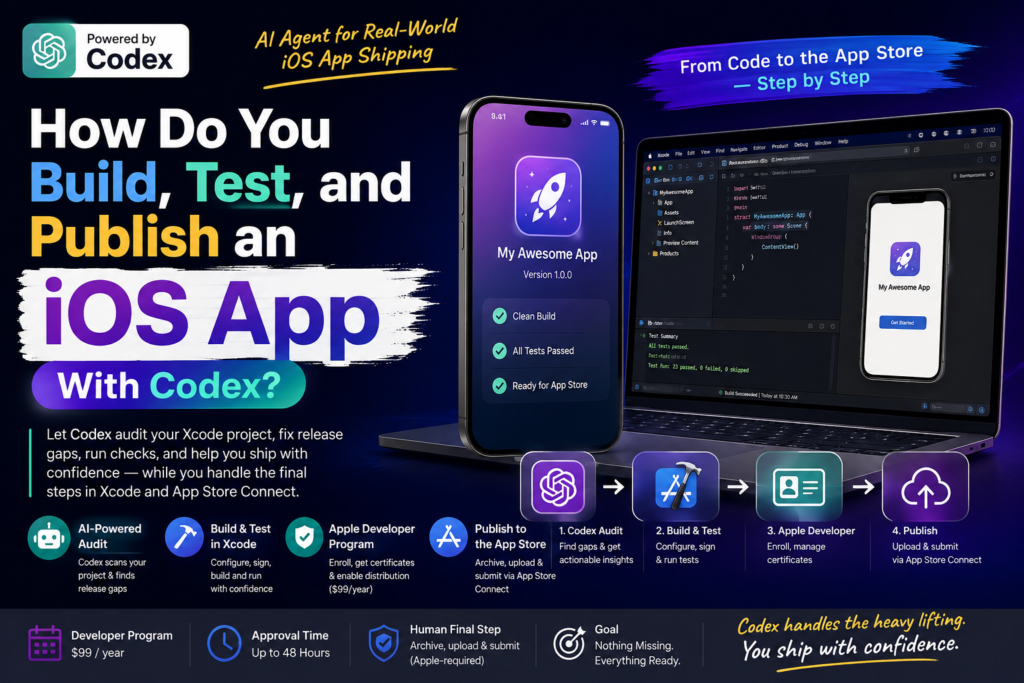
You have a working iPhone app sitting in a project folder, and the only thing standing between you and the App Store is a checklist you have never fully understood. You can build, test, and publish an iOS app with Codex by letting the AI coding agent inspect your Xcode project, flag every release gap, and separate the tasks it can do from the ones only Apple allows a human to complete. This guide walks through that exact workflow, based on a step-by-step release published by The Rundown University on August 18, 2026.
If you are a student or fresher in Odisha exploring how AI agents fit into real software shipping (not just chatbot demos), this is one of the clearest examples yet of an AI agent handling a genuinely high-stakes, multi-system task.
What Is Codex, and Why Use It for an iOS App Release?
Codex is OpenAI’s coding agent, available inside ChatGPT, that can read a local project’s files, run commands, and reason about code changes rather than just answering questions about them. Unlike a general chatbot, Codex can open your Xcode project folder, check its actual configuration, and tell you exactly which values are missing or still set to placeholder text. This matters for an iOS app with Codex because App Store submission is not one task, it is a checklist spread across three separate systems, and most first-time builders lose time bouncing between them without a clear map.
According to The Rundown University’s guide, the workflow separates responsibility cleanly: Codex inspects the local project and runs checks, Xcode manages the target, signing, build, and tests, and Apple Developer manages the paid membership that unlocks distribution. Framed this way, shipping an iOS app with Codex stops feeling like a mysterious Apple ritual and starts looking like a project with a visible gap list.
Question: Can Codex actually submit my app to the App Store on its own? No. Codex can audit, draft, and prep your project, but the final archive-and-upload step inside Xcode, and the App Store Connect submission, remain actions Apple requires a human to complete. Codex’s job is to make sure you walk into that final step with nothing missing.
What Do You Need Before You Start?
Before you attempt to build an iOS app with Codex, gather the same prerequisites listed in the original Rundown University guide:
- A working iPhone app or prototype, along with its local project folder
- ChatGPT with Codex mode enabled, plus Xcode installed on a Mac
- An Apple Account and enrollment in the Apple Developer Program, needed once you move beyond local testing
- The content you’ll need to write a privacy policy and a support page for your app
Apple currently lists Apple Developer Program membership at $99 per year, and the guide notes that approval can take up to 48 hours, so it is worth starting that enrollment early, well before you plan to upload a build.
Step 1: Verify Apple Access and Your Xcode Project
The first real step in shipping an iOS app with Codex is making sure the foundational accounts and tools are actually in place, not assumed to be.
In Xcode, open Settings > Accounts and add the Apple Account you plan to use for this app. Then open Settings > Components and install the current iOS simulator runtime if it is missing, if your Mac is short on storage, this is also a good moment to remove simulator runtimes you no longer use.
Definition: Apple Developer Program is Apple’s paid membership tier that unlocks the ability to distribute apps beyond your own devices, including TestFlight and App Store distribution. Free local development lets you build and run an app on your own simulator or device, but only a paid, approved membership unlocks the certificates and provisioning needed to submit anything publicly.
If your version of Xcode supports connecting an external agent, you can link Codex inside Xcode as an optional convenience. It is not required, Codex can inspect your project files directly, and Xcode can still handle building and testing independently of that integration.
Step 2: Use Codex to Audit Your App’s Release Gaps
This is where an iOS app with Codex starts to look genuinely different from a manual checklist. Instead of you hunting through Xcode’s project settings one tab at a time, you hand Codex a structured prompt and let it produce an evidence-based gap list.
The Rundown University guide’s example prompt asks Codex to review the app for Apple distribution readiness, specifically checking:
- The project target, scheme, and bundle identifier
- Display name, version number, and build number
- App icon, signing team, and release configuration
- Export-compliance setting and simulator configuration
- Test results and any leftover demo or placeholder labels
Question: What should Codex actually output from this audit? A useful audit shows evidence for each check, not just a pass/fail label, lists every remaining gap, and separates which actions belong to Codex, Xcode, Apple Developer, and App Store Connect respectively. This separation keeps you from wasting time trying to fix something in Xcode that actually requires an Apple Developer enrollment step instead.
Codex can also run the release build and the test suite directly. If a command fails because of something environmental, a missing simulator, a stale certificate, the guide recommends letting the agent finish diagnosing the actual cause before assuming the app’s code itself is broken.
One boundary matters here: when Codex flags an issue, you complete the human-only Apple action yourself and then let it re-check the project. You should never hand an AI agent a password, recovery code, certificate secret, or payment detail, even one built specifically for coding tasks.
Step 3: Publish the Required Privacy and Support Pages
App Store distribution requires two public-facing pages before Apple will accept your submission: a privacy policy and a support page. The good news for a solo builder is that you do not need a full marketing website to host these, a simple published page is enough.
In the guide’s own example, a small couples-calendar app called OurDays used Notion-hosted pages for both its privacy policy and its support page, published and tested while signed out to confirm they load for outside visitors. You can have Codex draft the copy for these pages based on what your app actually does, then publish them yourself and pass the final URLs back to Codex so it can verify they are wired into your App Store metadata correctly.
Definition + Expansion: Privacy Policy Page, in this context, is a public URL describing what user data your app collects, stores, or shares. Apple requires this link during submission regardless of how simple your app is, and the guide is specific that the policy needs to match what you are actually shipping, if you later add accounts, analytics, cloud sync, or payments, you need to revisit both the policy and your App Privacy answers in App Store Connect before you distribute an update.
Before packaging the project, confirm you have an app icon ready. If you do not, Codex can generate a placeholder or draft option for you to refine.
Step 4: Build, Archive, and Upload Through App Store Connect
With the audit gaps closed and the public pages live, run the release build and test suite one more time, and give the app icon and project identity a final review. This is the last checkpoint before the workflow moves into Apple-only territory.
Once your Apple Developer Program membership is approved (remember, this can take up to 48 hours), create or confirm your app’s record in App Store Connect using the same bundle identifier you verified with Codex earlier. From there:
- In Xcode, select a generic or real iOS device as the build target.
- Choose Product > Archive.
- Use Distribute App > App Store Connect > Upload.
- Wait for Apple to finish processing the build before it appears in App Store Connect.
- Select the processed build, complete your listing details, and submit for review.
This final sequence is entirely manual by design, Apple does not allow an AI agent to hold the credentials needed to archive and upload a build, and that boundary is exactly why the earlier audit step matters so much. The more gaps Codex catches before this stage, the fewer surprises you hit once you are inside Apple’s own systems.
How Long Does This Actually Take, Start to Finish?
Timelines vary by app complexity, but the structure of this workflow makes the biggest bottleneck predictable well in advance. The Apple Developer Program approval window, up to 48 hours, is the one step you cannot compress, so it belongs at the very start of your plan, not somewhere in the middle.
Everything Codex handles locally (the release audit, drafting privacy and support page copy, running the build and test suite) can realistically happen in a single focused session, especially if your project is already close to feature-complete. The two slower stretches are Apple’s account approval and Apple’s build-processing time after you upload through App Store Connect, and neither of those depends on how fast you or Codex work.
Question: Should I wait for Apple Developer approval before running the Codex audit? No. Run the Codex audit and fix any local project gaps while your Apple Developer Program application is still pending. By the time your membership is approved, your project should already be clean, tested, and ready to archive, which turns a multi-day process into a same-day upload once access unlocks.
A rough sequencing that follows the guide’s structure:
- Day 1: Apply for Apple Developer Program membership; run the Codex release audit in parallel and start closing local gaps.
- Day 1–2: Draft and publish the privacy policy and support pages; confirm both load correctly while signed out.
- Day 1–2 (waiting): Apple Developer approval processes in the background, up to 48 hours.
- Day 2–3: Once approved, create the App Store Connect record, archive the build in Xcode, and upload.
- Day 3+: Apple processes the build, you complete the listing, and you submit for review.
Planning this way means the Codex-driven audit work overlaps with Apple’s own waiting periods instead of stacking on top of them, which is often the difference between a same-week release and one that drags for no real reason.
Codex-Assisted Workflow vs. Traditional Manual iOS Release
| Aspect | Manual Release Checklist | iOS App With Codex |
| Finding release gaps | Manually reading through Xcode project settings tab by tab | Codex audits target, signing, icon, and tests in one structured pass |
| Evidence tracking | Builder keeps notes separately, often incomplete | Codex shows evidence for each check and lists remaining gaps |
| Task ownership clarity | Easy to confuse Xcode-only vs. Apple Developer-only steps | Codex explicitly separates Codex, Xcode, Apple Developer, and App Store Connect actions |
| Privacy/support pages | Often drafted last-minute, sometimes generic | Codex can draft page copy early, matched to actual app behavior |
| Credential handling | Builder manages certificates and passwords directly | Builder still handles all credentials; Codex never touches secrets |
| Final upload | Fully manual | Still fully manual, Apple requires this |
Common Mistakes to Avoid When Using an AI Agent for App Store Submission
Even with a capable AI agent guiding the process, a few habits can derail a release:
- Assuming Codex verified something it only described. The guide is explicit that Codex should show evidence for every check, not just state a status, always ask for the underlying evidence, not a summary claim.
- Skipping early Apple Developer Program enrollment. Since approval can take up to 48 hours, starting late is one of the most common reasons a release slips.
- Letting the privacy policy drift out of sync with the app. If you add a new data-collecting feature later, both the public policy page and your App Privacy answers in App Store Connect need updating before that release goes out.
- Sharing credentials with the AI agent. No coding agent, including Codex, should ever be given a password, recovery code, certificate secret, or payment detail.
- Treating the in-Xcode Codex connection as mandatory. It is an optional convenience for supported Xcode versions, the core workflow works without it.
Why This Workflow Matters for Indian Developers and Students
For students and early-career developers building their first portfolio app, this kind of guided, evidence-based release process lowers a real barrier: Apple’s distribution checklist has historically been intimidating precisely because it spans three unfamiliar systems at once. Learning to direct an AI agent for app development tasks like release audits, rather than only using AI to generate code snippets, is a genuinely transferable skill as more engineering teams in India adopt agentic coding tools inside their existing pipelines.
If you are exploring how agentic AI tools like Codex fit into real software shipping workflows, this is exactly the kind of applied, tool-in-the-loop skill that AI/software teams are starting to look for in junior hires.
FAQ: Building and Publishing an iOS App With Codex
Does Codex replace Xcode for building an iOS app? No. Codex inspects your project, runs checks, and can draft supporting materials, but Xcode remains the tool that manages your target, signing, build, tests, and final archive.
How much does the Apple Developer Program cost? Apple currently lists the Apple Developer Program at $99 per year, and approval can take up to 48 hours after you apply.
Can I skip the privacy policy and support page if my app is simple? No. App Store distribution requires both a public privacy policy URL and a support page URL regardless of how simple the app is; you can host them on a free tool like Notion instead of building a full website.
Is connecting Codex directly inside Xcode required? No. It is an optional convenience available on compatible Xcode versions. The core workflow of using Codex to audit the project and Xcode to build it works without that in-app connection.
Should I give Codex my Apple account password to speed things up? No. You should never share a password, recovery code, certificate secret, or payment detail with an AI coding agent, even one designed to assist with your release process.
What happens after I upload my build through App Store Connect? Apple processes the build before it appears in App Store Connect. Once processed, you select it, complete your app listing, and submit it for review.
Keep Exploring AI-Assisted Development
If this walkthrough of shipping an iOS app with Codex sparked ideas for your own project, explore more hands-on AI workflow breakdowns and training resources on Kalinga.ai, where we track how agentic AI tools are reshaping real development and career pipelines for builders across India.