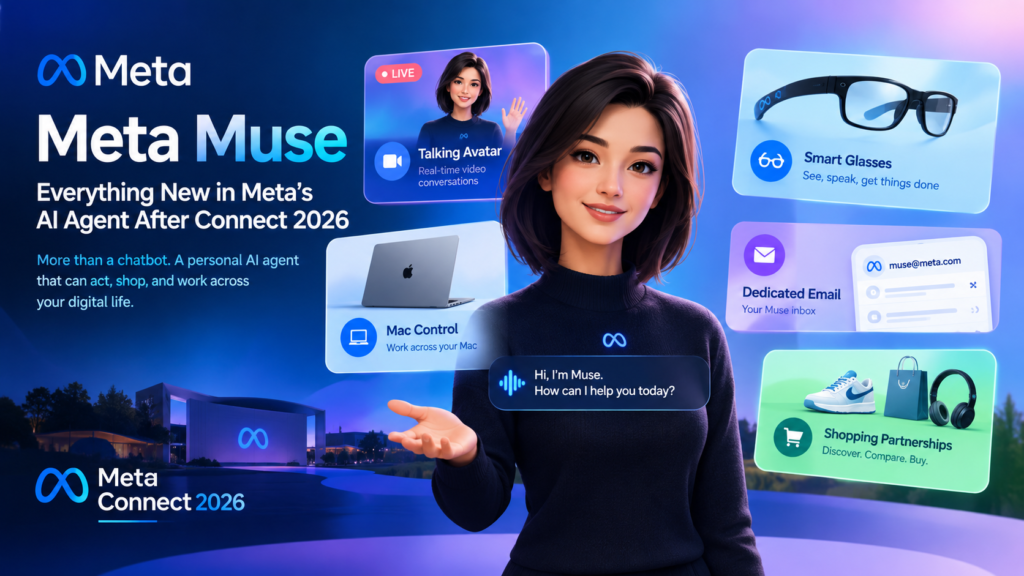
Meta Muse is Meta’s personal AI agent, a system that does tasks for you instead of only answering questions, and at Connect 2026 the company added a talking avatar, smart glasses support, Mac control, its own email address, and a wave of shopping partnerships. Muse launched only a few weeks ago, and on Wednesday, September 23, 2026, Mark Zuckerberg made it the centerpiece of his keynote in Menlo Park. If you want to know what changed, what is shipping now, what is still “coming soon,” and whether you should trust an agent with your inbox and your payment details, this guide answers each question in a self-contained section.
Key Takeaways
- Muse is a personal AI agent that connects to your apps, takes actions, and keeps working after you close the app.
- It is powered by Muse Spark, Meta’s multimodal model built for agentic work.
- New at Connect: a real-time video avatar, smart glasses integration, Mac computer control, a dedicated email address, and expanded shopping connectors.
- Most of the new features have no firm launch date. Meta says “soon” or “in the coming months.”
- Muse is free for a large number of tokens today. Meta expects to earn a small fee on transactions over time.
- Muse is currently rolling out in the US, and neither Meta nor TechCrunch has announced an India date.
What Is Muse?
Meta Muse is a personal AI agent from Meta that handles everyday tasks and long-term goals on a person’s behalf across the apps and accounts they already use. It works through the Muse app, on muse.ai, and directly inside WhatsApp, so talking to it feels like messaging another person.
Definition and expansion
A chatbot answers. An agent acts. That distinction is the whole point of Muse. According to Meta’s launch post, a person tells Muse what needs doing, and it can send an email, book travel, open a browser, fill out forms, and negotiate. For larger goals, it builds a plan, coordinates your time and resources, and then advances the work by itself. For slower tasks, it keeps going in the background and returns when something changes or when it needs your approval, for example before it sends an email or makes a purchase.
Meta’s stated examples include selling a car for more, lowering a bill, and adjusting a training plan when the rest of your life shifts. It also remembers details you mentioned only once, so it can act on them later, such as turning a saved recipe reel into a grocery list or remembering a friend’s dietary restrictions before invitations go out.
How do Muse, Muse Spark, and Jolly relate?
They are three different layers of one product. Confusing them is common, so here is the clean split:
- Muse is the agent, the product you talk to and delegate work to.
- Muse Spark is the underlying multimodal model. Meta describes it as its most capable model to date, and it was introduced in April 2026 as the first model from Meta Superintelligence Labs.
- Jolly is the name Zuckerberg gave the physical avatar of the Muse agent at Connect.
Keeping these apart matters if you publish about the topic, because search and AI retrieval systems treat the agent, the model, and the avatar as separate entities.
What Did Meta Announce for Meta Muse at Connect 2026?
Meta announced five headline additions: a digital avatar, smart glasses support, Mac computer control, a dedicated email address, and a large set of shopping partnerships and connectors. Zuckerberg opened the keynote by calling Muse the centerpiece of Meta’s vision and said he expects it to grow into a “personal superintelligence” used by billions of people, according to TechCrunch. The details below follow the order Meta presented them.
Does Muse get its own avatar?
Yes, soon. Users will be able to create a distinct digital avatar for their own agent and video chat with it in real time. A new model called Muse Realtime Avatar powers the feature, and it was demoed on stage at Connect. The idea is to give a previously faceless assistant a face, body, and voice so conversations feel more personal. Users can give the avatar tasks and ask it questions live. TechCrunch noted that the feature carries a hint of the old Metaverse ambition, though this time it is attached to an agent that can actually do work.
No launch date was given for the avatar.
Is Muse coming to smart glasses?
Yes, in “the coming months.” Muse will be integrated with Meta’s smart glasses line, so you can talk to your agent by speaking to your glasses and activating it with a wake word. Meta says the agent will be able to guide a personalized workout, log meals, book an appointment, and help you buy products you see. As with the phone version, Muse will work in the background and check back when it finishes.
The glasses angle is strategically important. An agent that lives on a wearable is always within reach, and it sees what you see. That makes voice-first delegation (“buy this,” “remind me about that”) far more natural than typing into an app.
Can Muse control a Mac?
Yes, that capability is on the way. Meta is bringing Muse’s computer work to Mac, expanding on an earlier announcement. Users will be able to delegate tasks, and like the agents from OpenAI and Anthropic, Muse will be able to operate any app on the desktop. Alexandr Wang, Meta’s chief AI officer, described the goal at Connect: you can help run a small business or get work done, and you can step away from your computer while Muse keeps working through the jobs you lined up.
This is the feature that moves Muse from a lifestyle assistant toward a genuine work tool.
Will Muse have its own email address?
Yes, and Wang said it will arrive “soon.” Because Muse works in the background, it needs an identity of its own. Users will be able to add Muse to an email thread or forward emails to it so it can handle them on their behalf. A dedicated address also creates a cleaner boundary: rather than giving an agent full access to your personal inbox, you can route specific threads to it.
What shopping partnerships did Meta announce?
Meta signed partnerships with Stripe and Shopify and added a list of retail and service connectors. Here is the summary:
- Payments: Muse checks out with Link, built by Stripe. Meta’s launch post says Muse is the first AI agent covered by Link’s purchase protections, and that Link’s agent wallet creates a one-time-use card so your real card details stay hidden. Shop Pay and PayPal support are also part of the picture, and 1Password support is planned so Muse can use logins you already have.
- Catalog access: According to Wang, Muse can access the full Shopify product catalog agentically.
- Retailers: Best Buy, Gap, Sephora, Walmart, and Wayfair.
- Travel and groceries: Expedia now, with Instacart coming soon.
- Work tools: GitHub, Granola, and Notion.
Can developers build for Meta Muse?
Yes. Meta recently opened its platform so outside developers can build their own connectors, and Wang said the company received more than 1,500 applications in under a week. He called it a generational opportunity to build for a new platform as it takes off. For small businesses in particular, a connector could become the way an agent discovers and buys from them.
How Does Muse Work Under the Hood?
Muse runs on Muse Secure VM, a dedicated virtual computer in the cloud that houses both the agent and the person’s data. Meta’s argument is that personal agents need a new kind of secure computer, and that a shared chatbot architecture is the wrong foundation for something that holds your credentials.
What is Muse Secure VM?
It is an isolated cloud machine that belongs to one user. Meta says it is contained so no one else’s agent can reach it, and it is where the data and credentials for connected services are stored. The agent has its own browser inside that machine, which is how it can open pages and fill out forms without touching your local device.
What is the Sentinel agent?
Sentinel is a second agent that supervises Muse. It runs on the same machine but is separated from Muse at the system level. Per Meta, nothing Muse does reaches the internet unless Sentinel approves it, and Sentinel asks you for permission when needed. In practice, this is a checks-and-balances design: the agent that acts is not the agent that decides what leaves the box.
What controls do users get?
Meta lists a set of controls that put the person in charge of access. Together they define how much you can trust the system:
- Muse cannot see your passwords or payment methods. Credentials go into secure storage, so Muse can use them without viewing them.
- Muse checks with you before sensitive actions such as sending an email or making a purchase.
- You get a full audit trail of what Muse has done and plans to do.
- You choose which apps connect and how much access each one has. For email, you can allow reading only, or reading and sending.
- You can change access or disconnect a service at any time.
- You can opt out of having your interactions used to train Meta’s AI models.
- Meta says Muse does not share your conversations or VM data with its ad systems.
- You can tell Muse to forget specific things it has learned.
Later this year, Meta plans to introduce Muse Confidential VM, in which the entire VM, including your data and conversations, is encrypted with a key only you hold, so that not even Meta can access it.
How Much Does Meta Muse Cost?
Muse is free for most of what people need, with subscription plans for heavier use, and Meta expects to earn a small fee on transactions. Zuckerberg said Meta is making Muse free for a huge number of tokens, with the expectation that over time the company will profit by taking a small cut of transactions. He also suggested Muse could make money for its users.
This is the strategic core of the announcement. Most AI subscriptions charge for access. Meta is betting on a commerce model, where the agent is cheap or free and value is captured when it completes a purchase or booking. That explains the Stripe, Shopify, PayPal, and retailer partnerships: each one is a place where a transaction, and therefore revenue, can happen.
How Does Muse Compare With Other Assistants?
Muse sits between a chat assistant and a desktop work agent, with a stronger consumer and commerce focus than either. The table below compares the three categories rather than specific competing products, because features in this space change quickly.
| Feature | Chat assistant | Desktop work agent | Meta Muse |
| Core job | Answers questions and drafts text | Operates apps on your computer | Runs errands, goals, and purchases across apps |
| Where it lives | Browser or app | Your desktop | Cloud VM, app, WhatsApp, planned glasses and Mac |
| Acts without you watching | Rarely | Yes, on jobs you queue | Yes, and returns when it needs approval |
| Payments | Usually none | Varies | Link by Stripe, one-time cards, Shop Pay and PayPal support |
| Permission model | Conversation-level | App and file access on your device | Per-app access, Sentinel approval, audit trail |
| Business model | Subscription | Subscription or usage-based | Free tier plus subscription and planned transaction fee |
| Availability (per Meta) | Global in most cases | Varies by product | US rollout first |
The takeaway: Muse’s differentiator is not raw intelligence. It is reach (WhatsApp and glasses), a security architecture built around a dedicated VM, and a monetization model tied to shopping.
What Is Still Unclear About Meta Muse?
Several important details remain unconfirmed. Anyone writing about or planning around the agent should treat the following as open questions:
- Dates. The avatar, the smart glasses integration (“the coming months”), the Muse email address (“soon”), and the Instacart connector have no specific launch dates.
- Geography. Meta’s launch post describes a US rollout on iOS, Android, and muse.ai. No international schedule was published in the sources reviewed for this article.
- Pricing tiers. Meta says subscription plans exist for people who want to do more, but the exact tiers and limits were not detailed.
- Transaction fees. Zuckerberg described the fee as small, but no percentage was given.
- Real-world reliability. Demos on stage are controlled. How well Muse handles messy tasks like negotiating a bill or rebooking travel will only be clear once many people use it.
Why Does Muse Matter for India?
Muse matters for India because it signals where consumer AI is heading, and because its connector platform is open to developers anywhere. Even though the current rollout is US-first, three shifts are worth watching for students, freshers, and young professionals.
First, agents are becoming a distribution channel. When an agent decides which store, service, or tool to use, being “connected” to it matters as much as ranking on a search page. Indian startups and small businesses that build connectors early could reach users in a way that traditional advertising does not.
Second, the skills market is shifting. The roles growing around agents are not only research roles. They include people who can design workflows, write reliable tool integrations, test agent behavior, and reason about permissions and security. Those are learnable skills, and the 1,500-plus connector applications Meta received in under a week suggest that developer demand is real.
Third, WhatsApp is central to the design. Muse works directly inside WhatsApp, a product already deeply embedded in daily life in India. If and when Meta extends Muse beyond the US, that channel could make adoption faster than for an app people must download and learn. This is a reasonable inference from the product design, not an announced plan, so treat it as something to watch rather than something confirmed.
How Can You Prepare for Meta Muse and Agentic AI?
Start by learning how agents are built and controlled, not just how to prompt them. A practical starting list:
- Learn the vocabulary: agents, tools, connectors, permissions, and audit logs.
- Practice delegation: write task descriptions with a clear goal, constraints, and an approval point.
- Study security basics: least-privilege access, credential isolation, and why a supervising agent like Sentinel is a useful pattern.
- Build one small integration: even a simple connector to a calendar or notes app teaches how agents call external services.
- Track official sources: rely on Meta’s newsroom and reputable reporting for launch dates, not social media rumors.
- Audit your own accounts: decide in advance which services you would and would not connect to any agent.
Frequently Asked Questions About Meta Muse
What is Muse in one sentence?
Muse is a personal AI agent that takes actions for you across your apps, powered by Meta’s Muse Spark model, and available through the Muse app, muse.ai, and WhatsApp in the US.
When did Muse launch?
Meta introduced Muse on September 8, 2026, and expanded its plans at Connect on September 23, 2026.
Is Muse free?
Meta says it is free for most of what people need, with subscription plans for heavier use. Zuckerberg said Muse is free for a huge number of tokens, with Meta expecting to take a small fee on transactions over time.
Is Muse safe to connect to my email and payments?
Meta says Muse runs in an isolated VM, cannot see your passwords or payment methods, asks before sensitive actions, and shows an audit trail. Those are the company’s claims, and independent testing will matter. Start with limited, read-only access and expand only if you are comfortable.
Can Muse run on my computer?
A Mac version is coming that lets Muse operate any app on your desktop. No exact date was given.
Does Muse work in India?
Meta’s launch post describes a US rollout. No India availability has been announced in the sources reviewed for this article.
Conclusion: What Muse Means Next
Meta Muse is Meta’s clearest bet yet that the next phase of consumer AI is delegation, not conversation. The Connect 2026 additions make that bet concrete: an avatar that gives the agent a face, glasses that put it within reach, a Mac version that lets it do real work, an email address that gives it an identity, and payment and retail partnerships that let it close transactions. What remains to be proven is reliability, pricing, and trust.
For learners and builders, the practical move is to understand how agents work and how to control them. If you want structured, India-focused guidance on AI agents, LLM engineering, and how to turn these announcements into career skills, explore the AI training resources and workshops at Kalinga.ai.