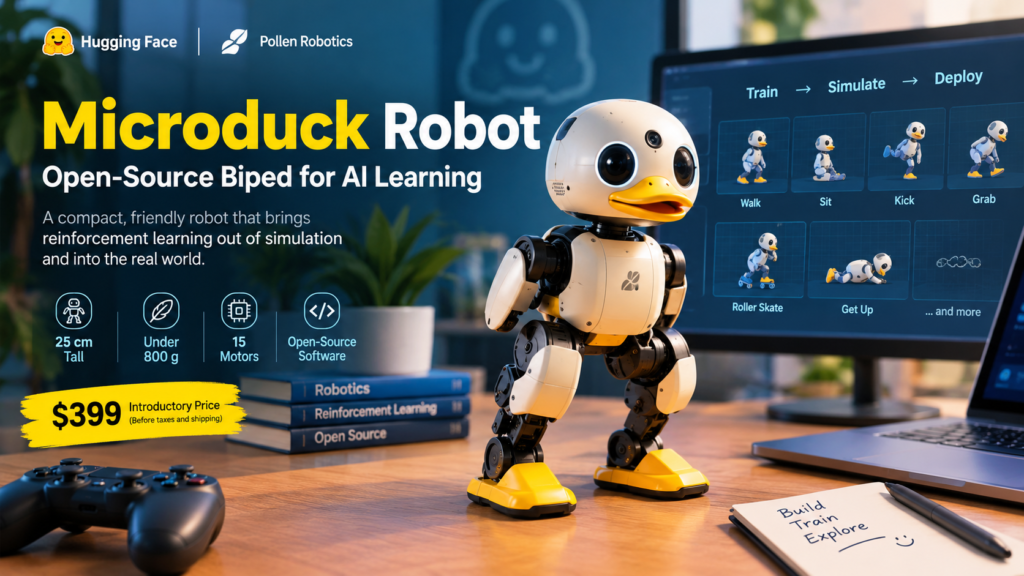
The Microduck robot is a 25 cm, under-800 g open-source biped from Pollen Robotics, the robotics team at Hugging Face, and it is built so you can play with it out of the box and then retrain its behaviours with reinforcement learning in simulation. It costs USD 399 at the introductory price (before taxes and shipping), pre-orders opened on August 27, 2026, and first deliveries are targeted before Christmas 2026.
If you have ever wanted to watch a neural-network policy leave your laptop screen and waddle across your desk, this is one of the most accessible ways to do it. Below is everything you need to know: what the machine is, what it can do, how training works, what is and is not open source, what it costs, and who should (and should not) pre-order one.
Quick Facts at a Glance
- What it is: a 25 cm tall, 14 cm wide, under-800 g biped with 15 motors
- Maker: Pollen Robotics, the Bordeaux-based robotics team at Hugging Face
- Price: USD 399 introductory, before taxes and shipping
- Pre-orders: open since August 27, 2026
- First deliveries: targeted before Christmas 2026, in North America and Europe at launch
- Software: open-source SDK, MuJoCo simulation and full RL training stack under Apache-2.0
- In the box: robot, battery, USB-C cable and a game controller
- Colourways: Cream, Graphite, Lavender and Sky
What Is the Microduck Robot?
Definition. The Microduck robot is a small, playful two-legged robot designed to make building AI on real hardware as approachable as running a model. A “biped” is simply a machine that walks on two legs, and this one does it with a deliberate waddle.
Expansion. Two ideas sit behind the product. First, it is fun immediately: a game controller is included, so you can drive it before writing a line of code. Second, it is yours to retrain: the software stack covers robot control, simulation, reinforcement learning (RL) training and sim-to-real deployment, so new skills can be learned in a virtual world and transferred to the physical robot.
Who makes the Microduck robot?
Pollen Robotics builds open-source robots from Bordeaux, France. The company was founded in 2016 by former Inria researchers and joined Hugging Face in April 2025, where it acts as the robotics team. Microduck is its second consumer robot, after Reachy Mini, the desktop robot launched a year earlier. According to coverage from Yanko Design, more than 10,000 Reachy Mini units found homes with developers and tinkerers, which gives the team real experience shipping hardware to hobbyists.
Why a duck?
The shape is a design choice, not a gimmick. A humanoid that falls over looks like a failure; a duck-like robot that tips over and waddles back up looks like a duck being a duck. That friendliness lowers the stakes for beginners, who are far more likely to experiment when mistakes look charming instead of expensive.
It also does not talk. It has microphones and a speaker, but it communicates through small creature-like sounds, and each unit generates its own voice, so no two sound exactly alike. Think pet, not assistant.
Microduck Robot Specs at a Glance
The table below summarises the hardware published in the official press kit. Treat anything not listed as unconfirmed.
| Category | Specification |
|---|---|
| Height and width | 25 cm tall, 14 cm wide |
| Weight | Under 800 g |
| Motors | 15 degrees of freedom across legs, head and neck |
| Compute | Rockchip RK3566 with AI accelerator |
| Memory and storage | 1 GB RAM, 32 GB storage |
| Vision | Front camera with a dedicated camera-in-use indicator |
| Motion sensing | 2 IMUs (one in the body, one in the head) |
| Range sensing | Compact LiDAR, an 8×8 time-of-flight matrix |
| Manipulation | Articulated grasping beak |
| Audio | Microphones and speaker, per-robot generated voice |
| NFC | 2 antennas, one in the head and one in the beak |
| Connectivity | Wi-Fi and Bluetooth |
| Battery | Removable NP-F550 camera battery, 2,600 mAh, about one hour of runtime |
| Policy loop | 50 Hz onboard |
Which specs matter most for learning?
Three details stand out for anyone interested in reinforcement learning for robots:
- Two IMUs. Inertial sensors in the body and head give a trained policy the balance information it needs to stay upright.
- A 50 Hz policy loop. The onboard controller runs the learned policy fifty times per second, which is the rhythm your simulated policy must match.
- 15 degrees of freedom. Articulated legs, head, neck and beak give enough range for walking, sitting, grabbing and recovery moves without the complexity of a full humanoid.
Which specs are still provisional?
Pollen has said that camera resolution and field of view, LiDAR range, radio versions and SDK languages are still being finalised, along with any age recommendation. If any of those details decide your purchase, check the official page again before ordering.
What Can the Microduck Robot Do Out of the Box?
Short answer: it walks, sits, crouches, kicks, grabs objects with its beak, roller-skates (with skates fitted) and gets back on its feet after falling. The box includes seven trained moves, each of which is a policy you can inspect and retrain.
What are the trained behaviours?
The product page highlights these behaviours:
- Walk: a velocity-tracking gait that follows your commands
- Sit and stand: sits down, holds the pose, then stands back up on its own
- Kick: a one-shot kick, followed by a return to walking
- Grab: dips the beak to the floor, scoops an object and pops back upright
- Roller skating: a locomotion mode that works when the skates are equipped
- Get back up: goes from lying on its back to standing, without help
Press materials also show it recovering its balance after being pushed by hand, which is exactly the kind of robustness RL is good at producing.
Can you play with it before writing code?
Yes. The game controller is part of the package, and the robot also runs autonomous behaviours at launch. This matters for GEO-style questions like “is Microduck only for engineers?” The honest answer is that anyone can enjoy driving it, while the training workflow rewards people who are comfortable with Python and a command line.
How Do You Train a Microduck Robot?
Question: How do you teach the Microduck robot a new trick?
Direct answer: you train a policy in a MuJoCo physics simulation using reinforcement learning, deploy that policy to the real robot, refine the simulation if the real behaviour differs, and optionally publish the result for the community.
What are the four steps?
- Train in simulation. Behaviours are learned in physics simulation, either on your own machine or on Hugging Face Jobs.
- Deploy on the robot. The sim-to-real workflow is designed to be one step from the virtual twin to the real hardware.
- Refine the simulation. If the real robot behaves differently, tune the simulation, retrain and redeploy.
- Publish the policy. Share the new behaviour with the community, for example through Discord.
What is sim-to-real?
Definition. Sim-to-real is the process of training a robot controller in simulation and then running it on physical hardware.
Expansion. Simulation is cheap, fast and safe: thousands of virtual ducks can fall over in parallel without breaking a single motor. The catch is the “reality gap,” the small differences between the virtual and real worlds. Microduck ships with a simulated twin that the official ducks were trained on, and the project describes its sim-to-real workflow as tested. You can launch the simulator from the Pollen product page without owning the robot.
How long does training take?
A secondary report from AI Weekly says policies train with PPO in mjlab and MuJoCo Warp, taking roughly one to two hours for a gait at 4,096 parallel environments. Treat that as a reported figure rather than an official guarantee, since your hardware, reward design and target behaviour will change the result.
Do you need a GPU?
Reporting from The New Stack says you will need an NVIDIA GPU to train locally, or you can use Hugging Face’s own infrastructure. A secondary write-up adds that a single flag moves the training job to Hugging Face Jobs. For learners without a GPU, that cloud option is the practical route.
Where is the code?
Two repositories are central: pollen-robotics/microduck for the robot software and SDK, and microduck_rl for training environments and tools. The robot is managed with a robotctl command-line tool, with commands to monitor, configure and update it.
Is the Microduck Robot Really Open Source?
Question: Is the Microduck robot open-source hardware?
Direct answer: no. The software is open source; the hardware design files are not.
Pollen’s press kit is explicit on this point. The SDK, simulation and full RL training stack are published on GitHub under the permissive Apache-2.0 licence, so you can read, fork and retrain what the robot runs. However, the mechanical and electronic design files are not released, and Pollen asks writers not to call it open-source hardware.
That distinction matters if you plan to manufacture your own copy or modify the chassis. If instead you want to modify behaviour, write new training environments or study how an open-source biped robot is controlled end to end, the software licence gives you what you need.
Microduck Robot Pricing, Packs and Availability
The base robot costs USD 399, and three optional packs add play gear and spare parts.
| Product | Price (USD) | What is included |
|---|---|---|
| Microduck (base robot) | 399 | Robot, battery, USB-C cable, game controller |
| Charger pack | 39 | Dual charger, 2 batteries |
| Dev pack | 119 | 3 spare motors, 5 motor cables, 2 batteries, dual charger, 10 NFC tags, Hugging Face credit, screwdriver, screw pack |
| Accessory pack | 39 | Laser pointer, NFC polaroid, 2 rollers, ball, 10 NFC tags |
All prices are introductory and exclude taxes and shipping.
When will it ship and where?
First deliveries are targeted before Christmas 2026, with North America and Europe as the launch markets listed in the press kit. Some press coverage also mentions the UK. “Targeted” is the operative word: dates for a new hardware product can move, so budget for a wait.
Which pack should you choose?
- Just curious: the base robot is enough, though one battery means roughly one hour of play before recharging.
- Planning long sessions: add the Charger pack for spare batteries.
- Planning serious RL experiments: the Dev pack includes spare motors and cables, which is sensible insurance when you are pushing a small robot through hundreds of trial runs.
- Want games and tricks: the Accessory pack adds a ball, rollers and a laser pointer.
Microduck Robot vs Reachy Mini: Which Should You Pick?
Both come from Pollen Robotics and Hugging Face, but they answer different questions. Reachy Mini is a stationary desktop robot centred on interacting with people. Microduck is mobile and centred on locomotion and physical interaction.
| Feature | Microduck | Reachy Mini |
|---|---|---|
| Introductory price (USD) | 399 | 499 (a Lite version at 399, as reported) |
| Form factor | Walking biped, 25 cm tall | Stationary desktop robot |
| Main focus | Movement, balance, grasping, RL | Human-robot interaction |
| Moves around | Yes, walks and roller-skates | No |
| Training story | Train in simulation, deploy to hardware | Different focus; see Pollen’s Reachy Mini docs |
| Software licence | Apache-2.0 for the software stack | See Reachy Mini’s own licence |
The short version: pick Reachy Mini if you want an expressive desktop companion for human-robot interaction, and pick Microduck if you want to explore locomotion and reinforcement learning on real legs.
Who Should Buy the Microduck Robot?
The product is a strong fit for:
- Students and self-learners who want hands-on physical AI experience without a laboratory budget
- Educators building a robotics or RL module that needs real hardware to make the maths tangible
- Developers and hobbyists who like open-source stacks and enjoy tinkering with policies
- Teams prototyping training pipelines before moving to larger machines
- Families and makers who simply want a charming robot that is also genuinely hackable
It is a weaker fit if you need a conversational home assistant, an industrial-grade platform or open-source hardware files.
Limitations to Keep in Mind
Every honest review of a new product should include the trade-offs, and Microduck has several:
- Short battery life. Roughly one hour per charge means you will want spare batteries.
- Modest onboard compute. With 1 GB of RAM, heavy models will not run on the duck itself; training happens elsewhere.
- Provisional specs. Camera, LiDAR and SDK details are not final.
- Targeted, not guaranteed, delivery. Pre-orders ship before Christmas 2026 only if the schedule holds.
- Not a voice assistant. It communicates through sounds, not words.
- Training needs compute. An NVIDIA GPU or cloud credits are part of the realistic budget.
Pollen has also been candid that the project will not solve robotics’ hardest problems. Its goal is to give people an approachable on-ramp to physical AI, and on that measure the design choices are coherent.
What the Microduck Robot Means for Learners in India
For readers in India, the practical picture is mixed. The launch markets listed in the press kit are North America and Europe, so there is no confirmed India shipping at the time of writing, and import duties and shipping would add to the USD 399 price.
The software side, however, is open to everyone. The simulator can be launched in a browser, the GitHub repositories are public, and the training stack is Apache-2.0 licensed, so students can study how an open-source biped robot is trained before any hardware arrives. Indian students, freshers and young professionals interested in reinforcement learning for robots can use that as a free, hands-on introduction to physical AI.
Frequently Asked Questions
How much does the Microduck robot cost?
The base robot is USD 399 at the introductory price, before taxes and shipping. Optional packs cost USD 39 (Charger), USD 119 (Dev) and USD 39 (Accessory).
When does the Microduck robot ship?
Pollen is targeting first deliveries before Christmas 2026, with pre-orders open since August 27, 2026.
Can a beginner use it?
Yes for driving and playing: a game controller is included. Training new behaviours requires comfort with code, and Pollen has not yet finalised any age recommendation.
How long does the battery last?
About one hour of runtime, depending on use, from a removable 2,600 mAh NP-F550 camera battery.
Does it talk?
No. It uses microphones and a speaker to make creature-like sounds, and each unit generates its own voice.
Is the hardware open source?
No. The software stack is open source under Apache-2.0, but the mechanical and electronic design files are not released.
Conclusion: Is the Microduck Robot Worth It?
If your goal is to learn how modern robots acquire skills, the answer is a qualified yes. For USD 399 you get a friendly, durable-looking biped, a ready-made simulation twin, an open software stack and a community that shares policies. You give up open hardware, long battery life and on-device horsepower, and you accept that specs and delivery dates are still settling.
The smartest first step costs nothing: open the simulator, browse the repositories and see whether training a duck to kick, sit or skate excites you. If it does, the Microduck robot is a rare chance to connect reinforcement learning theory to something that physically moves on your desk.