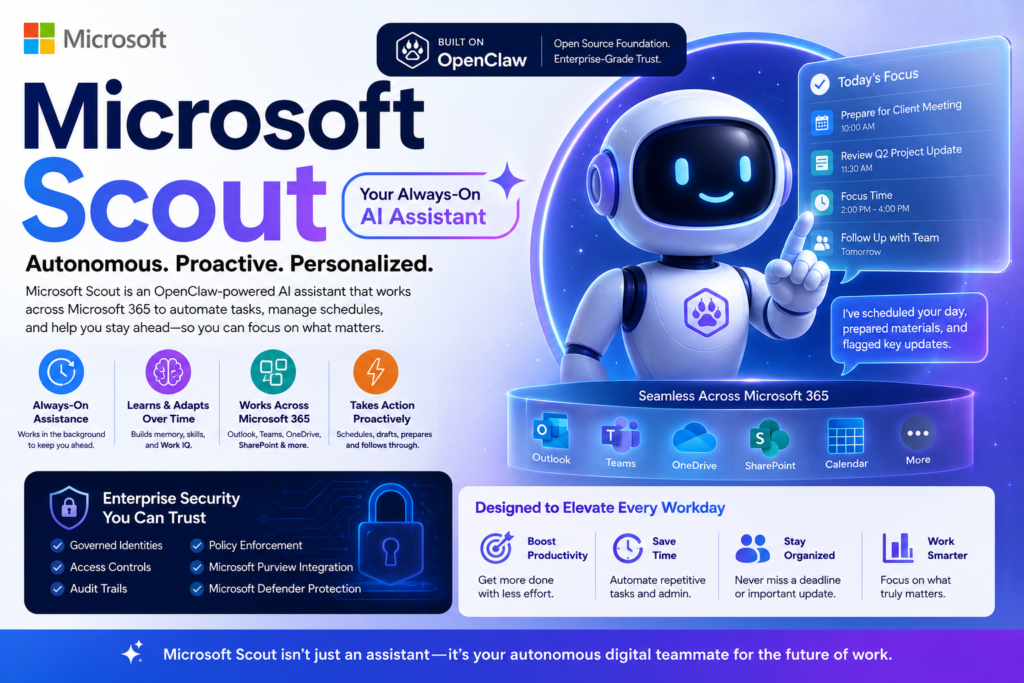
Artificial intelligence is rapidly moving beyond chatbots and into a new era of autonomous digital coworkers. Microsoft’s latest announcement, Microsoft Scout, signals one of the biggest shifts yet toward AI systems that can actively manage work rather than simply respond to prompts.
In short, Microsoft Scout is an always-on AI personal assistant built on OpenClaw technology that can learn user preferences, automate tasks, coordinate workflows, and operate across Microsoft’s ecosystem with a persistent identity. Rather than waiting for instructions, it aims to proactively help users get work done.
What Is Microsoft Scout?
Definition
Microsoft Scout is Microsoft’s first “Autopilot” agent—an always-active AI assistant designed to operate autonomously across Microsoft 365 applications, web environments, and desktop experiences. Unlike traditional assistants that respond to individual requests, Scout is designed to maintain ongoing awareness of work activities and take action on behalf of users within approved permissions.
Expansion: Why It Matters
The launch represents a significant evolution in enterprise AI.
Most AI tools today work like smart search engines or conversational assistants. Users ask questions, and the AI responds. Scout introduces a different model: persistent assistance.
This means the assistant can:
- Monitor upcoming deadlines
- Coordinate meetings
- Organize schedules
- Surface important information
- Prepare meeting materials
- Learn recurring work patterns
- Execute approved workflows automatically
Microsoft describes this as moving from answering questions to following through on tasks.
How Microsoft Scout Works
Persistent Identity and Memory
One of the defining characteristics of Microsoft Scout is its persistent identity.
Users can name their Scout instance and continuously train it through feedback. Over time, the system develops a deeper understanding of:
- Personal preferences
- Communication styles
- Scheduling habits
- Recurring workflows
- Organizational priorities
Microsoft executives describe this as creating an assistant that accumulates memories and skills, becoming increasingly effective as it learns from interactions.
Cross-Platform Intelligence
Unlike assistants confined to a single application, Scout operates across multiple environments.
Its reach includes:
- Outlook
- Teams
- OneDrive
- SharePoint
- Calendar
- Contacts
- Desktop applications
- Web browsers
- MCP-enabled systems
This broad visibility allows the assistant to connect information across traditionally separate tools and workflows.
Autonomous Task Execution
Perhaps the most important capability is autonomy.
Rather than waiting for explicit instructions, Scout can:
- Schedule meetings
- Coordinate across time zones
- Draft agendas
- Block focus time
- Identify stalled projects
- Surface organizational risks
- Generate preparation materials
The goal is to reduce administrative overhead while allowing knowledge workers to focus on higher-value tasks.
Microsoft Scout vs Copilot vs OpenClaw
Many readers are asking a simple question:
Question: Is Scout just another version of Copilot?
Direct Answer: No. Scout is designed to be more autonomous, persistent, and proactive than Copilot.
| Feature | Microsoft Scout | Microsoft Copilot | OpenClaw |
|---|---|---|---|
| Always-On Operation | Yes | No | Yes |
| Persistent Identity | Yes | Limited | Yes |
| Enterprise Governance | Extensive | Extensive | Varies |
| Autonomous Actions | Yes | Limited | Yes |
| Microsoft 365 Integration | Native | Native | External |
| Custom Skill Development | Yes | Partial | Extensive |
| Audit Trails | Yes | Yes | Depends on setup |
| Open Source Foundation | Built on OpenClaw | No | Yes |
Scout effectively combines the flexibility of OpenClaw with Microsoft’s enterprise infrastructure, governance, and security controls.
Key Features That Make Scout Different
Always-On Assistance
Most AI tools disappear after a conversation ends.
Scout continues operating in the background.
Microsoft refers to this category as “Autopilots,” agents that maintain awareness of ongoing work and can take action without requiring repeated prompts.
This changes the relationship between humans and AI from occasional interaction to continuous collaboration.
Personalized Skills
Another major differentiator is customization.
Users can create specialized skills that reflect how they prefer work to be done.
Examples might include:
- Meeting preparation workflows
- Client follow-up procedures
- Weekly reporting routines
- Project management processes
- Research workflows
As these skills accumulate, the assistant becomes increasingly tailored to the individual user.
Work IQ and Context Awareness
Microsoft introduces a concept called Work IQ.
According to Microsoft, Work IQ enables Scout to build context around:
- Priorities
- Projects
- Relationships
- Deadlines
- Work habits
Rather than processing each request in isolation, Scout continuously develops an understanding of the user’s professional environment.
Enterprise Security and Governance
Security remains one of the biggest concerns surrounding autonomous AI systems.
To address this challenge, Microsoft Scout includes:
- Governed identities
- Access controls
- Credential protection
- Audit logging
- Policy enforcement
- Human approval mechanisms
- Microsoft Purview integration
- Microsoft Defender protections
Microsoft is also contributing policy conformance tools back to the OpenClaw ecosystem.
Why Microsoft Is Betting on Autonomous AI Agents
The launch of Microsoft Scout reflects a broader industry trend.
AI is evolving through three major stages:
Stage 1: Information Retrieval
Examples:
- Search engines
- Knowledge bases
- FAQ systems
Stage 2: Conversational AI
Examples:
- ChatGPT
- Claude
- Gemini
- Copilot
Stage 3: Autonomous Agents
Examples:
- Scout
- OpenClaw-based assistants
- Enterprise AI agents
The third stage focuses on execution rather than conversation.
Instead of helping users understand what to do, the system helps do it.
This shift could fundamentally change knowledge work over the next decade.
Benefits of Microsoft Scout
Question: What advantages does Scout provide?
Direct Answer: Scout aims to reduce repetitive work while improving productivity through proactive assistance.
Potential benefits include:
- Less time spent scheduling meetings
- Better task prioritization
- Reduced context switching
- Faster information retrieval
- Automated workflow execution
- Improved deadline management
- Personalized work support
- Enhanced organizational coordination
For enterprise users, these efficiencies could translate into significant productivity gains across teams and departments.
Risks and Challenges
Every transformative technology introduces trade-offs.
Privacy Concerns
To function effectively, Scout requires access to:
- Emails
- Calendars
- Documents
- Communication platforms
- Workflow systems
This level of access naturally raises concerns about privacy, oversight, and governance.
Autonomy Risks
Autonomous systems can occasionally make incorrect decisions.
Potential issues include:
- Scheduling mistakes
- Misinterpreting priorities
- Acting on incomplete context
- Over-automation
These challenges explain Microsoft’s emphasis on approval workflows, policy enforcement, and audit trails.
User Dependency
Another emerging concern involves reliance on AI assistants.
As systems become more capable and personalized, users may increasingly depend on them for decision-making and daily workflow management.
Organizations will need to balance productivity gains with maintaining human oversight and critical thinking.
What Microsoft Scout Means for the Future of Work
The introduction of Microsoft Scout may eventually be viewed as an important milestone in enterprise AI.
Historically, workplace software helped people organize information.
Today’s AI tools help people interpret information.
Tomorrow’s autonomous agents will increasingly help people act on information.
That distinction is significant.
When software begins coordinating schedules, managing tasks, monitoring deadlines, preparing materials, and making operational decisions, it transitions from a productivity tool into a collaborative digital worker.
Microsoft appears to be positioning Scout as one of the first enterprise-grade implementations of that vision.
Frequently Asked Questions
What is Microsoft Scout?
Microsoft Scout is an autonomous AI personal assistant built on OpenClaw technology that operates across Microsoft 365 applications and can perform tasks proactively.
Is Microsoft Scout available now?
Scout is currently available through Microsoft’s Frontier program and select private previews. Access requires enrollment and a GitHub Copilot license.
Is Scout the same as Copilot?
No. Copilot primarily assists through conversations and task-specific interactions, while Scout is designed to operate continuously and autonomously.
Is Microsoft Scout built on OpenClaw?
Yes. Microsoft has confirmed that Scout is powered by OpenClaw open-source technology while adding enterprise governance and security capabilities.
Can Scout take actions without being prompted?
Yes. Scout is designed as an always-on agent that can proactively coordinate tasks and workflows within authorized permissions.
Conclusion
Microsoft Scout represents far more than another AI assistant launch. It reflects the industry’s transition from conversational AI toward autonomous AI agents capable of persistent, proactive work. Built on OpenClaw technology and integrated deeply into Microsoft 365, Scout combines personalization, automation, and enterprise governance in a way few assistants have attempted before.
Whether Scout becomes the blueprint for future workplace AI remains to be seen. What is clear is that Microsoft is betting that the next generation of productivity software will not simply answer questions—it will actively help get work done.