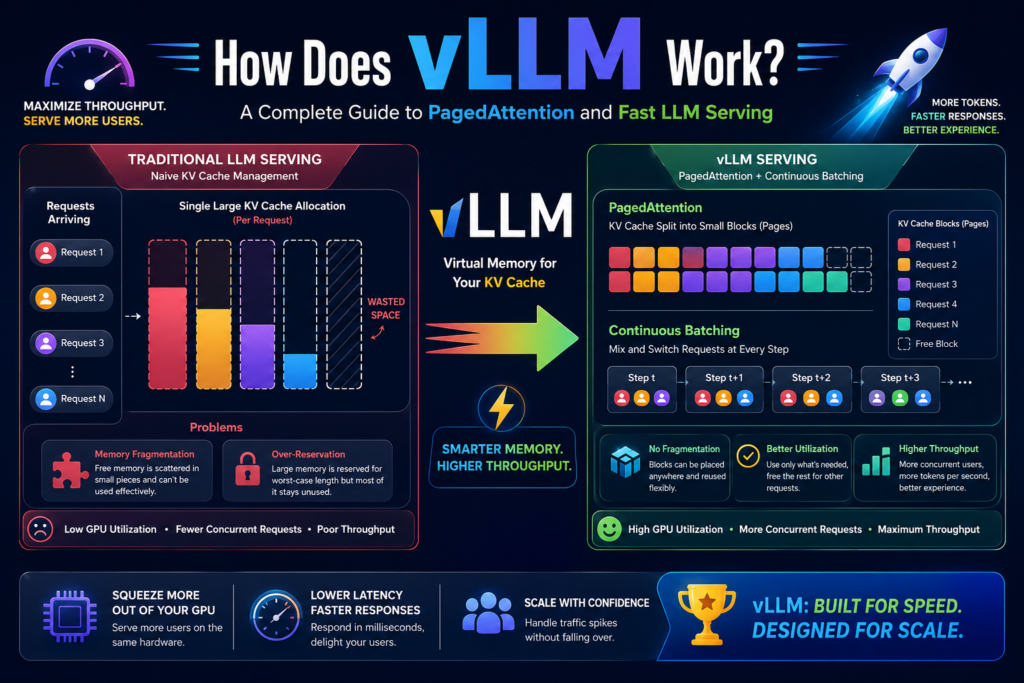
Quick answer: vLLM works by managing GPU memory the way an operating system manages RAM. It splits the KV cache into small, swappable blocks through a technique called PagedAttention, and it keeps the GPU constantly busy by rotating requests in and out at every generation step through continuous batching. Together, these two ideas let a single GPU serve far more users than a naive setup, without changing the quality of a single answer.
If you’ve ever wondered why a self-hosted chatbot felt sluggish under load, or why an open-source model that runs fine for one user falls over with a hundred, the answer almost always traces back to how the serving layer handles memory. That’s exactly the problem this serving engine was built to solve, and that’s what this guide breaks down step by step.
What Is LLM Serving, and Why Does It Matter?
Before getting into the internals, it helps to separate two very different jobs: training a model and serving a model.
Serving an LLM means running a trained model on hardware so that many people can send it prompts and get responses back, typically at the same time. A chatbot, a coding assistant, and a customer-support bot are all serving problems. Someone sends a question, a GPU does the work, and an answer comes back, ideally within a second or two.
This sounds simple until you add scale. A single GPU has a fixed, expensive, and limited amount of memory. Every additional person chatting with the model at once needs a slice of that memory. So the entire serving problem boils down to one question: how many requests can we squeeze onto one GPU before we run out of room or run out of speed?
Definition: What Is an LLM Serving Engine?
A serving engine is the software layer that sits between incoming user requests and the model itself. It accepts prompts, schedules them efficiently, runs them through the model on the GPU, and routes each response back to the right user. The quality of that scheduling and memory management is what separates a serving engine that handles ten concurrent users from one that handles a thousand on identical hardware.
A Fast Refresher: Prefill, Decode, and the KV Cache
To understand why this design exists, you need a short primer on how a transformer model actually generates text. Two phases are involved.
Prefill is the phase where the model reads and processes the entire incoming prompt before producing any output. Every token in the prompt gets analyzed in one pass.
Decode is the phase where the model writes the response one token at a time. After each new token, the model looks back at everything generated and read so far before producing the next one.
What Is the KV Cache, and Why Does It Matter?
Direct answer: the KV cache is a running memory of internal values the model computes for every token it has seen, stored on the GPU so it doesn’t have to redo that work for each new token.
Here’s the expansion. Without a cache, generating word number 500 of a response would require recalculating the relationships between word 500 and all 499 words before it, from scratch, every single time. That would make long responses unbearably slow. Instead, the model stores those computed values once per token and simply reuses them. That stored collection is the KV cache, and it’s what makes fluent, fast multi-paragraph answers possible at all.
Why the KV Cache Keeps Growing
The catch is that the KV cache isn’t static. It grows by one entry for every new token, throughout both prefill and decode. A short 50-token answer produces a small cache. A 2,000-token answer produces a cache forty times larger. And critically, all of this lives in the same limited pool of GPU memory that the model weights already occupy.
This single fact — a per-request memory footprint that grows unpredictably — is the root of almost every performance problem in LLM serving.
The Hidden Bottleneck: How Naive Serving Wastes GPU Memory
Here’s where most homegrown or simple serving setups go wrong, and where smarter memory management starts to make sense.
A naive serving engine doesn’t know in advance how long any given answer will be. To stay safe, it reserves one large, continuous slab of memory per request, sized for the worst case — say, enough room for 2,000 tokens — the moment the request arrives.
The result is two related forms of waste:
- Over-reservation: if the model can output up to 2,000 tokens but a particular answer only needs 60, the remaining 1,940 tokens’ worth of reserved space sits empty for the entire request, unusable by anyone else.
- Fragmentation: because each request grabs a differently-sized leftover chunk as it finishes, the GPU ends up with memory technically “free” but scattered into gaps too small and too disconnected to host a new request.
The net effect is brutal in practice. A GPU might report 40% of its memory as free, yet be unable to accept a single new request because no contiguous block is large enough. Reported availability and usable availability become two very different numbers — and that gap is exactly what limits how many concurrent users a naive engine can support.
What Is vLLM? Definition and Core Idea
vLLM is an open-source, high-throughput inference and serving engine for large language models, built around the idea that GPU memory for the KV cache should be allocated in small, flexible pieces instead of one large reserved block per request.
The name itself is a hint: the “v” stands for virtual, borrowed directly from virtual memory in operating systems, and the throughput goal is right there in the description. Its entire design exists to maximize throughput — the number of tokens and requests an engine can process per second — without sacrificing response quality.
Two mechanisms do almost all of the heavy lifting:
- PagedAttention, which restructures how the KV cache is stored and allocated.
- Continuous batching, which restructures how requests move through the GPU over time.
The rest of this guide walks through each one.
How Does vLLM Work? PagedAttention Step by Step
Borrowing a Trick From Operating Systems
Operating systems solved a nearly identical problem decades ago. Instead of giving each running program one giant block of RAM, an OS hands out memory in small, equal-sized pages on demand, and keeps a page table that tracks which physical pages belong to which program. The pages don’t need to sit next to each other at all.
PagedAttention applies the same logic to the KV cache. The available GPU memory is divided into small, fixed-size blocks, each holding the cached values for a fixed number of tokens (commonly 16). A block table tracks which blocks belong to which request, and in what order, even when those blocks are scattered all over the memory pool.
Step-by-Step: How Block Allocation Works
- A new request starts generating. The engine hands it exactly one block — enough for its first batch of tokens — instead of reserving space for the maximum possible answer.
- Once that block fills up, the engine hands the request a second block from wherever one happens to be free. It doesn’t need to be adjacent to the first.
- This continues, one block at a time, only as the answer actually grows.
- The instant the request finishes, every block it was using is released back into a shared pool, immediately available to the next waiting request.
Because blocks are uniform in size, any free block fits any request that needs one. Over-reservation nearly disappears, since memory is only claimed as it’s used. Fragmentation nearly disappears too, since there are no oddly-sized leftover gaps — just a clean pool of interchangeable blocks.
How PagedAttention Enables Memory Sharing
A nice side effect of moving to block-based memory is that requests can now share blocks instead of duplicating them.
This matters most in two situations:
- Shared prefixes. If many requests start with the same long system prompt — instructions, examples, formatting rules — the engine can compute and store that shared portion once, then let every request’s block table point to the same blocks. This is the foundation behind prompt and prefix caching in modern deployments.
- Parallel sampling and beam search. When a model explores several candidate continuations from the same starting point, those candidates can share the blocks covering their common beginning and only branch into separate blocks once their text actually diverges.
Both cases save real memory, which translates directly into more concurrent capacity on the same hardware.
Continuous Batching: How It Keeps the GPU Always Busy
Solving memory waste is only half the story. The other half is keeping the GPU’s compute busy, not just its memory.
Batching means processing several requests together rather than one at a time, since GPUs are dramatically more efficient running larger groups of work. The naive version of this, static batching, groups a fixed set of requests and waits for every single one to finish before starting the next group — even if some requests finished generating their reply long ago.
This engine instead uses continuous batching, which evaluates the batch at every generation step, removes any request that just finished, and immediately slots in a new waiting request to fill that spot. The batch composition is never fixed; it’s recalculated constantly.
Static Batching vs. Continuous Batching
| Aspect | Static Batching | Continuous Batching (vLLM) |
|---|---|---|
| When new requests join | Only at the start of a new batch | At every single generation step |
| Idle GPU slots | Common — short answers wait for long ones | Rare — a finished slot is refilled immediately |
| Memory release timing | After the whole batch finishes | The instant each request finishes |
| Effect on throughput | Limited by the slowest request in the batch | Limited only by total GPU capacity |
| Best paired with | Simple, low-traffic setups | PagedAttention’s instant block release |
This is also why continuous batching and PagedAttention are designed to work together rather than as separate features: the moment a request finishes, PagedAttention frees its memory blocks, and continuous batching immediately uses both the freed memory and the freed compute slot for the next request in line. Memory efficiency and compute efficiency reinforce each other instead of being solved independently.
Beyond the Basics: How Newer Features Build on the Same Idea
The core engine hasn’t stood still since PagedAttention first shipped. Several newer capabilities extend the same philosophy — allocate and schedule resources precisely, never reserve more than necessary:
- Chunked prefill breaks a long prompt’s prefill work into smaller pieces and interleaves it with ongoing decode steps, so one very long prompt can’t stall every other active request.
- Speculative decoding uses a small, fast draft model to propose several tokens at once, which the main model then verifies in a single pass, cutting decode latency when the draft model’s guesses are accurate often enough.
- Prefix caching generalizes the shared-prefix idea so that repeated system prompts across many separate conversations — common in RAG and agent workloads — are computed once and reused automatically.
- Multi-LoRA serving allows many fine-tuned adapters to be served from a single base model on one GPU, switching between them per request instead of reloading a different model each time.
- FP8 and other quantization formats shrink the memory footprint of model weights themselves, freeing up even more room for the KV cache pool that PagedAttention manages.
- Disaggregated prefill and decode separates the compute-heavy prefill phase and the memory-heavy decode phase across different GPU clusters, letting each be scaled independently.
None of this replaces PagedAttention or continuous batching — it builds on top of the same block-based, on-demand foundation.
The OpenAI-Compatible API Server
Here’s a question worth asking directly: do you need to rewrite your application to use vLLM?
Direct answer: no, in most cases. This engine can run as a server that exposes an API matching OpenAI’s chat completion format. Since a huge share of existing AI tooling, SDKs, and frameworks were originally written to call OpenAI’s API, pointing that same code at a self-hosted endpoint running it is often just a matter of changing a base URL.
That compatibility layer is a big part of why adoption has been so fast: teams get a high-throughput engine on the inside and a familiar, drop-in interface on the outside, without retraining developers on a new API shape.
Key Benefits at a Glance
Pulling the pieces together, the practical payoff of this design looks like:
- Higher throughput — far more tokens and requests processed per second compared with naive serving on identical hardware.
- Better GPU utilization — both memory and compute stay close to fully used instead of sitting idle behind reserved-but-unused blocks.
- Lower cost per request — serving more users from one GPU spreads the hardware cost across a larger user base.
- Unchanged output quality — none of these optimizations alter what the model actually generates; they only remove waste in how it’s served.
- Low adoption friction — the OpenAI-compatible interface means existing applications often need minimal changes to switch.
vLLM vs. Other Serving Frameworks
It isn’t the only option for self-hosted LLM inference, and it’s worth knowing where it sits relative to the alternatives.
| Framework | Core Approach | Best Fit | Trade-off |
|---|---|---|---|
| vLLM | PagedAttention + continuous batching, Apache 2.0 licensed | General-purpose, high-traffic, broad model support | Not always the single fastest on one specific GPU vendor |
| TensorRT-LLM | Vendor-optimized, compiled kernels for NVIDIA hardware | Maximum raw throughput on NVIDIA GPUs | Requires model-specific compilation, tighter vendor lock-in |
| SGLang | PagedAttention-derived memory management with structured generation focus | Workloads heavy on structured/constrained output | Smaller ecosystem than vLLM |
| Hugging Face TGI | Continuous batching without chunked prefill or disaggregated decode | Simple, lower-complexity deployments | Less suited to very long context or multimodal workloads |
The right choice usually depends on the hardware vendor, the model variety being served, and how much engineering time a team can spend on tuning versus just running something that works out of the box.
Where It’s Used in the Real World
High-Traffic Chat Applications
Anywhere a large number of people chat with a model at once, continuous batching keeps every GPU slot doing useful work, and PagedAttention packs many concurrent KV caches into the same memory pool. The practical result is serving a much larger crowd on fewer GPUs than a naive setup would allow.
Agentic AI Systems
AI agents — programs that work through a task across many steps, often calling tools along the way — tend to resend the same large block of system instructions on nearly every step. That repetition is exactly what shared-prefix caching was built for, and the many short, rapid-fire steps an agent takes benefit heavily from continuous batching keeping the pipeline full instead of stalling between turns.
Frequently Asked Questions
Is vLLM free to use? Yes. It is released under the Apache 2.0 license, which permits free commercial and non-commercial use, modification, and self-hosting.
Does vLLM work with closed models like GPT-4 or Claude? No. It’s designed for self-hosting open-weight models on your own GPUs. Closed, proprietary models accessed only through a vendor’s API aren’t something a self-hosted engine can serve, since the weights aren’t available to run locally.
Do I need NVIDIA hardware specifically? NVIDIA GPUs are the most common and best-supported target, but support has expanded over time to additional hardware backends, including some non-NVIDIA accelerators and even certain Apple Silicon configurations for local experimentation.
How much faster is vLLM than a naive setup? The exact number depends heavily on workload, prompt length distribution, and hardware, but the gains consistently come from the same two sources discussed above: eliminating reserved-but-unused memory, and eliminating idle GPU slots between requests of different lengths.
The Takeaway
At its core, this is how vLLM works: it borrows the page-based memory model from operating systems and applies it to the KV cache, so memory is handed out in small blocks exactly when needed instead of reserved upfront in one wasteful slab. It pairs that with continuous batching, so the GPU’s compute is refilled with new work the instant any slot frees up. Layered on top, features like chunked prefill, speculative decoding, and prefix caching extend the same on-demand philosophy further. The combined result is an engine capable of serving dramatically more users, at lower cost, from the exact same GPU — without ever changing what the model actually says.